
ZOSKVEE DR06
ZOSKVEE DR06 Smart Watch Instruction Manual
Model: DR06
1. Introduction
Thank you for choosing the ZOSKVEE DR06 Smart Watch. This manual provides essential information for setting up, operating, and maintaining your device. Please read it thoroughly to ensure optimal performance and longevity of your smartwatch.

Image: ZOSKVEE DR06 Smart Watch, highlighting its elegant design and display.
2. Package Contents
Ensure all items are present in your package:
- ZOSKVEE DR06 Smart Watch (with one silicone strap attached)
- Additional Leather-like Strap (color may vary by model)
- Magnetic Charging Cable
- User Manual
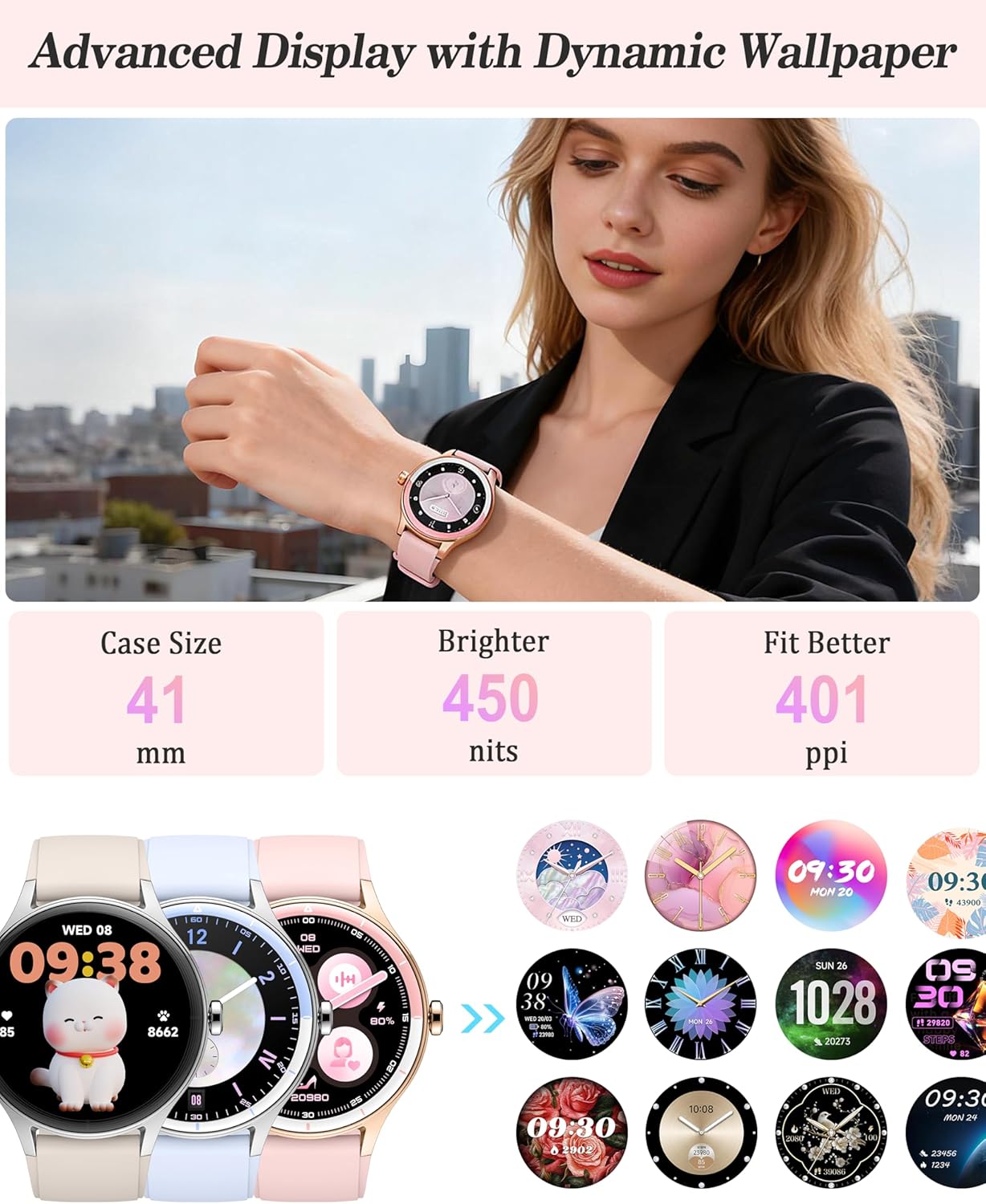
Image: Contents of the ZOSKVEE DR06 Smart Watch package, including the watch, straps, and charging cable.
3. Initial Setup
3.1 Charging the Watch
Before first use, fully charge your ZOSKVEE DR06 Smart Watch. Connect the magnetic charging cable to the charging points on the back of the watch. Connect the USB end of the cable to a power adapter (not included) or a computer's USB port. A full charge typically takes about 2 hours and provides 7-10 days of battery life with normal usage.

Image: The magnetic charging cable attaching to the back of the ZOSKVEE DR06 Smart Watch.
3.2 Downloading and Pairing with the VeryFit App
The ZOSKVEE DR06 Smart Watch requires the VeryFit app for full functionality. The app is compatible with iOS 9.0+ and Android 6.0+ smartphones.
- Download the App: Scan the QR code displayed on the watch screen after initial power-on, or search for "VeryFit" in your smartphone's app store (Google Play Store for Android, Apple App Store for iOS).
- Enable Bluetooth: Ensure Bluetooth is enabled on your smartphone.
- Pair the Device: Open the VeryFit app, follow the on-screen instructions to search for and pair with your DR06 Smart Watch. Keep the watch close to your phone during the pairing process.
- Initial Settings: Once paired, the app will guide you through setting the time, language, and other preferences.
For a visual guide on activating and connecting the watch to the app, please refer to the video below:
Video: Instructions on how to activate the ZOSKVEE DR06 Smart Watch and connect it to the VeryFit app.
4. Operating the Watch
4.1 Basic Navigation
The DR06 Smart Watch features a 1.27-inch full-touch screen with 360x360 resolution and 450 nits brightness for clear visibility.
- Swipe Up/Down: Scroll through menus and notifications.
- Swipe Left/Right: Access quick widgets or different data screens.
- Tap: Select an item or confirm an action.
- Side Button: Press to return to the home screen or wake the display.

Image: A user demonstrating touchscreen navigation on the ZOSKVEE DR06 Smart Watch.
5. Communication Features
5.1 Call Receive/Dial
With Bluetooth 5.3 connectivity, you can make and answer calls directly from your watch. Access your call history, frequent contacts, or use the dialpad on the watch screen.

Image: The ZOSKVEE DR06 Smart Watch showing its call interface and various app notifications.
5.2 Notifications
Receive real-time notifications from social media apps (WhatsApp, Facebook, Instagram, etc.) and text messages directly on your watch. Android users can also enjoy quick replies.
5.3 AI Voice Assistant
Utilize your phone's AI assistant (e.g., Siri, Google Assistant) through the watch for hands-free voice control, such as setting alarms, checking weather, or controlling music playback.
6. Health Monitoring
The ZOSKVEE DR06 Smart Watch provides comprehensive health tracking features:
- Heart Rate Monitoring: Tracks your heart rate throughout the day.
- Blood Oxygen (SpO2) Monitoring: Measures your blood oxygen levels.
- Stress Monitoring: Monitors your stress levels and offers breathing training.
- Sleep Quality Monitoring: Tracks light sleep, REM sleep, deep sleep, and awake times. Detailed analysis is available in the VeryFit app.
- Menstrual Cycle Tracking: Provides reminders and helps track your physiological cycle.

Image: The ZOSKVEE DR06 Smart Watch showing its health monitoring capabilities, including heart rate, blood oxygen, stress, and sleep data.
7. Fitness Tracking
Elevate your workouts with the DR06 Smart Watch's extensive fitness features:
- 100+ Sports Modes: Supports a wide range of activities, including swimming.
- Auto-Recognition: Automatically recognizes 4 key activities.
- Daily Activity Tracking: Logs daily steps, distance, and calories burned.

Image: The ZOSKVEE DR06 Smart Watch showing fitness tracking data for different sports, including swimming, basketball, and yoga.
8. Daily Tools
The DR06 Smart Watch includes several convenient tools for daily use:
- Mini-Games: Enjoy built-in mini-games.
- Calculator: A handy calculator for quick computations.
- Calendar: Keep track of your schedule.
- Weather Forecast: Get real-time weather updates.
- Flashlight: A convenient light source.
- Stopwatch & Alarm: Essential timekeeping functions.
- "Find My Phone": Locate your paired smartphone easily.
- Music Control: Control music playback on your phone.
- Remote Photography: Use your watch as a remote shutter for your phone's camera.
- Power-Saving Mode: Optimize battery usage.
- Screen Settings: Adjust screen-on time and brightness.
- Wrist-Raise-to-Wake: Automatically activate the screen when you raise your wrist.
9. Water Resistance (IP68)
The ZOSKVEE DR06 Smart Watch is IP68 water-resistant, meaning it can withstand dust, dirt, and sand, and is resistant to submersion up to a maximum depth of 1.5m (about 5 feet) for up to 30 minutes. It is suitable for daily use and activities like swimming.
Important Note:
- Avoid wearing the watch while taking hot showers or in saunas, as steam and hot water can compromise the water seal.
- Do not use for deep-sea diving.
Image: A woman wearing the ZOSKVEE DR06 Smart Watch in a swimming pool, demonstrating its IP68 water resistance.
10. Battery Life and Charging
The DR06 Smart Watch is powered by a 290mAh Lithium Ion battery. It offers:
- Basic Usage: 7-10 days
- Heavy Usage: Up to 5 days
- Low Power Mode: Up to 30 days
Charging takes approximately 2 hours for a full charge. To reduce power consumption, manage notifications and screen brightness settings via the VeryFit app or directly on the watch.
Video: Tips on how to reduce power consumption of the ZOSKVEE DR06 Smart Watch to extend battery life.
11. Specifications
| Feature | Detail |
|---|---|
| Model Number | DR06 |
| Screen Size | 1.27 Inches |
| Display Type | Full-touch, 360x360 resolution, 450 nits brightness |
| Case Size | 41mm |
| Connectivity | Bluetooth 5.3 |
| Battery Capacity | 290 Milliamp Hours (Lithium Ion) |
| Operating System | iOS & Android (iOS 9.0+, Android 6.0+) |
| Water Resistance | IP68 |
| Item Weight | 48 Grams (1.69 ounces) |
| Memory Storage Capacity | 128 MB |
| Special Features | Phone Call, message notifications, health monitoring, AI Voice, Calculator, Calendar, Games |
12. Troubleshooting
If you encounter issues with your ZOSKVEE DR06 Smart Watch, try the following steps:
- Connection Issues: Ensure Bluetooth is enabled on your phone and the watch is within range. Restart both your phone and the watch, then attempt to re-pair via the VeryFit app.
- Notifications Not Appearing: Check app permissions in your phone settings to ensure VeryFit has access to notifications. Also, verify notification settings within the VeryFit app.
- Inaccurate Health Data: Ensure the watch is worn snugly on your wrist. Avoid excessive movement during measurements. Note that the watch is not a medical device and data is for reference only.
- Battery Draining Quickly: Reduce screen brightness, shorten screen-on time, and limit continuous heart rate monitoring. Refer to the "Battery Life and Charging" section for more tips.
- Watch Unresponsive: Long-press the side button to attempt a restart. If unresponsive, ensure it is charged.
Video: Guide on how to self-check common problems and solutions using the VeryFit app.
13. Maintenance
To ensure the longevity and proper functioning of your ZOSKVEE DR06 Smart Watch:
- Cleaning: Regularly clean the watch and straps with a soft, dry cloth. If necessary, use a slightly damp cloth and mild soap, then dry thoroughly.
- Avoid Chemicals: Do not use harsh chemicals, cleaning solvents, or strong detergents, as these can damage the watch's finish and seals.
- Storage: Store the watch in a cool, dry place when not in use.
- Avoid Extreme Temperatures: Do not expose the watch to extreme hot or cold temperatures.
14. Warranty and Support
ZOSKVEE offers a 12-Month Quality Warranty for the DR06 Smart Watch. For any product-related inquiries, technical support, or warranty claims, please contact ZOSKVEE customer service.
- Customer Service: 24/7 Online Customer Service is available.
- Repair or Replacement: Professional repair or replacement services are provided under warranty.
Refer to your purchase documentation or the ZOSKVEE official website for specific contact details.
Related documentsDR06


Ask a question about this manual
Ask about setup, troubleshooting, compatibility, parts, safety, or missing instructions. Manuals+ will review the question and use this page’s manual context to help answer it.