
Introduction
Thank you for choosing the Surtime 48IN Flush Mount RGB Ceiling Fan with Lights. This manual provides essential information for the safe installation, operation, and maintenance of your new ceiling fan. Please read these instructions thoroughly before installation and retain them for future reference.
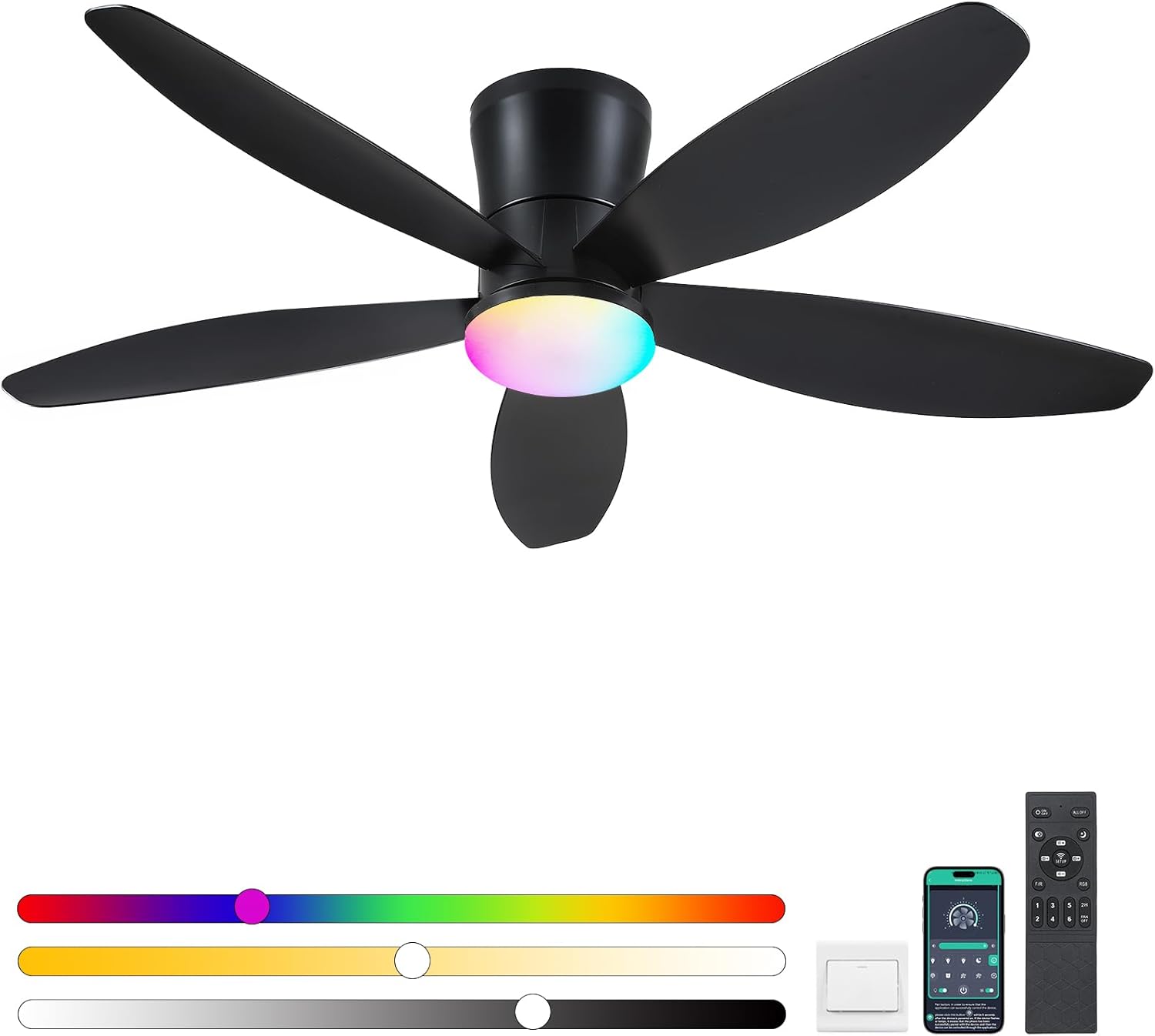
Image: The Surtime 48-inch flush mount RGB ceiling fan, showcasing its black finish, five blades, integrated RGB light, and accompanying remote control and smartphone app interface for control.
Safety Information
- Ensure the power supply is disconnected before installation or maintenance.
- Installation must be performed by a qualified electrician or in accordance with local electrical codes.
- The mounting structure must be capable of supporting the weight of the fan (approximately 8.75 pounds).
- Do not connect the fan to a dimmer switch not specifically designed for ceiling fans.
- Maintain a minimum clearance of 7 feet from the floor to the fan blades.
- This fan is suitable for indoor use and covered outdoor areas such as patios or porches. It is not waterproof.
Package Contents
Verify that all components are present before beginning installation:
- Ceiling Fan Motor Assembly
- Fan Blades (5)
- LED Light Kit
- Remote Control
- Mounting Bracket
- Hardware Pack (screws, wire nuts, etc.)
- Instruction Manual (this document)
Product Features
- Flush Mount Design: Low profile for spaces with lower ceilings.
- RGB Lighting System: 7 color options with multiple dynamic modes (static, gradient, strobe).
- Dimmable LED Light: Adjustable brightness and color temperature (3000K-6500K).
- Remote & APP Control: Convenient operation via included remote or smartphone application.
- 6 Wind Speeds: Customizable airflow for various comfort levels.
- Reversible DC Motor: Allows for both downdraft (summer) and updraft (winter) modes.
- Smart Memory Function: Retains preferred brightness and color settings.
- Timer Function: 2-hour and 4-hour automatic shut-off options.
- Snap-in Blade Design: Simplifies blade installation without additional tools.

Image: Illustration of the fan's lighting capabilities, showing 3000K Warm Light, 4500K Natural Light, 6000K White Light, and various RGB color options including Red, Purple, Green, Blue, and a multi-color blend.
Installation Instructions
Before You Begin: Ensure power is turned off at the circuit breaker. Read all instructions carefully.
- Mounting Bracket Installation: Secure the mounting bracket to the ceiling junction box using the provided screws. Ensure the bracket is firmly attached and can support the fan's weight.
- Wiring Connections: Connect the fan's electrical wires to the household wiring according to local electrical codes. Typically, this involves connecting live, neutral, and ground wires. Use wire nuts to secure connections.
- Fan Body Attachment: Carefully lift the fan motor assembly and attach it to the mounting bracket. Follow the specific instructions in the included manual for securing the fan body.
- Blade Installation: The fan features a snap-in blade design. Align each blade with its slot on the motor housing and push until it clicks securely into place. No tools are required for this step.
- LED Light Kit Installation: Connect the wires for the LED light kit to the fan motor assembly. Secure the light kit cover by twisting or snapping it into place.
- Power Restoration: Once all connections are secure and the fan is fully assembled, restore power at the circuit breaker.

Image: Detailed view of the fan's replaceable LED light kit and the innovative snap-in blade attachment points, highlighting the ease of assembly.
Operating Instructions
Remote Control Functions
The included remote control allows for convenient operation of all fan and light functions.

Image: The remote control for the Surtime ceiling fan, displaying buttons for power, fan speed (6 gears), color temperature adjustment (3000K-6500K), timer (2H), and forward/reverse blade rotation.
- ON/OFF: Powers the fan and light on or off.
- Fan Speed (1-6): Adjusts the fan speed from gentle (1-2) to strong (5-6).
- Light Control:
- Brightness Adjustment: Increase or decrease light intensity.
- Color Temperature: Cycle through 3000K (Warm), 4500K (Natural), and 6000K (White) light.
- RGB Button: Activates the 7-color RGB lighting system and cycles through dynamic modes.
- F/R (Forward/Reverse): Changes the direction of blade rotation for summer or winter mode.
- Timer (2H/4H): Sets the fan to automatically turn off after 2 or 4 hours.
APP Control Functions
Download the designated smartphone application (refer to the specific app name in the included manual or product packaging) to control your fan via Bluetooth or Wi-Fi (if applicable). The app provides all remote control functionalities and may offer additional customization options for RGB lighting.
Smart Memory Function
The fan's light system includes a smart memory function. If the light is turned off for at least 10 seconds, it will recall your last brightness and color settings when turned back on. Turning the light on within 10 seconds may result in a change of color temperature.
Reversible Motor Function
The DC reversible motor allows you to optimize air circulation for different seasons:
- Summer Mode (Downdraft): Blades rotate counter-clockwise, pushing cool air downwards to create a cooling effect.
- Winter Mode (Updraft): Blades rotate clockwise, drawing cool air up and pushing warm air down from the ceiling, helping to circulate heat.
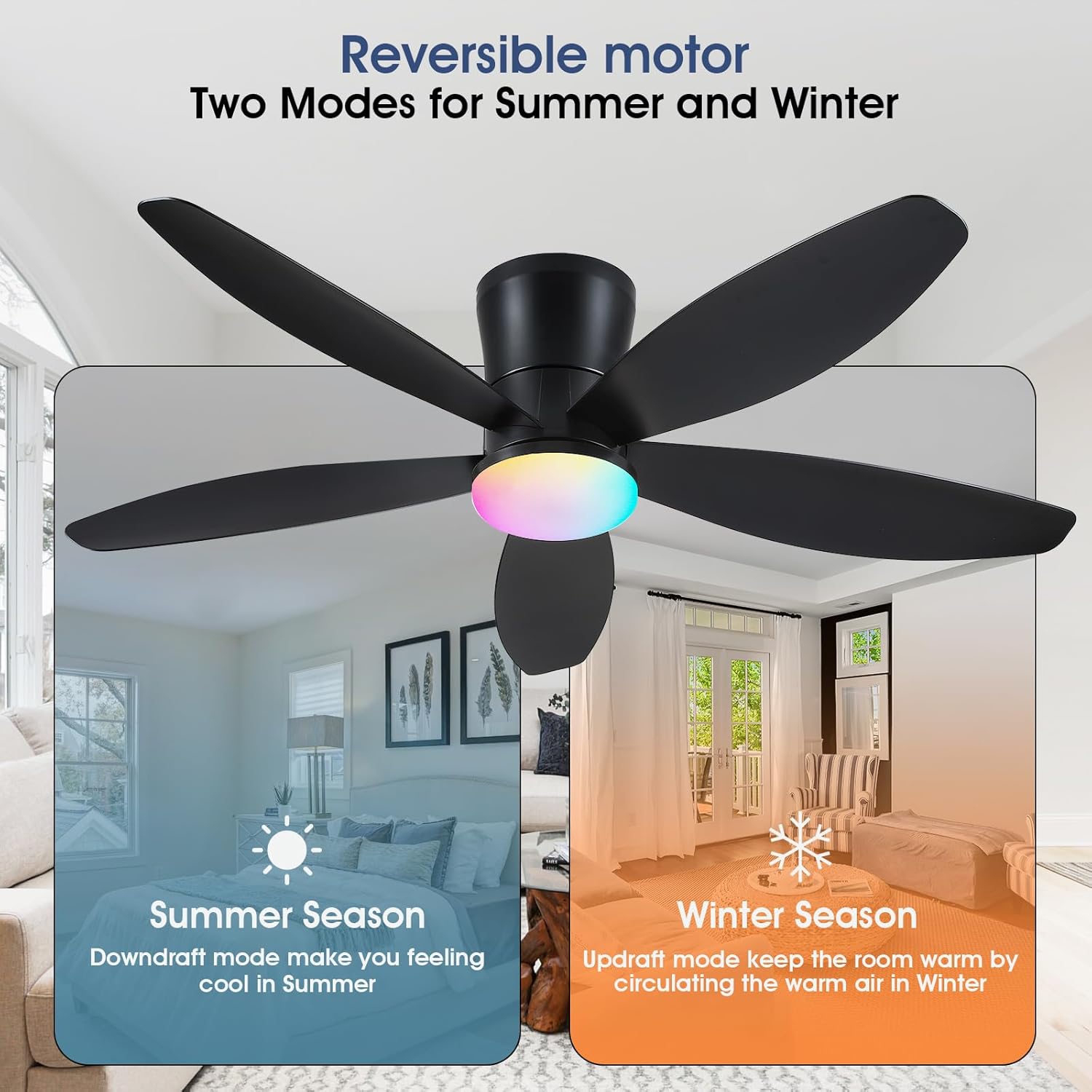
Image: Diagram illustrating the reversible motor function, showing downdraft mode for summer (cooling) and updraft mode for winter (circulating warm air).

Image: Visual representation of the 6 adjustable fan speeds, categorized into 1-2 Gear (Comfortable Wind), 3-4 Gear (Natural Wind), and 5-6 Gear (Strong Wind).
Maintenance
- Cleaning: Periodically clean the fan blades and motor housing with a soft, damp cloth. Do not use abrasive cleaners or solvents. Ensure power is off before cleaning.
- Blade Tightness: Check blade screws (if applicable) and other fasteners annually to ensure they are secure.
- Light Source: The LED light kit is designed for long life. If replacement is ever needed, contact customer support for compatible parts.
Troubleshooting
| Problem | Possible Cause | Solution |
|---|---|---|
| Fan does not start. | No power supply; loose wiring; remote control battery low. | Check circuit breaker; verify wiring connections; replace remote control battery. |
| Light does not work. | No power supply; loose wiring; LED kit issue. | Check power; verify wiring; contact customer support if LED kit is faulty. |
| Fan makes noise. | Loose screws; unbalanced blades; motor issue. | Tighten all screws; ensure blades are properly seated; contact customer support if noise persists. |
| Remote control not responding. | Low battery; remote not paired; obstruction. | Replace battery; refer to pairing instructions (if applicable); ensure clear line of sight. |
Specifications
- Model: 6666
- Size: 48 inches
- Product Dimensions: 48 x 48 x 15 inches
- Item Weight: 8.75 pounds
- Voltage: 90-265V (Input), 110 Volts (Operating)
- Wattage: 36W (Light)
- Color Temperature: 3000K-6500K (Dimmable)
- Light Features: 7 Color RGB Lights, App Operable, Dimmable Light, Light Memory Function, Timer
- Fan Speeds: 6
- Motor Type: DC Reversible
- Material: Acrylic
- Mounting Type: Ceiling Mount
- Recommended Use: Air Circulation, Cooling for Bedroom, Game Room, Kids Room, Living Room, Patio (covered, not waterproof)

Image: Diagram showing the product dimensions (48 inches width, 8.6 inches height, 6.7 inches base width) and key electrical specifications including voltage (90-265V), color temperature (3000K-6500K), wattage (36W), material (Plastic), and 6 wind speeds.
Warranty and Support
Surtime provides a 1-year warranty on quality-related issues for this product. If you encounter any problems or require assistance, please contact Surtime customer support. Refer to your purchase documentation for contact details.


