
Introduction
The XDUOO XD05 BASIC2 is a versatile desktop and portable HiFi DAC (Digital-to-Analog Converter) and headphone amplifier. It features Bluetooth 5.4 connectivity, supports DSD256 and MQA 8X audio formats, and is designed to deliver high-quality audio performance for various devices. This manual provides instructions for its setup, operation, and maintenance.
What's in the Box
- XDUOO XD05 BASIC2 Unit x 1
- Type-C USB Cable x 1
- Type-C to C OTG cable x 1
- 6.35 to 3.5 Converter x 1
- Rubber Feet x 1
- User Manual x 1
Product Overview

Figure 1: Overall view of the XDUOO XD05 BASIC2 unit. This image displays the compact, rectangular design with a dark gray finish and the 'X' logo on the top surface.
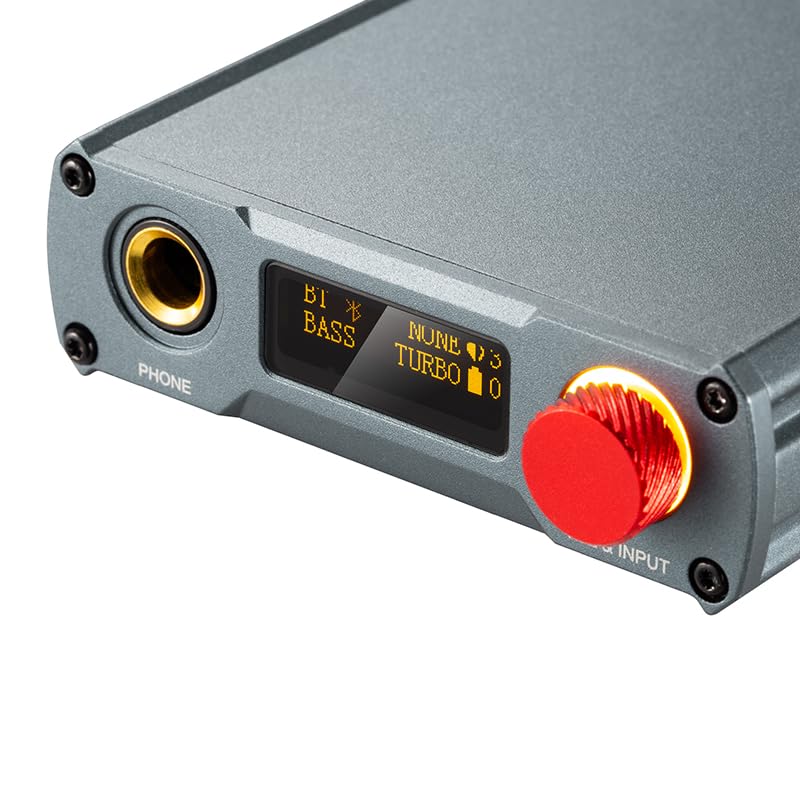
Figure 2: Close-up of the front panel, showing the 6.35mm headphone output (PHONE), the OLED display, and the combined volume and input selection knob (VOL & INPUT) with an orange illuminated ring.
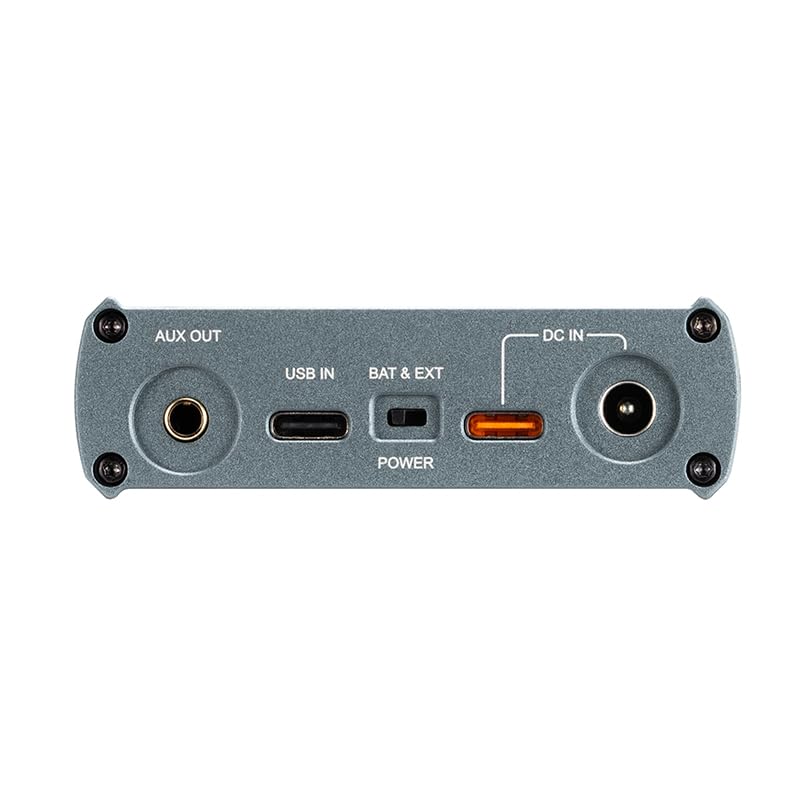
Figure 3: Rear panel connections, including AUX OUT, USB IN (Type-C), BAT & EXT switch, POWER indicator, and DC IN port.
Setup
1. Charging the Device
Before first use, fully charge the XD05 BASIC2. Connect the provided Type-C USB cable to the USB IN port on the rear panel and the other end to a USB power adapter (not included) or a computer USB port. The POWER indicator will show charging status. A full charge takes approximately 3 hours with fast charging or 5 hours with slow charging.
2. Connecting Audio Sources
- USB Connection: Use the provided Type-C USB cable to connect the XD05 BASIC2 to a computer (Windows/Linux/Mac OSX), smartphone (iOS/Android), or tablet. The device will function as an external DAC.
- Bluetooth Connection: Refer to the 'Bluetooth Connectivity' section for pairing instructions.
3. Connecting Headphones
Plug your headphones into the 6.35mm PHONE output on the front panel. If your headphones have a 3.5mm plug, use the included 6.35 to 3.5 converter.
Operating Instructions
1. Powering On/Off
Press and hold the VOL & INPUT knob on the front panel to power the device on or off.
2. Input Selection
Short press the VOL & INPUT knob to cycle through available input sources (USB, Bluetooth). The selected input will be displayed on the OLED screen.
3. Volume Control
Rotate the VOL & INPUT knob clockwise to increase volume and counter-clockwise to decrease volume. Adjust to a comfortable listening level.
4. Gain Adjustment
The device features high and low gain settings. Access this setting through the menu on the OLED screen. Adjusting the gain can help match the amplifier's output to the sensitivity of your headphones.
5. Bass Boost
The XD05 BASIC2 includes a bass boost function. This can be enabled or disabled via the menu settings on the OLED screen. The bass boost offers 0dB or +6dB options.
Bluetooth Connectivity
The XD05 BASIC2 supports Bluetooth 5.4 with LE Audio, including LC3, aptx_Lite, and aptx_AD codecs, as well as classic audio codecs like SBC, AAC, aptX, aptX_HD, and aptX_Adaptive.
Pairing Procedure:
- Ensure the XD05 BASIC2 is powered on and set to Bluetooth input mode. The Bluetooth icon on the OLED screen will blink, indicating it is in pairing mode.
- On your source device (smartphone, tablet, etc.), enable Bluetooth and search for available devices.
- Select "XDUOO XD05 BASIC2" from the list of found devices to pair.
- Once paired, the Bluetooth icon on the XD05 BASIC2's screen will become solid, indicating a successful connection.
Maintenance
- Cleaning: Use a soft, dry cloth to clean the exterior of the device. Avoid using harsh chemicals or abrasive materials.
- Storage: Store the device in a cool, dry place away from direct sunlight and extreme temperatures.
- Battery Care: To prolong battery life, avoid fully discharging the battery frequently. If storing for an extended period, charge the battery to approximately 50% and recharge every few months.
Troubleshooting
| Problem | Possible Cause | Solution |
|---|---|---|
| No sound from headphones | Incorrect input selected; Volume too low; Headphones not properly connected; Source device not playing audio. | Verify input selection; Increase volume; Ensure headphones are fully plugged in; Check audio playback on source device. |
| Bluetooth pairing fails | Device not in pairing mode; Source device Bluetooth off; Interference. | Ensure XD05 BASIC2 is in Bluetooth pairing mode (blinking icon); Turn Bluetooth on your source device; Move closer to the device and away from other wireless devices. |
| Device not charging | Cable faulty; Power source insufficient; USB port issue. | Try a different Type-C USB cable; Use a different USB power adapter or computer USB port; Ensure the power source provides sufficient current. |
| Distorted audio | Volume too high; Source audio quality poor; Incorrect gain setting. | Reduce volume; Check source audio file quality; Adjust gain setting to match headphones. |
Specifications
| Parameter | Value |
|---|---|
| Battery | 3.7V/3000mAh |
| Screen | 0.91 inch OLED |
| Compliant OS | Windows/Linux/Mac OSX/iOS/Android |
| Frequency Response (USB/BT) | 20Hz~20kHz(±0.5dB) |
| Frequency Response (AMP) | 10Hz~80kHz(±0.5dB) |
| Sampling Rate Support (PCM) | 16-32Bit/44.1k-384kHz |
| Sampling Rate Support (DSD) | DSD64-256 |
| Sampling Rate Support (MQA) | 8x |
| Bluetooth Codecs | LE Audio: LC3, aptx_Lite, aptx_AD; Classic Audio: SBC, AAC, aptX, aptX_HD, aptX_Adaptive (aptX_Low Latency, aptX_High Quality, aptX_Lossless), LDAC |
| Gain | +0dB/6dB |
| Bass Boost | 0/+6dB |
| Headphone Output Power | 750mW (32Ω load) |
| Headphone Out THD+N | 0.0006%@1kHz |
| Headphone Out S/N | 124dB |
| Headphone Out Crosstalk | ≥74dB |
| AUX OUT Level | 2.0Vrms |
| AUX OUT THD+N | 0.0003%@1kHz |
| AUX OUT SNR | 124dB |
| AUX OUT Crosstalk | ≥107dB |
| Battery Life (USB IN) | 11 hours |
| Battery Life (BT IN) | 15 hours |
| Charging Time (Fast) | 3 hours |
| Charging Time (Slow) | 5 hours |
| Size | 13.9 x 7.5 x 2.3 cm |
| Weight | 0.30 kg |
Warranty and Support
For warranty information and technical support, please refer to the documentation included with your purchase or visit the official Fanmusic/XDUOO website. Specific warranty terms may vary by region and retailer.