
JOYING JY-VT131N4
JOYING 9" Car Stereo RCD330 (JY-VT131N4) User Manual
Model: JY-VT131N4 | Brand: JOYING
1. Product Overview
The JOYING 9" Car Stereo (Model JY-VT131N4) is an advanced head unit designed for Volkswagen Jetta, Golf, Passat, Skoda, Seat, Caddy, Polo, Tiguan, Transporter, and EOS models (2016-2021 PQ system). It features a 9-inch touchscreen display running Android 13, offering seamless integration with your vehicle's existing systems and modern connectivity options.
2. Package Contents
Verify that all components are present in the package:
- 9" Radio Unit (x1)
- Power Cable (x1)
- AR Cable (x1)
- Screen Ribbon Cable (x1)
- External Microphone (x1)
- 4G Antenna (x2)
- WiFi Antenna (x1)
- USB Cable (x2)
- GPS Antenna (x1)
- User Manual (x1)

Image: All components included in the Joying 9" Car Stereo package, laid out for verification.
3. Installation Guide
This unit is designed for plug-and-play installation in compatible Volkswagen vehicles. No cutting of original vehicle wiring is typically required.
3.1. Compatibility Check
Ensure your vehicle's system (PQ or MQB) is correctly identified to use the appropriate CANbus decoder. This information is often found on the original radio's sticker.

Image: Visual guide for identifying PQ and MQB systems based on original radio stickers, crucial for correct installation.
3.2. Removing the Original Radio
Carefully pry off the trim surrounding your original radio using a plastic trim removal tool. Unscrew the mounting screws (typically T20 Torx) holding the radio in place. Gently pull the radio out and disconnect all cables (power, antenna, etc.) from the rear.
Video: A detailed guide demonstrating the removal and installation process for Volkswagen radios, including trim removal and cable disconnection.
3.3. Connecting the New Head Unit
Connect the provided wiring harness to your vehicle's original wiring. Ensure all necessary adapters (e.g., antenna adapter, CANbus decoder) are correctly connected. Plug the harness and all other accessories (GPS antenna, USB cables, 4G/WiFi antennas, external mic) into the corresponding ports on the new JOYING head unit.
Image: Rear view of the Joying Car Stereo highlighting various connection ports for power, audio, video, and antennas.
CANbus Setting: If your vehicle is equipped with CAN bus, ensure the communication protocol (white button) is set to the right side (CAN) on the unit.
Image: Close-up of the CANbus setting switch on the Joying Car Stereo, indicating the correct position for CAN bus vehicles.
3.4. Installing the New Head Unit
Carefully slide the new head unit into the dashboard opening, ensuring no wires are pinched. Secure it with the original mounting screws. Reattach the trim panel, ensuring all clips snap into place.
Video: Demonstration of the removal of an old car stereo and the installation of a new one, showing the process of connecting wires and securing the unit.
4. Operating Instructions
4.1. Initial Startup and Fast Boot
The first boot-up may take 30-40 seconds. Subsequent startups will be significantly faster, entering the user interface in approximately 2 seconds after the car key is inserted.
4.2. User Interface and Navigation
The 9-inch touchscreen provides access to various functions. The Android 13 operating system offers a customizable interface. Precise GPS engines and included GPS antennas ensure accurate real-time navigation. Offline maps can be downloaded for use without an internet connection.

Image: The main user interface of the Joying Car Stereo, showcasing the Android 13 operating system with navigation, media, and app icons.
4.3. Split-screen Multitasking
The unit supports split-screen functionality, allowing you to run two applications simultaneously (e.g., navigation and music). To activate, tap the recent apps icon, find the app you want to split, click its split-screen button, and then select the second app.

Image: The Joying Car Stereo displaying split-screen multitasking, showing a video application alongside a navigation map.
4.4. CarPlay and Android Auto
Connect your mobile phone via USB cable or Bluetooth to access CarPlay or Android Auto. This allows for seamless integration of your phone's navigation, calls, and music directly on the head unit's display.
Video: Demonstration of the car stereo's CarPlay and Android Auto features, showing phone integration for navigation, music, and calls.
4.5. Audio Features
The unit features a TDA7851 DSP chip and a 48-band graphic equalizer for high-quality sound. It supports aftermarket amplifiers with 4 audio outputs, 1 subwoofer output, fiber optical output, SPDIF coaxial output, and a center channel output.

Image: Overview of the Joying Car Stereo's high-quality sound features, including the DSP chip, equalizer, and various audio outputs for external amplifiers.
4.6. OEM Feature Integration
The stereo supports factory air conditioning display, parking sensor display, steering wheel controls, door information display, factory amplifier, and factory reverse camera. This ensures seamless integration with your vehicle's existing systems.

Image: The Joying Car Stereo displaying integrated OEM features such as parking trajectory, audio system information, steering wheel controls, air conditioning, and door status.
Video: A wiring guide for the reversing camera function of a car radio, demonstrating how to connect the camera to the head unit.
4.7. HDMI Output
The HDMI output provides a full digital image and sound-sending interface, supporting synchronized audio and video output. This allows for projection screen display for passengers or on-screen display with zero delays.

Image: The HDMI output feature of the Joying Car Stereo, showing how it can project content to rear screens for passenger entertainment.
5. Settings and Personalization
The unit offers various personalization options, including changing the car boot logo, customizing wallpapers, and adjusting button colors to match your vehicle's interior or personal preference.

Image: Display of the Joying Car Stereo's personalization options, including changeable button colors, car boot logo, customizable wallpapers, and adjustable screen brightness.
6. Connectivity
The unit supports Bluetooth, Ethernet, USB, and Wi-Fi connectivity. It has a built-in 4G module for internet access (SIM card required, no calls/SMS). An independent WiFi antenna ensures stable signal quality and fast internet access.
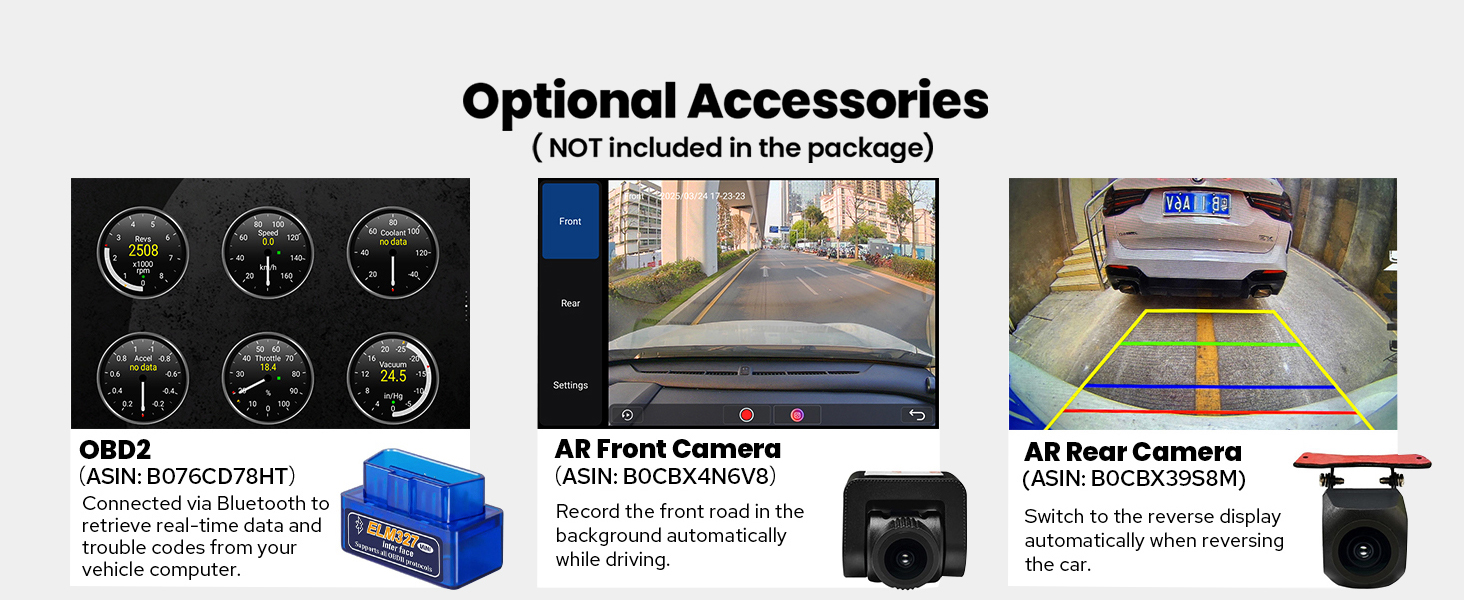
Image: Illustration of the upgraded WiFi signal feature of the Joying Car Stereo, showing an independent antenna for stable and fast internet access.
7. Optional Accessories
The following accessories are not included in the package but can enhance your experience:
- OBD2: Connects via Bluetooth to retrieve real-time data and trouble codes from your vehicle computer.
- AR Front Camera: Records the front road automatically while driving.
- AR Rear Camera: Switches to the reverse display automatically when reversing the car.

Image: Overview of optional accessories for the Joying Car Stereo, including OBD2 scanner, AR Front Camera, and AR Rear Camera.
8. Specifications
| Feature | Detail |
|---|---|
| Item Weight | 5 pounds |
| Package Dimensions | 13 x 9 x 8 inches |
| Item Model Number | JY-VT131N4 |
| Display Size | 9 Inches |
| Operating System | Android |
| Memory Storage Capacity | 64 GB |
| Connectivity Technology | Bluetooth, Ethernet, HDMI, USB, Wi-Fi |
| Special Features | DSP, Equalizer, Front View Camera Input, RCA, RDS |
| Audio Output Mode | Stereo |
9. Warranty and Support
The JOYING 9" Car Stereo comes with a 2-year warranty. For technical support or warranty claims, please refer to the contact information provided in the included User Manual or visit the official JOYING website.
Ask a question about this manual
Ask about setup, troubleshooting, compatibility, parts, safety, or missing instructions. Manuals+ will review the question and use this page’s manual context to help answer it.