
1. Introduction
The HEATIT ET-44W is a programmable WiFi smart thermostat designed for electric radiant floor heating systems. It features a touchscreen interface, wide voltage range compatibility (120V-240V), and dual sensing capabilities for both room and floor temperatures. This thermostat allows for remote management via the Warmme app, as well as voice control through Amazon Alexa and Google Assistant, providing efficient and convenient temperature regulation for your home.
2. Safety Information
- Electrical Hazard: Installation must be performed by a qualified electrician in accordance with local electrical codes. Disconnect power at the circuit breaker before installation or servicing.
- Voltage Compatibility: Ensure the thermostat's voltage rating (120V-240V) matches your electrical system.
- Load Capacity: Do not exceed the maximum load of 16A. For optimal longevity, it is recommended to keep the load around 90% of 16A.
- Floor Sensor: Always install the included floor sensor to protect your flooring material from overheating. The floor temperature limit is set to 86°F (30°C) by default.
- Intended Use: This thermostat is designed exclusively for electric radiant floor heating systems. Do not use with baseboard heaters or other heating types unless explicitly stated.
3. Package Contents
Carefully unpack the box and ensure all items are present and undamaged. Refer to the unboxing video for a visual guide.
Video: HEATIT ET-44 Thermostat Unboxing. This video demonstrates the contents of the HEATIT ET-44 thermostat package, including the thermostat unit, sensor cable, screws, and user manual.
- HEATIT ET-44W Thermostat Unit
- Floor Temperature Sensor Cable
- Mounting Screws
- User Manual
4. Product Overview
The HEATIT ET-44W thermostat features a sleek touchscreen design for intuitive control and monitoring of your floor heating system.

Image: Thermostat Components. This image highlights the main components of the thermostat's interface: Temperature display, Heating symbol, Plus key (+), Home key, Minus key (-), and WiFi symbol.
Key Features:
- Touchscreen Display: Clear digital display for temperature, mode, and settings.
- WiFi Connectivity: Enables remote control via the Warmme app.
- Voice Control: Compatible with Amazon Alexa and Google Assistant.
- Dual Sensing: Monitors both room air temperature and floor temperature for precise control.
- Programmable Schedules: 7-day programming with Adaptive Learning technology.
- Multiple Modes: Auto, Hold, Holiday, Anti-frozen, Child Lock, Open Window Detection.
5. Installation
Important: Installation should only be performed by a qualified electrician. Ensure power is disconnected at the main circuit breaker before beginning installation.
5.1. Mounting the Thermostat
The HEATIT ET-44W thermostat is designed for standard electrical wall boxes. However, some users have reported that the thermostat's mounting dimensions may not perfectly align with certain North American electrical boxes, potentially requiring an adapter plate or a deeper box. Please verify compatibility with your specific electrical box before installation.

Image: Installation Steps. This diagram illustrates the four steps for installing the thermostat: 1. Separating the frame, 2. Connecting wiring, 3. Fixing the thermostat, 4. Reattaching the frame.
- Step 1: Separate the Frame. Use a flat-blade screwdriver to carefully separate the front frame and adapter from the thermostat unit.
- Step 2: Connect Wiring. Connect the electrical wires to the corresponding terminals on the thermostat's back panel. Refer to the wiring diagram below.
- Step 3: Fix the Thermostat. Secure the thermostat unit into the electrical wall box using the provided mounting screws.
- Step 4: Reattach the Frame. Snap the frame and adapter back onto the thermostat unit until it is securely in place.
5.2. Wiring Instructions
Ensure all connections are secure and correctly wired to prevent electrical hazards and ensure proper operation.

Image: Wiring Diagram. This diagram shows the terminal connections for the power cable (L/N), heating cable (L1/N1), and floor sensor.
- L/N: Connect to the main power cable (Live and Neutral).
- L1/N1: Connect to the electric heating cable.
- Sensor: Connect the floor temperature sensor cable.
Recommendation: To prolong the lifespan of your thermostat and heating system, keep the maximum load around 90% of the rated 16A.
6. Setup & Connectivity
6.1. Initial Power-On
After successful installation, restore power at the circuit breaker. The thermostat display will light up, and you may be prompted to complete an initial setup wizard.
6.2. Connecting to WiFi and Warmme App
The Warmme app allows for remote control and advanced programming. Download the Warmme app from the App Store (iOS) or Google Play Store (Android).
- Ensure your thermostat is powered on and the WiFi symbol is blinking, indicating pairing mode. If not, refer to the manual for entering pairing mode.
- Open the Warmme app and create an account or log in.
- Follow the in-app instructions to add a new device. This typically involves selecting your thermostat model and entering your WiFi network credentials.
- Once connected, the WiFi symbol on the thermostat will become solid, and you can control it via the app.

Image: Smart WiFi Thermostat for Floor Heating. This image shows the thermostat on a wall and a smartphone displaying the Warmme app interface, demonstrating remote control capabilities.
6.3. Voice Control Integration (Alexa/Google Assistant)
To enable voice control, link your Warmme account with your Amazon Alexa or Google Assistant app.
- Open your Alexa or Google Home app.
- Navigate to the 'Skills' (Alexa) or 'Works with Google' (Google Home) section.
- Search for the 'Warmme' skill/service and enable it.
- Log in with your Warmme account credentials when prompted.
- Discover devices. Your HEATIT thermostat should now be controllable via voice commands.
7. Operation
The HEATIT ET-44W offers various operating modes and programming options to suit your comfort needs.

Image: Total Control, Multiple Modes. This image displays the various operating modes available: Auto Mode, Hold Mode, Holiday Mode, Child Lock, APP Control, Manual Mode, Anti-frozen, Heating, and Open Window Detection.
7.1. Manual Control
Use the physical buttons on the thermostat for direct temperature adjustments.
- Power Button: Press to turn the heating ON or OFF.
- Plus (+) / Minus (-) Keys: Press to increase or decrease the target temperature.
7.2. Programmable Modes
The thermostat supports 7-day programming with two main options:
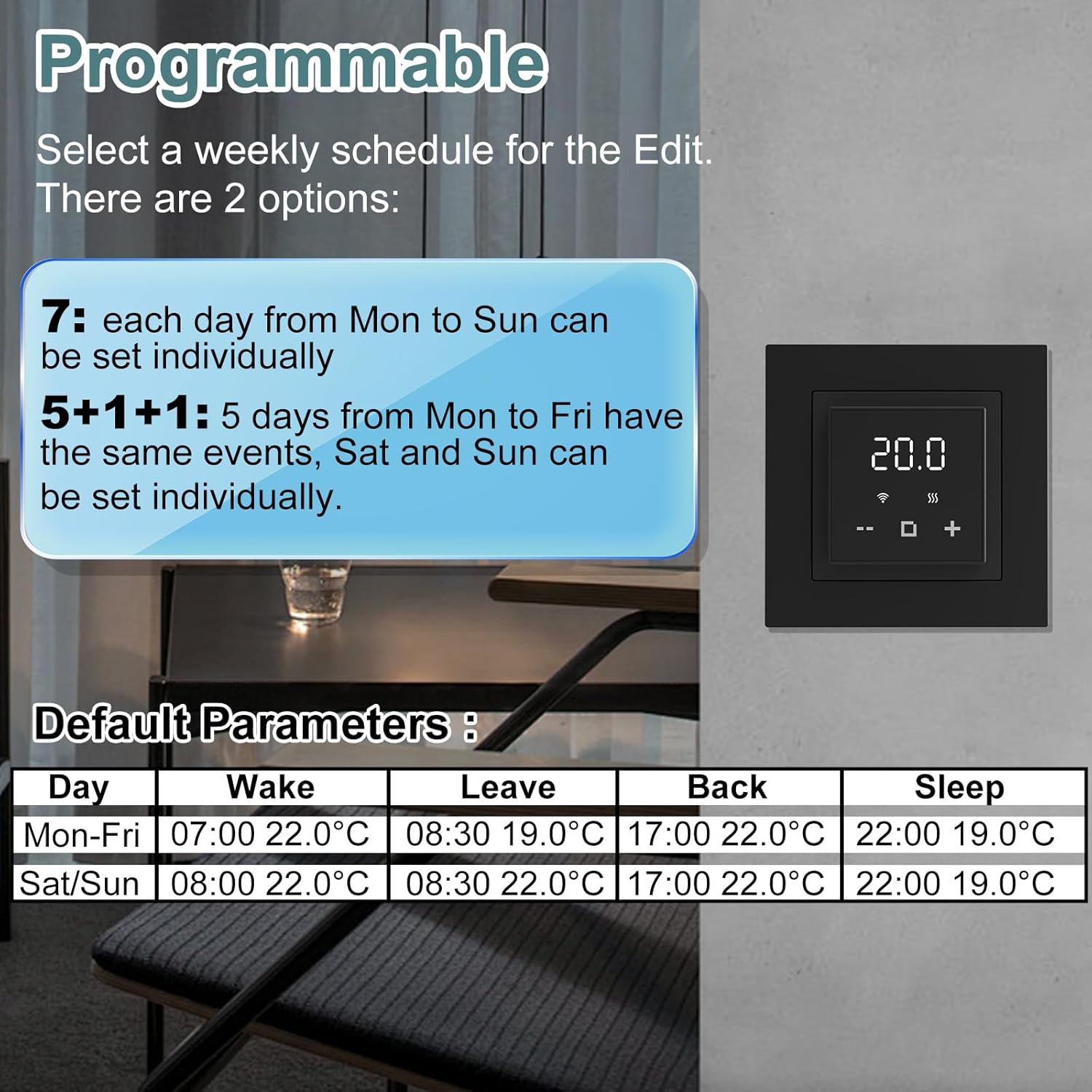
Image: Programmable Schedule. This image shows the two programming options (7-day individual or 5+1+1 day) and a table of default parameters for Wake, Leave, Back, and Sleep times and temperatures.
- 7-Day Individual: Each day from Monday to Sunday can be set with individual schedules.
- 5+1+1 Day: Monday to Friday share the same schedule, while Saturday and Sunday can be set individually.
Access programming settings through the thermostat's menu or the Warmme app. The Adaptive Learning technology will automatically adjust run times to maintain ideal temperatures while optimizing energy consumption.
7.3. Special Modes
- Hold Mode: Maintains a constant temperature until manually changed or a new schedule begins.
- Holiday Mode: Sets a specific temperature for an extended period, ideal for when you are away.
- Anti-frozen Function: Prevents the floor from freezing by maintaining a minimum temperature.
- Child Lock: Locks the thermostat's physical buttons to prevent unintended changes.
- Open Window Detection: Automatically pauses heating if a sudden drop in temperature (e.g., from an open window) is detected, saving energy.
8. Maintenance
- Cleaning: Wipe the thermostat's touchscreen and casing with a soft, damp cloth. Do not use abrasive cleaners or solvents.
- Sensor Care: Ensure the floor sensor cable is not damaged or exposed. If the sensor needs replacement, use an official HEATIT replacement part.
- Software Updates: Periodically check the Warmme app for firmware updates to ensure optimal performance and access to new features.
9. Troubleshooting
Common Issues and Solutions:
- Thermostat not powering on: Check the circuit breaker. Ensure all wiring connections are secure.
- No heating: Verify the thermostat is in an active heating mode (e.g., Auto or Hold with a set temperature above ambient). Check the heating symbol on the display. Ensure the floor sensor is correctly installed and not faulty.
- WiFi connection issues: Ensure your WiFi network is 2.4GHz. Restart your router and the thermostat. Follow the app's pairing instructions carefully.
- Inaccurate temperature readings: The thermostat uses both room and floor sensors. If you suspect an issue with the room sensor, ensure it's not obstructed or exposed to drafts. The app allows for minor calibration adjustments.
- Thermostat does not fit US electrical box: This is a known issue for some installations. An adapter plate or a deeper, compatible electrical box may be required. Consult with your electrician for suitable solutions.
- App/Voice control not working: Ensure the thermostat is connected to WiFi and linked correctly in the Warmme app and your smart home assistant app (Alexa/Google Home).
If you encounter persistent issues, please contact HEATIT customer support.
10. Specifications
| Brand | HEATIT |
| Model Number | ET-44W |
| Controller Type | Warmme app, Amazon Alexa, Google Assistant |
| Special Features | Remote Access & Control, Energy Usage Tracking, Adaptive Learning |
| Color | Black |
| Temperature Control Type | Digital, Programmable, Smart/Remote |
| Connectivity Technology | Wi-Fi |
| Included Components | Temperature Sensor |
| Power Source | Corded Electric |
| Material | Plastic, ABS |
| Display Type | Touchscreen |
| Control Method | App, Touch, Voice |
| Mounting Type | Wall Mount (designed for electrical box) |
| Voltage Range | 120V-240V |
| Max Load | 16A |
| Item Weight | 7 ounces |
| Package Dimensions | 4.02 x 3.82 x 2.8 inches |
11. Warranty and Support
The HEATIT ET-44W Programmable WiFi Smart Thermostat is backed by a 4-year limited warranty, ensuring safe and durable performance. For warranty claims, technical assistance, or any questions not covered in this manual, please contact HEATIT customer support through their official channels or the Warmme app.


