
1. Product Overview
The TOMLOV DM4W is an innovative digital microscope uniquely integrated with a precision weighing scale. Designed for detailed inspection and accurate measurement, it is an ideal tool for coin collectors, jewelers, students, and anyone requiring high-magnification observation combined with precise weight verification. This device features a clear display, adjustable lighting, and PC connectivity for enhanced usability.

2. What's in the Box
Please verify that all components are present upon unboxing:
- TOMLOV DM4W Microscope (1 unit)
- Microscope Stand (1 unit)
- Microscope Base (1 unit)
- USB Cable (2 units)
3. Setup Guide
- Assemble the Stand: Attach the microscope stand to the microscope base. Ensure it is securely fastened to provide stability during operation.
- Mount the Microscope: Carefully slide the TOMLOV DM4W microscope unit onto the stand's mounting bracket. Tighten the securing knob to hold the microscope firmly in place.
- Charge the Device: Connect one of the provided USB cables to the microscope's charging port and the other end to a suitable USB power adapter (not included) or a computer USB port. The device features a built-in rechargeable battery for portable use.
- Connect the Scale (Optional): If using the weighing scale function, connect the dedicated USB-A to C cable from the microscope unit to the scale port on the base.

4. Operating Instructions
4.1. Microscope Operation
- Power On/Off: Press and hold the 'POWER' button located on the front panel of the microscope to turn the device on or off.
- Adjusting Height and Focus: Use the adjustment knob on the stand to raise or lower the microscope head, changing the working distance. Fine-tune the image clarity by rotating the focus ring on the microscope lens.
- LED Lighting: The built-in LED light illuminates the specimen. Adjust the brightness using the dedicated controls on the microscope to achieve optimal viewing conditions.
- Zoom (10X-200X): The microscope offers a zoom range from 10X to 200X. Adjust the height and focus to achieve desired magnification levels.
- Capturing Photos & Videos: Use the 'OK' button to capture still images or start/stop video recording. Captured media is saved to an inserted microSD card (not included).
- Display: The 4.3-inch HD IPS True Color screen provides a clear and wide viewing angle (178°), ensuring vivid detail and accurate colors.


4.2. Weighing Scale Operation
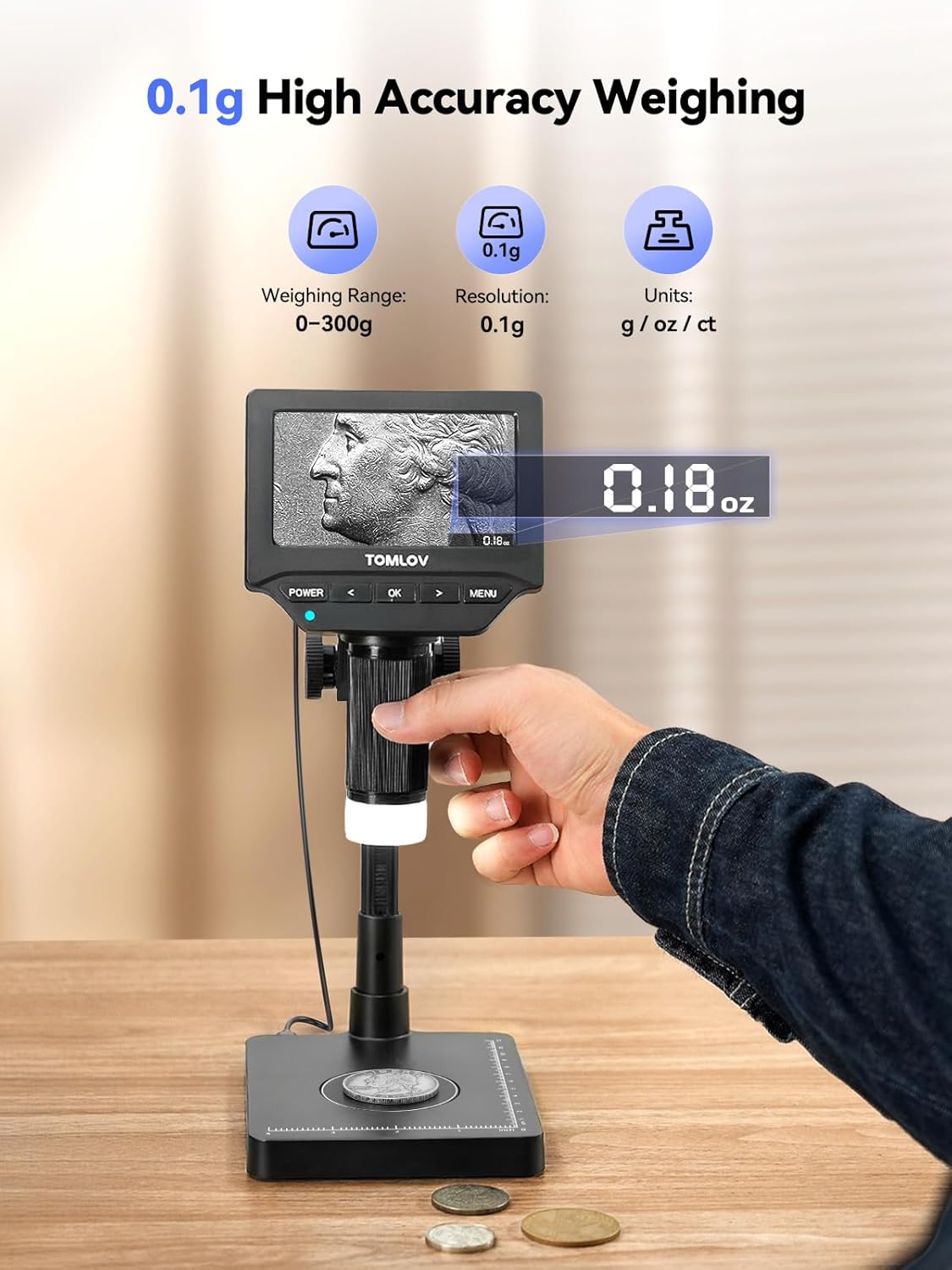
The integrated precision scale allows for accurate weight measurements.
- Placement: Place the item to be weighed directly on the designated circular area on the microscope base.
- Reading: The weight will be displayed on the microscope's screen.
- Units: The scale measures in grams (g), ounces (oz), and carats (ct). Refer to the on-screen menu to switch between units. The scale provides 0.1g resolution and ±0.5g accuracy.

4.3. PC/Mac Connectivity
The TOMLOV DM4W can be connected to a Windows or macOS computer via USB for real-time viewing, sharing, and recording on a larger screen.
- Connect: Use a USB cable to connect the microscope to your computer.
- Select Mode: On the microscope, select 'PC Camera' mode when prompted.
- Software: Use your computer's default camera application or third-party microscope software to view the live feed and capture images/videos.

4.4. Portability
The compact design and built-in rechargeable battery allow for cord-free operation, making it suitable for field inspections or mobile use.

4.5. Product Video
Watch this official product video for a visual guide on using the TOMLOV DM4W Microscope with Scale:
5. Maintenance
- Cleaning: Use a soft, dry cloth to clean the exterior of the microscope and display screen. For the lens, use a specialized lens cleaning cloth and solution. Avoid abrasive materials or harsh chemicals.
- Storage: Store the device in a cool, dry place away from direct sunlight and extreme temperatures.
- Battery Care: To prolong battery life, avoid fully discharging the battery frequently. Charge the device regularly, even if not in use for extended periods.
6. Troubleshooting
- No Power: Ensure the device is fully charged. If using a power adapter, verify the connection and power source.
- Blurry Image: Adjust the focus ring on the microscope lens. Ensure the working distance (height of the microscope from the specimen) is appropriate for the desired magnification. Clean the lens if smudges are present.
- Scale Inaccuracy: Ensure the scale is on a flat, stable surface. Avoid placing items that exceed the maximum weight capacity. Recalibration may be necessary if persistent inaccuracies occur (refer to manufacturer's support for calibration instructions).
- No PC/Mac Connection: Verify the USB cable connection. Ensure 'PC Camera' mode is selected on the microscope. Try a different USB port or cable.
7. Specifications
| Feature | Detail |
|---|---|
| Product Dimensions | 8.5 x 6.9 x 3.5 inches |
| Item Weight | 15.5 ounces |
| Item Model Number | DM4W |
| Batteries | 1 Lithium Ion batteries required (included) |
| Light Source Type | LED |
| Material | Plastic |
| Color | Black |
| Real Angle of View | 178 Degrees |
| Magnification Maximum | 1000 x |
| Voltage | 5 Volts |
| Compatible Devices | Laptop, Personal Computer |
8. Warranty and Support
TOMLOV products are designed for reliability and performance. For warranty information, technical support, or service inquiries, please refer to the official TOMLOV website or contact their customer service directly. Keep your purchase receipt for warranty claims.
For further assistance, visit: TOMLOV Official Store on Amazon

