
Important Safety Instructions
Please read all instructions carefully before assembly and use. Keep this manual for future reference.
- Electrical Safety: Ensure the power supply is disconnected before installation or maintenance. All electrical connections should be performed by a qualified electrician in accordance with local codes.
- Handling: The mirror is made of tempered glass and is fragile. Handle with extreme care to prevent breakage and injury.
- Mounting: This cabinet is designed for wall mounting. Ensure the wall structure can support the weight of the cabinet and its contents. Use appropriate mounting hardware for your wall type.
- Water Exposure: While the product is IP44 waterproof rated, avoid direct water spray onto electrical components.
- Children: Keep children away from the product during installation. Do not allow children to play with the cabinet.
Product Overview
The soges LED Aluminum Medicine Cabinet Mirror combines functionality with modern design, offering storage and intelligent lighting for your bathroom.
Key Features:
- Durable Construction: Features a 4mm tempered aluminum mirror and aircraft-grade aluminum alloy frame.
- Smart Tri-Lighting System: Integrated LED strips with 3 color temperatures (Warm/Neutral/Daylight) and dimmable touch controls. Includes power-off memory function.
- Anti-Fog Technology: Full-surface anti-fog function automatically clears condensation within 30 minutes.
- Adjustable Storage: Inner adjustable shelves provide flexible storage options.
- Slow-Close Door: Equipped with slow-close hinges to prevent slamming.
- Waterproof Rating: IP44 certification ensures resistance against water splashes and dust ingress.
- Safety: Patent-backed driver system and shatterproof aluminum mirror.

Image: Key features of the soges LED Medicine Cabinet Mirror.
Specifications
| Feature | Detail |
|---|---|
| Brand | soges |
| Model Number | 10NBGLMC3047-NA |
| Product Dimensions (D x W x H) | 5.1"D x 20"W x 28"H |
| Material | Tempered Glass, Aluminum |
| Color | Black |
| Item Weight | 21.12 Pounds |
| Weight Capacity (Maximum) | 88 Pounds |
| Number of Shelves | 6 (Adjustable) |
| Mounting Type | Wall Mount |
| Waterproof Rating | IP44 |
| Lighting Modes | 3-Color Changing (Warm, Neutral, Daylight) |
| Additional Features | Anti-Fog, Dimmable, Power-Off Memory, Slow-Close Door |

Image: Product dimensions (5.1"D x 20"W x 28"H).
Package Contents
Verify that all components are present and undamaged before beginning assembly.
- LED Aluminum Medicine Cabinet Mirror
- Adjustable Glass Shelves (Quantity: 6)
- Mounting Hardware Kit
- Instruction Manual
Setup & Installation
Follow these steps carefully for proper installation. It is recommended to have two people for installation due to the product's size and weight.
Tools Required (Not Included):
- Drill
- Measuring Tape
- Level
- Pencil
- Screwdriver
Installation Steps:
- Prepare the Wall: Choose a suitable location on a sturdy wall. Use a level and pencil to mark the desired mounting height and positions for the hanging pieces.
- Install the Top Hanging Piece: Secure the top hanging bracket to the wall using appropriate screws and anchors. Ensure it is level and firmly attached.
- Install the Bottom Fixing Tray: Position the bottom fixing tray below the top bracket, ensuring it is level and aligned. Secure it to the wall.
- Fix the Top Hanging Piece: Carefully lift the medicine cabinet and hook it onto the top hanging piece. Ensure it is securely seated.
- Secure the Cabinet: Use the provided screws to fix the cabinet to the bottom fixing tray, preventing movement.
- Electrical Connection: Connect the cabinet's electrical wiring to your household electrical supply. This step must be performed by a qualified electrician. Ensure all connections are secure and insulated.
- Install Shelves: Place the adjustable glass shelves inside the cabinet at your desired heights.

Image: Visual guide for installation steps.

Image: Interior features including adjustable shelves and soft-close hinges.
Operating Instructions
LED Lighting Control:
The mirror features a smart touch sensor for controlling the LED lighting.
- Power On/Off: Lightly touch the power icon on the mirror surface to turn the LED lights on or off.
- Change Color Temperature: Double-touch the power icon to cycle through the three color temperatures: Warm Light, Neutral Light, and Cool Light (Daylight). The cabinet will remember your last setting when powered off and on.
- Adjust Brightness: When the lights are on, long-press the power icon to dim or brighten the LED lights. Release when the desired brightness is achieved.

Image: Smart touch sensor and 3 color lighting modes.

Image: Long press to adjust brightness.
Anti-Fog Function:
The mirror is equipped with an anti-fog function to maintain a clear reflection in humid conditions.
- Activate Anti-Fog: Lightly touch the anti-fog icon on the mirror surface to activate the defogging function.
- Automatic Operation: The anti-fog function will automatically clear condensation within approximately 30 minutes.
- Deactivate Anti-Fog: Touch the anti-fog icon again to turn off the function.
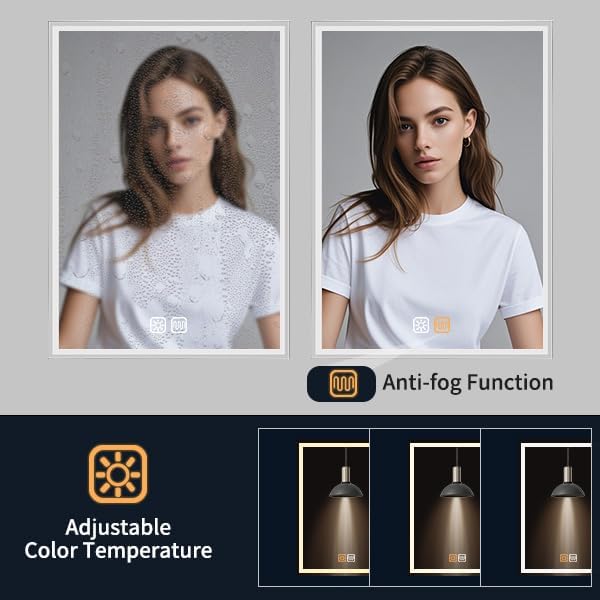
Image: Anti-fog function in action.
Maintenance & Care
Proper care will ensure the longevity and appearance of your medicine cabinet mirror.
- Cleaning the Mirror: Use a soft, lint-free cloth and a non-abrasive glass cleaner. Spray the cleaner onto the cloth, not directly onto the mirror, to avoid liquid seeping into electrical components.
- Cleaning the Cabinet: Wipe the aluminum frame and interior surfaces with a soft, damp cloth. Avoid harsh chemicals or abrasive cleaners that could damage the finish.
- Dusting: Regularly dust the cabinet and mirror with a dry, soft cloth.
- Avoid Excessive Moisture: Although IP44 rated, avoid prolonged exposure to steam or direct water spray. Ensure the bathroom is well-ventilated.
- Shelf Care: The glass shelves can be removed for cleaning. Wash with mild soap and water, then dry thoroughly before replacing.
Troubleshooting
If you encounter issues with your medicine cabinet mirror, refer to the following common problems and solutions.
| Problem | Possible Cause | Solution |
|---|---|---|
| LED lights do not turn on. | No power supply; loose electrical connection; faulty touch sensor. | Check the main power switch. Verify electrical connections (consult a qualified electrician). Ensure the touch sensor area is clean and dry. |
| Anti-fog function is not working. | Anti-fog function not activated; electrical issue. | Ensure the anti-fog icon has been touched to activate. Check power supply to the unit. |
| Lights flicker or change color unexpectedly. | Unstable power supply; touch sensor interference. | Ensure stable power. Clean the touch sensor area. Avoid touching the sensor with wet hands or objects. |
| Door does not close smoothly or slams. | Hinges require adjustment; obstruction. | Inspect hinges for damage or misalignment. Adjust hinges if necessary. Remove any obstructions preventing smooth closure. |
If the problem persists after attempting these solutions, please contact customer support.
Warranty & Support
No specific warranty information is provided in this manual. For warranty details, product support, or to purchase replacement parts, please contact soges customer service through their official website or the retailer where the product was purchased.
Please have your model number (10NBGLMC3047-NA) and purchase date available when contacting support.