
SIBRILLE BP-F030
SIBRILLE 36W Dimmable Arc Floor Lamp User Manual
Model: BP-F030 | Brand: SIBRILLE
Introduction
Thank you for purchasing the SIBRILLE 36W Dimmable Arc Floor Lamp. This manual provides important information regarding the safe installation, operation, and maintenance of your new lamp. Please read it thoroughly before use and retain it for future reference.
Important Safety Instructions
- Read all instructions carefully before assembly and operation.
- Keep this manual for future reference.
- Do not operate the lamp with a damaged cord or plug.
- Ensure the power supply voltage matches the lamp's requirements (110 Volts).
- Do not expose the lamp to water or moisture. This product is for indoor use only.
- Always unplug the lamp from the power outlet before cleaning or performing any maintenance.
- Do not attempt to modify or repair the lamp yourself. Contact qualified service personnel for repairs.
- Keep the lamp away from heat sources and direct sunlight.
- Ensure the base is stable to prevent tipping, especially around children and pets.
Package Contents
Verify that all components are present before beginning assembly:
- Floor Lamp (main body)
- Remote Control
- User Manual
- Bulb (integrated LED)
- Adapter
- Base
- Screw tools
- Iron pole sections (various, for assembly)
Image: Components included in the SIBRILLE 36W Dimmable Arc Floor Lamp package.
Assembly Instructions
Follow these steps to assemble your SIBRILLE 36W Dimmable Arc Floor Lamp. No complex tools are required beyond those provided.
- Unpack Components: Carefully remove all parts from the packaging and lay them out on a clean, flat surface.
- Assemble the Pole: Connect the iron pole sections (labeled A, B, C, etc., in the diagram) by screwing them clockwise. Ensure each section is securely tightened.
- Attach the Base: Secure the lamp base to the bottom pole section using the provided screw tools. The base is designed to be sturdy (6.9 lbs) to prevent tipping.
- Install Lampshades: Attach the fabric lampshades to the lamp heads. Ensure the lampshades are secured downwards onto the clasp, not hung on the power cord.
- Adjust Lamp Heads: Position the three lamp heads in different directions for optimal light distribution. Avoid installing all lamp heads in the same direction.
- Connect Power: Once fully assembled, plug the adapter into the lamp and then into a standard 110V power outlet.
Image: Diagram illustrating the assembly steps for the floor lamp.
Image: Visual tips for correct lampshade attachment and lamp head positioning.
Operating Instructions
Your SIBRILLE floor lamp can be controlled via the included remote control or the touch controls on the lamp body.
Remote Control Functions
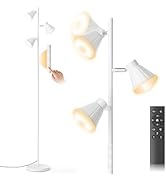
Image: Diagram showing the remote control buttons and the lamp's touch control panel.
- ON/OFF Button: Powers the lamp on or off.
- Brightness +/-: Adjusts brightness from 10% to 100% (stepless dimming).
- Color Temperature +/- (Warm/White): Changes color temperature between 3000K (Warm), 4000K (Natural), and 6000K (Cool White).
- M (Memory) Button: Recalls the last used lighting mode (brightness and color temperature).
- 1H (Timer) Button: Activates a 1-hour timer, after which the lamp will automatically turn off.
- Individual Lamp Control (1, 2, 3 buttons): Turns on/off or adjusts individual lamps.
- Reading Mode Button: Sets the lamp to a suitable brightness and color temperature for reading.
- Sleeping Mode Button: Sets the lamp to a low brightness and warm color temperature for night use.
The remote control features a magnetic design, allowing it to attach securely to the metal lamp pole for easy access.

Image: A person using the remote control to adjust the lamp settings from a sofa.

Image: Close-up of the remote control magnetically attaching to the lamp's metal pole.
Touch Control Functions
The lamp body has three touch controls (CCT1, CCT2, CCT3) for individual lamp operation:
- Short Press: Cycles through color temperatures (3000K-4000K-6000K-OFF) for the corresponding lamp.
- Long Press: Adjusts the brightness steplessly for the corresponding lamp.

Image: Demonstrates individual control of each lamp using either touch or remote, showing options for 1, 2, or 3 lights on.
Dimmable and Color Temperature Adjustment
The lamp offers stepless dimming from 10% to 100% brightness and three color temperature settings: Warm Light (3000K), Natural Light (4000K), and Cool White Light (6000K).

Image: Visual representation of the lamp's stepless dimming from 10% to 100% and color temperature range from 3000K (Warm) to 6000K (Cool White).
Memory Function
The lamp features a memory function that automatically saves your last used brightness and color temperature settings. When you turn the lamp on again, it will resume your preferred lighting mode.

Image: Illustrates the memory function, stating "Every time you turn on the light is your favorite lighting mode."
Product Videos
Video: "Stylish Arc Floor Lamp: Perfect for modern living spaces!" - This video demonstrates the lamp's features and its aesthetic appeal in various room settings.
Maintenance
- Cleaning: Always unplug the lamp before cleaning. Use a soft, dry cloth to wipe the lamp body and shades. Do not use abrasive cleaners or solvents.
- Bulb Replacement: The lamp uses an integrated LED bulb. Do not attempt to replace the bulb yourself. If the LED light source fails, contact customer support for assistance.
- Storage: If storing the lamp for an extended period, disassemble it carefully and store it in its original packaging in a dry, cool place.
Troubleshooting
| Problem | Possible Cause | Solution |
|---|---|---|
| Lamp does not turn on. | Not plugged in; power outlet not working; remote control battery low; lamp not properly assembled. | Ensure the lamp is securely plugged into a working outlet. Check if the remote control battery needs replacement. Verify all lamp sections are tightly connected. |
| Remote control not working. | Battery low or depleted; remote not aimed at the lamp; interference. | Replace the remote control battery. Ensure there are no obstructions between the remote and the lamp. Try using the touch controls on the lamp body. |
| Light flickers or is unstable. | Loose connection; power fluctuation. | Check all connections for tightness. Try plugging the lamp into a different outlet. If the issue persists, contact customer support. |
| Cannot adjust brightness or color temperature. | Incorrect button pressed; remote control issue. | Refer to the "Operating Instructions" section for correct button usage. Try using the touch controls on the lamp body. |
Specifications
| Model Number | BP-F030 |
| Brand | SIBRILLE |
| Wattage | 36 watts |
| Light Source Type | LED (Integrated) |
| Color Temperature | 3000K-6000K (Adjustable) |
| Dimmable | 10%-100% Stepless |
| Control Method | Remote, Touch |
| Power Source | Corded Electric |
| Voltage | 110 Volts |
| Product Dimensions | 40.6"D x 40.6"W x 73.6"H |
| Item Weight | 13.5 Pounds |
| Base Material | Metal |
| Shade Material | Linen |
| Indoor/Outdoor Usage | Indoor |
| Additional Features | 1 Hour Timer, Adjustable Color Temperature, All-In-One LED Bulb, Dimmable, Memory Function |

Image: Diagram showing the dimensions of the SIBRILLE Arc Floor Lamp.
Warranty and Support
This SIBRILLE floor lamp comes with a 2-year warranty. We also offer a 30-day no-hassle quality refund.
If you have any questions, concerns, or require technical assistance, please contact SIBRILLE customer support through the Amazon messaging system. Our team is dedicated to resolving your issues promptly.
Ask a question about this manual
Ask about setup, troubleshooting, compatibility, parts, safety, or missing instructions. Manuals+ will review the question and use this page’s manual context to help answer it.