
Introduction to the TIMMKOO SR1 AI Voice Recorder
The TIMMKOO SR1 is an advanced digital voice recorder designed for high-quality audio capture and intelligent text processing. Featuring AI-powered transcription, summarization, and translation capabilities, it offers a comprehensive solution for recording meetings, lectures, interviews, and personal notes. Its intuitive touchscreen interface combined with physical buttons ensures ease of use, while robust storage options and long battery life provide reliability for extended use.

Image: Front and side view of the TIMMKOO SR1 AI Voice Recorder, showcasing its sleek black design and touchscreen interface.
What's in the Box
Your TIMMKOO SR1 AI Voice Recorder package includes the following items:
- TIMMKOO SR1 AI Voice Recorder Body
- USB Type-C Charging Cable
- 3.5mm AUX Cable
- User Manual
- 128GB Micro SD Card (pre-installed or separate)

Image: All items included in the TIMMKOO SR1 package: the AI Voice Recorder, charging cable, AUX cable, and user manual.
Setup and Initial Use
1. Charging the Device
Before first use, fully charge your TIMMKOO SR1. Connect the provided USB Type-C cable to the device's charging port and the other end to a USB power adapter (not included) or a computer's USB port. The screen will indicate charging status. A full charge supports up to 30 hours of continuous recording.
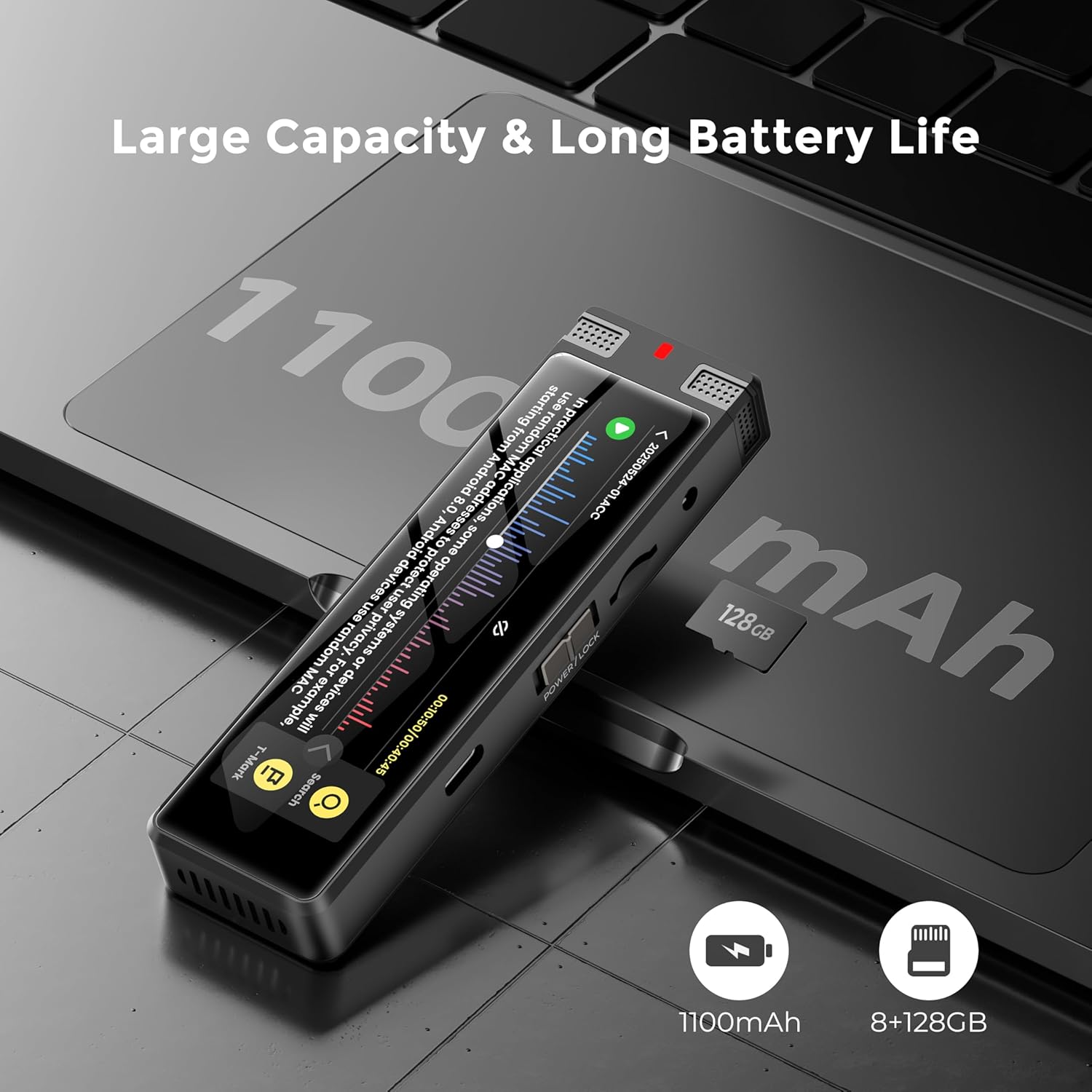
Image: The TIMMKOO SR1 AI Voice Recorder connected to a laptop via its USB-C cable, illustrating the charging process and its large battery capacity.
2. Powering On/Off and Screen Lock
To power on the device, slide the "POWER/LOCK" switch to the "POWER" position and hold for a few seconds. To power off, repeat the action. To lock the screen and prevent accidental touches during recording or playback, slide the switch to the "LOCK" position. This will disable touchscreen input while allowing physical buttons to function.

Image: Close-up of the TIMMKOO SR1 highlighting its dual control options: a responsive touchscreen and traditional physical buttons for power, lock, and navigation.
Operating Modes
The TIMMKOO SR1 offers several specialized recording modes to optimize audio capture for different scenarios:
STT Boost Mode
Optimized for speech-to-text conversion. This mode reduces ambient noise and enhances speech clarity, making it ideal for lectures, meetings, and interviews where accurate transcription is crucial.
Vocal Boost Mode
Provides professional voice isolation by aggressively suppressing environmental noise (up to 30dB reduction). It focuses on human voice frequencies (300Hz-3.4KHz), making it perfect for podcasts, voice memos, or recording in noisy environments.
Hi-Fi Mode
Ensures true-to-source audio preservation. This mode captures full-spectrum sound (20Hz-40KHz) without filtering, maintaining original acoustic characteristics. Recommended for music recording, ambient sampling, or ASMR.

Image: Visual representation of the three main recording modes: STT Boost for meetings, Vocal Boost for individual speech, and Hi-Fi for music recording.
Advanced Recording Features
Scheduled & Auto Recording
The SR1 supports two automated recording modes for hands-free operation:
- Scheduled Recording: Set a specific time for the device to start and stop recording automatically.
- Voice-Activated Auto Recording: The recorder will automatically start recording when it detects sound and pause when silence is detected, conserving battery and storage.

Image: The TIMMKOO SR1 on a nightstand, illustrating its unattended and voice-activated capture capabilities with sound waves emanating from the device.
External Audio Input
For enhanced audio quality, the SR1 supports external microphones and Line-in audio input via its 3.5mm jack. This allows for clearer recordings, especially in challenging acoustic environments.

Image: The TIMMKOO SR1 connected to various external audio sources, including different types of microphones and an AUX cable, demonstrating its multi-source audio input capability.
Exclusive Backup Feature
The SR1 includes a unique backup function that automatically creates a duplicate of your recordings during the saving process. This helps protect important audio files from potential loss due to storage device failure, ensuring your data is secure.
AI-Powered Text Processing
Leverage the power of AI with the SR1's integrated text processing features, all without subscription fees:
Offline Transcription
Convert speech to text directly on the device in up to 92 languages. This ensures reliable privacy protection as your audio files never need to be uploaded to the cloud.
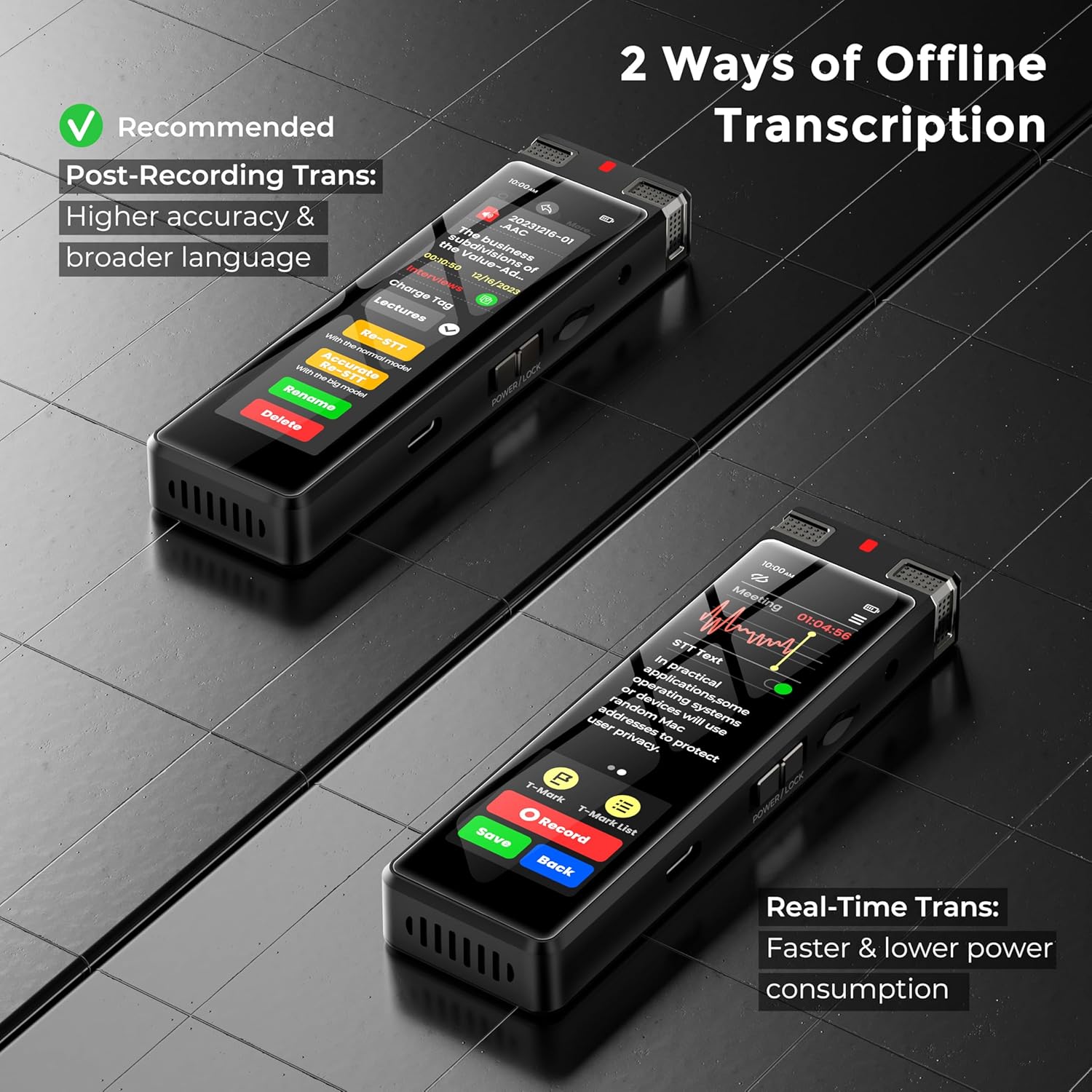
Image: The TIMMKOO SR1 displaying two ways of offline transcription: Post-Recording Trans for higher accuracy and Real-Time Trans for faster processing.
Video: A short tutorial demonstrating how to achieve accurate STT (Speech-to-Text) transcription directly on the TIMMKOO SR1 device.
Online Summarize, Mindmap, and Translation
Connect to Wi-Fi to utilize powerful AI-driven tools for proofreading, correction, structured organization, analysis, summarization, mind mapping, meeting recaps, and translation into 92 languages. Your audio files remain on your device, with only the text processed online for privacy.

Image: The TIMMKOO SR1 displaying its AI-Pro menu with options like Add Punctuation, Proofread and Correct, Structured Organization, Analyze and Summarize, Mind Map, and Translate into English.
Video: A brief demonstration of how to use the TIMMKOO SR1 to achieve online summarization, mind mapping, and translation of recorded content.
File Management and Storage
The SR1 comes with 8GB of internal storage and a 128GB SD card (expandable up to 1TB), allowing for approximately 380 to 2200 hours of recordings. You can easily browse, review, and export your recorded audio and generated text files.
Accessing Files
Navigate to the "File Browser" option on the device's touchscreen to view files stored on both internal memory and the SD card. You can import external audio files (MP3, MKA, OGG, AAC, WAV, MP2, AMR) for playback and AI processing.
Video: A step-by-step guide on how to review and export documents generated by the STT and AI-Do features on the TIMMKOO SR1.
Maintenance and Care
To ensure the longevity and optimal performance of your TIMMKOO SR1, follow these maintenance guidelines:
- Cleaning: Use a soft, dry cloth to clean the device. Avoid using liquid cleaners or abrasive materials.
- Storage: Store the device in a cool, dry place away from direct sunlight, extreme temperatures, and humidity.
- Battery Care: For optimal battery life, avoid fully discharging the device frequently. Charge it regularly, even if not in active use.
- Software Updates: Periodically check for firmware updates through the device settings to ensure you have the latest features and improvements.
Troubleshooting
If you encounter any issues with your TIMMKOO SR1, refer to the common problems and solutions below:
- Device not powering on: Ensure the device is fully charged. Check the power/lock switch is in the correct position.
- Poor recording quality:
- Ensure microphones are not obstructed.
- Try different recording modes (STT Boost, Vocal Boost, Hi-Fi) suitable for your environment.
- Consider using an external microphone for clearer audio.
- Transcription accuracy issues:
- Ensure clear speech and minimal background noise during recording.
- Use STT Boost mode for optimal transcription.
- For online AI processing, ensure a stable Wi-Fi connection.
- Device not connecting to computer: Ensure the USB cable is securely connected. Try a different USB port or cable.
For further assistance, please refer to the detailed user manual or contact customer support.
Technical Specifications
| Feature | Specification |
|---|---|
| Model Number | SR1 |
| Dimensions | 0.6 x 1.4 x 4.4 inches |
| Item Weight | 6.7 ounces |
| Internal Storage | 8GB |
| Expandable Storage | 128GB SD card included (up to 1TB) |
| Battery Capacity | 1100mAh |
| Continuous Recording | Up to 30 hours |
| Screen Size | 3.7 Inches |
| Headphones Jack | 3.5 millimeters |
| Hardware Interface | USB Type C |
| Audio Format | WAV (supports MP3, MKA, OGG, AAC, MP2, AMR for import) |
Warranty and Support
The TIMMKOO SR1 AI Voice Recorder comes with a standard manufacturer's warranty. For detailed warranty terms, registration, and support inquiries, please refer to the warranty card included in your product packaging or visit the official TIMMKOO website.
For technical assistance, troubleshooting, or any questions regarding your device, please contact TIMMKOO customer support. Contact information can be found in your user manual or on the brand's official website.
