
1. Introduction
This manual provides detailed instructions for the safe and effective use of your KAIWEETS HT118A Digital Multimeter and KET20 Silicone Multimeter Test Leads. The HT118A is a True RMS 6000-count digital multimeter designed for accurate measurement of various electrical parameters. The KET20 test leads are engineered for high safety and durability, complementing the multimeter's capabilities. Please read this manual thoroughly before operation to ensure proper usage and to prevent potential hazards.
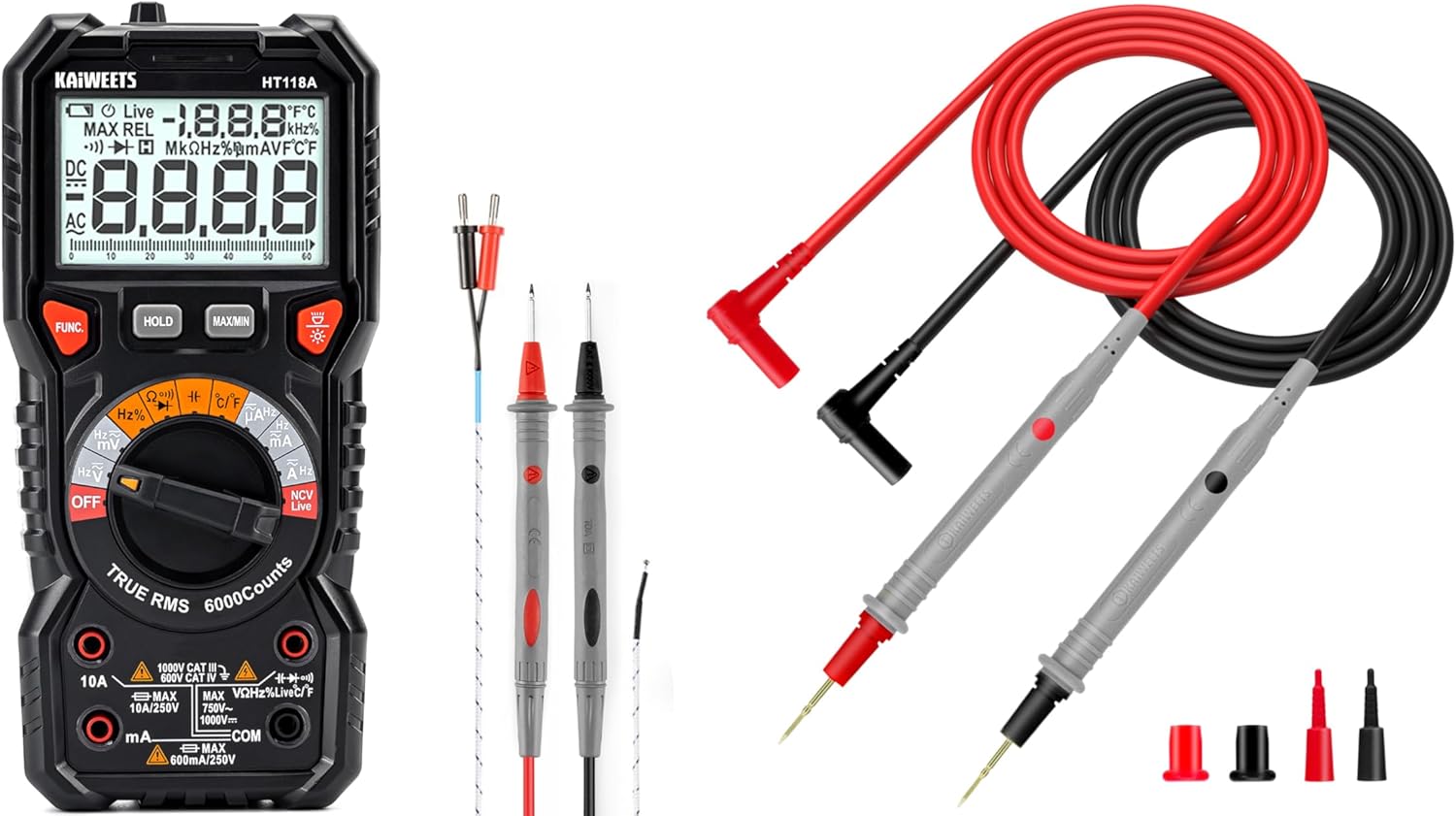
Figure 1: KAIWEETS HT118A Digital Multimeter and KET20 Test Leads. This image displays the HT118A multimeter on the left, featuring its large display and rotary dial, alongside the KET20 silicone test leads on the right, coiled and ready for use.
2. Safety Information
Always adhere to safety precautions when using electrical testing equipment. Failure to do so may result in electric shock, injury, or damage to the meter or equipment under test.
- Ensure the multimeter and test leads are in good condition before each use. Inspect for any damage to the casing, insulation, or connectors.
- The KET20 test leads are rated for CAT III 1000V and CAT IV 600V. Always use appropriate safety category leads for the measurement task.
- Do not apply voltage or current that exceeds the maximum ratings specified for the multimeter.
- Always disconnect power to the circuit before connecting or disconnecting test leads, especially when measuring current or resistance.
- Use caution when working with voltages above 30V AC RMS, 42V peak, or 60V DC, as these pose a shock hazard.
- Do not operate the meter in explosive gas, vapor, or dust environments.
- Replace batteries promptly when the low battery indicator appears to ensure accurate readings.
- Refer to the specifications section for detailed safety ratings and measurement limits.
3. Product Overview
3.1 KAIWEETS HT118A Digital Multimeter
The HT118A is a versatile digital multimeter featuring True RMS measurement for accurate readings on non-sinusoidal waveforms. It offers a 6000-count resolution on its large 2.9-inch backlit LCD, ensuring clear visibility of measurements.
- Measurement Capabilities: Measures DC/AC voltage up to 1000V/750V, DC/AC current up to 10A, resistance up to 60 MOhms, capacitance, frequency, duty cycle, temperature, diodes, and continuity.
- Auto-Ranging: Simplifies operation by automatically selecting the correct measurement range.
- LED Lightning Jacks: Flashing LED lights guide the user to the correct input jacks for the selected function.
- Non-Contact Voltage (NCV) Detection: For identifying live wires without direct contact.
- Live Wire Detection: Specific function to detect live electrical lines.
- Data Hold and MAX/MIN: Functions to freeze readings and record maximum/minimum values.

Figure 2: LED Lightning Jacks. This image highlights the LED indicators around the input jacks of the HT118A multimeter, which illuminate to guide the user to the correct probe connection for the selected function.

Figure 3: 2.9" HTN Backlit Screen and Auto-ranging. This image shows the multimeter's large, orange-backlit display with dual readings, illustrating its auto-ranging capability for accurate AC/DC measurements.

Figure 4: HT118A Multimeter Functions and Battery Compartment. This image provides an overview of the various measurement functions available on the HT118A, including AC/DC voltage, current, frequency, resistance, temperature, capacitance, diodes, continuity, data retention, non-contact voltage, and live line detection. It also shows the battery compartment and kickstand.

Figure 5: Temperature Measurement. This image demonstrates the HT118A multimeter measuring temperature using the included K-Type thermocouple, shown immersed in a glass of water.
3.2 KAIWEETS KET20 Silicone Multimeter Test Leads
The KET20 test leads are designed for enhanced safety and performance, featuring durable silicone insulation and gold-plated probes.
- Safety Ratings: CAT III 1000V and CAT IV 600V, 20A current rating, suitable for professional electrical testing.
- Material: Temperature-resistant soft silicone material ensures flexibility and prevents hardening in various environments. Non-toxic and eco-friendly.
- Probes: Ultra-sharp 2mm gold-plated probes for precise contact on high-density circuit boards.
- Wire Construction: 47 strands of 0.12mm copper wire for excellent tensile strength, flexibility, low resistance, and reliable electrical conductivity.
- Connectors: Universal 4mm banana plugs, compatible with most digital multimeters and clamp meters.
- Length: 48 inches (120cm) long for extended reach.

Figure 6: KET20 Test Leads Safety and Features. This image illustrates the key features of the KET20 test leads, including their 0.7mm tip, silicone material, 4mm banana plug, and 120cm length, along with their CAT IV 600V and CAT III 1000V safety ratings.

Figure 7: KET20 Test Leads Higher Safety and Durability. This image emphasizes the robust construction of the KET20 test leads, highlighting their durability, high-temperature resistance, safety, convenience, and universal compatibility.

Figure 8: KET20 Test Leads Silicone Material Properties. This image visually demonstrates the heat and cold resistance of the silicone material used in the KET20 test leads, showing them exposed to flame and ice, indicating suitability for extreme environments.

Figure 9: KET20 Test Leads Probe Details. This image provides a close-up view of the test lead probes, highlighting their flexible silicone construction, high-purity copper wire, and gold-plated tips.
4. Setup
4.1 Battery Installation
- Ensure the multimeter is turned OFF.
- Locate the battery compartment cover on the back of the multimeter (refer to Figure 4).
- Unscrew the retaining screw(s) and remove the cover.
- Insert the required batteries, observing correct polarity (+ and -).
- Replace the battery compartment cover and secure it with the screw(s).
4.2 Connecting Test Leads
- For most measurements (voltage, resistance, continuity, diode, capacitance, frequency, temperature), insert the red test lead into the "VΩHz" jack and the black test lead into the "COM" jack.
- For current measurements (mA/µA), insert the red test lead into the "mAµA" jack and the black test lead into the "COM" jack.
- For high current measurements (10A), insert the red test lead into the "10A" jack and the black test lead into the "COM" jack.
- The LED lightning jacks will illuminate to indicate the correct connection points for the selected function.
5. Operating Instructions
The HT118A features auto-ranging for most functions, simplifying operation. Turn the rotary dial to the desired measurement function.
5.1 Measuring Voltage (AC/DC)
- Turn the rotary dial to the V~ (AC Voltage) or V- (DC Voltage) position.
- Connect the red test lead to the "VΩHz" jack and the black test lead to the "COM" jack.
- Connect the test probes in parallel across the component or circuit to be measured.
- Read the voltage value on the display.
5.2 Measuring Current (AC/DC)
- WARNING: Always disconnect power to the circuit before connecting the multimeter for current measurement.
- Turn the rotary dial to the A~ (AC Current) or A- (DC Current) position.
- For mA/µA measurements, connect the red test lead to the "mAµA" jack and the black test lead to the "COM" jack.
- For 10A measurements, connect the red test lead to the "10A" jack and the black test lead to the "COM" jack.
- Connect the test probes in series with the circuit to be measured.
- Apply power to the circuit and read the current value on the display.
5.3 Measuring Resistance
- WARNING: Ensure the circuit is de-energized and all capacitors are discharged before measuring resistance.
- Turn the rotary dial to the Ω (Resistance) position.
- Connect the red test lead to the "VΩHz" jack and the black test lead to the "COM" jack.
- Connect the test probes across the component to be measured.
- Read the resistance value on the display.
5.4 Continuity Test
- WARNING: Ensure the circuit is de-energized before performing a continuity test.
- Turn the rotary dial to the ))) (Continuity) position.
- Connect the red test lead to the "VΩHz" jack and the black test lead to the "COM" jack.
- Touch the test probes to the two points of the circuit to be tested.
- If continuity exists (low resistance), the meter will emit an audible beep.
5.5 Diode Test
- WARNING: Ensure the circuit is de-energized before performing a diode test.
- Turn the rotary dial to the ->| (Diode) position.
- Connect the red test lead to the "VΩHz" jack and the black test lead to the "COM" jack.
- Connect the red probe to the anode and the black probe to the cathode of the diode. The display will show the forward voltage drop.
- Reverse the probes. The display should show "OL" (Open Loop) for a good diode.
5.6 Capacitance Measurement
- WARNING: Ensure the capacitor is fully discharged before measurement to prevent damage to the meter.
- Turn the rotary dial to the -||- (Capacitance) position.
- Connect the red test lead to the "VΩHz" jack and the black test lead to the "COM" jack.
- Connect the test probes across the capacitor terminals.
- Read the capacitance value on the display.
5.7 Frequency and Duty Cycle Measurement
- Turn the rotary dial to the Hz% (Frequency/Duty Cycle) position.
- Connect the red test lead to the "VΩHz" jack and the black test lead to the "COM" jack.
- Connect the test probes across the signal source.
- Press the "FUNC" button to toggle between frequency (Hz) and duty cycle (%).
5.8 Temperature Measurement
- Turn the rotary dial to the °C/°F (Temperature) position.
- Connect the K-Type thermocouple (included) to the appropriate input jacks (usually marked for temperature).
- Place the thermocouple probe at the point where temperature is to be measured.
- Read the temperature value on the display. Press "FUNC" to switch between Celsius and Fahrenheit.
5.9 Non-Contact Voltage (NCV) and Live Wire Detection
- Turn the rotary dial to the NCV Live position.
- Bring the top of the multimeter near the conductor to be tested.
- For NCV, the meter will beep and the NCV indicator will light up if AC voltage is detected.
- For Live wire detection, press the "FUNC" button to switch to Live mode. Place the red probe into the live wire socket. The meter will indicate if it's a live wire.
5.10 Special Functions
- HOLD: Press the "HOLD" button to freeze the current reading on the display. Press again to release.
- MAX/MIN: Press the "MAX/MIN" button to enter MAX/MIN recording mode. The meter will display the maximum or minimum value recorded since activation. Press again to cycle through MAX, MIN, and current readings.
- Backlight: Press the backlight button (often indicated by a light bulb icon) to turn the display backlight on or off.
6. Maintenance
6.1 Cleaning
- Wipe the meter casing with a damp cloth and mild detergent. Do not use abrasives or solvents.
- Keep the test leads clean and free from dirt or grease to ensure good electrical contact.
6.2 Battery Replacement
When the low battery indicator appears on the display, replace the batteries as described in Section 4.1. Remove batteries if the meter is not used for an extended period to prevent leakage.
6.3 Test Lead Inspection
Regularly inspect the KET20 test leads for any signs of damage, such as cuts, cracks, or exposed wiring. Damaged leads must be replaced immediately to ensure safety and accurate measurements.
7. Troubleshooting
- Meter does not turn on: Check battery installation and ensure batteries are not depleted.
- "OL" displayed: This typically means "Over Limit" or "Open Loop." The measured value is outside the meter's range, or there is an open circuit (e.g., when measuring resistance on an open wire).
- Inaccurate readings:
- Check battery level.
- Ensure test leads are properly connected to the correct jacks.
- Verify the rotary dial is set to the appropriate function.
- Clean test probes and connection points.
- No continuity beep: Ensure the circuit is de-energized and the probes are making good contact.
8. Specifications
| Feature | Specification |
|---|---|
| Brand | KAIWEETS |
| Model | HT118A |
| Display | 6000 Counts, 2.9" HTN Backlit LCD |
| Measurement Type | True RMS |
| DC Voltage Range | Up to 1000V |
| AC Voltage Range | Up to 750V |
| DC/AC Current Range | Up to 10A |
| Resistance Range | Up to 60 MOhms |
| Capacitance | Yes |
| Frequency/Duty Cycle | Yes |
| Temperature Measurement | Yes, with K-Type Thermocouple |
| Diode Test | Yes |
| Continuity Test | Yes |
| NCV/Live Detection | Yes |
| Safety Rating (Test Leads) | CAT III 1000V, CAT IV 600V (20A) |
| Test Lead Material | Silicone |
| Test Lead Probe Type | 2mm Ultra-Fine Gold-Plated |
| Power Source | Battery Powered |
| Color | Black |
Note: Specifications are subject to change without notice.
9. Warranty and Support
KAIWEETS products are designed for reliability and performance. For warranty information, technical support, or service inquiries, please refer to the official KAIWEETS website or contact their customer service department. Keep your purchase receipt as proof of purchase for warranty claims.
Official KAIWEETS Store: KAIWEETS Store on Amazon


