
1. Introduction
The MOFT Dynamic Folio Case is designed to enhance your iPad mini experience by providing versatile viewing angles and reliable protection. This manual provides instructions for proper setup, operation, maintenance, and troubleshooting to ensure optimal use of your folio case.
1.1 Compatibility
This folio case is exclusively compatible with the following iPad mini models:
- iPad mini 7th Gen (A17 Pro 2024) - Models: A2993, A2995
- iPad mini 6th Gen (A15 2021) - Models: A2567, A2568
Please verify your iPad model before use. For questions regarding compatible models, please contact customer support.

2. Setup Instructions
2.1 Attaching the Folio Case
- Ensure your iPad mini is clean and free of debris.
- Align the iPad mini with the back cover of the Dynamic Folio Case. The case uses strong N52 magnets for secure attachment.
- Gently place the iPad onto the magnetic surface. Ensure the camera cutout and all ports align correctly.

2.2 Initial Use
Upon first attachment, the folio's auto wake/sleep feature should activate, turning your iPad screen on or off when the cover is opened or closed.
3. Operating Instructions: Viewing Angles
The MOFT Dynamic Folio Case offers over 20 adjustable angles through its unique origami-inspired design. Here are some common modes:
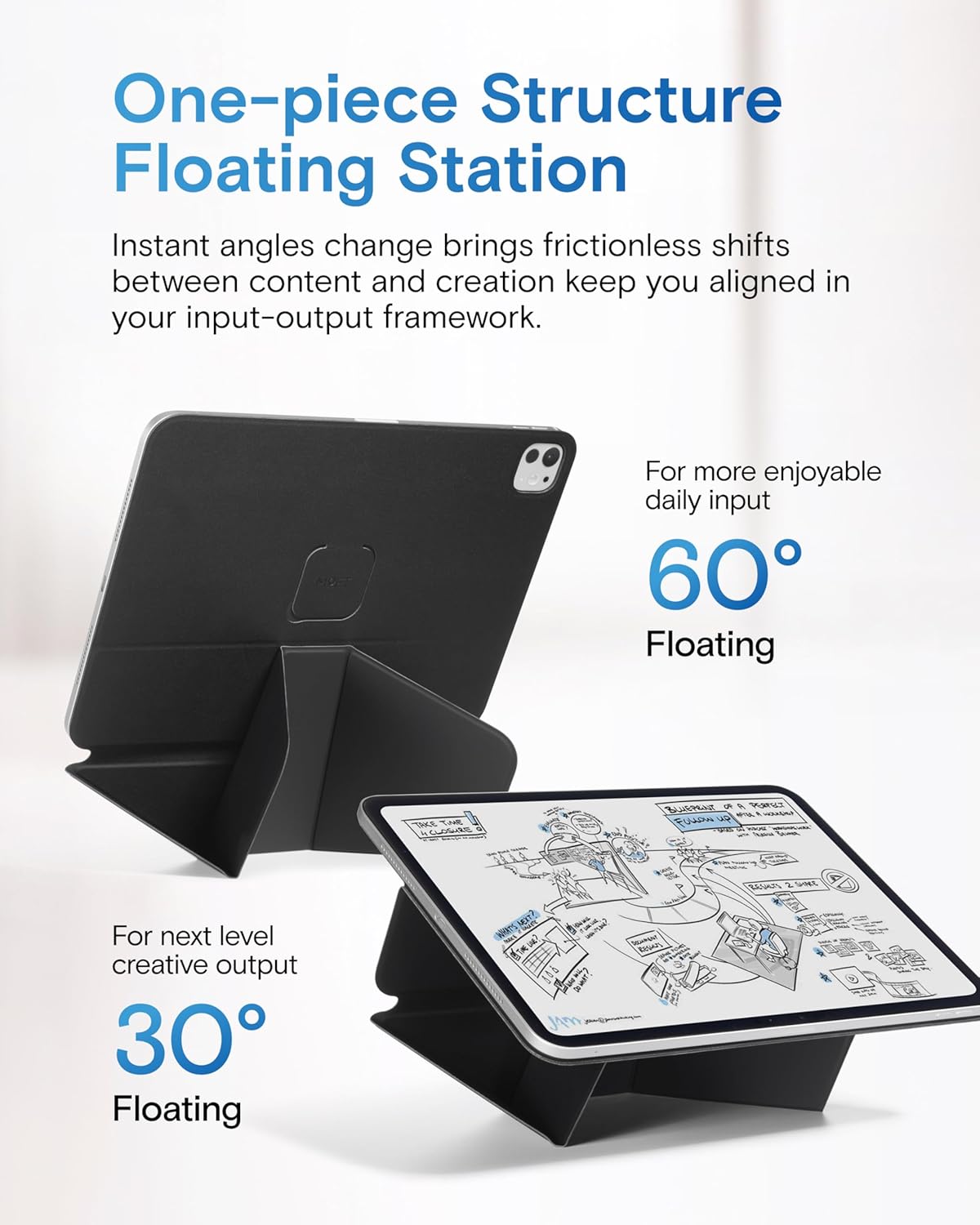
3.1 Floating Modes (60° & 30°)
These modes elevate your iPad for improved ergonomics, suitable for drawing, writing, or viewing content.
- To achieve the 60° Floating Mode, fold the case as shown in Figure 3, matching the circular magnetic points.
- For the 30° Floating Mode, adjust the fold to a lower elevation, as also depicted in Figure 3.
Video 1: Demonstrating how to achieve various viewing angles with the MOFT Dynamic Folio Case.
3.2 Portrait Mode (80° & 70°)
Ideal for reading, video calls, or browsing in a vertical orientation.
- To set up the 80° Portrait Mode, fold the case as shown in Figure 4, utilizing the tuck-in snap design.
- The 70° Reading Mode offers a slightly lower vertical angle, also achieved through specific folds.

3.3 Dual-Screen Creation Mode
This mode allows you to dock your smartphone above your iPad mini, creating an efficient dual-screen setup for enhanced productivity.
- Set your iPad mini in a floating mode (e.g., 30°).
- Utilize the designated magnetic area on the folio to attach your MagSafe-compatible smartphone, as shown in Figure 5.

3.4 Leg Mount Angle
For comfortable use on your lap, the folio can be folded into a stable leg mount angle, providing freedom of handwriting and comfortable viewing.

4. Features
4.1 Magnetic Flexibility
The case utilizes super-strong N52 magnets to ensure a secure connection between the iPad mini and the folio, allowing for stable elevation and seamless angle shifts.
Video 2: MOFT Certified Standard Magnetic Strength Test Method, demonstrating the secure hold of the folio.
4.2 Lightweight Design
Weighing approximately 6oz (172g), the folio provides protection and versatility without adding significant bulk to your iPad mini.

4.3 Auto Wake/Sleep Functionality
The integrated magnets automatically wake your iPad mini when the cover is opened and put it to sleep when closed, conserving battery life.
4.4 Durable MOVAS Material
Constructed from durable MOVAS material, the folio offers a premium feel and long-lasting performance.
5. Maintenance
To maintain the appearance and functionality of your MOFT Dynamic Folio Case:
- Wipe the exterior with a soft, damp cloth to remove dust and smudges.
- Avoid using harsh chemicals or abrasive cleaners, as these may damage the material.
- Keep the case away from extreme temperatures and direct sunlight for prolonged periods.
6. Troubleshooting
6.1 Insufficient Magnetic Hold
If the iPad mini does not feel securely attached or falls easily:
- Check Compatibility: Ensure your iPad mini model is one of the compatible models listed in Section 1.1. Magnetic attachment points differ between iPad models.
- Re-align: Remove the iPad mini and re-attach it, ensuring proper alignment with the magnetic points on the folio.
- Avoid Damaging Actions: Certain actions can compromise the magnetic hold or damage your iPad. Refer to Video 3 for actions to avoid.
Video 3: Demonstrating actions that may damage your iPad or compromise the folio's magnetic hold.
6.2 Auto Wake/Sleep Not Working
If the auto wake/sleep feature is not functioning:
- Check iPad Settings: Go to iPad Settings > Display & Brightness and ensure 'Lock/Unlock' is enabled.
- Re-attach Case: Remove and re-attach the iPad mini to the folio to ensure proper magnetic contact.
7. Specifications
| Feature | Detail |
|---|---|
| Brand | MOFT |
| Model Number | MS028-1-mini |
| Compatible Devices | iPad mini 7th Gen (A17 Pro 2024), iPad mini 6th Gen (A15 2021) |
| Material | Durable MOVAS material, Fiberglass structure |
| Weight | 172 Grams (approx. 6oz) |
| Dimensions | 11.13 x 7.76 x 0.12 inches |
| Magnetic Strength | Super-strong N52 magnets |
| Additional Features | Auto Sleep/Wake, 20+ adjustable viewing angles, Ultra-thin design |
| Color | Jet Black |
8. Warranty and Support
8.1 Manufacturer's Warranty
The MOFT Dynamic Folio Case comes with a 6-month manufacturer's warranty. This warranty covers defects in materials and workmanship under normal use.
8.2 Customer Support
For any questions, technical assistance, or warranty claims, please visit the official MOFT website or contact MOFT customer support through your retailer.