
1. Introduction
This manual provides detailed instructions for the EURANS Smart Watch, designed for health and fitness tracking. It can operate independently without a smartphone application or connect to an app for extended features.
2. Package Contents
- EURANS Smart Watch
- Charging Cable
- User Manual (this document)
3. Setup
3.1 Initial Charging
Before first use, fully charge your EURANS Smart Watch. Connect the provided charging cable to the watch's charging port and a standard USB power adapter (not included). A full charge typically takes approximately 2.5 hours.
Note: The watch has a battery life of up to 7 days with typical use and 30 days in standby mode.
3.2 Power On/Off
- Power On: Press and hold the side button until the screen illuminates.
- Power Off: Navigate to the settings menu on the watch, select "Power Off," and confirm.
3.3 Basic Navigation
The EURANS Smart Watch features a 1.85-inch Ultra HD display with a responsive touch interface.
- Swipe Up/Down: Scroll through menus and notifications.
- Swipe Left/Right: Access different feature screens (e.g., activity data, heart rate).
- Tap: Select an item or confirm an action.
- Side Button: Press to return to the home screen or wake the display.

Image: The EURANS Smart Watch main display showing time and date, alongside a smaller view illustrating the initial setup choice between binding with an app or operating independently.

Image: This image highlights the watch's primary feature of not requiring an app or phone connection for basic functionality, showing two individuals wearing the watch in a casual setting.
4. Operating the Smart Watch
4.1 Dual Usage Modes
The EURANS Smart Watch offers two operational modes:
- Standalone Mode (No App Required): Access built-in functions directly on the watch. This includes activity tracking, 20+ sports modes, heart rate, blood oxygen, sleep monitoring, alarms, calculator, and 5 built-in watch faces.
- App-Connected Mode (Optional): Pair with a smartphone app to unlock advanced features such as Bluetooth calling/answering, message notifications, 100+ sports modes, weather updates, and additional watch faces.

Image: A visual comparison of features available when using the watch independently versus when connected to a smartphone application.
4.2 Activity Tracking
The watch continuously monitors your daily activity. View your steps, calories burned, distance traveled, and active time directly on the watch display. You can compare today's data with yesterday's to track progress.
- Steps: Counts the number of steps taken.
- Calories: Estimates calories burned based on activity.
- Distance: Calculates distance covered.
- Activity Time: Records duration of active periods.
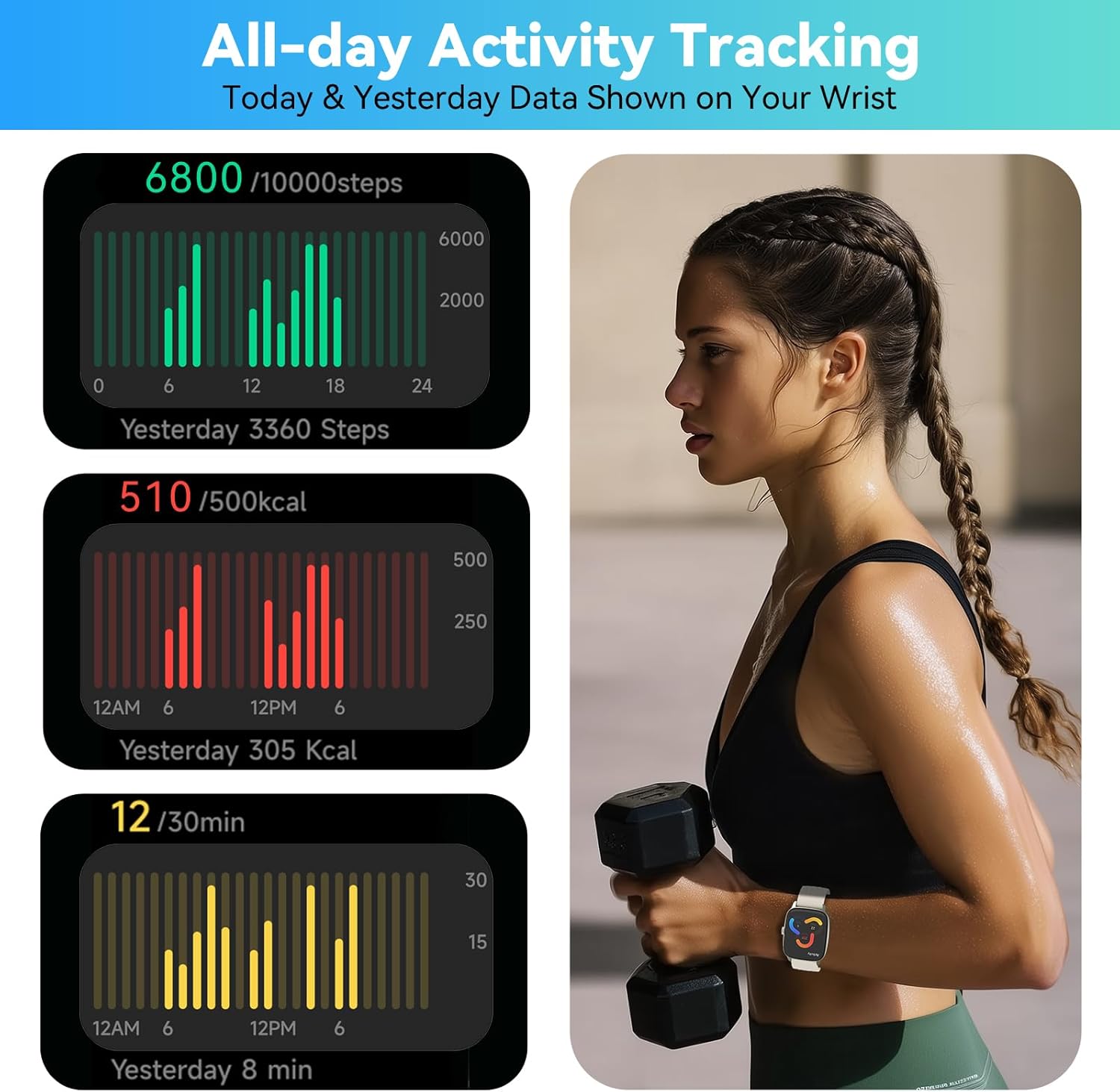
Image: This graphic illustrates the watch's ability to track and display all-day activity data, including steps, calories, and active minutes, with a comparison to the previous day.
4.3 Sports Modes
The watch includes over 20 built-in sports modes for tracking various physical activities. Select the appropriate mode before starting your workout for accurate data collection.

Image: This image demonstrates the multiple sports modes available on the watch, along with its health monitoring capabilities for heart rate, blood oxygen, stress, and sleep.
4.4 Health Monitoring
The EURANS Smart Watch provides continuous health insights:
- Heart Rate Monitor: Tracks your heart rate 24/7.
- Blood Oxygen Monitor: Measures blood oxygen levels.
- Sleep Monitor: Analyzes sleep patterns, including deep, light, and REM sleep stages.
4.5 Other Functions
- Alarms: Set multiple alarms directly from the watch.
- Calculator: A basic calculator function is available.
- Watch Faces: Choose from 5 built-in watch faces. More are available when connected to the app.

Image: This visual highlights the watch's high-resolution Retina display and the availability of dynamic watch faces.
5. Maintenance
5.1 Waterproof Rating
The EURANS Smart Watch has an IP68 waterproof rating. This means it is protected against dust ingress and can withstand immersion in water up to 1.5 meters for 30 minutes. It is suitable for daily use, including:
- Rain exposure
- Swimming (shallow water)
- Washing hands
- Sweat during workouts
Note: Avoid hot water, saunas, or diving, as extreme temperatures and high-pressure water jets may compromise the seal.

Image: This image demonstrates the IP68 waterproof capability of the watch, showing it being worn during swimming, indicating its suitability for various water-related activities.
5.2 Cleaning
Regularly clean your watch and strap to prevent skin irritation and maintain functionality. Use a soft, damp cloth to wipe the screen and strap. Ensure the watch is dry before charging.
6. Troubleshooting
- Watch not powering on: Ensure the watch is fully charged. Connect it to the charging cable for at least 10 minutes before attempting to power on again.
- Inaccurate readings: Ensure the watch is worn snugly on your wrist, about one finger's width above the wrist bone. Clean the sensor on the back of the watch.
- Screen unresponsive: Try restarting the watch by holding the side button. If unresponsive, allow the battery to fully drain and then recharge.
- Cannot connect to app (if applicable): Ensure Bluetooth is enabled on your phone and the watch is within range. Restart both the watch and your phone.
7. Specifications
| Feature | Detail |
|---|---|
| Model | B0F8BJGPM5 |
| Brand | EURANS |
| Display Size | 1.85 Inches |
| Operating System | No APP/Phone Required (Standalone) |
| Waterproof Rating | IP68 |
| Battery Life | Up to 7 days (typical use), 30 days (standby) |
| Charging Time | Approx. 2.5 hours |
| Item Weight | 3.2 ounces |
| Package Dimensions | 10.55 x 3.27 x 0.75 inches |
| Battery Type | Nonstandard Battery (Lithium Ion) |
8. Warranty and Support
For warranty information and customer support, please refer to the purchase documentation or contact EURANS customer service through the retailer where the product was purchased.
Keep your purchase receipt as proof of purchase for any warranty claims.


