1. Introduction
This manual provides instructions for the VINABTY LP-099 replacement remote control, designed for use with Lonpoo LP-099 DVD Players and other compatible models. This remote offers a lightweight and ergonomic design for comfortable handling, serving as an ideal replacement for your original or broken remote control.
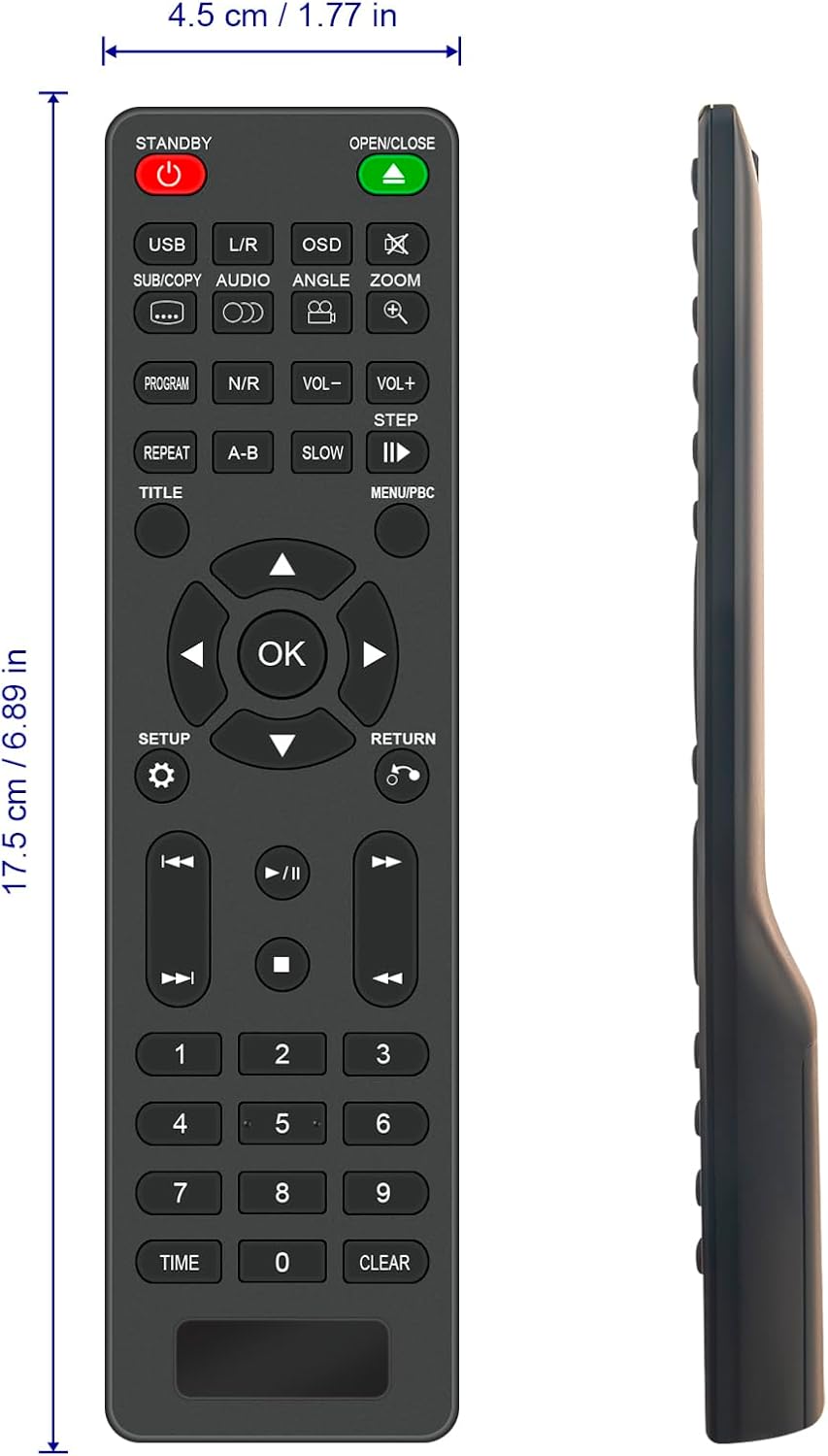
Figure 1.1: Front view of the VINABTY LP-099 Remote Control, showing its layout and approximate dimensions (17.5 cm / 6.89 in length, 4.5 cm / 1.77 in width).
2. Setup: Battery Installation
The VINABTY LP-099 remote control requires two AAA alkaline batteries (not included) for operation. No programming or setup is required; simply insert the batteries to begin use.
- Locate the battery compartment on the back of the remote control.
- Slide the battery compartment cover downwards or press the latch and lift to open it.
- Insert two AAA alkaline batteries, ensuring the positive (+) and negative (-) terminals align correctly with the markings inside the compartment.
- Replace the battery compartment cover by sliding it back into place until it clicks securely.
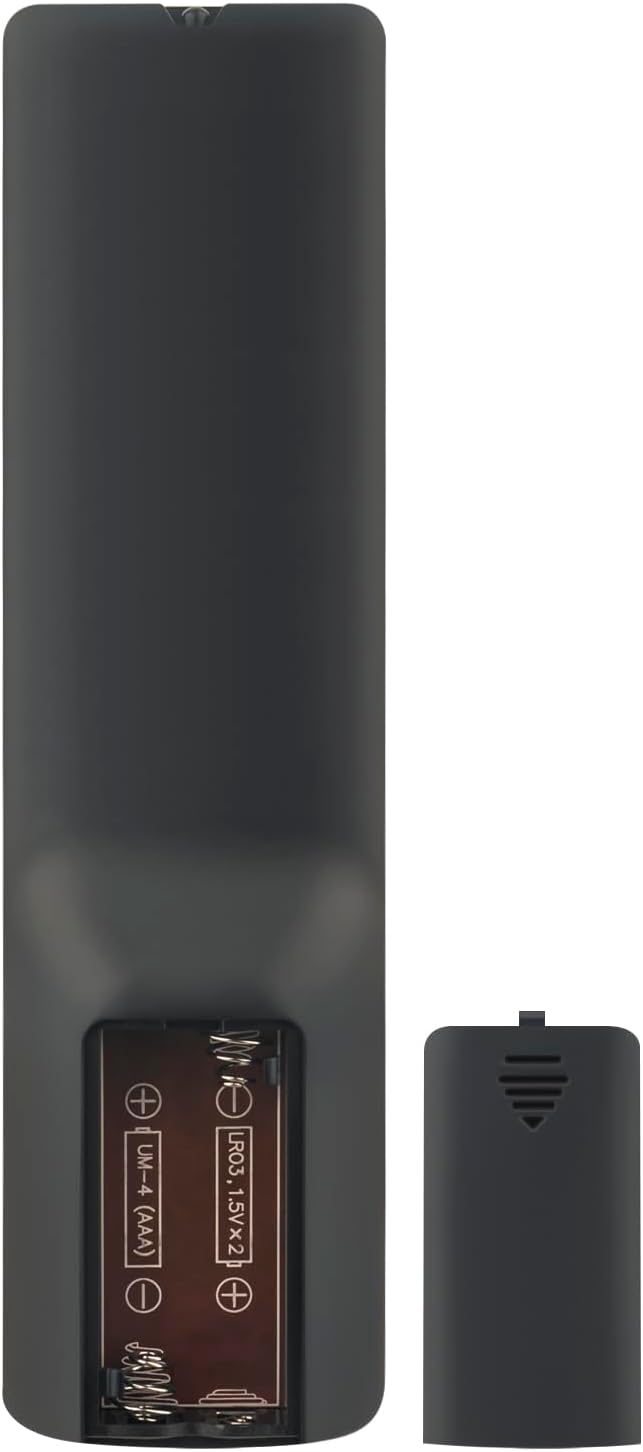
Figure 2.1: Rear view of the remote control with the battery compartment open, illustrating the correct orientation for AAA battery insertion.
3. Operating Instructions: Button Functions
Familiarize yourself with the buttons on your VINABTY LP-099 remote control to effectively operate your Lonpoo DVD Player.

Figure 3.1: Angled view of the remote control, highlighting the button layout for various functions.
- STANDBY (Power Button): Turns the DVD player on or off.
- OPEN/CLOSE: Opens or closes the disc tray.
- USB: Switches input to USB mode for media playback from a USB device.
- L/R (Audio Left/Right): Adjusts audio channels or settings.
- OSD (On-Screen Display): Displays information or menus on the screen.
- SUB/COPY: Selects subtitle tracks or initiates a copy function.
- AUDIO: Cycles through available audio tracks or languages.
- ANGLE: Changes the viewing angle on compatible DVDs.
- ZOOM: Zooms in or out on the video playback.
- PROGRAM: Accesses the program menu to create a custom playback sequence.
- N/R (Noise Reduction): Activates or deactivates noise reduction features.
- VOL- / VOL+: Decreases or increases the volume level.
- STEP: Advances playback frame by frame.
- REPEAT: Repeats the current track, chapter, or entire disc.
- A-B: Sets a start and end point for repeating a specific section.
- SLOW: Plays video in slow motion.
- PLAY/PAUSE (►/∥): Starts or pauses playback.
- TITLE: Returns to the DVD title menu.
- MENU/PBC (Playback Control): Accesses the main menu or playback control menu.
- Directional Pad (▲ ▼ ◀ ►): Navigates through menus and options.
- OK: Confirms selections in menus.
- SETUP: Accesses the system setup menu.
- RETURN: Goes back to the previous menu or screen.
- Previous/Next Track (◀◀, ►►): Skips to the previous or next track/chapter.
- Fast Rewind/Fast Forward («, »): Rewinds or fast forwards playback.
- STOP (■): Stops playback.
- Number Pad (0-9): Enters track numbers, chapter numbers, or other numerical inputs.
- TIME: Displays or sets playback time.
- CLEAR: Clears current input or selection.
4. Maintenance
To ensure the longevity and optimal performance of your remote control, follow these maintenance guidelines:
- Cleaning: Wipe the remote control with a soft, dry cloth. For stubborn dirt, lightly dampen the cloth with water or a mild cleaning solution, then wipe dry immediately. Avoid using abrasive cleaners or solvents.
- Battery Replacement: Replace batteries promptly when the remote's response becomes sluggish or it stops functioning. Always replace both batteries at the same time with new ones of the same type.
- Storage: If the remote control will not be used for an extended period, remove the batteries to prevent leakage and potential damage. Store in a cool, dry place away from direct sunlight.
- Avoid Damage: Do not drop the remote control, expose it to extreme temperatures, or immerse it in liquids.
5. Troubleshooting
If you encounter issues with your VINABTY LP-099 remote control, refer to the following common solutions:
- Remote Not Responding:
- Check if the batteries are inserted correctly with the correct polarity (+/-).
- Replace the batteries with new AAA alkaline batteries.
- Ensure there are no obstructions between the remote control and the DVD player's infrared sensor.
- Make sure you are within the effective operating range (up to 10 meters) and pointing the remote directly at the DVD player.
- Buttons Not Working:
- If only specific buttons are not working, try cleaning the remote control as described in the Maintenance section.
- Ensure the remote is compatible with your specific Lonpoo DVD player model.
- Intermittent Operation:
- This often indicates low battery power. Replace the batteries.
- Check for strong light sources (like direct sunlight or bright fluorescent lights) that might interfere with the infrared signal.
6. Specifications
| Brand: | VINABTY |
| Model: | LP-099 |
| Compatible Devices: | Lonpoo LP-099 DVD/Blu-Ray Player |
| Connectivity Technology: | Infrared |
| Dimensions (L x W x H): | 18 x 7 x 1 cm (approx. 7.09 x 2.76 x 0.39 inches) |
| Weight: | 60 grams (approx. 2.12 ounces) |
| Color: | Black |
| Battery Type: | AAA Alkaline (x2) |
| Batteries Included: | No |
| Maximum Range: | 10 Meters |
| Special Feature: | Ergonomic Design |
7. Warranty and Support
Your VINABTY LP-099 remote control comes with a 90-day warranty from the date of purchase.
If you experience any issues with the product or require assistance, please do not hesitate to contact our customer support. We aim to respond to all inquiries within 24 hours.
For support, please refer to the contact information provided by your retailer or on the product packaging.


