1. Introduction
This manual provides detailed instructions for the installation, operation, and maintenance of your SimPure T2-600T Reverse Osmosis Water Filter System. Please read this manual thoroughly before installation and use to ensure proper function and safety. This system is designed to provide high-quality, near 0 TDS drinking water for your home.
2. Safety Information
- Ensure all connections are secure to prevent leaks.
- Turn off the main water supply before beginning installation or maintenance.
- Use only the provided parts or SimPure-approved replacement parts.
- Do not operate the system if any parts are damaged.
- Keep the system away from direct sunlight and heat sources.
- Ensure proper electrical grounding for the power adapter.
3. Product Features
- Near 0 TDS Ultra-Clear Drinking Water: Reduces TDS to below 25 ppm, with 99.99% removal rate for dissolved solids.
- Built-in Pressure Tank: Compact all-in-one design ensures stable water pressure and fast flow (0.42 GPM) without a bulky external tank.
- SGS-Certified & NSF/ANSI 58 Standards: Eliminates 1000+ impurities, including heavy metals (lead, arsenic), PFAS, PFOA, fluoride, nitrates, microplastics, chlorine, and TDS.
- 600 GPD High Capacity: Produces 600 gallons per day, twice as fast as standard RO systems.
- 2:1 Pure-to-Drain Ratio: Efficient water usage, saving water and reducing waste.
- UV Power: Provides additional reliability by reducing microorganisms.
- Tool-Free Filter Replacement: Easy maintenance with simple twist-off filters.
4. Package Contents
Your SimPure T2-600T system includes all necessary components for standard installation. Please verify all parts are present before beginning installation.
Video: Unboxing and overview of the SimPure T2-600T Water Filter System components.
- SimPure T2-600T Main Unit with pre-installed filters (T33, RO, TANK, CF)
- Dedicated Faucet
- Feedwater Adapter Valve
- Drain Saddle
- Colored Tubing (Red, Blue, White)
- Power Adapter
- User Manual
- Mounting Screws and Wall Anchors
5. Installation Guide
The SimPure T2-600T is designed for under-sink installation. Follow these steps carefully. A wrench is the primary tool required for tightening connections.
5.1 Pre-Installation Checklist
- Measure your cabinet space to ensure the system (15.6"L x 5.3"W x 16.3"H) fits.
- Ensure you have a cold water supply line under your sink.
- Confirm availability of a suitable drain pipe for the drain saddle connection.
- Verify an electrical outlet (110V) is available under the sink.
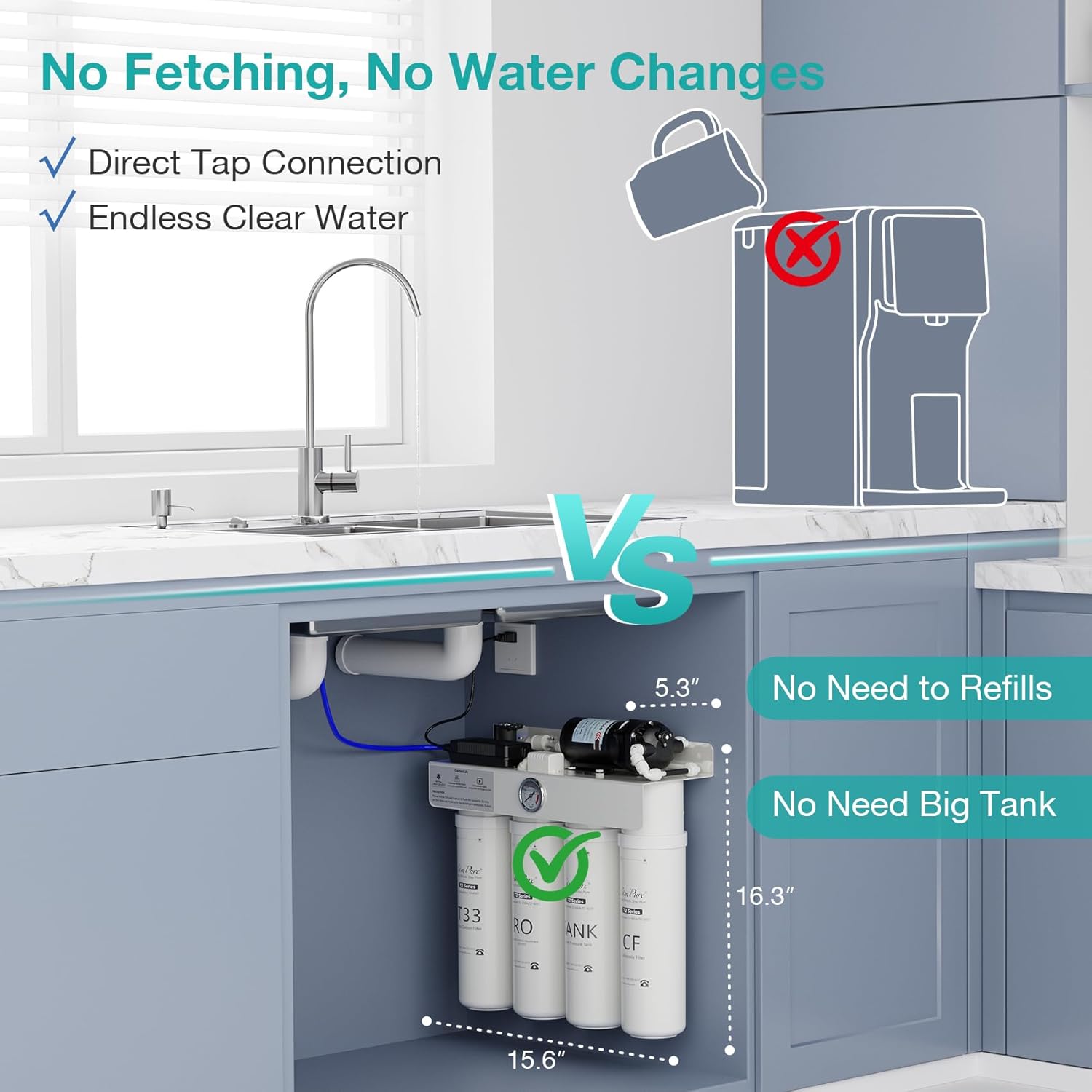
Image: The SimPure T2-600T system neatly installed under a kitchen sink, highlighting its compact size.
5.2 Water Supply Connection
- Turn off the cold water supply to your sink.
- Disconnect the existing cold water line from the faucet.
- Install the provided feedwater adapter valve onto the cold water supply.
- Reconnect your faucet's cold water line to the adapter valve.
- Connect the white tubing (inlet water) from the RO system to the feedwater adapter valve. Ensure the tube is pushed in firmly until it reaches the marked line and secure it with the blue clip.
5.3 Drain Saddle Installation
- Choose a suitable location on the drain pipe (above the P-trap) for the drain saddle.
- Drill a 1/4-inch hole through the drain pipe.
- Attach the drain saddle to the pipe, aligning the hole in the saddle with the drilled hole. Secure it tightly.
- Connect the red tubing (waste water) from the RO system to the drain saddle. Push firmly until the marked line is reached and secure with the blue clip.
5.4 Faucet Installation
- If your sink has an existing hole (e.g., for a soap dispenser), use it. Otherwise, drill a 1-inch hole in a suitable location on your countertop.
- Insert the dedicated faucet through the hole.
- Secure the faucet from underneath the sink using the provided washers and nut.
- Connect the blue tubing (pure water) from the RO system to the bottom of the faucet. Push firmly until the marked line is reached and secure with the blue clip.
5.5 System Mounting & Power Connection
- Mount the main RO unit to the cabinet wall using the provided screws and wall anchors. Ensure it is level and securely fastened.
- Plug the power adapter into a grounded 110V electrical outlet.
Video: Detailed installation guide for the SimPure T2-600T Reverse Osmosis Water Filter System, demonstrating connections and mounting.
6. Operating Instructions
6.1 Initial System Flush
After installation, it is crucial to flush the system to remove any air, carbon fines, or manufacturing residues. This ensures optimal water quality.
- Slowly turn on the cold water supply to the sink.
- Open the dedicated RO faucet and let the water run for 20-30 minutes. This allows the filters to be adequately flushed.
- Close the RO faucet. The system is now ready for use.
6.2 Daily Use
Simply open the dedicated RO faucet to dispense purified water. The system's booster pump will activate automatically to maintain pressure and flow, and will turn off when the faucet is closed.

Image: The SimPure T2-600T system effectively reduces Total Dissolved Solids (TDS) to near zero, as demonstrated by a TDS meter.
7. Maintenance
Regular filter replacement is essential for maintaining optimal system performance and water quality.
7.1 Filter Replacement Schedule
- CF (Composite Filter) & T33 (Post Carbon Filter): Replace every 3-6 months.
- RO (Reverse Osmosis Membrane) & TANK (Water Pressure Tank Filter): Replace every 12 months.
7.2 Tool-Free Filter Replacement
The SimPure T2-600T features a convenient tool-free filter replacement design.
- Turn off the cold water supply to the system.
- Twist the old filter cartridge counter-clockwise to remove it.
- Insert the new filter cartridge and twist clockwise until it locks into place.
- Turn on the cold water supply and check for leaks.

Image: Easy, tool-free filter replacement on the SimPure T2-600T system.
8. Troubleshooting
- Low Water Flow: Check for kinks in tubing, ensure water supply is fully open, or filters may need replacement.
- Leaks: Ensure all push-and-play connections are fully inserted and secured with blue clips. Check threaded connections for proper tightening.
- Unusual Taste/Odor: Perform a system flush. If taste/odor persists, replace the carbon filters (CF and T33).
- System Not Turning On: Verify power adapter is securely plugged into a working outlet.
9. Specifications
| Feature | Specification |
|---|---|
| Model Number | T2-600T |
| Product Dimensions | 15.6"L x 5.3"W x 16.3"H |
| Item Weight | 18.86 pounds |
| Maximum Flow Rate | 0.42 Gallons Per Minute (600 GPD) |
| Installation Type | Under Sink |
| Filtration Stages | 8 Stage (including UV) |
| Pure-to-Drain Ratio | 2:1 |
| Certifications | NSF/ANSI 58, SGS Certified |
10. Warranty and Support
SimPure is committed to delivering world-class water filtration solutions. If you have any questions or require support, please contact our team of trained water specialists.
- Toll-Free: 1-866-528-4572
- Customer Service Email: service@simpurelife.com
- Website: www.simpurelife.com


