Introduction
This manual provides comprehensive instructions for the setup, operation, and maintenance of your EziMedPil Bluetooth Pill Dispenser. This device is designed to assist with medication adherence by providing timely alerts and secure dispensing of pills, vitamins, and supplements.

The EziMedPil Bluetooth Pill Dispenser, shown with its frosted lid and a smartphone displaying the SmartLife app interface. This image highlights the device's modern design and its connectivity features.
Safety Information
Please read all safety warnings and instructions carefully before using this product. Keep this manual for future reference.
- Ensure the device is placed on a stable, flat surface to prevent accidental spills.
- Keep the device out of reach of children and unauthorized individuals due to the presence of medication.
- Use only the specified battery type (4 AA batteries).
- Do not immerse the device in water or expose it to excessive moisture.
- Statements regarding dietary supplements have not been evaluated by the FDA and are not intended to diagnose, treat, cure, or prevent any disease or health condition.
Package Contents
Verify that all items are present in the package:
- EziMedPil Bluetooth Pill Dispenser (Frosted Lid)
- Quick Start Guide / Instruction Manual
- 4 x AA Batteries
- Cover Lid Metal Key
- 9 x Interchangeable Dosage Rings

An exploded view of the EziMedPil Bluetooth Pill Dispenser, showing the internal carousel, LCD display, control buttons, and the included locking key. This image helps identify the main parts of the device.
Product Overview
Familiarize yourself with the main components of your EziMedPil dispenser:
- Frosted Lid: Provides privacy for stored medications.
- LCD Digital Display: Shows current time, alarm settings, and battery status.
- Control Buttons: Used for manual time and alarm adjustments (A, B, C buttons).
- 28-Compartment Carousel: Holds medications for up to 28 days.
- Drug Window: The opening through which pills are dispensed.
- Locking Mechanism: Secures the lid to prevent unauthorized access.
- Battery Compartment: Located on the underside of the device.
- Mini Magnifying Glass: Integrated into the lid for viewing dosage information.

A close-up of the EziMedPil dispenser's LCD display, highlighting features such as AM/PM indicator, low battery alert, current time, current alarm, alarm volume, alarm tone, time format (12HR or 24HR), built-in mini magnifier, and the drug window. This image provides a clear guide to the display and its functions.
Setup
1. Battery Installation
- Locate the battery compartment on the underside of the dispenser.
- Use the provided metal key to unlock and open the cover lid.
- Insert 4 AA batteries, ensuring correct polarity (+/-).
- Close the battery compartment cover and lock it with the key.

The underside of the EziMedPil dispenser, showing the battery compartment with four AA batteries inserted. This image illustrates the battery installation process.
2. App Download and Setup (SmartLife App)
The EziMedPil dispenser integrates with the SmartLife app for advanced scheduling and control. Download the app using one of the following methods:
- Scan QR Code: Locate the QR code on the back of the dispenser and scan it with your smartphone camera. This will direct you to the SmartLife app download page.
- Search App Store: Search for "Smart Life" in your device's app store (Google Play Store for Android or App Store for iOS).
Once downloaded, open the app and follow the on-screen prompts to register an account (via email or mobile phone number) and set a password. Then, log in to your account.
Official video demonstrating the unboxing, battery installation, and SmartLife app setup for the EziMedPil Bluetooth Pill Dispenser. This video provides a visual guide for initial setup.
3. Device Pairing (Bluetooth)
- Ensure Bluetooth is enabled on your smartphone.
- Open the SmartLife app. The app will automatically search for nearby devices.
- When the "M151A demo" (or similar device name) appears, click to add the device.
- Confirm the connection. The device has now connected to your app.

The EziMedPil Bluetooth Pill Dispenser shown next to a smartphone, illustrating the Bluetooth connection process. This image emphasizes the modern convenience of app control.
4. Filling the Dispenser
- Press the "PRESS" button on the front of the dispenser to open the lid.
- Select the appropriate dosage ring based on your daily medication schedule (1 to 9 doses per day).
- Place the selected dosage ring onto the carousel.
- Fill each compartment with the prescribed medication for the corresponding day/dose. The 28 compartments can hold up to 24 aspirin-sized tablets each.
- Close the lid securely.
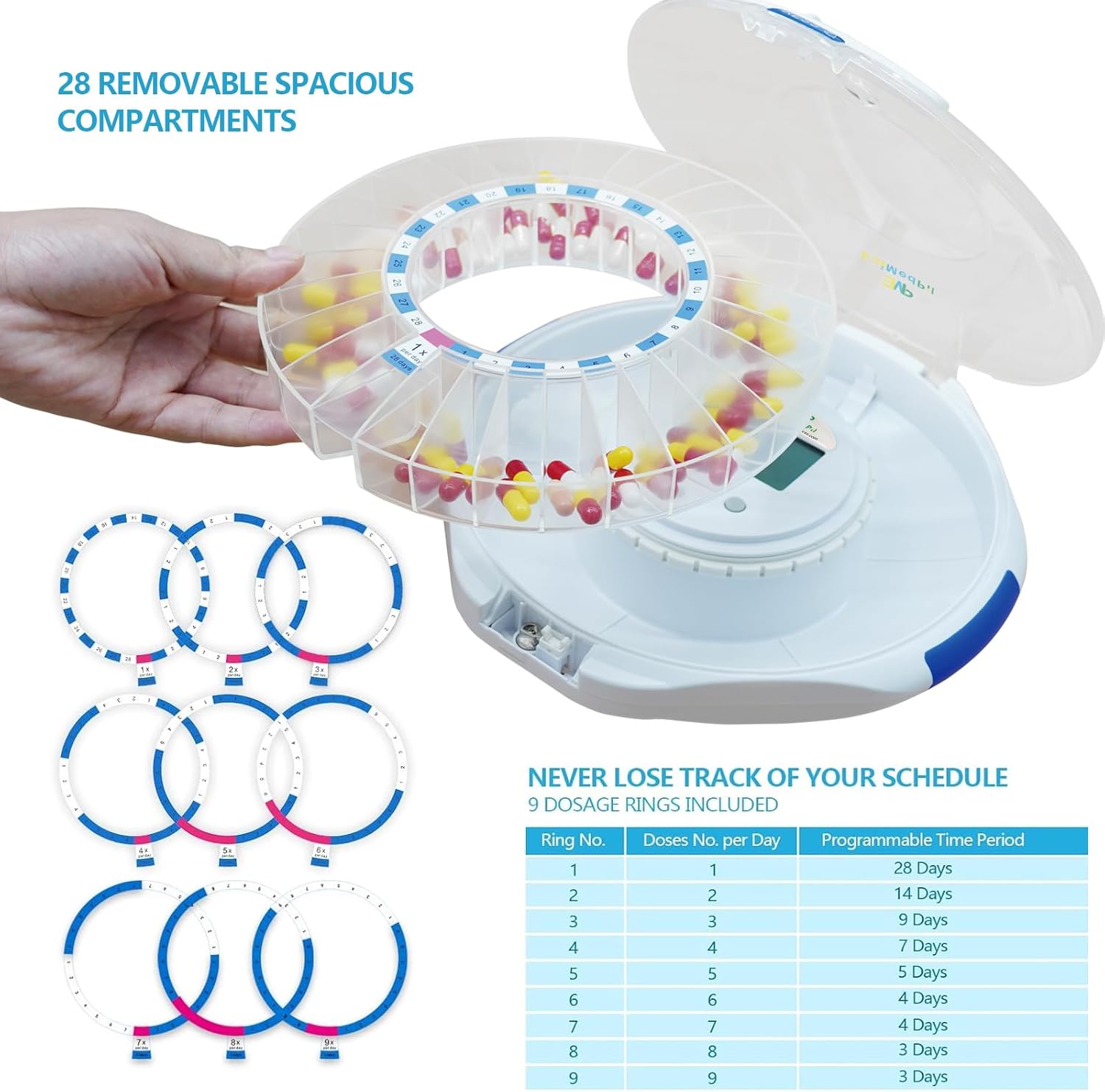
A view of the EziMedPil dispenser with its lid open, revealing the 28 removable compartments and a selection of 9 interchangeable dosage rings. A table details the programmable time periods for each ring, from 1 dose per day for 28 days to 9 doses per day for 3 days.
Operating Instructions
1. Setting Alarms via SmartLife App
The SmartLife app allows for precise control over your medication schedule:
- Open the SmartLife app and select your EziMedPil device.
- Navigate to the "Alarms" section.
- Set up to 9 daily alarms, specifying the time, pill name, and dosage for each.
- The app allows you to view your current cycle, remaining doses, and active slots.
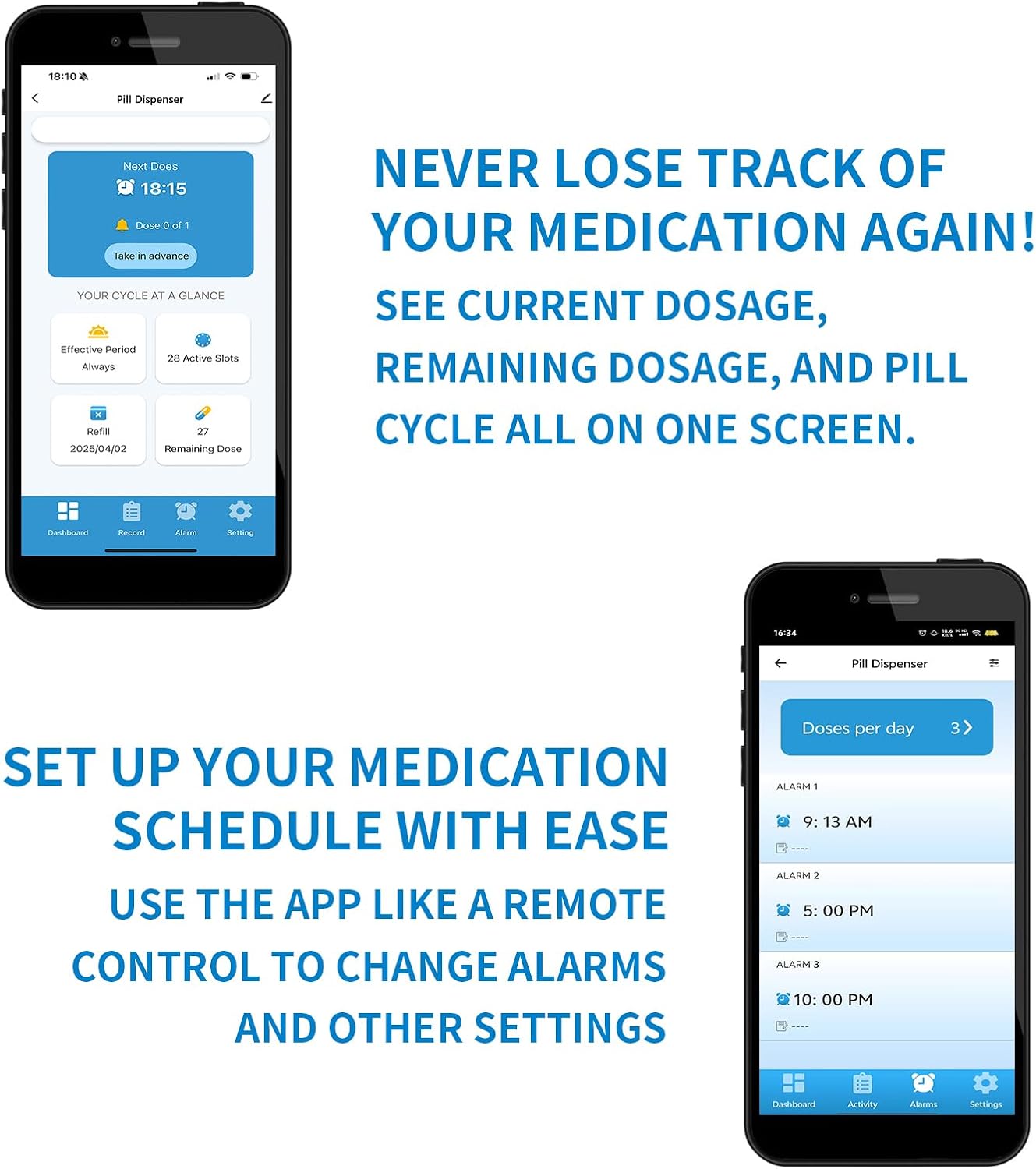
Screenshots of the SmartLife app interface, demonstrating how to set up medication schedules and view current dosage, remaining dosage, and pill cycle information. This visual aid helps users navigate the app for alarm management.
2. Taking Medication
When an alarm is due, the dispenser will sound an alert and flash blue lights. The carousel will automatically rotate to present the correct dose at the drug window.
- Slide open the drug window.
- Flip the Bluetooth medication dispenser upside down to dispense the pills and stop the alarm.
- The alarm will sound for 30 minutes or until the dispenser is inverted.
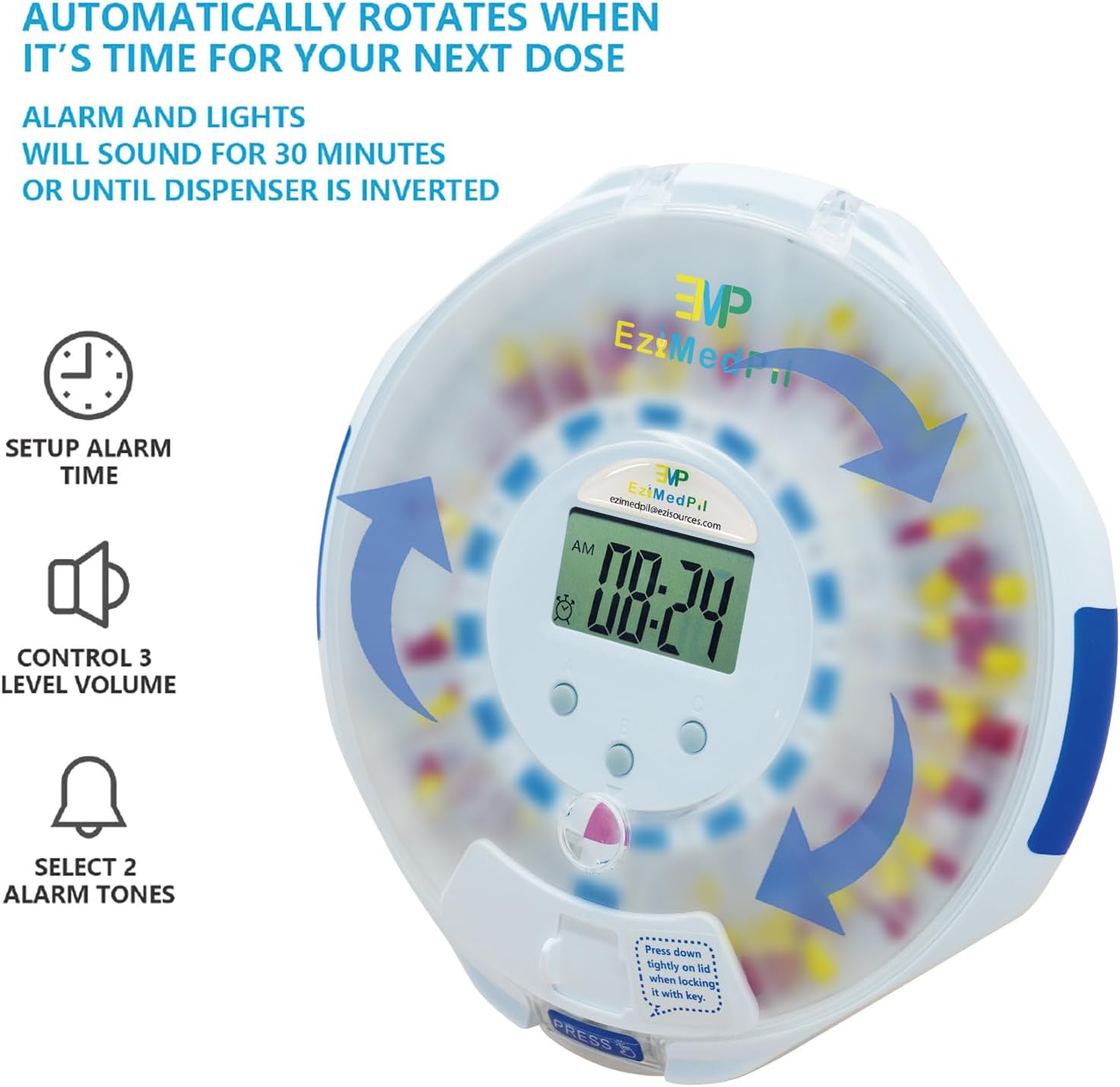
The EziMedPil dispenser shown with arrows indicating its automatic rotation feature when it's time for the next dose. The image also highlights the alarm settings, including 3-level volume control and 2 alarm tones.
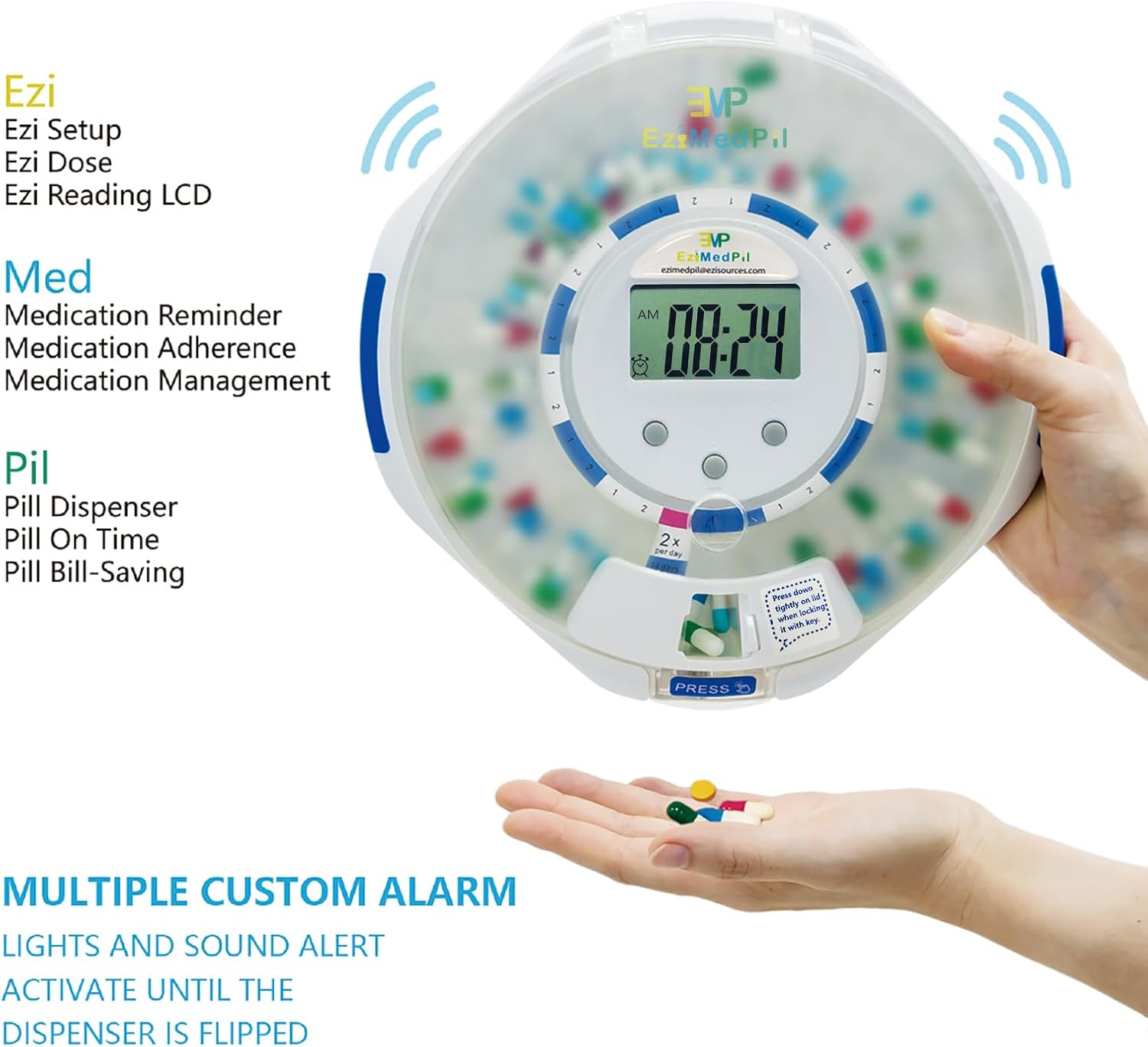
The EziMedPil dispenser with its drug window open, dispensing pills into a user's hand. This image demonstrates the final step of medication retrieval and the device's multi-alarm functionality.
3. Adjustable Sound and Light Alerts
You can customize the alarm settings directly on the device using the 3-button interface or through the SmartLife app:
- Adjust volume (3 options).
- Select beep tunes (2 options).
- Set time format (12HR or 24HR).
Maintenance
Cleaning
To ensure proper hygiene and functionality, clean your dispenser regularly:
- Wipe the exterior with a soft, damp cloth.
- Do not use abrasive cleaners or immerse the device in water.
- The removable carousel can be gently wiped clean. Ensure it is completely dry before reassembling.
- The bubble ring with cover and lock system helps keep pills clean and moisture-proof.
Battery Replacement
When the low battery alert appears on the LCD display, replace all 4 AA batteries promptly to ensure continuous operation and accurate dispensing. Refer to the "Battery Installation" section for detailed steps.
Troubleshooting
| Problem | Possible Cause | Solution |
|---|---|---|
| Dispenser not turning on. | Batteries are dead or incorrectly installed. | Check battery polarity and replace with new AA batteries. |
| No alarm sound/light. | Alarm settings incorrect or volume too low. | Verify alarm times and volume settings in the SmartLife app or on the device. Ensure the device is powered on. |
| Pills not dispensing. | Drug window blocked or carousel jammed. | Ensure the drug window is clear. Check for any obstructions in the carousel. Ensure the lid is properly closed and locked. |
| App not connecting to dispenser. | Bluetooth off, device out of range, or app permissions. | Ensure Bluetooth is on. Bring device closer to phone. Check SmartLife app permissions for Bluetooth and location. Restart both app and dispenser. |
Specifications
- Product Dimensions: 8.86 x 8.86 x 2.68 inches
- Weight: 1.9 Pounds
- Power Source: 4 AA batteries (included)
- Material: Acrylonitrile Butadiene Styrene
- Color: Frosted Lid
- Special Feature: Lockable
- Compartments: 28 (each fits up to 24 aspirin-sized tablets)
- Alarms: Up to 9 per day
- Connectivity: Bluetooth
Warranty and Support
For product support, please visit the official EMP EZIMEDPIL Store on Amazon: EMP EZIMEDPIL Store.
Statements regarding dietary supplements have not been evaluated by the FDA and are not intended to diagnose, treat, cure, or prevent any disease or health condition.