
Introduction
Welcome to the user manual for your new ZMISHIBO 24-inch Low Profile Ceiling Fan with Light. This manual provides detailed instructions for installation, operation, maintenance, and troubleshooting to ensure optimal performance and safety.
This modern flush mount bladeless fan light is designed to provide high airflow and elegant lighting for various rooms, including bedrooms, living rooms, and kitchens.
Important Safety Information
Please read all instructions carefully before installation and use.
- Ensure power is disconnected at the circuit breaker before installation or maintenance.
- All wiring must be in accordance with national and local electrical codes.
- If you are unsure about wiring, consult a qualified electrician.
- Do not operate the fan with damaged wiring or if it is not functioning properly.
- Keep children and pets away from the fan during operation.
- This fan is designed for indoor use only.
For detailed safety guidelines, refer to local electrical regulations.
Package Contents
Verify that all components are present before beginning installation.
- ZMISHIBO 24-inch Ceiling Fan Unit
- Remote Control (2 AAA batteries included)
- Mounting Hardware Kit
- User Manual (this document)
If any parts are missing or damaged, contact ZMISHIBO customer support.
Product Overview and Dimensions
The ZMISHIBO 24-inch Low Profile Ceiling Fan features a sleek, modern design with integrated LED lighting. Its compact flush mount design is suitable for various room sizes.
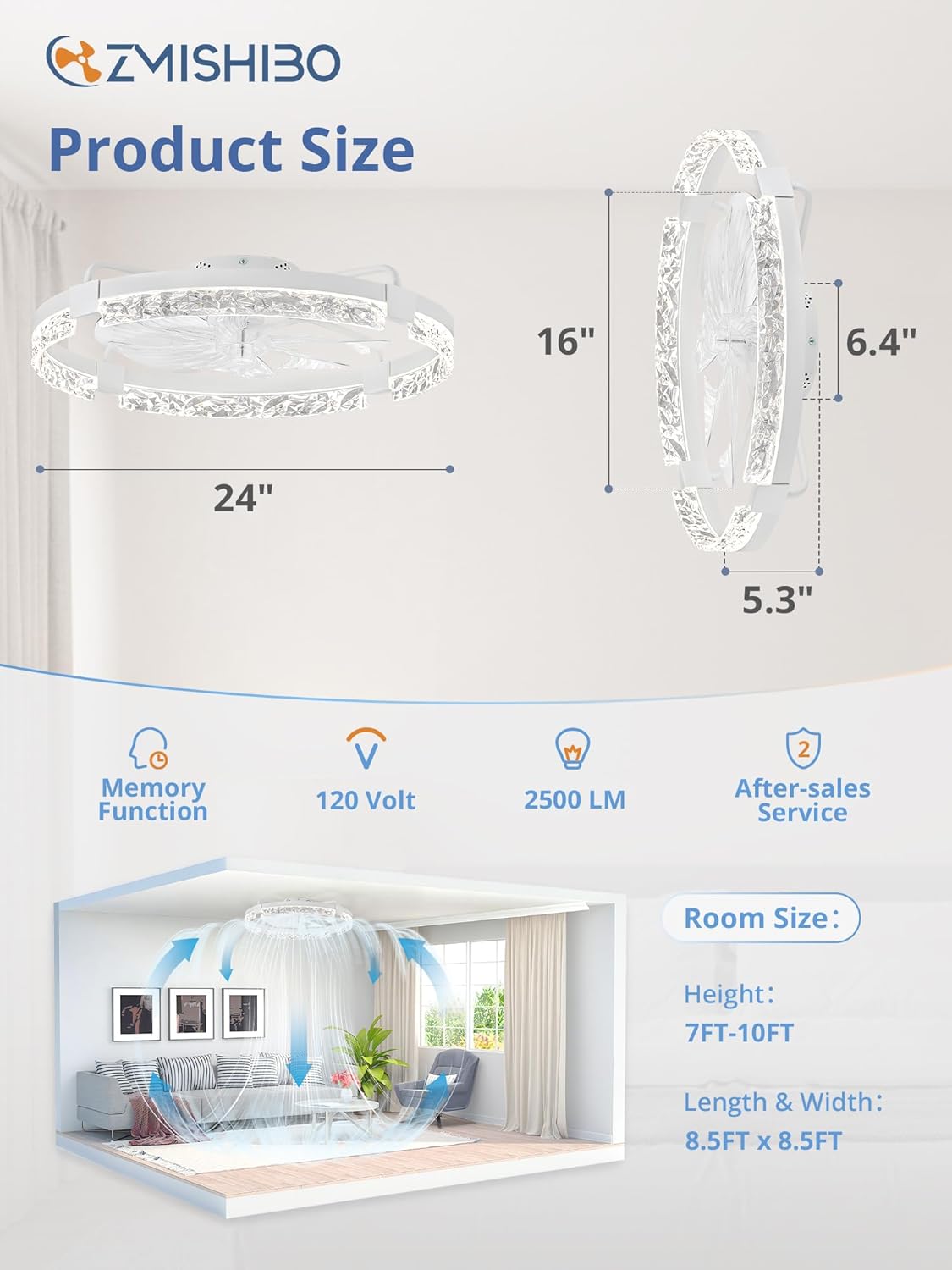
This image illustrates the fan's dimensions: 24 inches in diameter, 16 inches in overall height, with a depth of 6.4 inches and 5.3 inches from the ceiling. It also provides recommended room dimensions for optimal performance: ceiling height between 7 to 10 feet, and room length/width of approximately 8.5 x 8.5 feet.

This image shows the ZMISHIBO 24-inch ceiling fan installed, highlighting its modern aesthetic. The remote control and the accompanying smartphone application interface are also visible, demonstrating the dual control options available to the user.
Setup and Installation
Most components are pre-assembled for easier installation. We recommend watching the provided installation tutorials for a smooth setup process.
Tools Required (Not Included)
- Screwdriver (Phillips head)
- Wire Strippers
- Electrical Tape
- Ladder
Installation Steps
- Turn Off Power: Before starting, ensure the power supply to the installation area is completely turned off at the circuit breaker.
- Mounting Bracket Installation: Secure the mounting bracket to the ceiling junction box. Ensure it is firmly attached and can support the fan's weight.
- Wiring Connections: Connect the fan's electrical wires to the household wiring according to the wiring diagram provided in the detailed manual (refer to local electrical codes). Typically, this involves connecting live, neutral, and ground wires.
- Attach Fan Body: Carefully lift the fan body and attach it to the mounting bracket. Ensure all connections are secure and the fan is properly seated.
- Secure Fan: Fasten the fan body to the mounting bracket using the provided screws.
- Power On: Once installation is complete and all connections are secure, restore power at the circuit breaker.

This image provides a detailed view of the fan's construction, showcasing its durable iron frame, the design of the noiseless fan blades, and the overall modern aesthetic that integrates well into contemporary interiors.
Operating Instructions
Your ZMISHIBO ceiling fan can be controlled via the included remote control or a smartphone application.
Remote Control & APP Operation

This image demonstrates the dual control methods: the physical remote control and the "Fanlamp Pro" mobile application. The app allows for comprehensive control of fan and light functions, requiring Bluetooth connectivity.
Pairing the Remote Control / App
Follow the instructions in the detailed manual to pair the remote control or connect the app via Bluetooth.
Lighting Features

This image highlights the adjustable lighting features: three color temperatures (warm white 3000K, neutral white 4500K, cool white 6000K) and a smooth dimming function that allows brightness adjustment from 10% to 100%.
- Color Temperature Adjustment: Cycle through 3000K (Warm White), 4500K (Neutral White), and 6000K (Cool White) using the remote or app.
- Dimmable Lighting: Adjust brightness from 10% to 100% to suit your preference and mood.
- Night Light Function: Activate a low-brightness setting for nighttime use.
Fan Features

This image illustrates the six adjustable fan speeds, providing options from a gentle breeze (soft wind) to a powerful airflow (cool wind) to suit various comfort levels.
- Six Fan Speeds: Select from six different fan speeds for optimal airflow.
- Reversible Air Circulation:
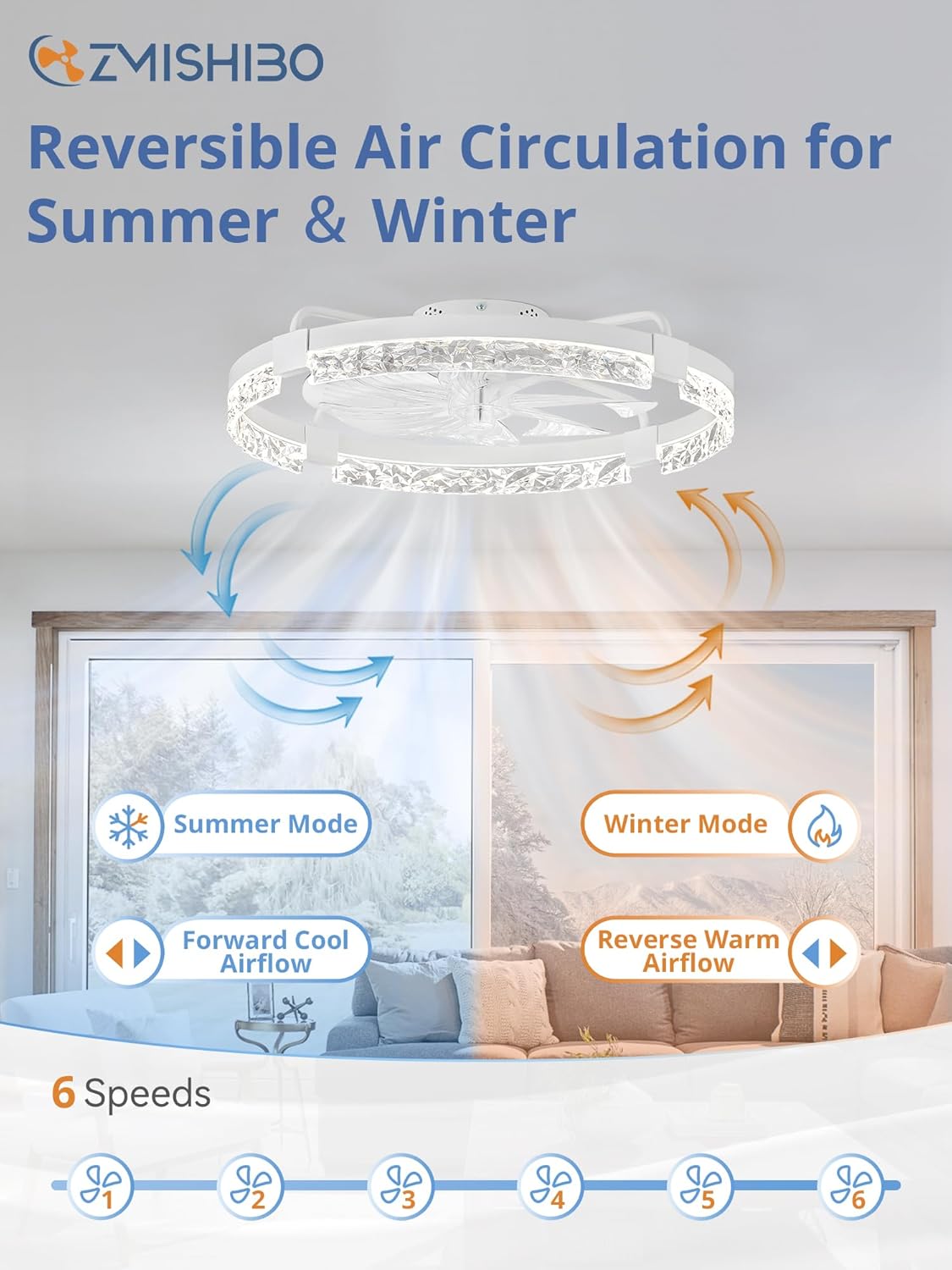
This image explains the reversible motor function, which allows for forward airflow (cooling) in summer and reverse airflow (circulating warm air) in winter, enhancing year-round comfort.
Summer Mode (Forward): Blades rotate counter-clockwise to create a downward airflow, providing a cooling effect.
Winter Mode (Reverse): Blades rotate clockwise to create an upward airflow, circulating warm air trapped near the ceiling.
Timer Setting

This image highlights the intelligent timer setting, specifically a 2-hour auto-off timer, which is convenient for nighttime use or energy saving.
Set the fan to automatically turn off after a specified period (e.g., 2 hours) using the remote or app. Ideal for nighttime use.
Maintenance
Regular cleaning and maintenance will ensure the longevity and optimal performance of your ceiling fan.
- Cleaning:
Before cleaning, ensure the power is turned off at the circuit breaker.
Wipe the fan and light fixture with a soft, damp cloth. Do not use abrasive cleaners or solvents.
The bladeless design makes cleaning easier and safer.
- Bulb Replacement: The LED light source is integrated and designed for long-term use. If replacement is ever needed, contact customer support.
- Remote Control Batteries: Replace AAA batteries in the remote control when its range decreases or it stops responding.
Troubleshooting
If you encounter any issues, refer to the following common problems and solutions.
| Problem | Possible Cause | Solution |
|---|---|---|
| Fan does not turn on | No power supply | Check circuit breaker and wall switch. |
| Fan does not turn on | Loose wiring connection | Turn off power, check all wiring connections. |
| Remote control not working | Dead batteries | Replace AAA batteries in the remote. |
| Remote control not working | Not paired | Re-pair the remote control with the fan. |
| Light does not turn on | No power supply | Check circuit breaker and wall switch. |
| Light does not turn on | Loose wiring connection | Turn off power, check all wiring connections. |
| Fan makes excessive noise | Loose screws or components | Ensure all mounting screws are tightened. |
| Fan makes excessive noise | Unbalanced fan | Ensure the fan is installed level. |
| App control not working | Bluetooth not enabled or not paired | Ensure Bluetooth is on and re-pair the device in the app. |

This image illustrates the fan's ultra-quiet operation, demonstrating that its noise level is approximately 30dB, which is significantly quieter than typical room sounds like conversations or meetings, ensuring a peaceful environment.
Specifications
| Feature | Detail |
|---|---|
| Brand | ZMISHIBO |
| Model | 24-inch Low Profile Ceiling Fan with Light |
| Dimensions | 24 x 24 x 5 inches |
| Item Weight | 7.39 pounds |
| Color | White |
| Material | Metal |
| Style | Modern |
| Light Source Type | LED |
| Brightness | 2500 Lumen |
| Color Temperature | 3000K, 4500K, 6000K (Adjustable) |
| Dimmable | Yes (10%-100%) |
| Fan Speeds | 6 Speeds |
| Control Method | Remote, App (Bluetooth) |
| Timer | 2-hour Auto-off |
| Power Source | DC |
| Installation Type | Flush Mount |
| Batteries Required | 2 AAA (for remote, included) |
Note: Specifications are subject to change without notice for product improvement.
Warranty and Support
ZMISHIBO stands behind its products with reliable customer service and a 2-year warranty.
Warranty Information
This product is covered by a 2-year limited warranty from the date of purchase. The warranty covers defects in materials and workmanship under normal use. It does not cover damage caused by improper installation, misuse, accidents, or unauthorized repairs.
Customer Support
Should you have any questions, require technical assistance, or need to claim warranty service, please contact ZMISHIBO customer support. We are committed to responding to inquiries within 24 hours.
For the most up-to-date contact information, please visit the official ZMISHIBO store on Amazon: ZMISHIBO Store


