
TeeGGi KF104 MAX 2
TeeGGi KF104 MAX2 Drone User Manual
Your comprehensive guide to operating and maintaining your KF104 MAX2 Drone.
1. Introduction to the KF104 MAX2 Drone
The TeeGGi KF104 MAX2 is a professional-grade RC quadcopter designed for adults, featuring advanced flight capabilities and a high-resolution camera system. This manual provides essential information for safe and effective operation, setup, maintenance, and troubleshooting.

Figure 1.1: The KF104 MAX2 Drone package includes the drone, remote control with screen, three batteries, and a carrying bag.
2. Important Safety Guidelines
Always prioritize safety when operating the drone. Failure to follow these guidelines may result in injury, damage to the drone, or property damage.
- Pre-Flight Check: Ensure all components are securely attached and in good working order before each flight.
- Environmental Awareness: Fly in open areas, away from people, animals, buildings, and power lines. Avoid flying in strong winds, rain, or other adverse weather conditions.
- Battery Safety: Use only original batteries and chargers. Do not overcharge or puncture batteries. Store batteries in a cool, dry place.
- Obstacle Avoidance: While the drone features 360° obstacle avoidance, it is not foolproof. Always maintain visual line of sight and be prepared to take manual control.
- Age Restriction: This product is intended for adult use. Keep out of reach of children.
- Local Regulations: Be aware of and comply with all local aviation laws and regulations regarding drone operation.

Figure 2.1: Example of safety warnings found on product packaging, emphasizing small parts and choking hazards for young children.
3. Components Overview
Familiarize yourself with the main components of your KF104 MAX2 Drone and its remote control.
3.1 Drone Components

Figure 3.1: The drone's front features an obstacle avoidance sensor and bright LED headlights for improved visibility and safety.

Figure 3.2: The KF104 MAX2 is equipped with a 3-axis mechanical gimbal and a 4K camera, ensuring stable and high-quality aerial footage.

Figure 3.3: The drone's bottom includes a specialized mechanism for payload release, allowing for unique aerial delivery capabilities.

Figure 3.4: The drone is powered by an 11.1V 3900mAh high-capacity smart battery, providing extended flight times.
3.2 Remote Control
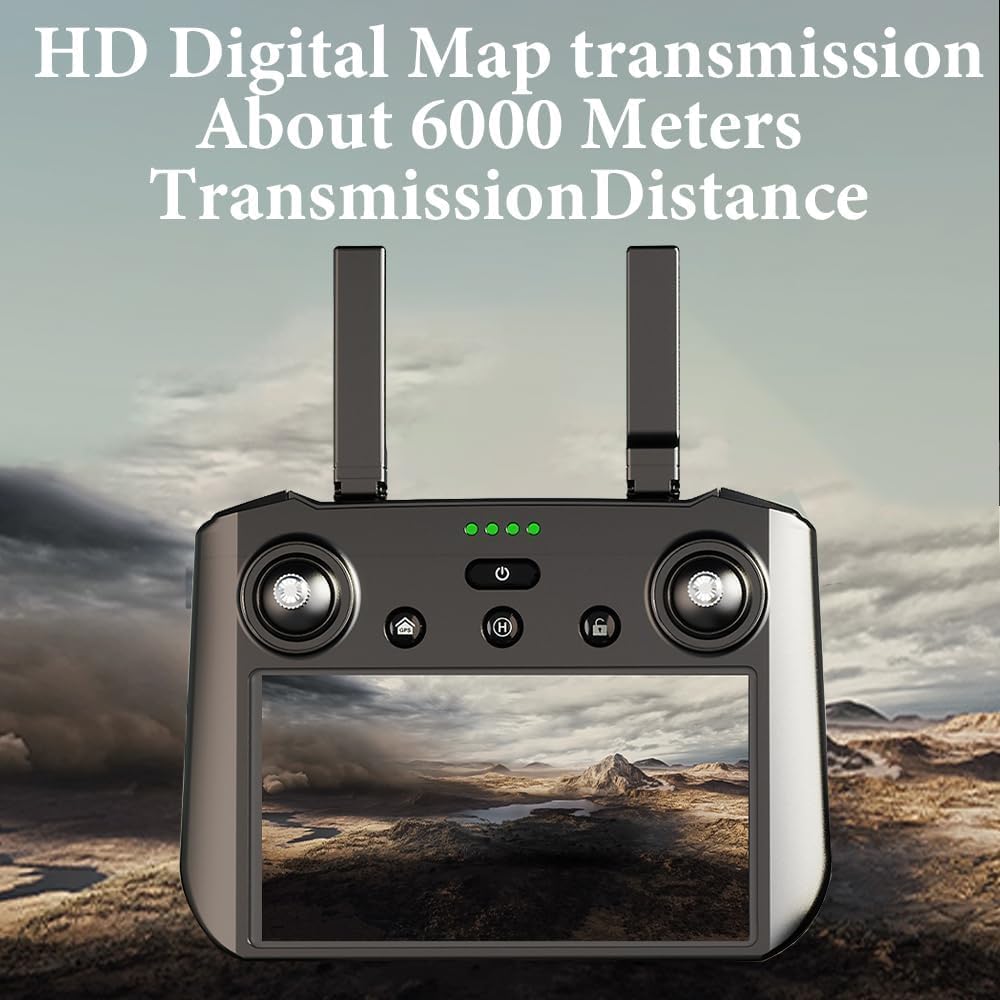
Figure 3.5: The remote control features an integrated screen for direct viewing of flight data and camera feed, eliminating the need for a separate mobile device.

Figure 3.6: The remote control's display offers a versatile interface, supporting various functions beyond flight control, such as game play, video viewing, and communication.
4. Setup Guide
Follow these steps to prepare your KF104 MAX2 Drone for its first flight.
4.1 Charging Batteries
- Connect the drone battery and remote control to their respective chargers.
- Ensure the charging indicators show a full charge before use.
4.2 Attaching Propellers
- Identify the correct propellers (marked A and B) for each motor arm.
- Securely attach the propellers according to the markings, ensuring they are firmly in place.
4.3 Powering On and Pairing
- Place the drone on a flat, open surface.
- Press and hold the power button on the drone until the indicator lights turn on.
- Power on the remote control. The remote and drone should automatically pair. Refer to the remote control screen for pairing status.
5. Operating Your Drone
The KF104 MAX2 Drone offers a variety of intelligent flight modes and features to enhance your flying experience.
5.1 Flight Features and Modes
- 360° Obstacle Avoidance: The drone scans a 360° sector to detect obstacles within 20 meters, automatically stopping and alerting the pilot via the remote control for safer flight in complex environments.
- Remote Control System with Display: The remote control features its own integrated system, supporting GPS intelligent return, orbit flight, route planning, gesture photo/video, headless mode, and follow mode without needing a separate mobile app.
- 3-Axis Mechanical Gimbal + EIS 4K Camera: The stable 3-axis mechanical gimbal combined with Electronic Image Stabilization (EIS) ensures clear, stable 4K video (3840 x 2160P 30fps) and photos (3840 x 2160P), even during dynamic flights.
- Extended Range and Flight Time: Enjoy a flight distance and image transmission distance of up to 6 km, with a flight height up to 500 m. The 3900 mAh smart battery provides up to 40 minutes of flight time.
- 4K HD + Night Shot: Capture stunning 4K HD visuals with a 90° wide-angle lens. The night recording function enhances detail in low-light conditions.
- Surround Mode: The drone can automatically circle a point of interest, capturing dynamic footage.
- One-Bond Helix: Execute complex spiral flight paths with ease.
- One Key to the Sky / Fly Far with One Button: Simplified takeoff and long-distance flight initiation with a single command.
- Support Vertical Screen Shooting: The camera supports vertical video capture, ideal for social media content.
- Fuselage Self-Contained Airdrop Air Energy / Precision Throwing: Utilize the drone's payload release mechanism for precise delivery of small items.
- GPS Intelligence Follow Mode: The drone can automatically follow a moving subject, keeping it centered in the frame.
- Time-Lapse Photography: Capture stunning time-lapse sequences for creative aerial videography.
- One-Button Return Flight: Initiate an automatic return-to-home function with a single button press for safe landing.

Figure 5.1: The drone's omnidirectional obstacle avoidance system actively detects and helps prevent collisions.

Figure 5.2: The drone's night shot mode captures clear and detailed images even in challenging low-light environments.
5.2 Official Product Video
Video 5.1: This official product video demonstrates the KF104 MAX2 Drone's key features, including its 3-axis gimbal, high-resolution camera, obstacle avoidance capabilities, various intelligent flight modes like surround and follow, and the payload release function. It also showcases the remote control's integrated screen and the drone's impressive flight range.
6. Maintenance
Proper maintenance ensures the longevity and optimal performance of your drone.
- Cleaning: Regularly wipe down the drone and remote control with a soft, dry cloth. Avoid using harsh chemicals or solvents.
- Propeller Inspection: Check propellers for any cracks, bends, or damage before and after each flight. Replace damaged propellers immediately.
- Battery Care: Store batteries at approximately 50% charge if not used for extended periods. Do not expose batteries to extreme temperatures.
- Storage: Store the drone and its components in a cool, dry place, preferably in its original carrying case, away from direct sunlight and moisture.
7. Troubleshooting
This section addresses common issues you might encounter with your KF104 MAX2 Drone.
| Problem | Possible Cause | Solution |
|---|---|---|
| Drone does not power on | Low battery; Battery not properly inserted | Charge battery fully; Reinsert battery securely |
| Remote control not connecting | Drone not powered on; Out of range; Interference | Ensure drone is on; Move closer to drone; Change flying location |
| Poor image/video quality | Dirty camera lens; Gimbal obstruction; Low light conditions | Clean lens gently; Check for obstructions; Utilize night shot mode or fly in better light |
| Drone drifts during flight | Uncalibrated sensors; Strong winds | Perform IMU/compass calibration; Avoid flying in windy conditions |
8. Technical Specifications
| Feature | Specification |
|---|---|
| Brand | TeeGGi |
| Model Name | KF104 MAX 2 |
| Dimensions (L x W x H) | 13.39" x 14.37" x 3.35" |
| Item Weight | 632 Grams (1.39 pounds) |
| Video Capture Resolution | 4K (3840 x 2160P 30fps) |
| Photo Resolution | 4K (3840 x 2160P) |
| Gimbal | 3-Axis Mechanical Gimbal + EIS |
| Obstacle Avoidance | 360° Intelligent Obstacle Avoidance (20m detection) |
| Control Distance | Up to 6 km |
| Flight Height | Up to 500 m |
| Battery Capacity | 11.1V 3900 mAh |
| Flight Time | Up to 40 minutes |
| Connectivity Technology | Wi-Fi |
| Control Type | Remote Control with Screen |
| Material | Plastic |
9. Warranty and Support
For warranty information and customer support, please refer to the contact details provided with your product packaging or visit the official TeeGGi website. Keep your proof of purchase for any warranty claims.
For additional assistance, you may contact TeeGGi directly via their Amazon store page: TeeGGi Amazon Store.
Ask a question about this manual
Ask about setup, troubleshooting, compatibility, parts, safety, or missing instructions. Manuals+ will review the question and use this page’s manual context to help answer it.