
1. Introduction
The ENGINE DETOX DM58 Outdoor Sport GPS Smartwatch is designed for rugged performance, intelligent tracking, and stylish everyday wear. Equipped with a vibrant 1.43-inch AMOLED touch screen, precise GPS navigation, and 5ATM waterproof protection, this smartwatch is built for athletes and outdoor enthusiasts. It helps monitor health, track workouts, and stay connected.
2. What's in the Box
Upon opening your product package, please ensure all the following items are present:
- 1x DM58 GPS Smartwatch
- 1x Magnetic Charging Cable
- 1x User Manual
- 1x Warranty Card
3. Product Overview
3.1. Watch Components
Familiarize yourself with the main components of your DM58 Smart Watch.
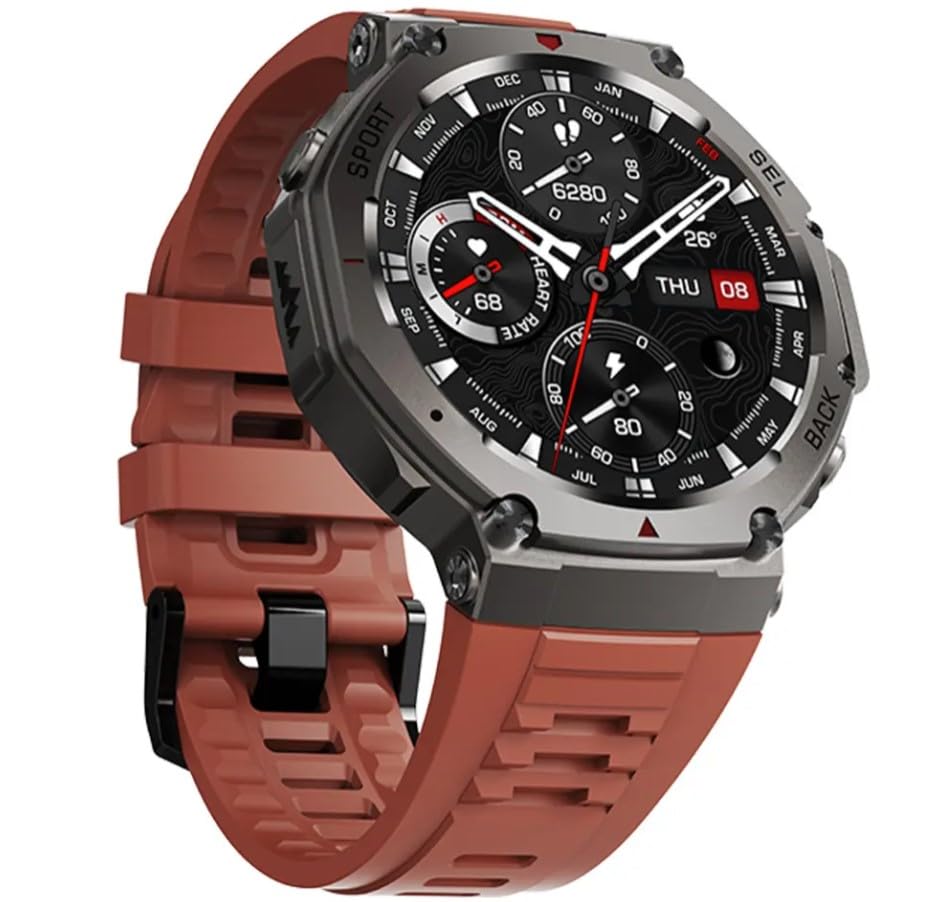
Figure 1: Front view of the DM58 Smart Watch with a brown strap, showcasing the display and overall design.
3.2. Display
The DM58 features a 1.43-inch AMOLED HD Touch Display. This crisp, colorful screen offers smooth touch controls and supports an Always-On Display mode for easy readability, even under direct sunlight.

Figure 2: The DM58 Smart Watch display showing a vibrant outdoor scene with time, date, and activity metrics.
3.3. Buttons and Side View
The watch includes physical buttons on the side for navigation and quick access to functions, alongside a clearly marked GPS button.
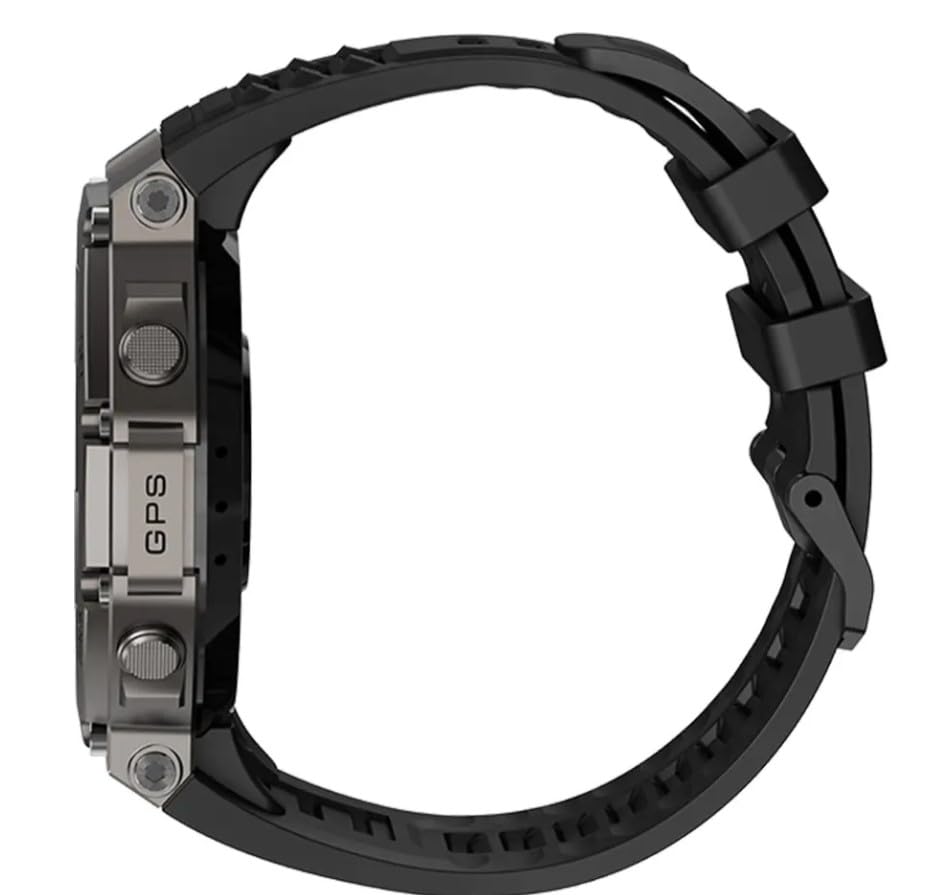
Figure 3: Side view of the DM58 Smart Watch, highlighting the physical control buttons and the 'GPS' label.
3.4. Sensors
The rear of the watch houses advanced sensors for health and fitness monitoring.

Figure 4: Back view of the DM58 Smart Watch, displaying the optical heart rate sensor and charging contacts.
4. Setup
4.1. Charging the Smart Watch
Before initial use, fully charge your DM58 Smart Watch. Connect the magnetic charging cable to the charging contacts on the back of the watch and a USB power source. A full charge typically provides several days of usage.
4.2. Power On/Off
- Power On: Press and hold the power button (usually the top right button) until the screen lights up.
- Power Off: Navigate to the settings menu on the watch, find the 'Power Off' option, and confirm. Alternatively, press and hold the power button until a power-off prompt appears.
4.3. App Pairing
To unlock the full potential of your DM58 Smart Watch, pair it with its companion app on your smartphone (compatible with Android and iPhone devices, running on Zepp OS). Refer to the specific instructions within the app for detailed pairing steps.
- Download the official companion app from your phone's app store.
- Open the app and create an account or log in.
- Follow the in-app instructions to add a new device and select your DM58 Smart Watch.
- Confirm the pairing request on both your phone and the watch.
5. Operating Instructions
5.1. Basic Navigation
- Swipe: Swipe left, right, up, or down on the touchscreen to navigate through menus, widgets, and notifications.
- Tap: Tap to select an item or open an application.
- Buttons: Use the physical buttons for quick access to specific functions or to return to the previous screen/watch face.
5.2. GPS Tracking
The built-in GPS with multi-satellite support (GPS/GLONASS) allows for accurate real-time positioning. This feature is ideal for tracking outdoor activities such as running, hiking, and cycling without needing your phone.
- To activate GPS for an activity, select the desired sport mode from the workout menu.
- Ensure you are in an open area for optimal GPS signal acquisition.
- The watch will indicate when GPS is locked and ready to track.
5.3. Health and Fitness Monitoring
The DM58 Smart Watch provides comprehensive health and fitness tracking:
- Heart Rate: Continuous heart rate monitoring throughout the day.
- SpO2: Blood oxygen saturation measurement.
- Sleep Quality: Tracks sleep stages and provides insights into sleep patterns.
- Activity Tracking: Monitors step count, calories burned, and distance covered.
- Sport Modes: Multiple sport modes are available for personalized workout tracking, providing specific metrics for each activity.
5.4. Smart Notifications and Music Control
- Notifications: Receive call, SMS, and app alerts directly on your wrist. Ensure your watch is connected to your phone via Bluetooth and app notifications are enabled.
- Music Control: Control music playback on your smartphone directly from your watch during workouts or daily activities.
6. Water Resistance
The DM58 Smart Watch features a 5ATM waterproof design, meaning it is water-resistant up to 50 meters. This makes it suitable for:
- Swimming
- Showering
- Rain and all-weather outdoor use
Note: It is not suitable for deep diving or high-pressure water activities.
7. Battery Life
The DM58 Smart Watch is equipped with a 500mAh high-capacity battery, designed for extended usage. It offers several days of operation on a single charge, making it ideal for travel and prolonged outdoor workouts. The average battery life is approximately 27 days, depending on usage patterns and activated features.
8. Specifications
Detailed technical specifications for the ENGINE DETOX DM58 Smart Watch:
| Feature | Specification |
|---|---|
| Brand | ENGINE DETOX |
| Model | DM58 |
| Display Size | 1.43 Inches (AMOLED) |
| Battery Capacity | 500mAh (700 Milliamp Hours in some specifications) |
| Battery Average Life | 27 Days |
| Waterproof Rating | 5ATM (up to 50 meters) |
| Operating System | Zepp OS |
| Memory Storage Capacity | 26 GB |
| Connectivity Technology | Bluetooth |
| Compatible Devices | Android, iPhone |
| Special Features | Activity Tracker, Always On Display, GPS, Multisport Tracker, Music Player |
| Item Weight | 68 g |
9. Maintenance
To ensure the longevity and optimal performance of your DM58 Smart Watch, follow these maintenance guidelines:
- Cleaning: Regularly wipe the watch screen and strap with a soft, damp cloth. Avoid using harsh chemicals or abrasive materials.
- Water Exposure: While 5ATM waterproof, rinse the watch with fresh water after exposure to saltwater or chlorinated water to prevent corrosion. Ensure it is completely dry before charging.
- Charging Contacts: Keep the charging contacts on the back of the watch clean and free of debris to ensure proper charging.
- Storage: Store the watch in a cool, dry place when not in use. Avoid extreme temperatures.
10. Troubleshooting
If you encounter issues with your DM58 Smart Watch, try the following solutions:
- Watch Not Turning On: Ensure the watch is fully charged. Connect it to the charger and wait a few minutes before attempting to power it on again.
- Display Unresponsive: Try restarting the watch. If unresponsive, press and hold the power button for an extended period (e.g., 10-15 seconds) for a forced restart.
- App Connection Issues:
- Ensure Bluetooth is enabled on your smartphone.
- Check if the watch is within the Bluetooth range of your phone.
- Restart both your phone and the watch.
- Re-pair the watch through the companion app if necessary.
- Inaccurate Health Data: Ensure the watch is worn snugly on your wrist, not too tight or too loose. Clean the sensor area regularly.
- GPS Not Locking: Ensure you are in an open outdoor area with a clear view of the sky. Wait a few moments for the watch to acquire a signal.
11. Product Video Overview
Watch this video for a quick overview of the ENGINE DETOX DM58 Smart Watch features and capabilities.
Video 1: An overview of the ENGINE DETOX DM58 Smart Watch, highlighting its display, battery, phone features, and other functions.
12. Warranty and Support
The ENGINE DETOX DM58 Smart Watch comes with a standard brand warranty. For specific warranty terms, conditions, and to register your product, please refer to the included Warranty Card or visit the official product detail page on Amazon.in for further information.
For technical support or customer service inquiries, please contact the manufacturer or refer to the support information provided with your product.