
1. Introduction
Thank you for choosing the DEERC 1/12 Scale 9006E 4WD High-Speed RC Truck. This manual provides essential information for the safe and optimal operation, maintenance, and troubleshooting of your new remote control vehicle. Please read all instructions carefully before use.
Safety Information
This product contains small parts and is not suitable for children under 14 years old as it may pose a choking hazard. Always operate the product under adult supervision, especially in areas with traffic or hazards. Keep hands, face, and loose clothing away from moving parts. Do not operate in wet conditions unless specified as waterproof. Ensure batteries are charged correctly and handled safely.
2. What's in the Box
The following items are included with your DEERC 9006E RC Truck:
- 1x DEERC 9006E RC Truck
- 1x 2.4GHz Full Proportional Remote Control
- 2x 7.4V 1500mAh Lithium-ion Battery
- 1x Charging Cable
- 1x Screwdriver
- 1x Spare Parts Kit
- 1x User Manual

3. Setup
3.1 Battery Installation
RC Truck Battery:
- Remove the body clips and lift the truck body.
- Locate the battery compartment.
- Connect one of the provided 7.4V 1500mAh Li-ion batteries to the truck's power connector.
- Secure the battery using the Velcro strap.
- Replace the truck body and secure it with the body clips.
Remote Control Battery:
- Open the battery cover on the back of the remote control.
- Insert 2 AA batteries (not included) into the compartment, observing correct polarity.
- Close the battery cover.

3.2 Charging Instructions
Use the provided USB charging cable to charge the 7.4V 1500mAh Li-ion batteries. Connect the battery to the charging cable, then plug the USB end into a compatible USB power source (e.g., computer, USB wall adapter). The indicator light on the charger will show the charging status. Ensure batteries are fully charged before first use for optimal performance.
3.3 Controller Pairing
To pair the remote control with the RC truck:
- Ensure both the RC truck and remote control are powered off.
- Turn on the RC truck. The indicator light on the truck's receiver will flash.
- Turn on the remote control. The indicator light on the remote will flash.
- Wait for a few seconds. Once the lights on both the truck and remote stop flashing and remain solid, the devices are successfully paired.
- Test the controls to ensure proper functionality.
4. Operating Instructions
4.1 Basic Controls
- Forward/Backward: Pull the trigger on the remote control to move forward, push to move backward.
- Steering: Turn the steering wheel on the remote control left or right to steer the truck.
4.2 Speed Control
The 2.4GHz full proportional remote control allows for precise speed adjustments. Use the speed switch on the remote to set the desired maximum speed. This feature is useful for beginners or when operating in confined spaces.
4.3 All-Terrain Dominance
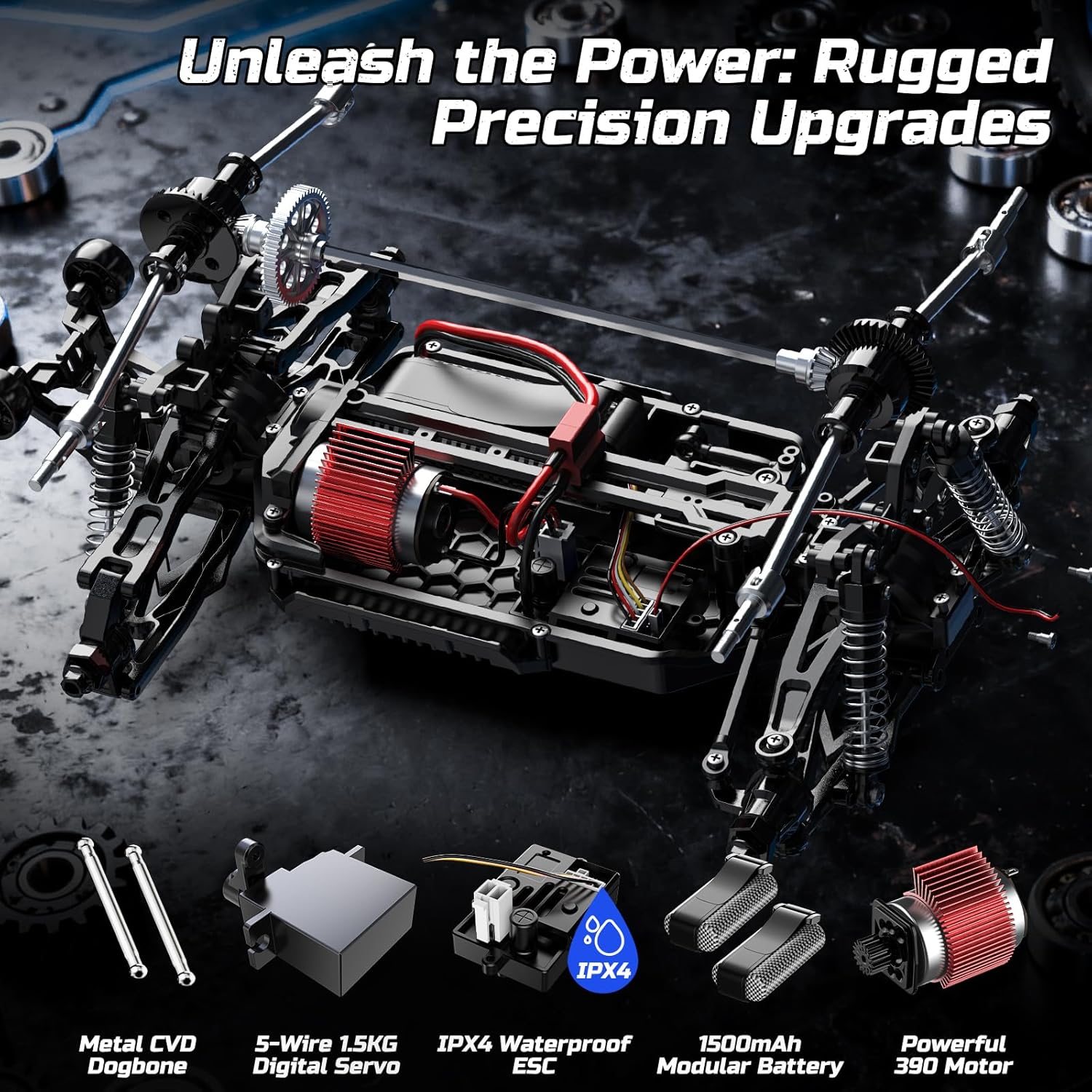
This 4WD RC monster truck is designed to conquer various surfaces including grass, sand, and asphalt. Its professional shock absorption system and all-terrain tires provide exceptional grip and stability. The IPX4 waterproof ESC allows for performance in light rain or on slippery surfaces.

4.4 Wheelie Bar
The integrated wheelie bar allows for exciting stunts during hard acceleration, helping to maintain control while performing wheelies.

5. Maintenance
5.1 Cleaning
After each use, especially after off-road driving, use the provided dust brush to clean dirt and debris from the truck's chassis, wheels, and body. This helps prevent wear and tear on moving parts.
5.2 Spare Parts
The truck is engineered with reinforced metal drive shafts, alloy dog bones, and other metal parts for high-speed driving. A protective roll cage, strengthened bumpers, and secure body pins enhance durability. A spare tire is included for easy replacement. Refer to the user manual for a detailed diagram of spare parts and their part numbers.
5.3 Battery Care
Always disconnect batteries from the truck when not in use. Store batteries in a cool, dry place. Do not overcharge or over-discharge batteries. If the battery casing is damaged, discontinue use immediately.
6. Troubleshooting
- Truck not responding: Ensure both the truck and remote control are powered on and properly paired. Check battery levels in both devices.
- Short playtime: Ensure batteries are fully charged. Battery performance can decrease over time; consider replacing old batteries.
- Poor control/range: Ensure there is no interference from other 2.4GHz devices. Operate within the specified 328-foot control range.
- Truck flips easily: Adjust speed settings on the remote control, especially for beginners. Practice smooth steering inputs.
- Unusual noises/performance: Check for debris in moving parts or damaged components. Refer to the spare parts diagram in the manual for identification and replacement.
7. Specifications
| Feature | Detail |
|---|---|
| Product Dimensions | 14.37 x 9.65 x 5.9 inches |
| Item Weight | 3.62 pounds |
| Item Model Number | US-9006E |
| Manufacturer Recommended Age | 14 years and up |
| Batteries (RC Truck) | 2x 7.4V 1500mAh Lithium-ion (included) |
| Batteries (Remote Control) | 2x AA batteries (required, not included) |
| Top Speed | 45 KM/H |
| Control Range | 328 feet |
| Motor | High-efficiency 390 motor |
| ESC | IPX4 waterproof ESC |
| Servo | 1.5kg high torque servo |
8. Warranty & Support
DEERC offers 24/7 customer support. If you have any questions, require parts replacement, or need assistance with your product, please reach out to our support team. We are always here to help you enjoy your driving experience.
For further assistance, please visit the official DEERC store or contact customer service through your purchase platform.


