
Introduction
The Surfans F28 is a high-fidelity portable music player designed to deliver an immersive audio experience. Featuring dual ESS9018 DACs, a 4.4mm balanced output, and comprehensive Bluetooth 5.2 support including LDAC and aptX HD, the F28 supports a wide range of lossless audio formats. This manual provides detailed instructions for setting up, operating, maintaining, and troubleshooting your device to ensure optimal performance and longevity.

Figure 1: Front and back view of the Surfans F28 HiFi Music Player.
Package Contents
Please verify that all items listed below are present in your package:
- 1x Surfans F28 HiFi Music Player
- 1x USB-C Charging Cable
- 1x 128GB Micro SD Card (pre-installed or included separately)
- 1x User Manual (this document)

Figure 2: Illustration of typical package contents.
Product Overview
Familiarize yourself with the various components and controls of your F28 music player.
Key Features:
- Dual ESS9018 DACs: For high-resolution audio decoding and minimal distortion.
- 4.4mm Balanced Output: Provides enhanced audio quality and power for demanding headphones.
- 3.5mm Single-Ended Output: Standard audio output for common headphones.
- Bidirectional Bluetooth 5.2: Supports LDAC and aptX HD for high-quality wireless audio transmission and reception.
- 3.5-inch IPS Touchscreen: For intuitive navigation and control.
- ALPS Analog Volume Knob: For precise volume adjustments.
- Expandable Storage: Supports Micro SD cards up to 512GB.
- USB-C Port: For charging and data transfer.

Figure 3: The F28 player showcasing its display and audio capabilities.

Figure 4: The dual ESS9018K2M DAC chips, central to the F28's high-fidelity audio.

Figure 5: Top panel with 4.4mm balanced and 3.5mm single-ended audio outputs, and the ALPS analog volume knob.
Setup
1. Charging the Device
Before first use, fully charge the F28. Connect the included USB-C cable to the player's USB-C port and the other end to a USB power adapter (5V/1A recommended) or a computer's USB port. The charging indicator will show the charging status. A full charge typically takes several hours.
2. Inserting the Micro SD Card
The F28 supports Micro SD cards up to 512GB. Locate the Micro SD card slot on the bottom of the device. Gently insert the Micro SD card with the gold contacts facing down until it clicks into place. To remove, push the card in slightly until it springs out.

Figure 6: Inserting the Micro SD card and connecting via USB-C for data transfer.
3. Transferring Music Files
Connect the F28 to your computer using the USB-C cable. The player will appear as a removable storage device. You can then drag and drop your music files directly into the Micro SD card's folders. The F28 supports various lossless formats including DSD (DSF/DFF), FLAC/WAV (up to 384kHz), AIFF/APE, as well as MP3/AAC.

Figure 7: Supported audio file formats for the F28 player.
Operating Instructions
1. Power On/Off
- Power On: Press and hold the power button (located on the side) until the screen illuminates.
- Power Off: Press and hold the power button until a power-off prompt appears, then confirm.
2. Basic Navigation
The F28 features a 3.5-inch IPS touchscreen for primary navigation. Swipe gestures and taps are used to select options and move between menus. Physical buttons on the side provide additional control for playback (play/pause, next/previous track) and menu navigation.
3. Music Playback
From the main menu, select "My Music" or "Folder" to browse your audio files. Tap on a song to begin playback. The playback screen displays track information, progress, and playback controls.
4. Volume Control
Adjust the volume using the gold-colored ALPS analog knob located on the top right of the device. Rotate clockwise to increase volume and counter-clockwise to decrease. The volume level will be displayed on the screen.
5. Bluetooth Connectivity
The F28 supports Bidirectional Bluetooth 5.2 with LDAC and aptX HD codecs for high-quality wireless audio. To pair with Bluetooth headphones or speakers:
- Go to "System Settings" and select "Bluetooth".
- Turn Bluetooth ON.
- The player will scan for available devices. Select your device from the list to pair.
The F28 can also act as a Bluetooth receiver, allowing you to stream audio from your phone or PC to the player.

Figure 8: The F28 features a Bluetooth 5.2 chip for stable and high-quality wireless connections.
6. Equalizer Settings
The F28 includes an equalizer to customize your sound. Navigate to the "Equalizer" option in the settings. You can choose from various presets or create a custom sound profile by adjusting the frequency bands.
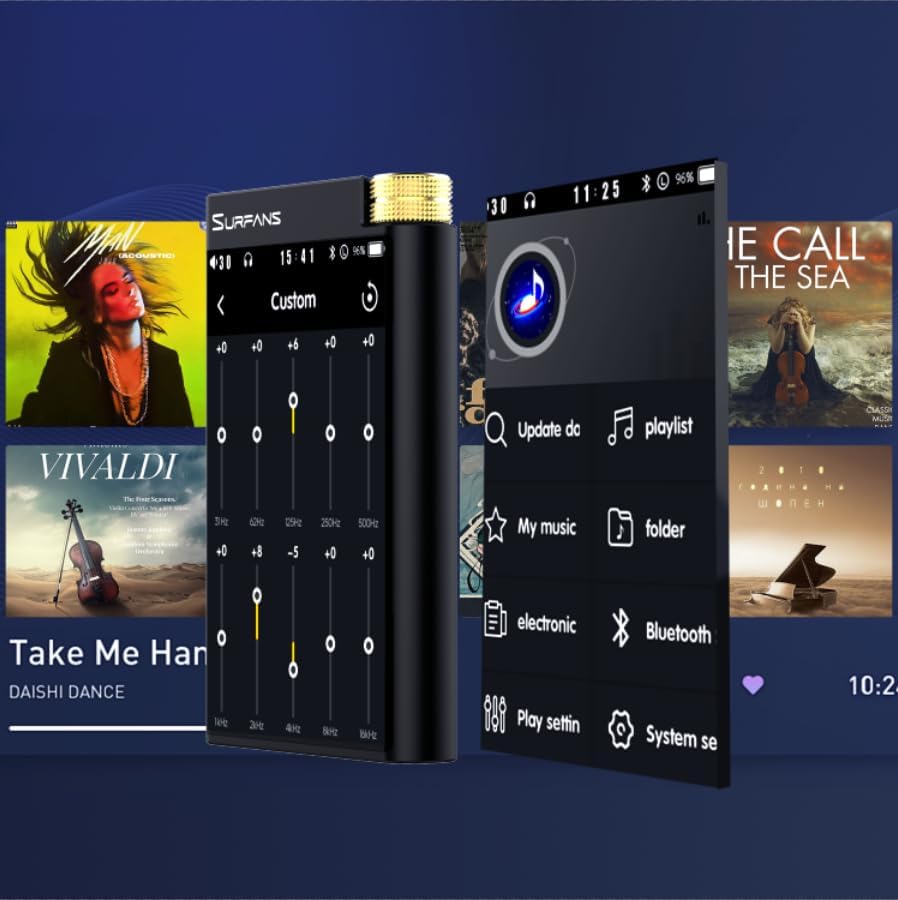
Figure 9: Customizing audio with the built-in equalizer.
7. Connecting to External Devices
Use the 4.4mm balanced or 3.5mm single-ended output to connect to headphones, amplifiers, or speakers. The USB-C port also supports USB DAC functionality, allowing the F28 to act as an external sound card for your computer.

Figure 10: The F28 can be connected to various audio systems, including acting as a USB DAC for computers.
Maintenance
- Cleaning: Use a soft, dry cloth to clean the device. Avoid using abrasive cleaners or solvents.
- Storage: Store the player in a cool, dry place away from direct sunlight and extreme temperatures.
- Battery Care: To prolong battery life, avoid fully discharging the battery frequently. If storing for extended periods, charge the battery to about 50% every few months.
Troubleshooting
| Problem | Possible Cause | Solution |
|---|---|---|
| Device does not power on. | Low battery; device frozen. | Charge the device for at least 30 minutes. If still unresponsive, try holding the power button for 10-15 seconds for a hard reset. |
| Touchscreen is unresponsive or slow. | Temporary software glitch; screen protector interference. | Restart the device. Ensure the screen is clean and free of debris. If using a screen protector, ensure it is properly applied and not too thick. |
| Bluetooth pairing issues. | Device not in pairing mode; distance; interference. | Ensure both devices are in pairing mode and within range. Turn off and on Bluetooth on both devices. Clear previous pairings if necessary. |
| Low volume via Bluetooth. | Volume settings on both devices; codec compatibility. | Increase volume on both the F28 and the connected Bluetooth device. Ensure optimal codec (LDAC/aptX HD) is selected if supported by the receiving device. |
| Music files not recognized or played in incorrect order. | Corrupted files; file system indexing issue. | Ensure files are in supported formats. Re-scan the music library from the player's settings. If issues persist, try reformatting the Micro SD card (backup data first) and re-transferring files. Note: Some players may sort by filename alphabetically rather than track number metadata. |
Specifications
| Feature | Detail |
|---|---|
| Model Name | F28 128G |
| Product Dimensions | 0.7 x 2.6 x 4.7 inches |
| Item Weight | 9.6 ounces |
| DAC Chip | Dual ESS9018K2M |
| Supported Audio Formats | DSD (DSF/DFF), FLAC/WAV (up to 384kHz/32-bit), AIFF/APE, MP3/AAC, WMA Lossless |
| Bluetooth Version | 5.2 (Bidirectional, supports LDAC/aptX HD) |
| Screen Size | 3.5 Inches IPS Touchscreen |
| Internal Storage | 128GB (included Micro SD card) |
| Expandable Storage | Up to 512GB via Micro SD card |
| Battery | 1x 12V battery (included), approx. 12-hour playback |
| Output Ports | 4.4mm Balanced, 3.5mm Single-Ended |
| Connectivity Technology | Aux, Bluetooth 5.2, USB-C |
| Special Feature | Equalizer |
Warranty and Support
For warranty information and technical support, please refer to the official Surfans website or contact their customer service directly. Keep your purchase receipt as proof of purchase for warranty claims.
You can visit the official Surfans Store on Amazon for more information and support: Surfans Audio Store