
Introduction
This manual provides detailed instructions for the setup, operation, and maintenance of your MOVE SPEED ST10 External Hard Drive with Touchscreen. Please read this guide thoroughly to ensure optimal performance and longevity of your device.
1. Getting Started
1.1 Package Contents
- MOVE SPEED ST10 External Hard Drive
- USB-C to USB-C Cable
- User Guide
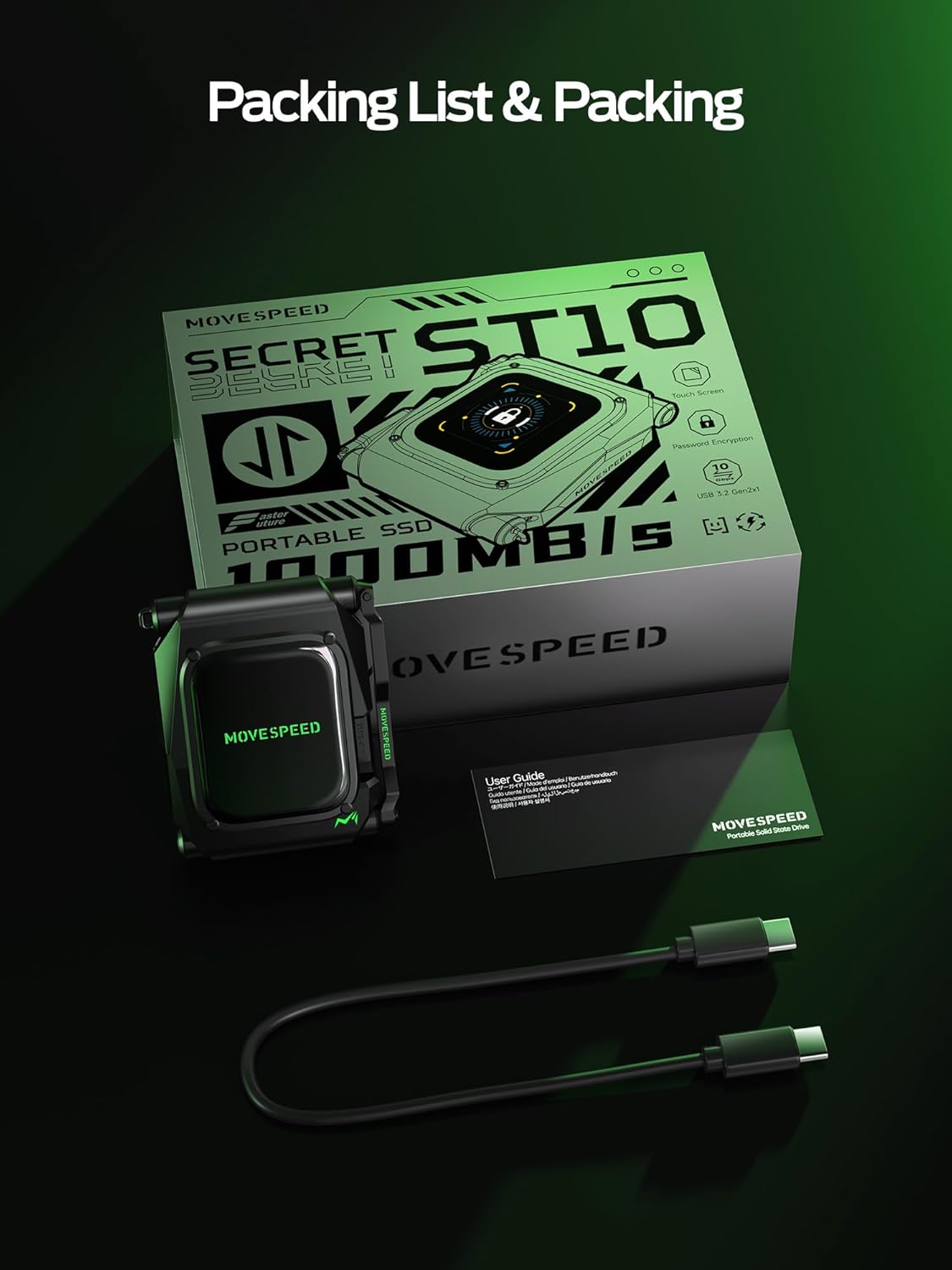
Image: The MOVE SPEED ST10 External Hard Drive, its USB-C cable, and user guide as found in the product packaging.
1.2 Connecting Your Device
The MOVE SPEED ST10 is designed for plug-and-play compatibility with various devices. Use the provided USB-C cable to connect the SSD to your computer, smartphone, or tablet.
For iPhone 15 Pro/Pro Max: Connect the SSD directly to your iPhone using the USB-C cable. The device will be recognized automatically, allowing for direct 4K ProRes video recording.
For Windows/Mac Computers: Connect the SSD to an available USB-C port. The drive will appear as an external storage device. For optimal performance, use a USB 3.2 Gen2 compatible port.

Image: The MOVE SPEED ST10 SSD demonstrating wide compatibility by connecting to a laptop, tablet, smartphone, and other devices.
1.3 Initial Setup and Password
Upon first connection or after a reset, you will be prompted to set up a password on the integrated touchscreen. This password is essential for accessing your data and securing the device.
- Power on the device by connecting it to a power source or host device.
- Follow the on-screen prompts to set your 6-digit password. Ensure you remember this password, as it is required for all future access.
- The touchscreen will display real-time information once setup is complete.

Image: The MOVE SPEED ST10 SSD connected to a laptop, illustrating the touchscreen password input for data security.
Video: An official product video demonstrating the setup, password encryption, and data transfer capabilities of the MOVE SPEED ST10 External Hard Drive.
2. Operation
2.1 Data Transfer
The ST10 supports USB-C 3.2 Gen2, offering data transfer speeds up to 10Gbps. This allows for rapid transfer of large files, such as 4K videos and extensive document libraries.
To transfer files, unlock the device using your password on the touchscreen. Once unlocked, drag and drop files to and from the drive as you would with any other external storage device.
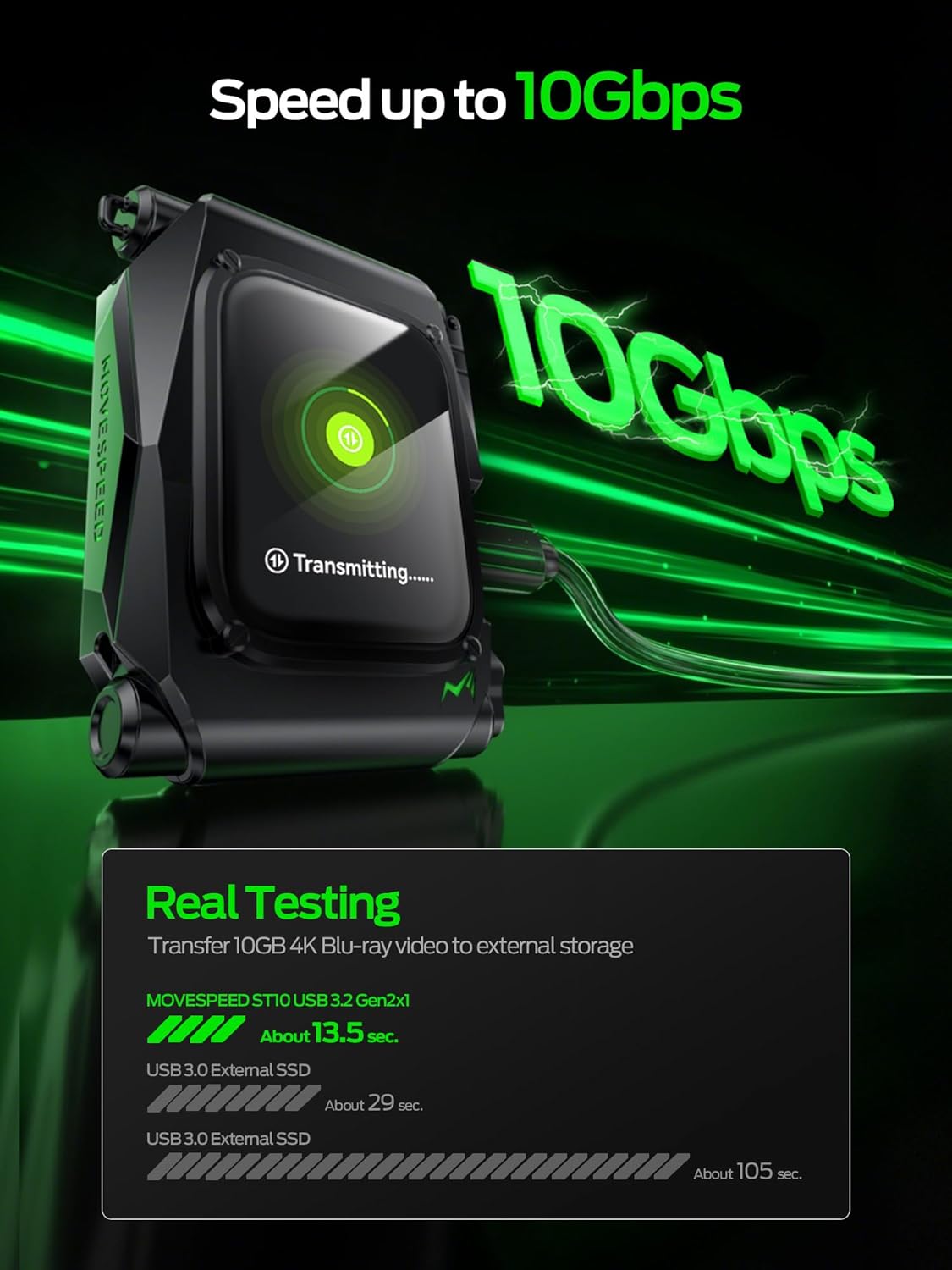
Image: The MOVE SPEED ST10 SSD showing a data transfer in progress, highlighting its 10Gbps speed capability.
2.2 Touchscreen Functions
The interactive touchscreen provides real-time monitoring and control over your SSD:
- Real-time Stats: View current transfer speeds, temperature, and power status.
- Disk Health: Monitor the health status of your SSD.
- Format Information: Check the current file system format (e.g., exFAT).
- Password Settings: Change or reset your password.
- Language Selection: Adjust the display language.
- Theme Style: Customize the visual theme of the display.

Image: The MOVE SPEED ST10 SSD's touchscreen interface showing a health dashboard with various real-time statistics.
2.3 Security Features
The ST10 incorporates advanced security features:
- Auto-Lock: The device automatically locks when unplugged from a host device, protecting your data.
- Tap-to-Encrypt: Manually lock the device with a tap on the touchscreen when connected, ensuring data privacy even during active use.
- Password Protection: A 6-digit password is required for all access.

Image: The MOVE SPEED ST10 SSD showcasing its security features, including automatic locking upon disconnection and manual encryption via touchscreen.
2.4 4K ProRes Video Recording (iPhone 15 Pro/Pro Max)
The ST10 allows direct recording of 4K 60Hz ProRes HDR videos from compatible iPhone models (iPhone 15 Pro or later). Connect the SSD to your iPhone, and select the external drive as the storage destination within your camera app.

Image: The MOVE SPEED ST10 SSD connected to an iPhone, illustrating its capability for direct 4K ProRes video recording.
3. Maintenance and Care
3.1 Physical Care
The ST10 features a high-quality aluminum alloy casing designed for durability and efficient heat dissipation. While robust, avoid exposing the device to extreme temperatures, direct sunlight, or harsh chemicals. Clean the touchscreen with a soft, dry cloth.

Image: The MOVE SPEED ST10 SSD undergoing lab tests, emphasizing its durable design and internal protection.
3.2 Monitoring Disk Health
Regularly check the disk health status via the touchscreen to ensure optimal performance and prevent potential data loss. The device provides real-time feedback on its operational status.

Image: The MOVE SPEED ST10 SSD's touchscreen showing detailed disk health information, aiding in maximizing its lifespan.
4. Troubleshooting
4.1 Device Not Recognized
- Ensure the USB-C cable is securely connected to both the SSD and the host device.
- Try a different USB-C port or cable.
- Restart your host device.
- Verify the SSD is unlocked via the touchscreen.
4.2 Slow Transfer Speeds
- Confirm your host device's USB port supports USB 3.2 Gen2 (10Gbps). Older USB standards will result in lower speeds.
- Ensure the cable used is rated for 10Gbps data transfer.
- Close other applications that might be using system resources or the drive.
4.3 Touchscreen Unresponsive or Display Issues
- Gently clean the touchscreen surface.
- Disconnect and reconnect the SSD.
- If the issue persists, contact customer support.
4.4 Changing Language
If the display language is not English, navigate through the touchscreen settings to find "Language Selection" and choose English. This option is typically found under the settings icon (gear symbol).
5. Specifications
| Feature | Detail |
|---|---|
| Model Number | ST10 |
| Digital Storage Capacity | 2 TB (available in 1TB and 2TB variants) |
| Hard Disk Interface | USB 3.0 (USB-C 3.2 Gen2 for 10Gbps) |
| Connectivity Technology | USB |
| Special Feature | Portable, Touchscreen Display |
| Hard Disk Description | Solid State Drive (SSD) |
| Compatible Devices | iPhone (15 Pro/Pro Max for 4K ProRes), Windows PCs, Mac Computers, Smartphones |
| Read Speed | Up to 1.25 Gigabytes Per Second (10Gbps) |
| Data Transfer Rate | 1000 Megabits Per Second (10Gbps) |
| Hardware Connectivity | USB Type C |
| Item Weight | 8 ounces |
| Enclosure Material | Aluminum Alloy / Nand Flash Memory |
6. Warranty and Support
6.1 Warranty Information
The MOVE SPEED ST10 External Hard Drive is backed by a 3-year manufacturer's warranty. This warranty covers defects in materials and workmanship under normal use. Please retain your proof of purchase for warranty claims.
6.2 Customer Support
For technical assistance, troubleshooting, or warranty inquiries, please visit the official MOVE SPEED website or contact their customer support team. Refer to the contact information provided in your product packaging or on the official brand website.
