
Nityers PF02
Nityers Automatic Cat Feeder Instruction Manual
Model: PF02
Introduction
Thank you for choosing the Nityers Automatic Cat Feeder. This 5-liter anti-clog food dispenser is designed to provide consistent and convenient feeding for your pets, ensuring they receive their meals on schedule with precise portions. Featuring freshness preservation, a 10-second voice recording function, and a long-lasting battery life, this feeder is ideal for multi-pet households and busy owners.

Figure 1: Nityers Automatic Cat Feeder (Black Standard)
Safety Information
- Use only dry pet food. Do not use wet food or any kibble larger than 15mm (0.6 inches) in diameter to prevent blockages.
- Keep the feeder on a stable, level surface to prevent tipping.
- Ensure the power adapter and cable are placed where pets cannot chew or damage them.
- Do not immerse the main unit in water. Only removable parts are washable.
- Keep out of reach of children.
Package Contents
Please check the box to ensure all items are present:
- 1 x 5-Liter Food Hopper
- 1 x Automatic Cat Feeder Body
- 1 x Lid
- 1 x Power Cord and Adapter
- 1 x Stainless Steel Food Bowl
- 1 x Bowl Tray
- 1 x Desiccant Bag
- 1 x User Manual

Figure 2: All Included Components
Product Overview
Familiarize yourself with the main parts of your Nityers Automatic Cat Feeder:
- Food Hopper: Large 5-liter capacity for dry food storage.
- Lid: Twist-lock design with silicone seal and desiccant compartment for freshness.
- Control Panel: Digital display for time, portion, and meal settings, along with buttons for manual feeding, recording, and settings.
- Food Outlet: Dispenses food into the bowl, sealed by a protective cover between feedings.
- Stainless Steel Bowl: Food-grade, whisker-friendly, and easy to clean.
- Power Port: Type-C input for adapter, with option for D-cell battery backup.
- Low Food Sensor: Notifies you when food levels are low.

Figure 3: Freshness Lock System

Figure 4: Control Panel Overview
Setup Guide
- Unpack and Assemble:
Carefully remove all components from the packaging. Rotate the lid counter-clockwise to open the food hopper. Take out any accessories packed inside the hopper.
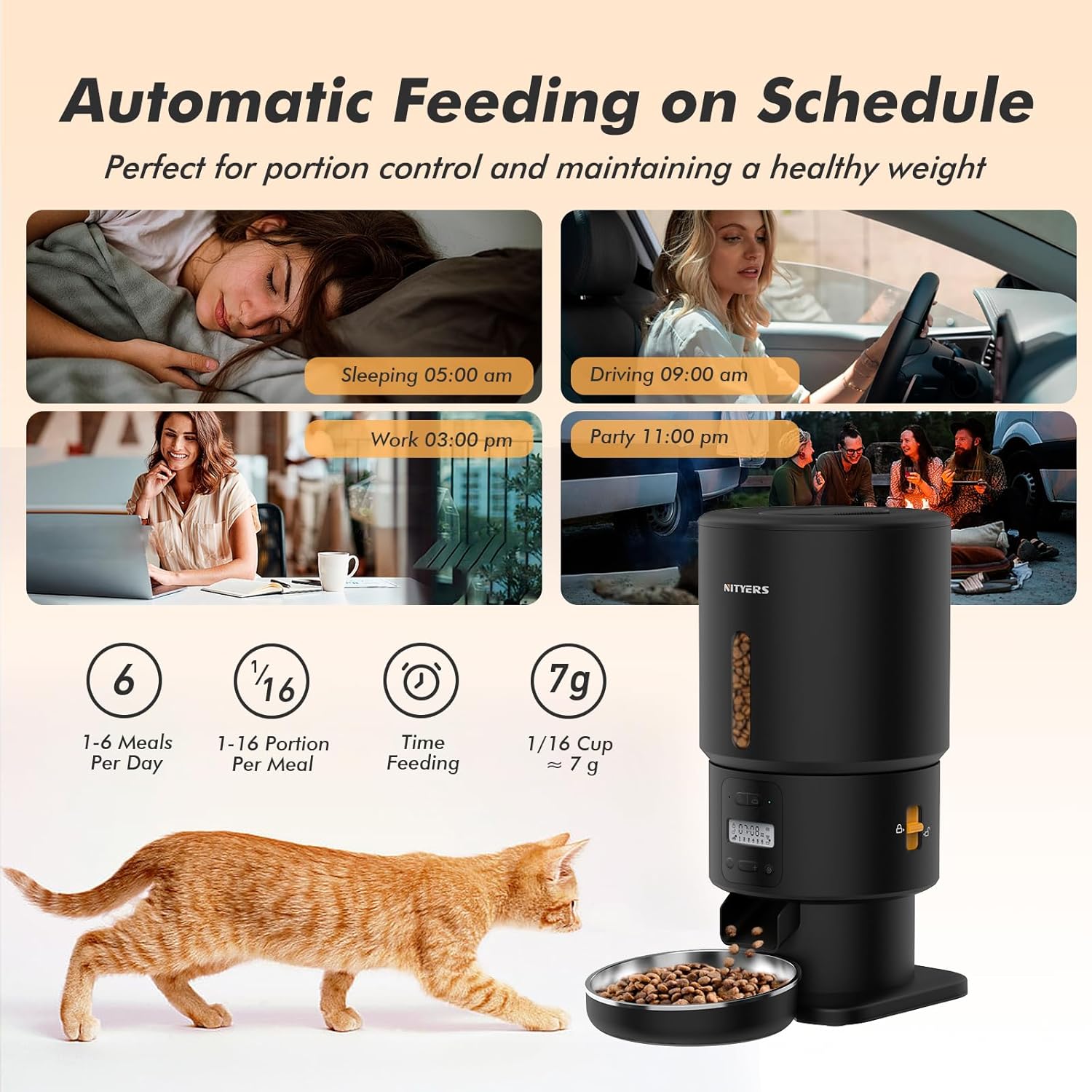
Figure 5: Feeder ready for setup
- Install Food Hopper:
Align the food hopper with the base unit and gently twist clockwise until it locks securely into place. Ensure a firm connection to prevent accidental spills.
- Prepare Desiccant:
Open the desiccant bag and place the desiccant packet into the dedicated compartment on the underside of the lid. This helps keep the kibble fresh and dry.

Figure 6: Inserting the desiccant packet
- Attach Bowl:
Place the stainless steel food bowl into the bowl tray, then slide the assembled bowl and tray under the food outlet of the feeder until it clicks into position.
- Fill Food Hopper:
Pour dry pet food into the hopper. The 5-liter capacity holds up to 21 cups of dry food. Close the lid securely by twisting it clockwise until it locks.

Figure 7: Filling the 5L food hopper
- Power On:
Connect the Type-C power adapter to the feeder and plug it into a wall outlet. For backup power, insert 3 D-cell alkaline batteries (not included) into the battery compartment at the bottom of the unit. The feeder will automatically switch to battery power during an outage.

Figure 8: Dual Power Supply Setup
- App Installation (Optional but Recommended):
Scan the QR code in the included user manual or search for "Pet Zero" in your device's app store. Download and install the app to access advanced features like remote feeding, scheduling, and monitoring.
Operating Instructions
Setting Time and Schedule:
Use the control panel or the Pet Zero app to set the current time and program feeding schedules. You can set up to 6 meals per day with customizable portion sizes from 1/16 cup to 1 cup per serving.

Figure 9: Customized Feeding Plan Example
Voice Recording:
Record a 10-second personalized voice message that will play at each feeding time to call your pet. Press and hold the record button on the control panel to begin recording.

Figure 10: Voice Meal Call Feature
Manual Feeding:
Press the manual feed button on the control panel or use the app to dispense a single portion of food immediately.
Anti-Clog Design:
The feeder features a smart reverse rotation system and a 45° angled food chute to prevent food jams. It is designed to handle kibble sizes from 2mm to 15mm.
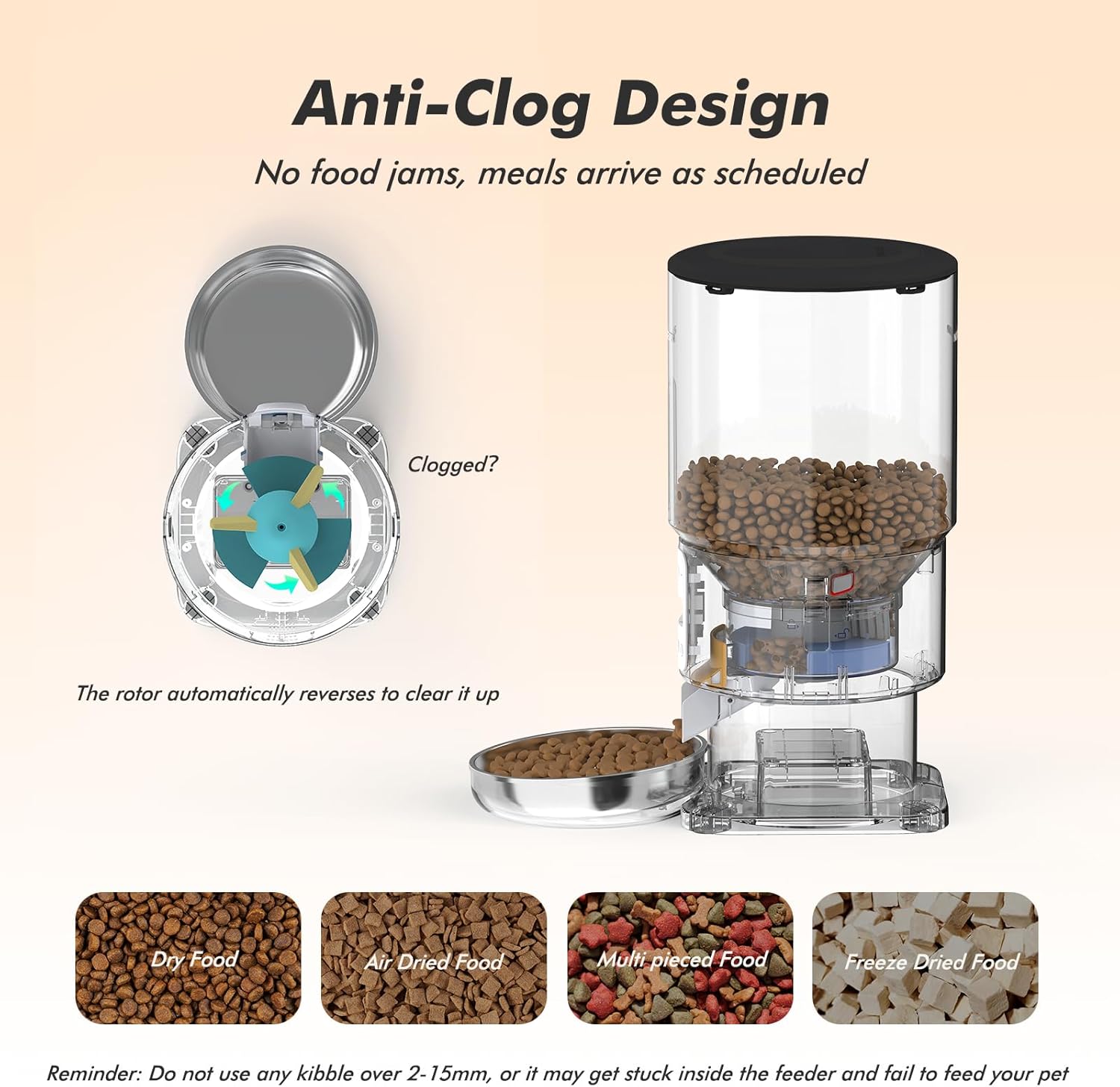
Figure 11: Anti-Clog Mechanism
Maintenance and Cleaning
Regular cleaning ensures hygiene and extends the life of your feeder.
- Disassembly: The lid, food hopper, stainless steel bowl, bowl tray, and food dispenser rotor are fully removable for easy cleaning.
- Washing: Wash removable parts with mild soap and water. Rinse thoroughly and allow to air dry completely before reassembly.
- Main Unit: Wipe the main feeder body with a damp cloth. Do not submerge the main unit in water.
- Desiccant Replacement: Replace the desiccant bag every 1-2 months, or as needed, to maintain food freshness.
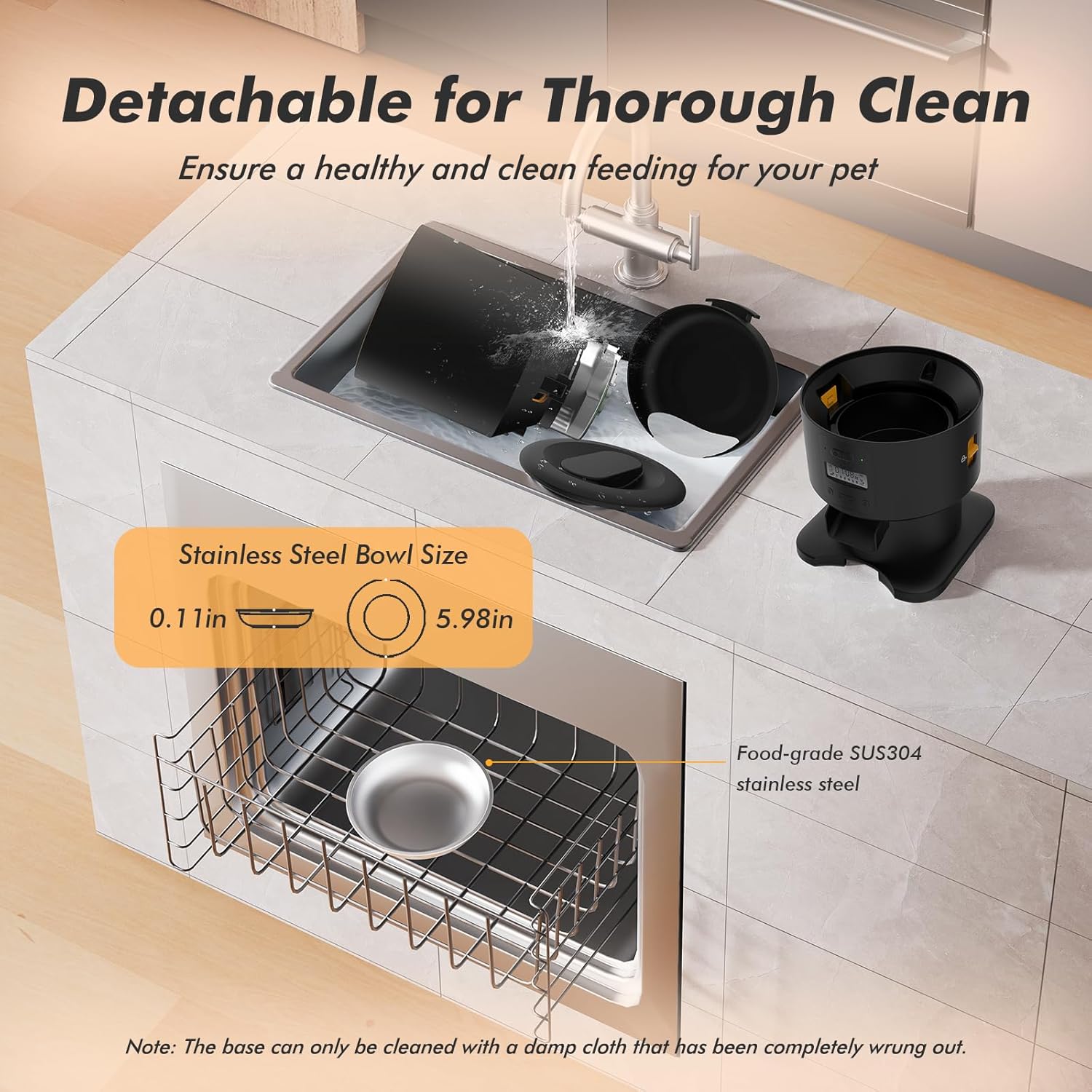
Figure 12: Detachable Design for Thorough Cleaning
Troubleshooting
| Problem | Possible Cause | Solution |
|---|---|---|
| Feeder not dispensing food. | Food hopper is empty; food jam; power issue. | Refill hopper; check for blockages in the chute/rotor and clear; ensure power adapter is connected or batteries are installed correctly. |
| Food is stale or not fresh. | Desiccant bag needs replacement; lid not sealed properly. | Replace desiccant bag; ensure lid is twisted and locked securely. |
| Voice recording not playing. | No recording saved; volume too low. | Record a new message; check volume settings in the app or on the device. |
| Feeder not connecting to app. | Bluetooth/Wi-Fi issue; incorrect app settings. | Ensure Bluetooth is enabled on your device; check Wi-Fi connection; restart feeder and app; re-pair device in app. |
Specifications
| Feature | Detail |
|---|---|
| Model Name | PF02 |
| Capacity | 5 Liters (approx. 21 cups) |
| Dimensions (LxWxH) | 7.44 x 7.44 x 13.62 inches |
| Item Weight | 3.3 Pounds |
| Material | Plastic, Stainless Steel |
| Power Supply | Type-C Adapter (included), 3 x D-cell Alkaline Batteries (not included) |
| Meals Per Day | 1-6 meals |
| Portion Size | 1/16 cup to 1 cup per serving |
| Compatible Kibble Size | 2-15mm (0.08-0.6 inches) |
| Voice Recording | 10 seconds |
Warranty and Support
The Nityers Automatic Cat Feeder comes with a 1-Year Warranty from the date of purchase. This warranty covers defects in materials and workmanship under normal use.
For any questions, concerns, or warranty claims, please contact our friendly and professional 24/7 customer support team. We are committed to ensuring your lifetime satisfaction.
Contact Information: Please refer to the contact details provided on the product packaging or the official Nityers website for the most up-to-date support information.
Ask a question about this manual
Ask about setup, troubleshooting, compatibility, parts, safety, or missing instructions. Manuals+ will review the question and use this page’s manual context to help answer it.