
Introduction
This manual provides essential information for the safe and efficient operation, maintenance, and troubleshooting of your RYOBI 40V Battery Topper Fan, Model RY40CF01B. Please read this manual thoroughly before using the product.
The RYOBI 40V Battery Topper Fan is designed to provide portable airflow with three speed settings and a multi-directional pivoting head. It features a 2-by metal hanging hook for versatile mounting and an integrated USB-C port for charging mobile devices.
Important Safety Information
Always follow basic safety precautions when using this product to reduce the risk of fire, electric shock, and personal injury.
- Read all instructions before use.
- Do not expose the fan to rain or wet conditions.
- Do not operate the fan with a damaged cord or plug.
- Keep fingers and other objects away from the fan blades.
- Use only RYOBI 40V batteries with this fan.
- Do not attempt to service the fan beyond what is described in this manual.
- Always remove the battery pack before cleaning or performing any maintenance.
Package Contents
- (1) RYOBI 40V Battery Topper Fan (Model RY40CF01B)
- Instruction Manual
Note: Battery and charger are sold separately.
Setup
1. Battery Installation
Ensure the fan is turned off before installing or removing the battery.
- Align the ribs on the battery pack with the grooves in the fan's battery port.
- Insert the battery pack into the fan until it clicks securely into place.
- To remove, press the battery release button and pull the battery pack out.
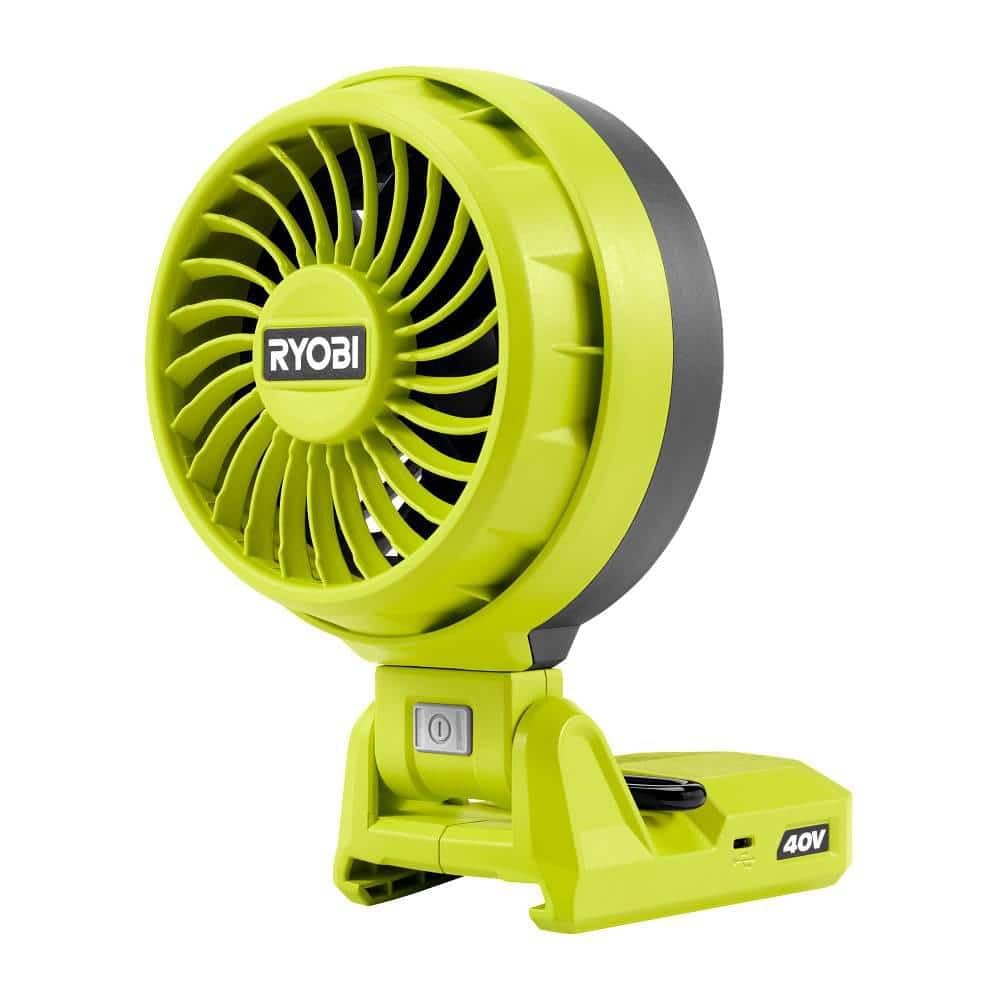
Image: The RYOBI 40V Battery Topper Fan with a 40V battery pack securely installed in the top compartment. The fan head is visible, along with the control panel.
2. Mounting Options
The fan features a 2-by metal hanging hook for versatile placement.
- Hanging: Extend the metal hook and hang the fan on a suitable support structure (e.g., a 2x4 stud, pipe, or hook). Ensure the support is stable and can bear the fan's weight.
- Freestanding: Place the fan on a flat, stable surface.
Adjust the multi-directional pivoting head to direct airflow as needed.
Operating Instructions
1. Powering On/Off
Press the power button located on the control panel to turn the fan on or off.
2. Adjusting Fan Speed
The fan has three speed settings: Low, Medium, and High. Press the speed control button repeatedly to cycle through the desired speed.
- Low Speed: Provides extended runtime for gentle air circulation.
- Medium Speed: Balances airflow and runtime.
- High Speed: Delivers maximum airflow for rapid cooling or ventilation.
3. USB-C Charging Port
The integrated USB-C port allows you to charge mobile devices. Connect your device's USB-C cable to the fan's USB-C port. The fan does not need to be operating to use the charging port, as long as a charged battery is installed.
Caution:
Do not use the USB-C port to charge the fan's 40V battery. This port is for charging external devices only.
Maintenance
Regular maintenance ensures optimal performance and extends the life of your fan.
1. Cleaning
Always remove the battery pack before cleaning.
- Use a soft, damp cloth to wipe down the exterior surfaces of the fan.
- Do not use harsh chemicals, abrasive cleaners, or solvents, as these may damage plastic parts.
- Periodically clean the fan blades and grille to remove dust and debris. A vacuum cleaner with a brush attachment can be used.
2. Storage
When not in use, store the fan in a clean, dry place, out of reach of children. Remove the battery pack for long-term storage.
Troubleshooting
| Problem | Possible Cause | Solution |
|---|---|---|
| Fan does not turn on. | Battery not installed correctly. | Ensure the battery pack is fully inserted and clicks into place. |
| Battery is discharged. | Charge the battery pack using a compatible RYOBI 40V charger. | |
| Fan is damaged. | Contact customer support for assistance. | |
| Reduced airflow. | Fan blades or grille are obstructed. | Remove battery, then clean fan blades and grille. |
| USB-C port not charging devices. | Battery is discharged or not installed. | Ensure a charged battery is installed. |
| Device cable is faulty. | Try a different USB-C cable or device. |
Specifications
- Model: RY40CF01B
- Brand: RYOBI
- Voltage: 40V DC
- Air Flow Capacity: 260 CFM
- Fan Speed Settings: 3 (Low, Medium, High)
- Special Features: Multi-directional pivoting head, 2-by metal hanging hook, USB-C charging port
- Dimensions (Product): 6 x 6 x 9 inches
- Power Source: Battery Powered (RYOBI 40V)
- Indoor/Outdoor Usage: Indoor, Outdoor
Warranty Information
This RYOBI 40V Battery Topper Fan (Model RY40CF01B) is backed by a 3-year manufacturer's warranty. This warranty covers defects in material and workmanship from the date of purchase. Please retain your proof of purchase for warranty claims. For full warranty details and conditions, please refer to the official RYOBI website or contact customer support.
Customer Support
For technical assistance, replacement parts, or warranty inquiries, please contact RYOBI customer support.
Website: www.ryobitools.com
Phone: Refer to the RYOBI website for regional contact numbers.
When contacting support, please have your product model number (RY40CF01B) and serial number (if applicable) ready.


