
1. Product Overview
The YYKY V31Z Smart Watch is a versatile wearable device designed to enhance your daily life with advanced health monitoring, communication features, and practical utilities. It features a vibrant 1.85-inch IPS HD display, Bluetooth calling, comprehensive health tracking including heart rate, SpO2, and sleep, over 100 sports modes, and an integrated LED flashlight. This manual provides detailed instructions for setup, operation, and maintenance of your new smartwatch.
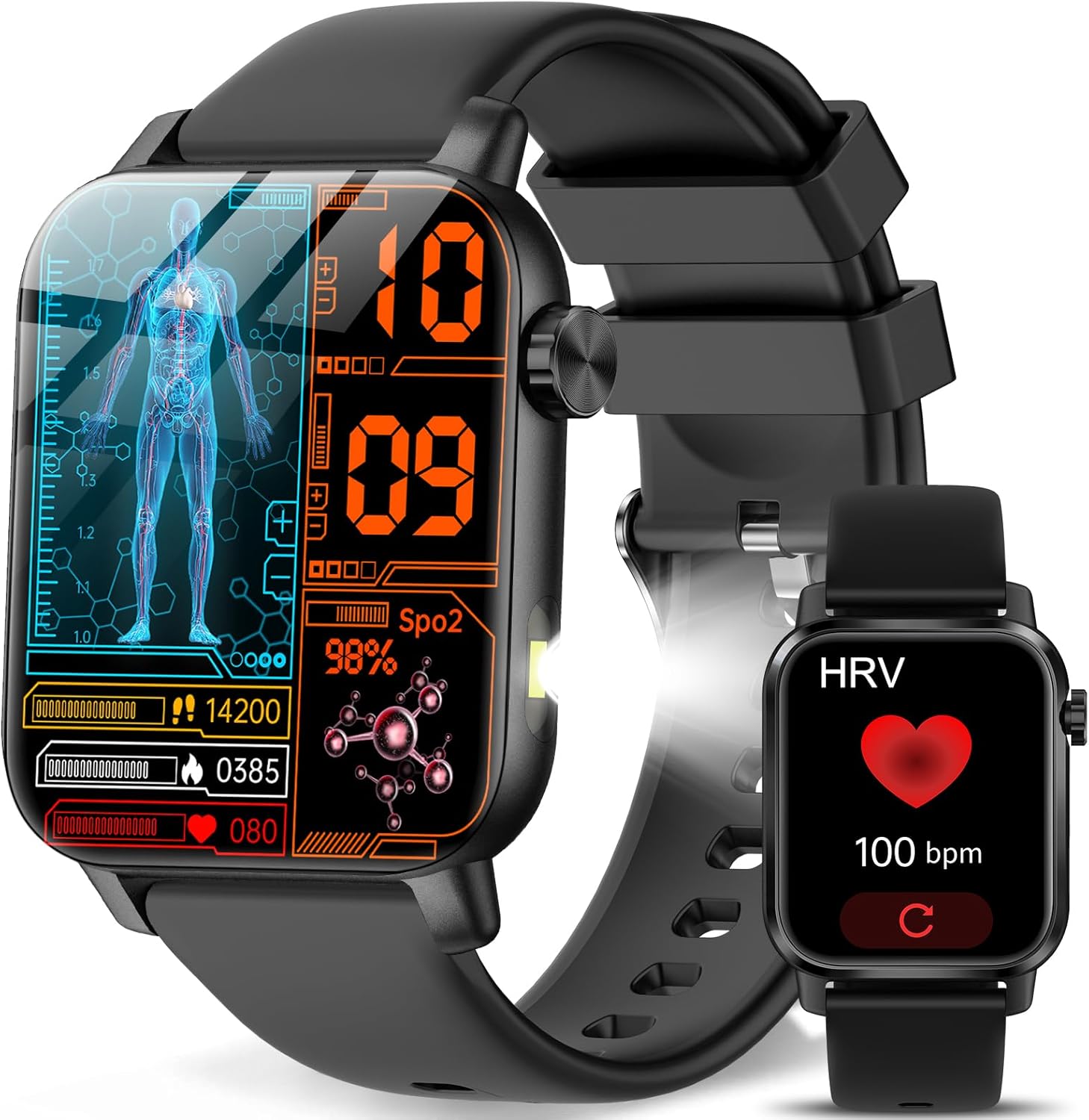
Figure 1.1: The YYKY V31Z Smart Watch displaying health metrics and a comparison with a smaller watch face showing HRV.
2. What's in the Box
Upon opening your product package, please verify that all the following items are included:
- Smartwatch x1
- Charging Cable x1
- User Manual x1

Figure 2.1: Illustration of the smartwatch, charging cable, and user manual included in the package, along with dimensions.
3. Setup Guide
3.1. Charging the Smartwatch
Before first use, fully charge your smartwatch. Connect the magnetic charging cable to the charging points on the back of the watch and plug the USB end into a compatible power adapter (not included) or a computer USB port. A full charge typically takes approximately 2 hours.

Figure 3.1: The smartwatch connected to its magnetic charging cable, illustrating the charging process and expected battery life.
3.2. App Installation
To unlock the full functionality of your smartwatch, download the "H Band" application on your smartphone. The app is available on both Google Play Store for Android devices (Android 6.0+ required) and Apple App Store for iOS devices (iOS 10.0+ required).
- Scan the QR code in the manual or search for "H Band" in your phone's app store.
- Download and install the application.
- Open the app and follow the on-screen instructions to create an account or log in.
3.3. Device Pairing
Pair your smartwatch with the "H Band" app to synchronize data and enable smart features.
- Ensure Bluetooth is enabled on your smartphone.
- Open the "H Band" app.
- Navigate to the device connection section within the app.
- The app will search for nearby devices. Select "V31Z" from the list of available devices to establish the connection.
- Once connected, the watch will synchronize time and data with your phone.

Figure 3.2: Visual guide for connecting the smartwatch to your smartphone using the H Band app and Bluetooth.
4. Operating the Smartwatch
4.1. Basic Navigation
The V31Z Smart Watch features a 1.85-inch IPS HD touchscreen display and a side button for navigation. Swipe left/right, up/down to access different functions and menus. Press the side button to return to the home screen or wake the device.

Figure 4.1: The 1.85-inch IPS HD large screen of the smartwatch, highlighting its visual quality and comfortable design.
4.2. Bluetooth Call and Answer
With Bluetooth 5.0 connectivity, you can make and answer calls directly from your wrist.
- Answering Calls: When a call comes in, the watch will display the caller ID. Tap the green icon to answer.
- Making Calls: Access the dial pad or your synchronized contacts (up to 10) on the watch to initiate a call.
- Call History: Review recent incoming and outgoing calls directly on the watch.
- The watch is equipped with an HD microphone and composite speaker for clear communication.

Figure 4.2: The smartwatch interface showing options for SOS emergency contact, HD microphone, message reminder, voice assistant, and composite speaker, along with call management screens.
4.3. Health Monitoring
The V31Z Smart Watch provides comprehensive 24/7 health monitoring features.
- Heart Rate Monitoring: Tracks your heart rate continuously throughout the day. View real-time data on the watch and detailed trends in the app.
- SpO2 Monitoring: Measures your blood oxygen saturation levels.
- Stress Monitoring: Analyzes stress levels and offers breathing exercises to help manage stress.
- Sleep Monitoring: Records sleep patterns, including deep sleep, light sleep, and awake times, to help improve sleep habits.
- Physiological Cycle Reminders: Provides reminders for menstrual cycles (for women).

Figure 4.3: The smartwatch interface showing real-time health monitoring for blood pressure, SpO2, heart rate, and sleep tracking, alongside a user sleeping.

Figure 4.4: The smartwatch's internal components, highlighting the high-precision wear detection chip and all-day health monitoring algorithm for improved accuracy.
4.4. Sports Modes
The smartwatch supports over 100 sports modes, automatically recognizing regular movements for comprehensive activity tracking. Track your workouts and view detailed statistics in the app.

Figure 4.5: A user engaged in running, with icons illustrating the wide variety of over 100 sports modes supported by the smartwatch, and its IP68 waterproof rating.
4.5. Other Features
- LED Flashlight: A built-in LED flashlight provides instant illumination with a single tap, useful in low-light conditions.
- Video Dynamic Watchface: Customize your watch face with short video clips or choose from over 200 exquisite dials.
- SOS Emergency Call: Press and hold the On/Off button for three seconds to display the "SOS" interface. Pressing the SOS button will automatically send notifications to pre-set emergency contacts.
- Smart Voice Assistant: Use voice commands to control smart devices, set alarms, check weather, play music, and more.
- Message Notifications: Receive real-time notifications from various apps (WhatsApp, Instagram, etc.) directly on your watch. Note: Reply function is not supported on the watch.
- Remote Camera Control: Control your phone's camera remotely for group photos.
- Built-in Tools: Includes a calculator, games, and calendar.
- Reminders: Features like sedentary reminder, drink water reminder, medication reminder, handwashing reminder, travel reminder, and long view reminder.

Figure 4.6: The smartwatch's LED flashlight in use, demonstrating its utility in various dark environments.

Figure 4.7: The smartwatch showcasing its customizable video watch face feature and a selection of over 200 exquisite dials.

Figure 4.8: A close-up of the smartwatch demonstrating the activation of the SOS emergency call feature by pressing the side button.

Figure 4.9: The smartwatch interface showcasing a range of practical functions including music playback, calendar, camera remote, weather display, and various health and activity reminders.
5. Maintenance
5.1. Water Resistance
The V31Z Smart Watch is rated IP68 waterproof, meaning it is resistant to splashes, rain, and sweat. It can be worn during handwashing. However, it is not suitable for hot water baths, saunas, swimming, or use in high-corrosive environments like seawater, as these conditions can compromise the waterproof seal.

Figure 5.1: The smartwatch being splashed with water, demonstrating its IP68 waterproof capabilities for daily activities like handwashing, rain, and sweat.
5.2. Cleaning and Care
To maintain your smartwatch's performance and appearance:
- Wipe the screen and strap regularly with a soft, damp cloth.
- Avoid using harsh chemicals, abrasive cleaners, or solvents.
- Ensure the charging contacts are clean and dry before charging.
- Store the watch in a cool, dry place when not in use.
6. Troubleshooting
If you encounter issues with your YYKY V31Z Smart Watch, please refer to the following common solutions:
| Problem | Possible Cause | Solution |
|---|---|---|
| Watch does not turn on | Low battery; device frozen | Charge the watch for at least 30 minutes. If still unresponsive, press and hold the side button for 10-15 seconds to force restart. |
| Cannot pair with phone | Bluetooth off; app issue; watch not discoverable | Ensure Bluetooth is on. Restart both phone and watch. Clear app cache or reinstall "H Band" app. Ensure watch is in pairing mode. |
| Inaccurate health data | Improper fit; sensor obstruction | Ensure the watch is worn snugly on your wrist, one finger-width above the wrist bone. Clean the sensor on the back of the watch. Avoid excessive movement during measurement. |
| Notifications not received | App permissions; notification settings | Check app permissions for "H Band" on your phone (e.g., notification access). Ensure notifications are enabled within the "H Band" app for desired applications. Keep the app running in the background. |
| Short battery life | Frequent use of power-intensive features; high brightness | Reduce screen brightness. Limit continuous heart rate monitoring or GPS usage. Turn off unnecessary notifications. |
7. Specifications
| Feature | Detail |
|---|---|
| Model Number | V31Z |
| Screen Size | 1.85 Inches IPS HD |
| Connectivity | Bluetooth 5.0 |
| Battery Capacity | 210 mAh Lithium Polymer |
| Battery Life (Normal Use) | 2-5 days |
| Battery Life (Standby) | 15+ days |
| Water Resistance | IP68 |
| Memory Storage Capacity | 128 MB |
| Operating System | Ubuntu Touch (as per product data, though this is unusual for a smartwatch) |
| Compatibility | Android 6.0+ / iOS 10.0+ |
| Dimensions (approx.) | 53.6mm x 37.8mm x 11.5mm (Watch body) |
8. Warranty and Support
For warranty information and customer support, please refer to the documentation provided with your purchase or visit the official YYKY brand store on Amazon:
If you require further assistance, please contact the seller directly through your Amazon order history.