
YYKY V31Z
YYKY V31Z Smartwatch User Manual
Model: V31Z
Introduction
Thank you for choosing the YYKY V31Z Smartwatch. This manual provides essential information for setting up, operating, and maintaining your device. Please read it thoroughly to ensure optimal performance and a complete understanding of its features.
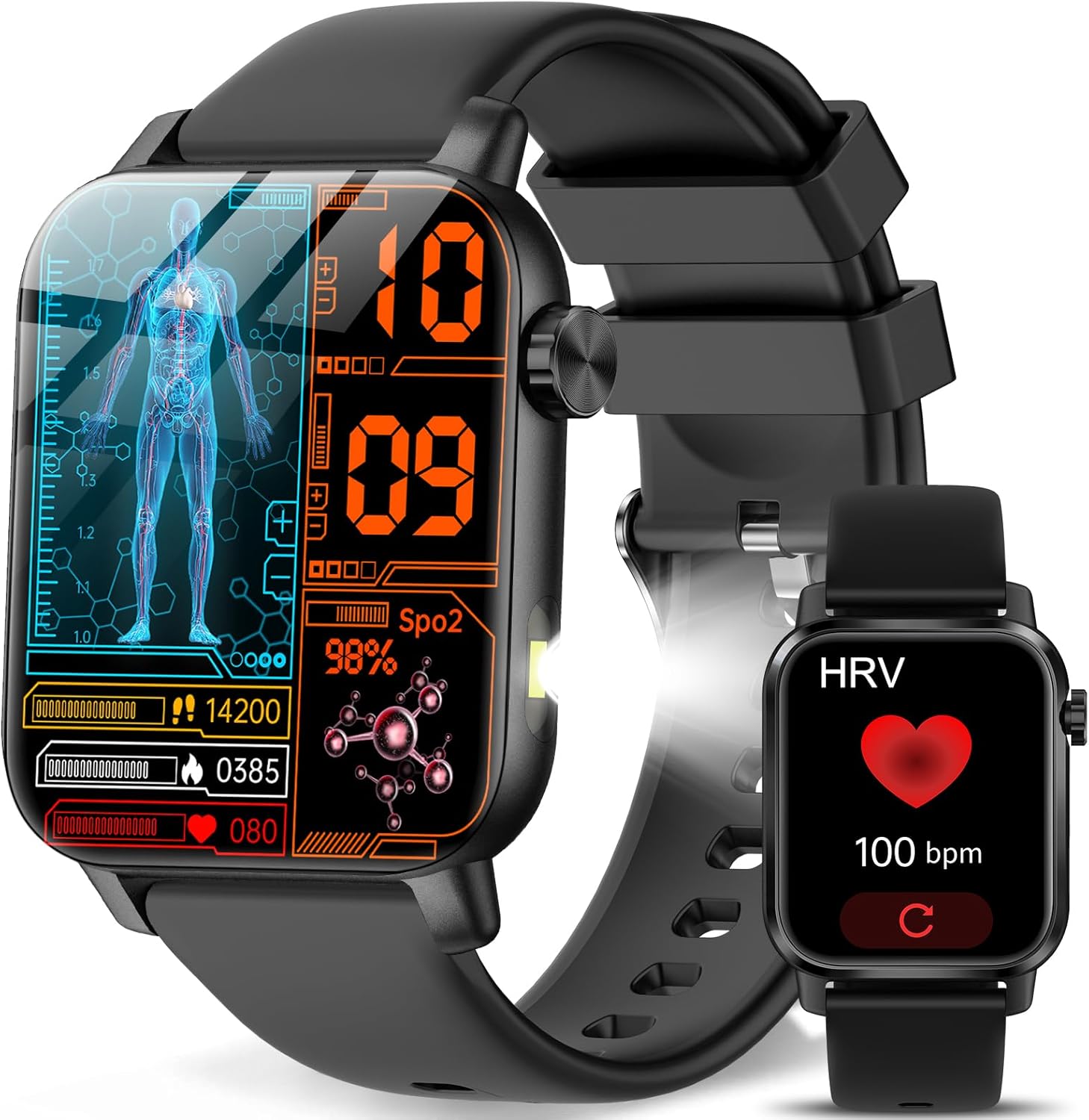
Image: The YYKY V31Z Smartwatch, showcasing its display with various health monitoring data such as heart rate, SpO2, and activity levels. A smaller watch face showing HRV is also visible.
Setup
1. Package Contents
Verify that your package contains the following items:
- YYKY V31Z Smartwatch x1
- Charging Cable x1
- User Manual x1
2. Charging the Smartwatch
Before first use, fully charge your smartwatch. Connect the magnetic charging cable to the charging contacts on the back of the watch and plug the USB end into a power adapter (not included) or a computer's USB port. The watch display will indicate charging status.

Image: An illustration showing the magnetic charging cable connected to the back of the smartwatch, alongside information about battery capacity (210mAh) and typical usage times (2-5 days normal use, 15+ days standby).
3. App Installation and Pairing
To unlock the full functionality of your smartwatch, download and install the companion app on your smartphone.
- Download the App: Search for "H Band" in the Google Play Store (for Android) or Apple App Store (for iOS) and install it.
- Enable Bluetooth: Ensure Bluetooth is enabled on your smartphone.
- Open App and Pair: Open the "H Band" app, navigate to the device options, and search for "V31Z". Select it to establish the connection.

Image: A four-panel graphic illustrating the connection process: downloading the H Band app, enabling Bluetooth, searching for the V31Z device in the app, and successfully connecting.
Operating Instructions
1. Basic Navigation
The V31Z Smartwatch features a 1.85-inch IPS HD touchscreen display. Swipe left, right, up, or down to navigate through menus and functions. The physical button on the side typically serves as a power button or a back/home button, depending on the context.

Image: A visual representation of the smartwatch's 1.85-inch IPS HD screen, highlighting its size and narrow bezels, with details on color accuracy and Adobe RGB coverage.
2. Bluetooth Call Function
Once paired with your smartphone, the smartwatch allows you to make and answer calls directly from your wrist.
- Answering Calls: When a call comes in, tap the green answer icon on the watch screen.
- Making Calls: Access the dial pad or your synced contacts on the watch to initiate a call.
- Volume Control: Adjust call volume directly on the watch.

Image: A person interacting with the smartwatch to make a call, showing the dial pad, incoming call screen, and call history interface on the watch.
3. Message Notifications
Receive real-time notifications from various apps (e.g., WhatsApp, Instagram, Facebook) directly on your smartwatch. Please note that replying to messages directly from the watch is not supported.

Image: The smartwatch screen showing incoming notifications from social media and messaging apps, with icons for various platforms like Facebook, WhatsApp, and Instagram.
4. Health Monitoring
The V31Z Smartwatch offers comprehensive health tracking features:
- Heart Rate: Continuous 24/7 heart rate monitoring. View real-time data and historical trends in the app.
- SpO2 (Blood Oxygen): Monitor your blood oxygen saturation levels.
- Stress Monitoring: Tracks stress levels and provides insights for management.
- Sleep Tracking: Analyzes sleep patterns, including deep sleep, light sleep, and awake times.
- Other Reminders: Includes medication reminders, handwashing reminders, and physiological cycle management.

Image: A person sleeping, with the smartwatch displaying sleep tracking data. Adjacent panels show watch screens for blood pressure, SpO2, heart rate, and sleep duration, along with icons for various health reminders.
5. Sports Modes
The smartwatch supports over 100 sports modes, automatically recognizing regular movements for comprehensive activity tracking. It utilizes your smartphone's GPS for route mapping during workouts.

Image: A person running outdoors, with icons representing over 100 sports modes. Below, the smartwatch displays its charging status and battery life information.
6. LED Flashlight
Activate the built-in LED flashlight with a single tap for convenient illumination in low-light conditions.

Image: The smartwatch emitting a bright light from its side, demonstrating its flashlight function in various scenarios such as camping, in a bedroom, and for checking on a baby.
7. Customizable Watch Faces
Personalize your smartwatch with over 200 exquisite dials. The device also supports video dynamic watch faces, allowing you to set short video clips as your background.

Image: The smartwatch displaying a dynamic video watch face, surrounded by various static watch face options. A smartphone interface shows how to customize watch faces, including selecting local or cloud videos.
8. Smart Voice Assistant
Utilize the built-in voice assistant to control smart devices, set alarms, check the weather, and more, enhancing convenience through seamless interaction.
9. SOS Emergency Call
For emergencies, press and hold the On/Off button for three seconds to display the "SOS" interface. Pressing the SOS button will automatically send notifications to your pre-set emergency contacts.
10. Other Practical Functions
The smartwatch includes additional features such as:
- Music Control
- Camera Remote Control
- Weather Forecast
- Calculator
- Games
- Calendar
- Stopwatch and Timer
- Alarm Clock

Image: A collage of images showing the smartwatch's various functions, including music playback control, calendar, sports reminders, camera remote, weather display, sedentary reminders, and icons for drinking water reminders, games, stopwatch, timer, alarm clock, calculator, and menstrual tracking.
Maintenance
1. Water Resistance
The V31Z Smartwatch is IP68 waterproof, meaning it is resistant to splashes, rain, and sweat. It can be worn while washing hands. However, it is not suitable for hot water baths, saunas, swimming, or exposure to corrosive liquids like seawater.

Image: A pink smartwatch being splashed with water, illustrating its IP68 waterproof rating. Text indicates it can withstand hand washing, rain, and sweat, with a warning against hot water, sauna, or corrosive environments.
2. Cleaning
Wipe the watch and strap regularly with a soft, dry cloth. If necessary, use a slightly damp cloth and then dry thoroughly. Avoid harsh chemicals or abrasive materials.
3. Battery Care
To prolong battery life, avoid fully discharging the battery frequently. Charge the device when the battery level is low. Store the watch in a cool, dry place when not in use for extended periods.
Troubleshooting
If you encounter issues with your YYKY V31Z Smartwatch, refer to the following common solutions:
- Device Not Turning On: Ensure the watch is fully charged. Connect it to the charger for at least 30 minutes.
- Cannot Pair with Phone:
- Ensure Bluetooth is enabled on your phone and the watch.
- Make sure the watch is within the Bluetooth range of your phone.
- Restart both your phone and the smartwatch.
- Clear the Bluetooth cache on your phone and try pairing again.
- Inaccurate Health Readings: Ensure the watch is worn snugly on your wrist, not too tight or too loose. Clean the sensor on the back of the watch. Note that health monitoring data is for reference only and should not be used for medical diagnosis.
- Notifications Not Appearing: Check app permissions on your phone to ensure the "H Band" app has access to notifications. Verify that notifications are enabled within the "H Band" app settings.
- Short Battery Life: Reduce screen brightness, disable unnecessary features, and limit frequent use of power-intensive functions like calls or continuous monitoring.
Specifications
| Feature | Detail |
|---|---|
| Model Number | V31Z |
| Screen Size | 1.85 Inches IPS HD |
| Connectivity | Bluetooth 5.0 |
| Battery Capacity | 210 mAh Lithium Polymer |
| Battery Life | 2-5 days (normal use), 15+ days (standby) |
| Water Resistance | IP68 |
| Operating System | Ubuntu Touch (as per product data, note: this is unusual for a smartwatch) |
| Memory Storage | 128 MB |
| Health Monitoring | Heart Rate, SpO2, Stress, Sleep, HRV, Blood Pressure, Blood Sugar (Note: Blood Pressure/Sugar data may be for reference only) |
| Special Features | LED Flashlight, Video Dynamic Watchface, Bluetooth Call, 100+ Sports Modes, SOS Emergency Call, Voice Assistant, Games, Calculator |
| Compatibility | Android 6.0+, iOS 10.0+ |
Warranty Information
Please refer to the warranty card included in your product packaging for detailed warranty terms and conditions. Typically, YYKY products come with a limited manufacturer's warranty covering defects in materials and workmanship from the date of purchase.
Customer Support
For further assistance, technical support, or inquiries regarding your YYKY V31Z Smartwatch, please contact YYKY customer service through the contact information provided on the official YYKY website or within the "H Band" application.
Ask a question about this manual
Ask about setup, troubleshooting, compatibility, parts, safety, or missing instructions. Manuals+ will review the question and use this page’s manual context to help answer it.