
Introduction
Thank you for choosing the Vamav Mercury DSP 1201 Amplified Speaker. This professional amplified speaker is designed to deliver natural sound with exceptional clarity and precision, ensuring uniform audio dispersion for various multimedia applications. This manual provides essential information for the safe and efficient operation of your speaker.
Safety Information
Please read all safety instructions carefully before operating the device. Keep this manual for future reference.
- Do not expose the speaker to rain or moisture.
- Do not block any ventilation openings.
- Ensure proper grounding for the power supply.
- Disconnect the power cord during lightning storms or when unused for long periods.
- Refer all servicing to qualified service personnel.
Package Contents
Verify that all items are present in the package:
- Vamav Mercury DSP 1201 Amplified Speaker
- Power Cable
- User Manual (this document)
Product Overview
The Vamav Mercury DSP 1201 is an active amplified speaker featuring a 12-inch woofer and a 1-inch driver. It is designed for floor mounting and offers versatile connectivity options.
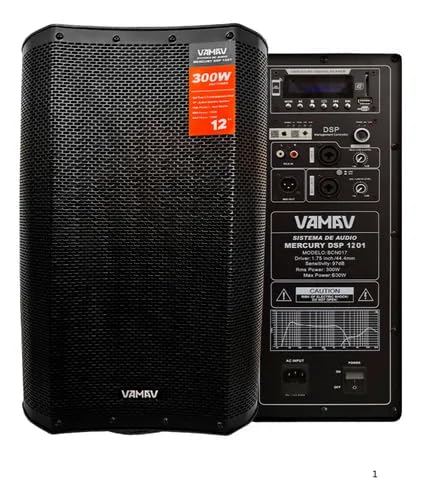
Figure 1: Front view of the Vamav Mercury DSP 1201 Amplified Speaker. This image shows the speaker's robust grille and the VAMAV branding at the bottom.

Figure 2: Angled front view of the Vamav Mercury DSP 1201 Amplified Speaker. This perspective highlights the speaker's overall design and the 300W power rating label.
Key Features:
- Speaker Configuration: 1 x 12-inch woofer, 1 x 1-inch driver
- RMS Power: 350W
- Sound Pressure Level (SPL): 96.5 dB
- Maximum SPL: 125 dB
- DSP Presets: 5 available presets for various audio environments
- Connectivity: USB, Micro SD, Radio FM, Bluetooth
- Inputs: 2 x XLR/6.3mm combo inputs, 1 x RCA input
- Output: 1 x XLR output
- Control: Remote control via dedicated mobile application (APP RC)
- Power Supply: 110V to 240V, 50/60Hz
- Material: Wood enclosure

Figure 3: Vamav Mercury DSP 1201 speaker and its control panel. This image illustrates the speaker's design alongside a detailed view of the rear control interface, highlighting input/output ports and control knobs.
Setup
- Placement: Position the speaker on a stable, flat surface. The speaker is designed for floor mounting. Ensure adequate ventilation around the unit.
- Power Connection: Connect the supplied power cable to the speaker's power input and then to a suitable electrical outlet (110V-240V, 50/60Hz).
- Initial Power On: Turn on the speaker using the power switch, usually located on the rear panel.
Operating Instructions
Bluetooth Connection
- Ensure the speaker is powered on.
- Activate Bluetooth mode on the speaker (refer to the control panel for mode selection).
- On your mobile device or computer, enable Bluetooth and search for available devices.
- Select "Vamav Mercury DSP 1201" (or similar name) from the list of devices to pair.
- Once paired, audio from your device will play through the speaker.
Input Connections
- XLR/6.3mm Combo Inputs: Connect microphones or line-level instruments using XLR or 6.3mm (1/4-inch) cables to the designated combo jacks.
- RCA Input: Use RCA cables to connect audio sources such as CD players, mixers, or other playback devices.
- USB/Micro SD: Insert a USB drive or Micro SD card into the respective slots on the control panel to play audio files directly.
- Radio FM: Select FM radio mode on the control panel to tune into radio stations.
DSP Presets
The speaker features 5 Digital Signal Processing (DSP) presets to optimize sound for different applications or environments. Refer to the control panel for selecting and cycling through these presets to find the best sound profile for your needs.
Mobile Application Control (APP RC)
For enhanced control, download the dedicated mobile application (APP RC) for your smartphone. This application allows remote control of various speaker functions, including volume, input selection, and DSP preset adjustments. Follow the instructions within the app for pairing and operation.
Maintenance
- Cleaning: Use a soft, dry cloth to clean the exterior of the speaker. Do not use liquid cleaners or solvents.
- Storage: When not in use for extended periods, store the speaker in a cool, dry place, away from direct sunlight and extreme temperatures.
- Ventilation: Ensure that the ventilation openings are kept clear of dust and debris to prevent overheating.
Troubleshooting
| Problem | Possible Cause | Solution |
|---|---|---|
| No power | Power cable not connected; Power outlet faulty; Power switch off. | Check power cable connection; Try a different outlet; Ensure power switch is ON. |
| No sound | Volume too low; Incorrect input selected; Audio source issue; Cable faulty. | Increase volume; Select correct input mode; Check audio source; Replace audio cables. |
| Bluetooth not connecting | Speaker not in pairing mode; Device too far; Interference; Previously paired device connected. | Ensure speaker is in Bluetooth pairing mode; Move device closer; Turn off other Bluetooth devices; Disconnect from other devices. |
| Distorted sound | Volume too high (clipping); Input signal too strong; Faulty cable. | Reduce volume on speaker and source; Check input gain settings; Replace cables. |
Specifications
| Model | MERCURY-DSP1201 |
| Manufacturer | VAMAV |
| Speaker Type | Amplified (Active) |
| Special Features | High-resolution audio, DSP Presets, Mobile App Control |
| Connectivity | Bluetooth, USB, Micro SD, Radio FM |
| Inputs | 2 x XLR/6.3mm Combo, 1 x RCA |
| Output | 1 x XLR |
| Material | Wood |
| Mounting Type | Floor |
| Color | Black |
| Dimensions (L x W x H) | 49 x 44 x 78 cm |
| Weight | 20 kg |
| Power Supply | 110V-240V, 50/60Hz |
| Batteries Required | No |
Warranty and Support
For warranty information and technical support, please refer to the documentation provided with your purchase or contact the manufacturer directly. Keep your proof of purchase for any warranty claims.