
1. Introduction
This manual provides detailed instructions for the setup, operation, and maintenance of your LINKMICRO LM208S 4K HDMI Digital Microscope and LM013 Portable Digital Microscope. Please read this manual thoroughly before using the devices to ensure proper function and longevity.

Image 1.1: The LINKMICRO LM208S 4K HDMI Digital Microscope (left) and the LM013 Portable Digital Microscope (right).
2. Product Overview - LM208S 4K HDMI Digital Microscope
2.1 Components
- 10.1-inch IPS Display Screen
- Microscope Camera Unit
- Adjustable Metal Stand
- Base Plate
- 56-LED Ring Light
- 8 Top LED Lights
- Gooseneck Side LED Lights (2)
- Slide Holder with Bottom Light
- Remote Control
- 64GB Memory Card
- HDMI Cable
- USB Cable
- Power Adapter
2.2 Key Features
- 4K 30FPS Video Resolution: Provides high-definition real-time visuals.
- 10.1-inch IPS Screen: Offers a 178° wide viewing angle for clear observation.
- Dual-Screen Capability: Simultaneous display on built-in screen and external 4K HDMI monitor.
- Spacious Work Area: 12.6-inch metal stand and 7x8-inch base for large objects like coins.
- Adjustable Illumination: External 56-LED ring light, 8 top LEDs, gooseneck side LEDs, and slide holder bottom light for optimal lighting.
- Image and Video Capture: Save observations to the included 64GB memory card.
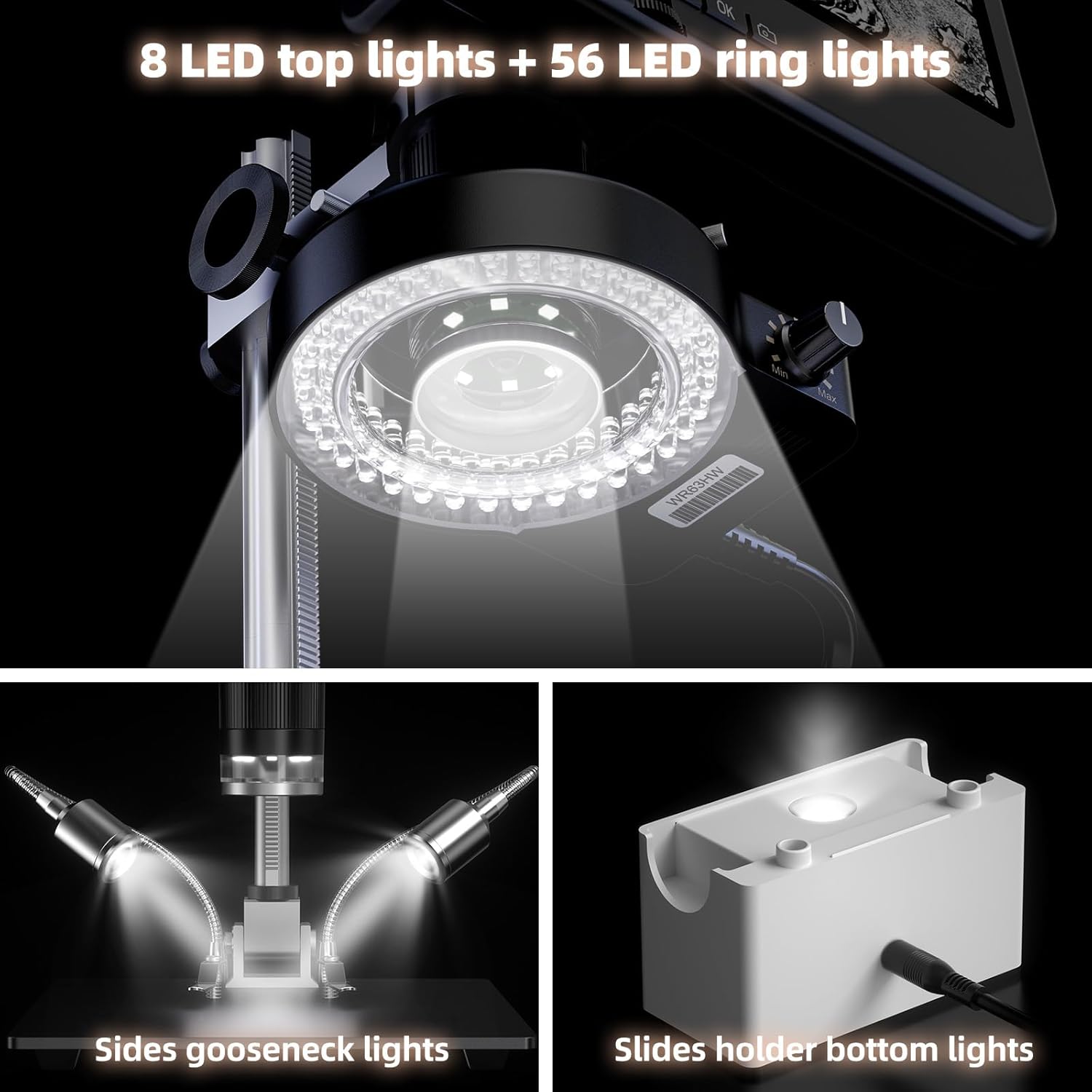
Image 2.1: Detailed view of the LM208S's multiple lighting sources, including the 56-LED ring light, 8 top LEDs, gooseneck side lights, and the slide holder with bottom light.
3. Product Overview - LM013 Portable Digital Microscope
3.1 Components
- LM013 Portable Microscope Unit with 2.8-inch LCD Screen
- Built-in Distance Adjustment Ring
- USB Cable
- Slide Holder (optional accessory, may be included)
3.2 Key Features
- Portable Design: Handheld for flexible exploration.
- 2.8-inch LCD Screen: Integrated display for direct viewing.
- Built-in Distance Adjustment Ring: Reduces image jitter and allows for a larger field of view without a stand.
- 3-in-1 Functionality: Operates as a microscope, digital camera, and telescope.
- USB Connectivity: Compatible with computer cameras for larger display.

Image 3.1: The LM013 portable microscope highlighting its built-in distance adjustment ring for stable and clear imaging.
4. Setup Instructions
4.1 LM208S 4K HDMI Digital Microscope Assembly
- Unpack Components: Carefully remove all parts from the packaging.
- Assemble Stand: Attach the metal stand to the base plate using the provided screws.
- Mount Microscope Unit: Secure the microscope camera unit onto the adjustable arm of the stand.
- Connect Display: Attach the 10.1-inch IPS display to the microscope unit.
- Install Lighting: Connect the 56-LED ring light, 8 top LED lights, and gooseneck side LED lights to their respective ports on the microscope unit or stand.
- Insert Memory Card: Insert the 64GB memory card into the designated slot on the microscope unit.
- Power Connection: Connect the power adapter to the microscope and a power outlet.
- Optional HDMI Connection: For external display, connect the HDMI cable from the microscope to a 4K HDMI monitor.

Image 4.1: The LM208S microscope fully assembled and positioned for detailed work on a circuit board, demonstrating its stable setup.
4.2 LM013 Portable Digital Microscope Initial Use
- Charge Battery: Connect the LM013 to a USB power source using the provided USB cable to charge the internal battery.
- Power On: Press and hold the power button to turn on the device.
- Optional Slide Holder: If using for microscope slides, place the LM013 onto the slide holder.
- USB Connection to Computer: To use as a USB magnifier with a computer, connect the LM013 via USB cable to your computer. The device should be recognized as a webcam or camera.

Image 4.2: The LM013 portable microscope connected to a laptop via USB, demonstrating its compatibility as a computer camera for magnified viewing.
5. Operating Instructions
5.1 Operating the LM208S
- Power On: Press the power button on the microscope unit or remote control.
- Place Object: Position the object to be observed on the base plate. For slides, use the slide holder.
- Adjust Focus: Use the focus knob on the microscope unit to achieve a clear image on the display.
- Adjust Magnification: Rotate the lens barrel to change magnification.
- Control Lighting: Use the controls for the ring light, top LEDs, and gooseneck lights to adjust brightness and direction. The slide holder also has a separate bottom light.
- Capture Images/Videos: Use the dedicated buttons on the microscope unit or remote control to take photos or record videos. Files are saved to the inserted memory card.
- HDMI Output: If connected to an external 4K HDMI display, the image will be mirrored in real-time.

Image 5.1: The LM208S displaying a circuit board on its integrated screen and simultaneously outputting a 4K 30FPS signal to an external HDMI monitor.
5.2 Operating the LM013
- Power On: Press the power button.
- Position Object: Hold the microscope over the object or place it on the slide holder.
- Adjust Distance: Rotate the built-in distance adjustment ring to bring the object into focus and achieve the desired field of view. This ring helps stabilize the image.
- Adjust Illumination: Use the integrated light controls to illuminate the subject.
- Capture Images/Videos: Press the designated button to take photos or record videos.
- Switch Modes (3-in-1): Use the mode button to switch between microscope, camera, and telescope functionalities.

Image 5.2: A close-up of the LM013's 2.8-inch IPS display, showing a magnified image of a ladybug, illustrating direct viewing without external connections.
6. Maintenance
- Cleaning Lenses and Screen: Use a soft, lint-free cloth specifically designed for optical surfaces. Do not use abrasive cleaners or solvents.
- Cleaning Body: Wipe the microscope body with a soft, dry cloth. For stubborn dirt, a slightly damp cloth can be used, ensuring no moisture enters openings.
- Storage: Store both microscopes in a clean, dry, and dust-free environment when not in use. Keep them away from direct sunlight and extreme temperatures.
- Battery Care (LM013): For optimal battery life, avoid fully discharging the LM013 frequently. Charge it regularly.
- Memory Card: Periodically back up data from the memory card to prevent loss. Format the card if performance degrades.
7. Troubleshooting
| Problem | Possible Cause | Solution |
|---|---|---|
| LM208S/LM013 does not power on. | No power, low battery (LM013), loose connection. |
|
| Image is blurry or out of focus. | Incorrect focus, object too far/close, dirty lens. |
|
| No image on external HDMI display (LM208S). | HDMI cable issue, incorrect input on monitor, monitor not 4K compatible. |
|
| Image jitter (LM013). | Unstable handholding, incorrect distance adjustment. |
|
| Cannot save photos/videos. | Memory card full, not inserted correctly, or corrupted. |
|
8. Specifications
8.1 LM208S 4K HDMI Digital Microscope
- Display: 10.1-inch IPS Screen, 178° wide viewing angle
- Video Resolution: 4K 30FPS
- Stand: 12.6-inch metal stand
- Base Plate: 7x8-inch
- Illumination: External 56-LED ring light, 8 top LEDs, 2 gooseneck side LEDs, slide holder bottom light
- Storage: Supports 64GB memory card (included)
- Output: HDMI, USB
8.2 LM013 Portable Digital Microscope
- Display: 2.8-inch LCD Screen
- Functionality: Microscope, Camera, Telescope (3-in-1)
- Focus: Built-in Distance Adjustment Ring
- Connectivity: USB (for computer camera function)
- Magnification (Built-in screen): Up to 120X (with 4X digital magnification)
9. Warranty and Support
LINKMICRO products are designed for reliability and performance. For warranty information, technical support, or service inquiries, please refer to the warranty card included with your product or visit the official LINKMICRO website. Please have your model number (LM208S or LM013) and purchase date available when contacting support.
Official LINKMICRO Store: LINKMICRO Store on Amazon
