
1. Overview
The FIBATDOR WT16 is a versatile 6-in-1 detector designed to identify various hidden surveillance devices, including cameras, listening devices, and GPS trackers. It utilizes wireless radio, magnetic, and infrared detection technologies to provide comprehensive privacy protection. Its compact and portable design makes it suitable for use in diverse environments such as travel, hotels, and public spaces.
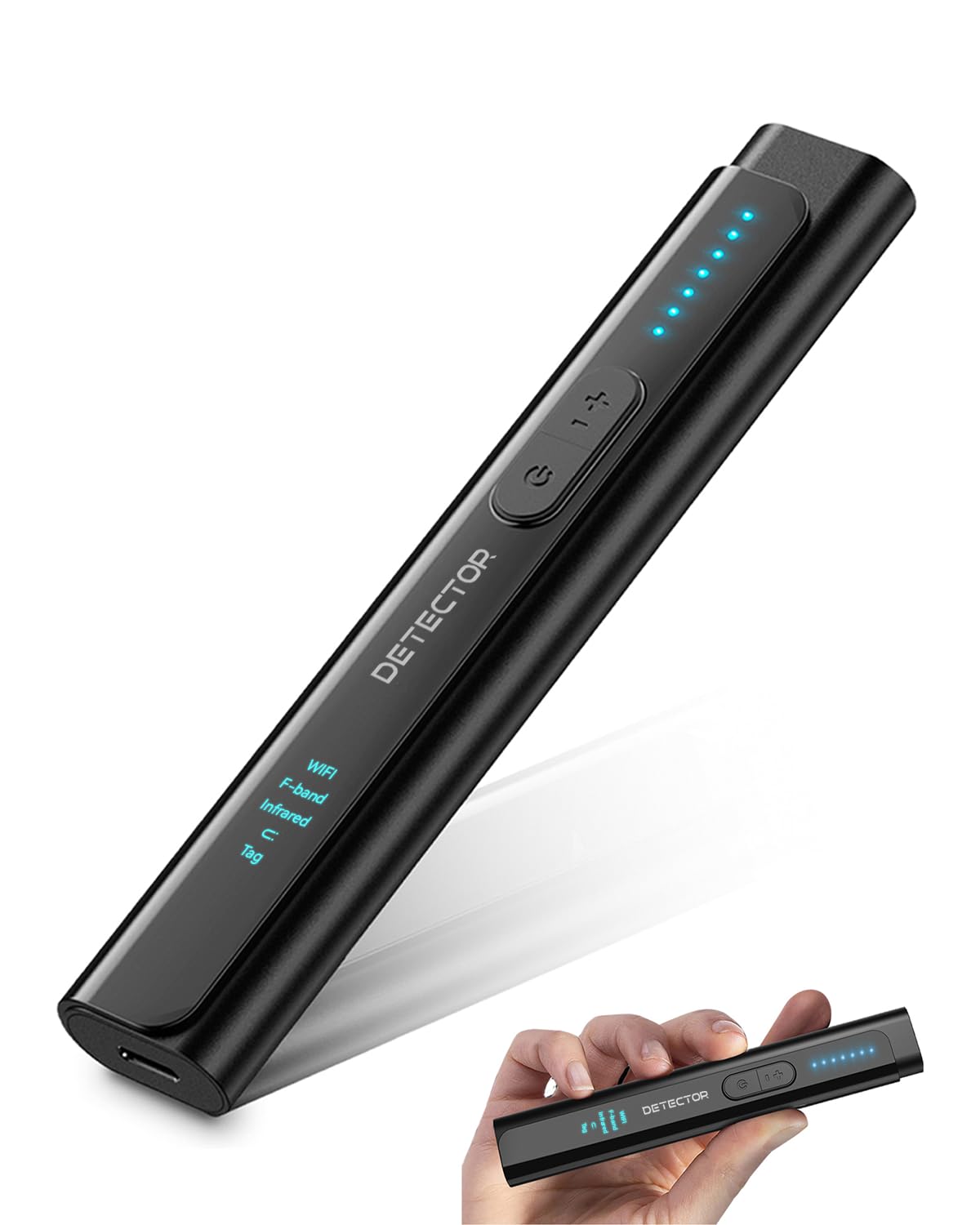
Figure 1: FIBATDOR WT16 Hidden Camera Detector
2. Key Features
- 6-in-1 Detection: Detects wireless radio, magnetic, and infrared devices, including various types of cameras, listening devices, and GPS trackers.
- Adjustable Sensitivity: Features 6 levels of sensitivity for broad scanning and precise pinpointing of hidden devices.
- Two Alert Modes: Offers both audible beep and vibration alerts for discreet or overt notification.
- Compact and Portable: Lightweight design (0.08 lbs) with dimensions of 5.35 x 1.02 x 0.6 inches, ideal for travel.
- Extended Battery Life: Provides up to 48 hours of continuous use on a single charge.
- Type-C Fast Charging: Built-in 500mAh lithium battery recharges in approximately 1 hour.

Figure 2: Illustration of the detector's multiple detection modes.

Figure 3: The detector's compact size and long battery life.
3. Setup
3.1 Initial Charging
Before first use, fully charge the FIBATDOR WT16 detector. Connect the provided Type-C charging cable to the device's charging port and a compatible USB power source. The charging indicator lights will illuminate during charging and turn off when fully charged. A full charge takes approximately 1 hour.

Figure 4: Connecting the Type-C charging cable to the detector.
3.2 Power On/Off
To power on the device, press and hold the power button until the indicator lights illuminate. To power off, press and hold the power button again until the lights turn off.
4. Operating Instructions
4.1 Adjusting Sensitivity
The detector features 6 levels of sensitivity. Press the sensitivity button (usually marked with '+' or similar) to cycle through the levels. Start with the highest sensitivity for a broad scan of an area. As you narrow down a potential source, gradually lower the sensitivity to pinpoint the exact location of the hidden device. The LED indicators will show the current sensitivity level.

Figure 5: The detector's LED indicators display the current sensitivity level.
4.2 Detection Modes
The WT16 detector integrates multiple detection modes:
- RF Signal Detection: Detects wireless signals from hidden cameras, listening devices, and GPS trackers. Move the device slowly around the area. An increasing number of illuminated LEDs or a stronger alert indicates a stronger signal.
- Magnetic Field Detection: Used to locate magnetic GPS trackers often attached to vehicles. Scan surfaces where such devices might be hidden.
- Infrared Detection: Identifies infrared light emitted by night vision cameras.
- Camera Lens Finder: Activates a red LED array. Look through the detector's viewing window while scanning the room. Hidden camera lenses will reflect the red light, appearing as a bright red dot. This mode is most effective in dark environments.

Figure 6: Using the detector to find a hidden camera lens by observing reflected light.
4.3 Switching Alert Modes
The detector offers two alert modes: audible beep and vibration. To switch between these modes, long press the sensitivity button for approximately 10 seconds. This allows for discreet detection when needed.
4.4 Instructional Video
Video 1: An official video demonstrating how the FIBATDOR Hidden Camera Detector identifies various types of cameras.
5. Maintenance
- Cleaning: Wipe the device with a soft, dry cloth. Do not use abrasive cleaners or solvents.
- Storage: Store the detector in a cool, dry place away from direct sunlight and extreme temperatures.
- Battery Care: To prolong battery life, avoid fully discharging the device frequently. Recharge it regularly, even if not in use for extended periods.
6. Troubleshooting
| Issue | Possible Cause | Solution |
|---|---|---|
| Device does not power on. | Low battery. | Charge the device fully using the provided Type-C cable. |
| Inaccurate or false detections. | High sensitivity in an area with many electronic devices (e.g., Wi-Fi routers, mobile phones). | Reduce the sensitivity level. Turn off nearby personal electronic devices (e.g., put phone in airplane mode) to minimize interference. |
| Cannot find camera lens in infrared mode. | Room is too bright; lens reflection is not visible. | Ensure the detection environment is as dark as possible for optimal visibility of lens reflections. |
| Short battery life. | Frequent use of high-power modes; aging battery. | Ensure the device is fully charged. If battery life significantly degrades over time, contact support. |
7. Specifications
| Feature | Detail |
|---|---|
| Model Name | LMY-FB16 (WT16) |
| Detection Modes | 6-in-1 (Wireless Radio, Magnetic, Infrared, Camera Lens, etc.) |
| Sensitivity Levels | 6 |
| Alert Modes | Audible Beep, Vibration |
| Battery Type | 500mAh Lithium Ion |
| Charging Time | Approx. 1 hour (Type-C) |
| Continuous Use Time | Up to 48 hours |
| Standby Time | Up to 7 days |
| Dimensions | 5.35 x 1.02 x 0.6 inches (approx. 13.6 x 2.6 x 1.5 cm) |
| Weight | 0.08 lbs (approx. 36 grams) |
| Material | Polypropylene (PP) |
8. Warranty and Support
The FIBATDOR WT16 Hidden Camera Detector comes with a Lifetime Warranty from the manufacturer. For any technical assistance, troubleshooting, or warranty claims, please contact FIBATDOR customer support. You can find more information and support resources on the official FIBATDOR store page: FIBATDOR Store.