
1. Introduction
This manual provides detailed instructions for the installation, operation, and maintenance of your Omethey 6.0 Cuft Fingerprint Safe (Model KM-65). This extra-large home safe box is designed to secure your valuables with advanced features including fingerprint access, a backlit keypad, a dual alarm system, and an adjustable shelf. Please read this manual thoroughly before using the safe to ensure proper function and security.

Image: The Omethey 6.0 Cuft Fingerprint Safe, showcasing its design and size within a typical home environment.
2. Safety Information
- Always keep emergency keys in a secure location away from the safe and out of reach of unauthorized individuals. Do not store them inside the safe.
- Ensure the safe is securely mounted to a wall or floor to prevent unauthorized removal.
- Do not expose the safe to extreme temperatures or humidity.
- Keep the keypad clean and dry.
- Avoid storing flammable liquids or compressed gases inside the safe.
- Regularly check the battery level and replace batteries as needed to avoid lockout.
- Do not attempt to force the safe open if you forget the password or encounter issues; use emergency keys or contact support.
3. Package Contents
Please verify that all components are present in the package:
- 1 x Omethey 6.0 Cuft Fingerprint Safe
- 4 x Emergency Keys
- 1 x USB Type-C Cable (for emergency power)
- 4 x Non-slip Pads
- 6 x Expansion Screws (for mounting)
- 1 x User Manual (this document)

Image: A visual representation of the accessories included with the safe, such as emergency keys, USB-C cable, foot mats, expansion screws, and the quick start guide.
4. Product Features
- Extra Large Capacity: External dimensions of 13.8"D x 13.8"W x 25.6"H, with a double door design for separate access.
- Robust Construction: Made from reinforced low carbon alloy steel with a pry-resistant thickened door and 5 solid living bolts for enhanced security.
- Biometric Fingerprint Access: Quick access with registered fingerprints (up to 30 fingerprints can be stored).
- Adjustable & Removable Shelf: Customize interior storage space to fit various items.
- Dual Alarm System: Activates after 3 incorrect password attempts or violent vibrations, emitting a 70-decibel alarm for 60 seconds.
- Metal Storage Box: Provides additional secure storage for smaller items like ammunition or pistols.
- Deposit Slot: Convenient front slot for depositing money or coins without opening the main door.
- Backlit Keypad: Ensures clear visibility and operation even in low-light conditions.
- Built-in LED Light: Automatically illuminates the interior when the safe is opened with a password, aiding visibility.
- Mute Function: Allows silent operation of the keypad to avoid disturbing others or alerting intruders.
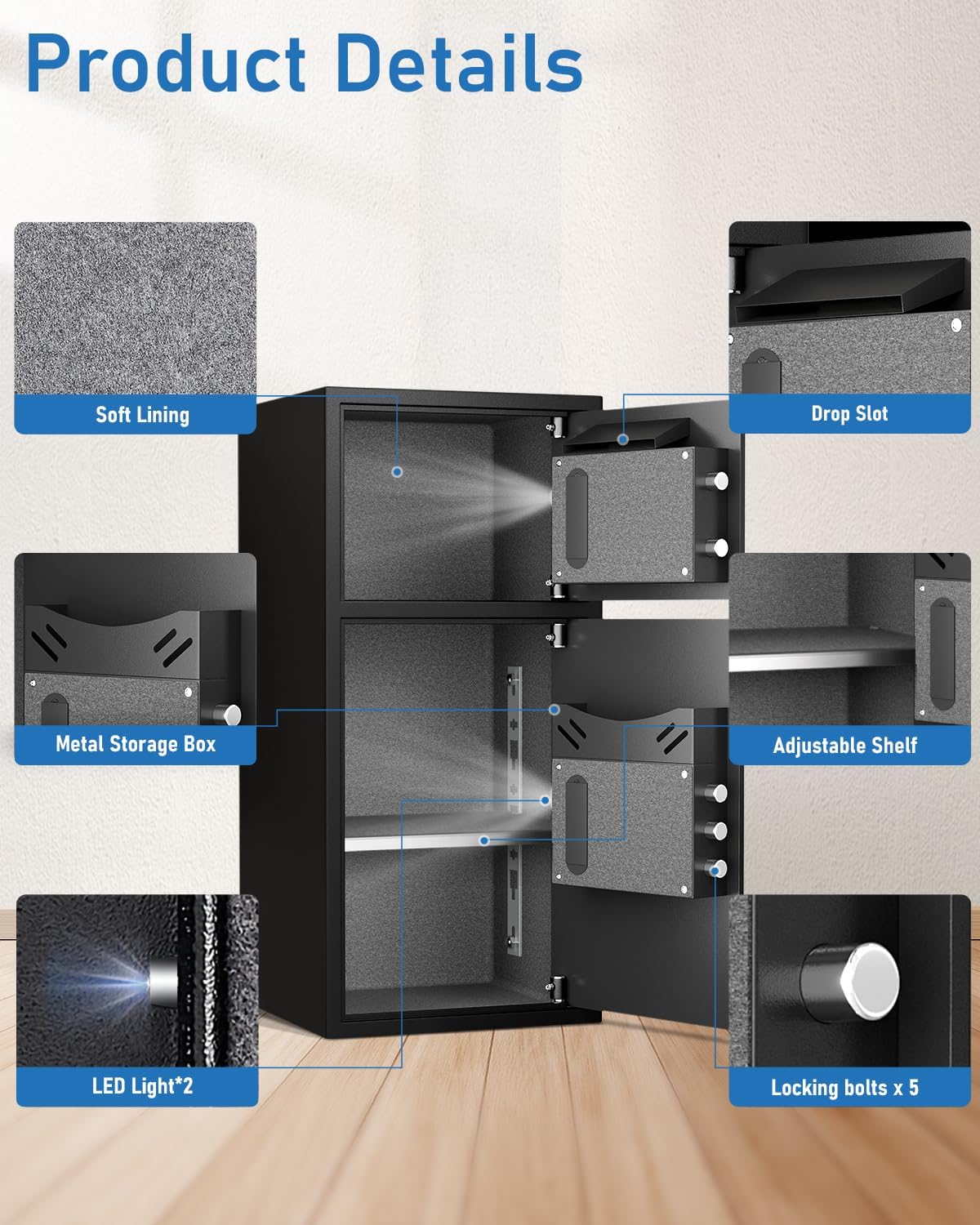
Image: An exploded view highlighting key features such as soft lining, drop slot, metal storage box, adjustable shelf, LED lights, and locking bolts.

Image: Illustrates the reinforced solid steel construction, emphasizing anti-theft, anti-prying, anti-drilling, and anti-corrosion properties.
5. Setup
5.1 Initial Opening
- Locate the emergency keys provided in the package.
- Insert an emergency key into the keyhole located behind the keypad cover.
- Turn the key clockwise while simultaneously turning the knob to open the safe door.
- Install 4 AA batteries (not included) into the battery compartment located on the inside of the door.
5.2 Mounting the Safe
The safe can be mounted to the floor or a wall for added security. Pre-drilled mounting holes are provided (four at the back, two at the bottom).
- Choose a suitable location for the safe.
- Mark the drilling points through the pre-drilled holes on the safe's back or bottom onto the wall or floor.
- Drill holes at the marked points using an appropriate drill bit.
- Align the safe with the drilled holes.
- Insert the expansion screws through the safe's holes and into the wall/floor.
- Tighten the screws securely to fix the safe in place.

Image: The Omethey safe securely installed inside a closet, demonstrating a common mounting scenario.
5.3 Adjusting the Shelf
The interior shelf is adjustable and removable to accommodate items of various sizes.
- Open the safe door.
- To remove, lift the shelf slightly and pull it out from its supports.
- To adjust, place the shelf onto the desired support brackets inside the safe.

Image: Shows the interior of the safe with the adjustable and removable shelf, illustrating different possible configurations for storage.
6. Operating Instructions
6.1 Opening Methods
Your Omethey safe offers multiple ways to open:
- Fingerprint + Turn Knob: Place a registered fingerprint on the sensor, then turn the knob.
- Emergency Key + Turn Knob: Use one of the emergency keys in the keyhole, then turn the knob.
- Password + Turn Knob: Enter your programmed password on the keypad, then turn the knob.
- USB Type-C + Password + Turn Knob: If batteries are dead, connect a USB Type-C cable to an external power source, enter your password, then turn the knob.
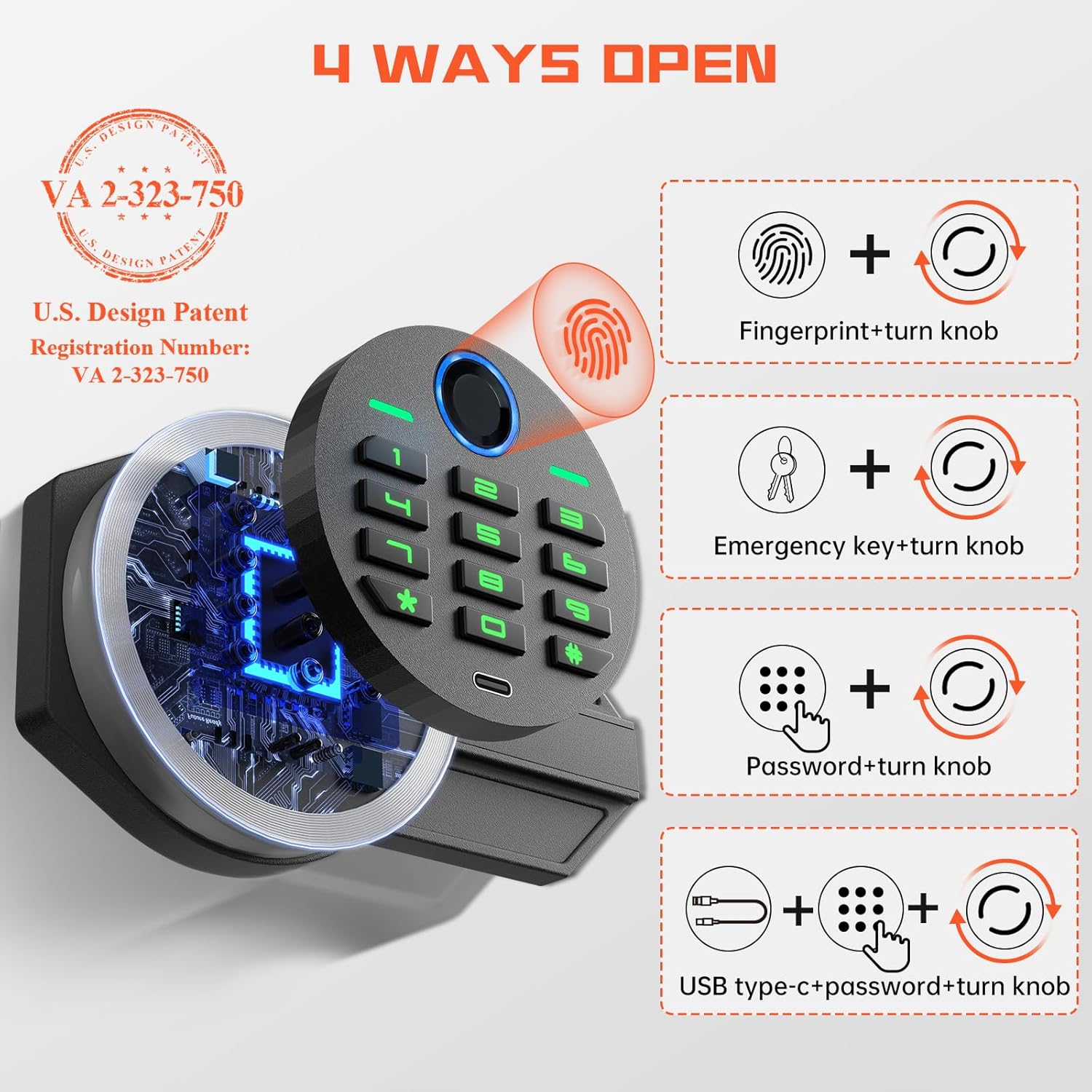
Image: A diagram illustrating the four different methods to open the safe: fingerprint, emergency key, password, and emergency power with password.
6.2 Setting/Changing Passwords
- With the safe door open, press the internal reset button (usually located on the inside of the door).
- The keypad will illuminate, and you will hear a beep.
- Enter your new 4-8 digit password on the keypad.
- Press the "#" key to confirm.
- Re-enter the new password and press "#" again to confirm.
- Test the new password with the door open before closing it.
6.3 Registering Fingerprints
The safe can store up to 30 fingerprints.
- With the safe door open, press the internal reset button.
- Place your finger on the fingerprint sensor.
- Lift and place your finger multiple times (usually 4-5 times) from different angles until the safe confirms successful registration (e.g., a green light and a beep).
- Repeat for additional fingerprints.
6.4 Mute Function
To activate or deactivate the mute function:
- Press the "*" key, then press the "1" key on the keypad.
- This will toggle the sound on or off for keypad presses and alarms.

Image: Details the mute function activation (* then 1) and explains the dual alarm system, which triggers at 70dB for 60 seconds after incorrect entries or violent vibrations.
7. Maintenance
- Battery Replacement: Replace batteries when the low battery indicator appears or if the keypad becomes unresponsive. Use 4 new AA alkaline batteries.
- Cleaning: Wipe the exterior of the safe with a soft, damp cloth. Avoid abrasive cleaners or solvents. Keep the fingerprint sensor and keypad free from dust and debris.
- Keyhole Maintenance: Do not lubricate the keyhole with oil. If the key mechanism feels stiff, use a graphite-based lubricant sparingly.
- Interior Care: The soft lining inside the safe can be gently vacuumed or wiped to remove dust.
8. Troubleshooting
| Problem | Possible Cause | Solution |
|---|---|---|
| Safe does not open with password/fingerprint. | Low batteries, incorrect password/fingerprint, system error. | Replace batteries. Re-enter password carefully. Re-register fingerprint. Use emergency key. |
| Keypad is unresponsive. | Dead batteries. | Replace batteries. If batteries are completely dead, use the emergency USB Type-C cable for temporary power. |
| Alarm sounds unexpectedly. | 3 incorrect entries, violent vibration. | Enter the correct password to stop the alarm. Avoid bumping the safe. |
| Emergency key does not turn. | Keyhole obstruction, incorrect key. | Ensure the correct key is used. Check for any debris in the keyhole. Do not force. |
9. Specifications
| Feature | Detail |
|---|---|
| Brand | Omethey |
| Model Number | KM-65 |
| Product Dimensions (External) | 13.8"D x 13.8"W x 25.6"H |
| Capacity | 6 Cubic Feet |
| Lock Type | Biometric (Fingerprint) and Digital Keypad |
| Material | Alloy Steel |
| Item Weight | 44 Pounds |
| Mounting Type | Wall & Floor Mount (hardware included) |
| Alarm System | Audible & Vibration (70dB) |
| Power Source | 4 x AA Batteries (not included), USB Type-C for emergency power |
Image: A detailed diagram showing the external and internal dimensions of the safe, along with a visual list of included accessories.
10. Warranty & Support
Omethey provides lifetime customer service for each safe sold. If you encounter any questions or issues with your Omethey 6.0 Cuft Fingerprint Safe, please do not hesitate to contact our customer support team.
Customer Service: Available 7 days a week, 24 hours a day.
Please refer to the contact information provided in your purchase documentation or on the official Omethey website for the most up-to-date support channels.