
Introduction
This manual provides essential instructions for the safe operation, assembly, maintenance, and troubleshooting of your Hiboy C1 Electric Bike. Please read this manual thoroughly before your first ride to ensure proper usage and to maximize your riding experience.

Figure 1: Hiboy C1 Electric Bike (Black)
This image displays the Hiboy C1 Electric Bike in its unfolded state, showcasing its compact design, 14-inch wheels, and integrated components like the front light and disc brake.
Safety Guidelines
Your safety is paramount. Always wear a helmet and appropriate safety gear when riding. Adhere to all local traffic laws and regulations. The Hiboy C1 Electric Bike is UL 2849 Certified, and its battery is UL 2271 Certified, ensuring compliance with safety standards.
- Perform a pre-ride inspection before each use.
- Ensure all bolts and quick releases are securely tightened.
- Check tire pressure and brake functionality.
- Do not ride under the influence of alcohol or drugs.
- Be aware of your surroundings and potential hazards.
- Avoid riding in adverse weather conditions.

Figure 2: Riders demonstrating safe operation with front lights and rear reflectors.
This image shows two individuals riding Hiboy C1 electric bikes, highlighting the importance of safety features like bright front lights and rear reflectors for visibility.
Setup and Initial Assembly
Your Hiboy C1 Electric Bike comes partially assembled. Follow these steps for initial setup:
- Unfolding the Bike: Carefully unfold the frame and handlebar stem until they lock into place. Ensure all quick-release levers are securely fastened.
- Handlebar Connection: Before installing the bicycle handlebar, connect the electrical cables between the controller and the instrument display. This is crucial for the electric functions to operate.
- Handlebar Installation: Securely attach the handlebars to the stem.
- Seat Adjustment: Adjust the seat height to a comfortable and safe position, ensuring your feet can touch the ground when stopped.
- Pedal Installation: Install the pedals, ensuring they are tightened correctly.
- Tire Inflation: Inflate tires to the recommended pressure indicated on the tire sidewall.
- Initial Charge: Fully charge the battery before your first ride. The battery requires 5-6 hours for a full charge.
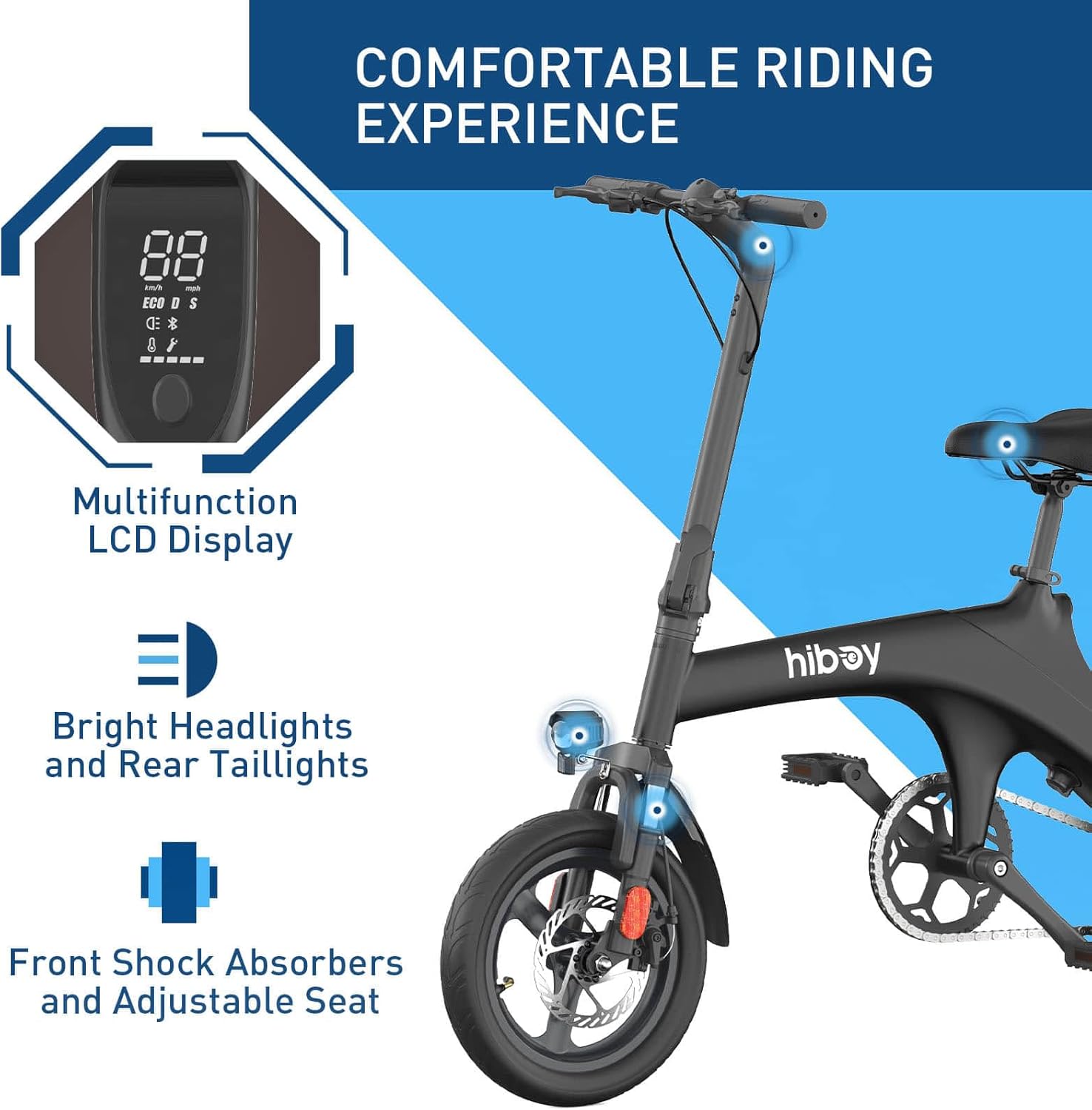
Figure 3: Multifunction LCD Display and Front Suspension.
This image provides a detailed view of the bike's multifunction LCD display, bright headlights, and front shock absorbers, which contribute to a comfortable riding experience.
Operating Instructions
Powering On and Display
Press the power button on the display to turn on the bike. The clear LCD display shows key information such as current speed, riding mode, light status, remaining range, and battery life.
Riding Modes
The Hiboy C1 offers three distinct riding modes:
- ECO Mode (Energy-Saving): Approximately 9.3 MPH. Ideal for conserving battery and relaxed riding.
- D Mode (Comfort): Approximately 15.5 MPH. A balanced mode for comfortable commuting.
- S Mode (Sport): Up to 20 MPH. Provides maximum power for faster travel.
Switch between modes using the controls on the handlebar. For new riders, it is recommended to start with ECO mode.

Figure 4: Demonstrating the three riding speeds of the Hiboy C1.
This image shows a rider on the Hiboy C1 electric bike, visually representing the availability of three distinct riding speeds for different preferences and conditions.
Pedal Assist Function
The bike features a pedal-assist function that provides motor power as you pedal, making riding easier, especially uphill. The maximum driving range with pedal-assist is approximately 43.5 miles.

Figure 5: Pedal Assist Function in action.
This close-up image focuses on the pedal and crank of the Hiboy C1 electric bike, illustrating the pedal assist function that aids the rider while pedaling.
Hiboy App Integration
Connect your Hiboy C1 to the Hiboy App via Bluetooth for enhanced control and monitoring. The app allows you to:
- Lock and unlock your bike.
- Change speed modes.
- Adjust speed units.
- View real-time speed, battery power, and riding time.

Figure 6: Hiboy App Interface.
This image displays a smartphone screen running the Hiboy App, showcasing its features for locking the bike, changing speed modes, and monitoring ride data.
Maintenance
Regular maintenance ensures the longevity and safe operation of your Hiboy C1 Electric Bike.
- Cleaning: Wipe down the bike with a damp cloth. Avoid using high-pressure water jets directly on electrical components.
- Tires: Regularly check tire pressure and inspect for wear or damage.
- Brakes: Ensure brake levers are responsive and brake pads are not excessively worn. Adjust as needed. The bike features a dual disc brake system for reliable stopping power.
- Chain: Keep the chain clean and lubricated to prevent rust and ensure smooth operation.
- Battery Care: Charge the battery regularly, even if not in use, to maintain its health. Store the battery in a cool, dry place.
- Fasteners: Periodically check and tighten all bolts, nuts, and quick-release mechanisms.

Figure 7: Dual Braking System.
This image shows two Hiboy C1 electric bikes, drawing attention to the dual braking system which provides enhanced stopping power and safety.
Troubleshooting
This section addresses common issues you might encounter with your Hiboy C1 Electric Bike.
| Problem | Possible Cause | Solution |
|---|---|---|
| Bike does not power on. | Battery not charged, loose battery connection, power button issue, disconnected display cables. | Ensure battery is fully charged and properly seated. Check all electrical connections, especially the display cables mentioned in setup. |
| Motor not assisting. | Low battery, incorrect riding mode, sensor issue. | Check battery level. Ensure you are in a pedal-assist mode (ECO, D, or S). If issue persists, contact customer support. |
| Brakes feel weak. | Worn brake pads, loose brake cable, air in hydraulic system (if applicable). | Inspect brake pads for wear and replace if necessary. Check brake cable tension and adjust. For hydraulic systems, professional service may be required. |
| Unusual noises during operation. | Loose components, dry chain, foreign object. | Inspect the bike for any loose parts and tighten them. Lubricate the chain. Check for any debris caught in the wheels or drivetrain. |
For issues not covered here, please refer to the support section or contact Hiboy customer service.
Specifications
| Feature | Detail |
|---|---|
| Model Name | C1 |
| Bike Type | Electric Bike |
| Age Range | Adult |
| Motor | 350W (500W Peak) Hub Motor |
| Battery | 36V 7.8Ah (280.8 Watt Hours), Removable |
| Max Speed | 20 MPH |
| Max Range (Pure Electric) | 21.7 Miles |
| Max Range (Pedal-Assist) | 43.5 Miles |
| Charging Time | 5-6 Hours |
| Wheel Size | 14 Inches |
| Frame Material | High-Carbon Steel |
| Suspension Type | Front |
| Brake Style | Disc (Dual Disc Brake System) |
| Special Features | LCD Display, Foldable Design, Smart App Connectivity |
| Certifications | UL 2849 Certified (Bike), UL 2271 Certified (Battery) |
| Foldable Design | Yes, foldable handlebar |

Figure 8: Key Performance Specifications.
This image highlights the Hiboy C1's performance metrics, including its 20 MPH top speed, 21.7-mile max range, and 350W motor (500W peak).
Warranty Information
The Hiboy C1 Electric Bike comes with a limited 1-year warranty from the date of purchase. This warranty covers manufacturing defects in materials and workmanship. Please retain your proof of purchase for warranty claims.
Extended protection plans may be available for purchase separately. Refer to your retailer for details on additional coverage options.
Customer Support
For further assistance, technical support, or warranty inquiries, please contact Hiboy customer service. You can find more information and contact details on the official Hiboy store page:
Visit the Hiboy Store on Amazon
When contacting support, please have your model name (C1) and purchase information readily available.


