
1. Product Overview
The DWVO 148cm TV Stand is designed to accommodate televisions up to 65 inches, offering a modern and functional solution for your living room or bedroom. It features customizable RGB LED lighting, versatile storage options, and adjustable tempered glass shelves.
Key Features:
- Modern Design: Elegant 148 x 32 x 51 cm dimensions, suitable for TVs up to 65 inches.
- RGB LED Lighting: Integrated LED lights with 7 preset colors and 22 dynamic modes. Control via included remote or downloadable app, featuring music mode and scheduling.
- Ample Storage: Includes 3 open shelves and 1 closed cabinet for media devices, games, books, and decor.
- Adjustable Glass Shelves: Tempered glass shelves can be adjusted to 5 different heights for flexible organization.
- Easy Assembly: Designed for straightforward assembly with detailed instructions and all necessary accessories.
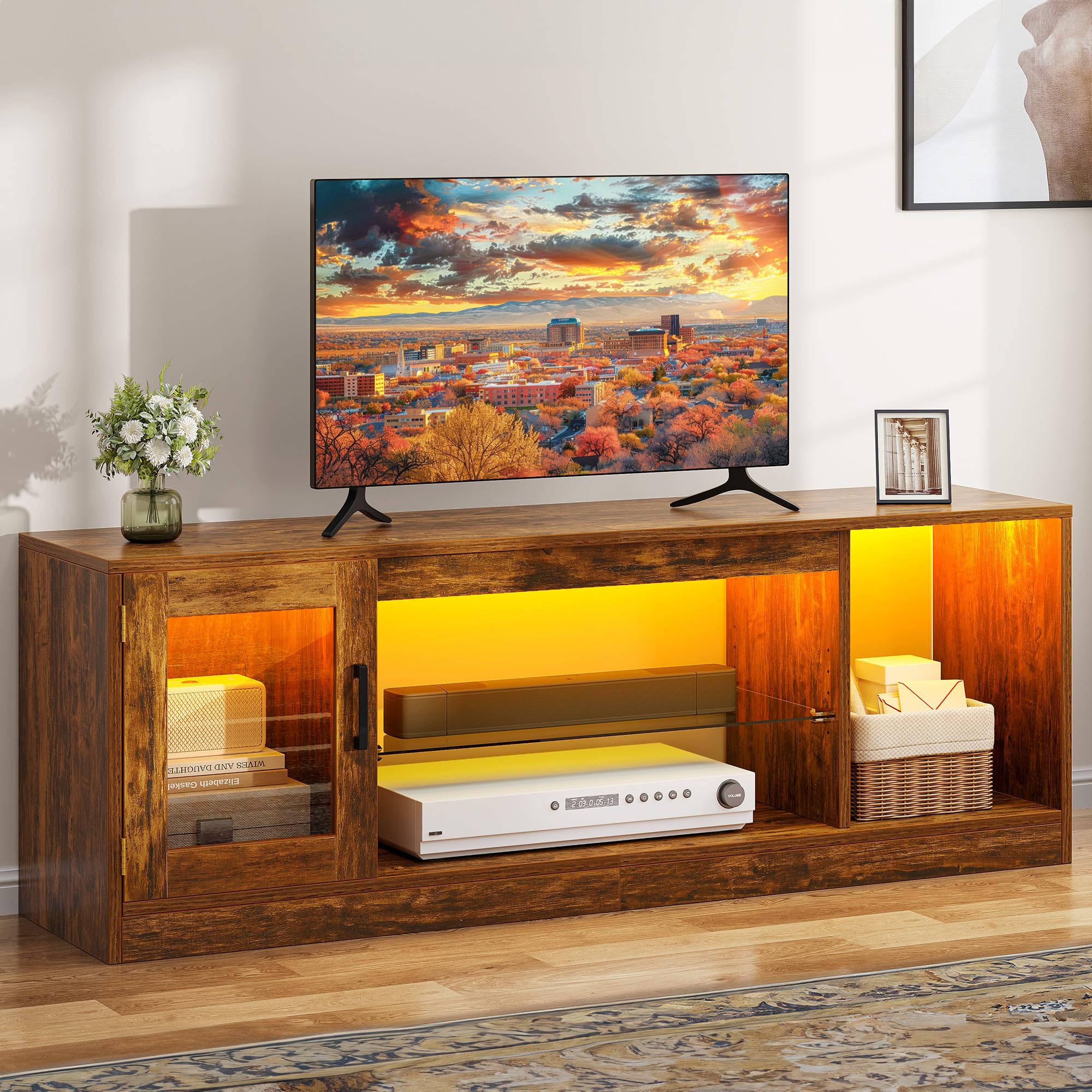
Figure 1: DWVO 148cm TV Stand with RGB LED Lighting (Retro Brown)
2. Safety Information
Please read and follow all safety instructions carefully to prevent injury or damage to the product.
- Anti-Tipping: Always secure the TV stand to the wall using the provided anti-tipping accessories to prevent accidental tipping, especially in households with children or pets.
- Glass Handling: Exercise caution when handling the tempered glass shelves. Edges can be sharp. Wear protective gloves if necessary.
- Weight Capacity: Do not exceed the maximum weight capacity for the top surface or shelves. Refer to the assembly manual for specific weight limits.
- Placement: Place the TV stand on a flat, stable surface. Avoid placing it in areas with high humidity or direct sunlight.
- Electrical Safety: Ensure all LED lighting connections are secure and follow electrical safety guidelines. Do not overload power outlets.
3. Setup and Assembly
The DWVO TV Stand is designed for straightforward assembly. Please follow the detailed step-by-step instructions included in the packaging. All necessary accessories are provided.
Before You Begin:
- Unpack all components and verify against the parts list in your manual.
- Ensure you have a clean, spacious area for assembly.
- Keep children and pets away from the assembly area.
- An online video guide is available to assist with the assembly process.
Assembly Steps:
- Identify all wooden panels and hardware. Match them with the labels in the instruction manual.
- Assemble the main frame of the TV stand according to the diagrams.
- Install the cabinet doors and hinges.
- Insert the adjustable tempered glass shelves into the desired positions.
- Attach the RGB LED light strips and connect them to the power source and controller.
- Secure the TV stand to the wall using the anti-tipping accessories.

Figure 2: Product Dimensions and TV Compatibility

Figure 3: Detailed Features of the TV Stand
4. Operating the RGB LED Lighting
The integrated RGB LED lighting system offers various customization options to enhance your entertainment experience.
Control Methods:
- Remote Control: Use the included remote control to power the lights on/off, change colors, adjust brightness, and select dynamic modes.
- Smartphone App: Download the dedicated app (refer to your LED light manual for app name and QR code) to access advanced features, including millions of color combinations, music synchronization, and scheduling.
Lighting Modes:
- Static Colors: Choose from 7 preset static colors.
- Dynamic Modes: Select from 22 dynamic lighting modes for various effects.
- Music Mode: Lights can synchronize with music played through your smartphone app.
- Scheduling: Program the lights to turn on or off at specific times.

Figure 4: RGB LED Lighting Features and Control
Video 1: Demonstration of DWVO TV Stand with RGB LED Lighting (Black variant)
Video 2: Demonstration of DWVO TV Stand with RGB LED Lighting (White variant)
5. Maintenance
Proper care and maintenance will ensure the longevity and appearance of your DWVO TV Stand.
- Cleaning Surfaces: Wipe wooden surfaces with a soft, damp cloth. Avoid abrasive cleaners or harsh chemicals that may damage the finish.
- Cleaning Glass: Use a glass cleaner and a soft, lint-free cloth for the tempered glass shelves.
- Dusting: Regularly dust all surfaces to prevent buildup.
- Hardware Check: Periodically check all screws and fittings to ensure they are tight. Retighten if necessary.
- LED Lights: The LED lights are designed for long-term use. If issues arise, refer to the troubleshooting section.
6. Troubleshooting
If you encounter any issues with your DWVO TV Stand, please refer to the following common problems and solutions:
| Problem | Possible Cause | Solution |
|---|---|---|
| LED lights not working. | Loose connection, power issue, remote battery dead. | Check all cable connections. Ensure the power adapter is plugged in. Replace remote control batteries. |
| Stand feels unstable. | Loose hardware, not secured to wall. | Retighten all assembly screws. Ensure the anti-tipping wall anchor is properly installed and secured. |
| Cabinet door not closing properly. | Misaligned hinges. | Adjust the hinges according to the assembly instructions. |
If the problem persists, please contact customer support for further assistance.
7. Specifications
- Model Number: AEDWVEIbcZ
- Brand: DWVO
- Material: Engineered Wood
- Dimensions (L x W x H): 148 x 32 x 51 cm (58.3 x 12.6 x 20.1 inches)
- Weight: 18.6 kg (41 lbs)
- TV Size Compatibility: Up to 65 inches
- Lighting: RGB LED with remote and app control
- Color: Retro Brown
8. Warranty and Support
For warranty information or technical support, please refer to the contact details provided in your product packaging or visit the official DWVO website. Keep your purchase receipt for warranty claims.
Our customer service team is available to assist you with any questions or concerns regarding your DWVO TV Stand.


