
HONOR HONOR 400 Pro (DNP-NX9)
HONOR 400 Pro Smartphone (Model DNP-NX9) User Manual
1. Introduction
Welcome to the user manual for your new HONOR 400 Pro Smartphone. This guide provides essential information to help you get started, operate, maintain, and troubleshoot your device. The HONOR 400 Pro (Model DNP-NX9) is a high-performance 5G smartphone featuring a 200MP AI camera, a vibrant 6.7-inch AMOLED display, a powerful Snapdragon 8 Gen 3 processor, and a long-lasting 5300mAh battery.

Image 1.1: Front and back view of the HONOR 400 Pro Smartphone, showcasing its design and camera module.

Image 1.2: Overview of key features including the 200MP AI camera, 5300mAh battery, and 5000 nit display.
2. Setup
2.1. What's in the Box
Upon unboxing your HONOR 400 Pro, verify that the following items are included:
- HONOR 400 Pro Smartphone (with integrated battery)
- USB Type-C Cable
- SIM Eject Tool
Note: The power adapter is sold separately and is not included in the standard package.

Image 2.1: Illustration of the items included in the product packaging.
2.2. Inserting the SIM Card
- Locate the SIM card tray on the side of your device.
- Insert the SIM eject tool into the small hole next to the tray and press firmly until the tray pops out.
- Place your Nano-SIM card(s) into the tray with the gold contacts facing down. Ensure proper orientation. The HONOR 400 Pro supports Dual SIM functionality.
- Carefully push the tray back into the slot until it clicks into place.
2.3. Initial Power On and Setup
- Press and hold the Power button until the HONOR logo appears.
- Follow the on-screen instructions to complete the initial setup, including language selection, Wi-Fi connection, Google account setup, and security settings.
2.4. Charging the Device
Before first use, it is recommended to fully charge your device. Connect the USB Type-C cable to the phone's charging port and the other end to a compatible power adapter (sold separately). The device supports 100W wired SuperCharge and 50W wireless SuperCharge.

Image 2.2: The HONOR 400 Pro displaying the SuperCharge animation while connected to a charger.
3. Operating Your HONOR 400 Pro
3.1. Display Features
The HONOR 400 Pro features a 6.7-inch AMOLED Eye Comfort display with a resolution of 2800x1280 pixels (460 PPI) and a 120Hz refresh rate. It offers an ultra-bright 5000 nit peak brightness for excellent visibility even in direct sunlight, supporting HDR Vivid and DCI-P3 wide color gamut.
- Eye Comfort: Features 3840Hz high-frequency PWM dimming and adaptive brightness to reduce eye strain, especially in low-light conditions.
- HDR Vivid: Enhances visual experience with improved contrast and color accuracy for compatible content.

Image 3.1: The HONOR 400 Pro display showcasing its vibrant colors and high brightness with a scenic view.

Image 3.2: Visual representation of the 5000 nit display brightness and fast charging capabilities.
3.2. Camera System
The HONOR 400 Pro is equipped with an advanced AI camera system designed for professional-grade photography.
- Main Camera: 200MP Ultra-clear AI Camera with a large 1/1.4-inch sensor, Optical Image Stabilization (OIS), and Electronic Image Stabilization (EIS).
- Telephoto Camera: 50MP with 3X optical zoom.
- Ultra-wide Camera: 12MP with a 112° field of view.
- Selfie Camera: 50MP with f/2.0 aperture.
AI Photography Features:
- AI Super Zoom: Allows for clearer magnification of distant subjects.
- AI Portrait: Enhances portrait shots with intelligent background blur and improved facial details.
- AI-Enhanced Portrait: Optimizes portraits for stunning results.
- AI Motion Photo: Captures a series of frames to ensure you get the best moment, with AI restoring clarity to each frame.
- Night Mode: Improves photo quality in low-light conditions.

Image 3.3: Detailed view of the HONOR 400 Pro's AI camera system, highlighting its various lenses and AI Super Zoom capability.

Image 3.4: Demonstrations of AI-powered camera modes including vertical shots, enhanced portraits, night mode, and HD motion photos.
3.3. Performance
The HONOR 400 Pro is powered by the Snapdragon 8 Gen 3 processor, ensuring smooth and efficient performance for all tasks, from gaming to multitasking. It comes with 12GB of RAM and 512GB of internal storage.
- Processor: Snapdragon 8 Gen 3 for flagship-level speed and efficiency.
- GPU Turbo X: Enhances graphics processing for a superior gaming experience.

Image 3.5: Visual representation of the Snapdragon 8 Gen 3 processor and the GPU Turbo X gaming engine.
3.4. Battery and Charging
The device is equipped with a 5300mAh Silicon-Carbon battery, providing extended usage time. It supports both fast wired and wireless charging technologies.
- Wired SuperCharge: 100W, capable of reaching 51% charge in approximately 15 minutes.
- Wireless SuperCharge: 50W, capable of reaching 33% charge in approximately 15 minutes.
Note: SuperCharge accessories are sold separately.

Image 3.6: Visual representation of the 5300mAh Silicon-Carbon battery.
3.5. Connectivity and Other Features
- 5G Connectivity: For high-speed mobile data.
- Dual SIM: Supports two SIM cards simultaneously.
- NFC: For contactless payments and quick pairing.
- Wi-Fi 7 & Wi-Fi 6E: Advanced Wi-Fi standards for faster and more reliable wireless connections.
- Universal IR Remote Control: Allows the phone to control various home appliances.
- Dual Stereo Speakers: Provides rich and immersive audio.

Image 3.7: Overview of connectivity features like Wi-Fi 7 & 6E, NFC, and dual stereo speakers, alongside other functionalities.
3.6. AI Assistant (Google Gemini)
The HONOR 400 Pro integrates with Google Gemini, offering advanced AI capabilities to enhance productivity and creativity.
- Google Lens: Identify objects, text, and translate languages using your camera.
- Circle to Search: Easily search for information by circling items on your screen.
- Deepfake Detection: Helps identify potentially manipulated media.
- Magic Portal: Intelligent content recognition and sharing.
- Live Translation: Real-time translation during calls or in text.
- AI Writing Tools: Assists with composing and refining text.

Image 3.8: Visual guide to the integrated Google Gemini AI Assistant and its various functions.
4. Maintenance and Care
4.1. Durability and Protection
The HONOR 400 Pro is built for durability, featuring IP69 water and dust resistance, making it suitable for various environments. It also holds an SGS 5-star premium performance certification for drop and crush resistance.
Note: Water and dust resistance are not permanent and may decrease over time with normal wear and tear. Avoid intentional submersion.

Image 4.1: The HONOR 400 Pro shown in a water splash scenario, illustrating its water resistance.
4.2. General Care Tips
- Keep your device clean by wiping it with a soft, dry cloth.
- Avoid exposing the phone to extreme temperatures or direct sunlight for prolonged periods.
- Protect the screen with a screen protector and use a protective case to prevent physical damage.
4.3. Battery Longevity
The 5300mAh battery is designed to maintain 80% of its capacity for up to 4 years, ensuring long-term performance.
5. Troubleshooting
If you encounter issues with your HONOR 400 Pro, try the following common troubleshooting steps:
- Device Unresponsive: Press and hold the Power button for about 10 seconds to force a restart.
- App Issues: Close and reopen the problematic app. If the issue persists, clear the app's cache or reinstall it.
- Network Connectivity: Toggle Airplane Mode on and off, or restart your device. Check your SIM card insertion.
- Battery Drain: Check battery usage in settings to identify power-consuming apps. Adjust screen brightness and disable unnecessary features like GPS or Wi-Fi when not in use.
- Software Glitches: Ensure your device's software is up to date. Go to Settings > System & updates > Software update.
- Factory Reset: As a last resort, you can perform a factory reset. This will erase all data on your device, so ensure you back up important information first. Go to Settings > System & updates > Reset > Reset phone.
For more detailed troubleshooting or persistent issues, please refer to the official HONOR support resources.
6. Specifications
| Feature | Specification |
|---|---|
| Brand | HONOR |
| Model Name | HONOR 400 Pro |
| Model Number | DNP-NX9 |
| Operating System | Android 15 |
| Processor | Snapdragon 8 Gen 3 |
| RAM | 12 GB |
| Internal Storage | 512 GB |
| Display Size | 6.7 inches |
| Display Type | AMOLED |
| Display Resolution | 2800x1280 Pixels (460 PPI) |
| Refresh Rate | 120 Hz |
| Main Camera | 200 MP AI Ultra-clear (OIS+EIS) |
| Telephoto Camera | 50 MP (3X Optical Zoom) |
| Ultra-wide Camera | 12 MP (112°) |
| Selfie Camera | 50 MP |
| Battery Capacity | 5300 mAh (Lithium Polymer) |
| Wired Charging | 100W SuperCharge |
| Wireless Charging | 50W SuperCharge |
| Connectivity | 5G, Dual SIM, NFC, Wi-Fi 7 & 6E, USB OTG |
| Water & Dust Resistance | IP69 |
| Dimensions | 16.08 x 7.61 x 0.81 cm |
| Weight | 205 grams |
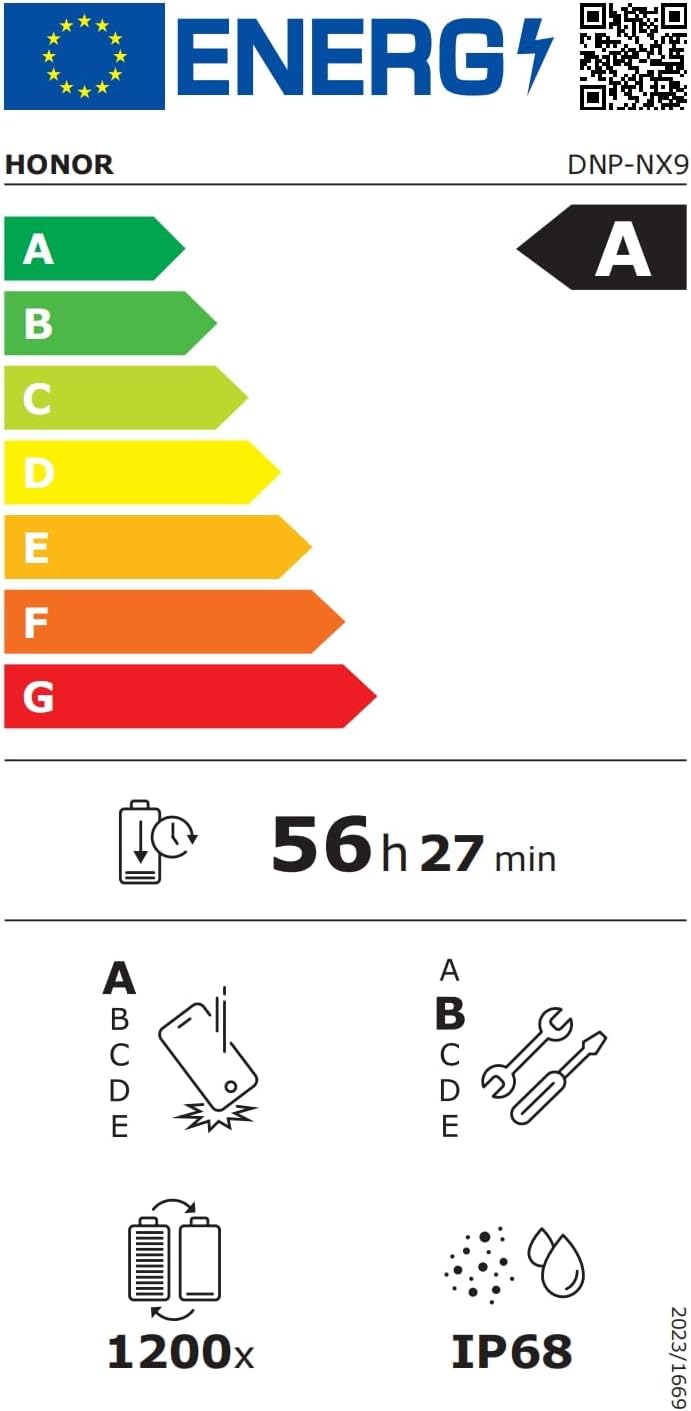
Image 6.1: Energy efficiency label for the HONOR 400 Pro (DNP-NX9).
For detailed energy information, visit: EPREL Database
7. Warranty and Support
7.1. Warranty Information
Your HONOR 400 Pro Smartphone comes with a standard manufacturer's warranty. Please refer to the warranty card included with your product or visit the official HONOR website for specific terms and conditions applicable to your region.
7.2. Customer Support
For further assistance, technical support, or service inquiries, please contact HONOR customer service or visit their official support channels:
- Official Support Website: https://honor.ginnnet.eu/
- Repair Information: https://www.honor.com/de/support/self-repair/
- Email Support: de.support@honor.com
- Telephone: +490080058833722
Related documentsHONOR 400 Pro (DNP-NX9)


Ask a question about this manual
Ask about setup, troubleshooting, compatibility, parts, safety, or missing instructions. Manuals+ will review the question and use this page’s manual context to help answer it.