
1. Introduction
Thank you for choosing the STF Kronos Insignia Smartwatch. This device is designed to enhance your daily life with smart features, health monitoring, and connectivity. Please read this manual carefully to ensure proper use and maintenance of your smartwatch.
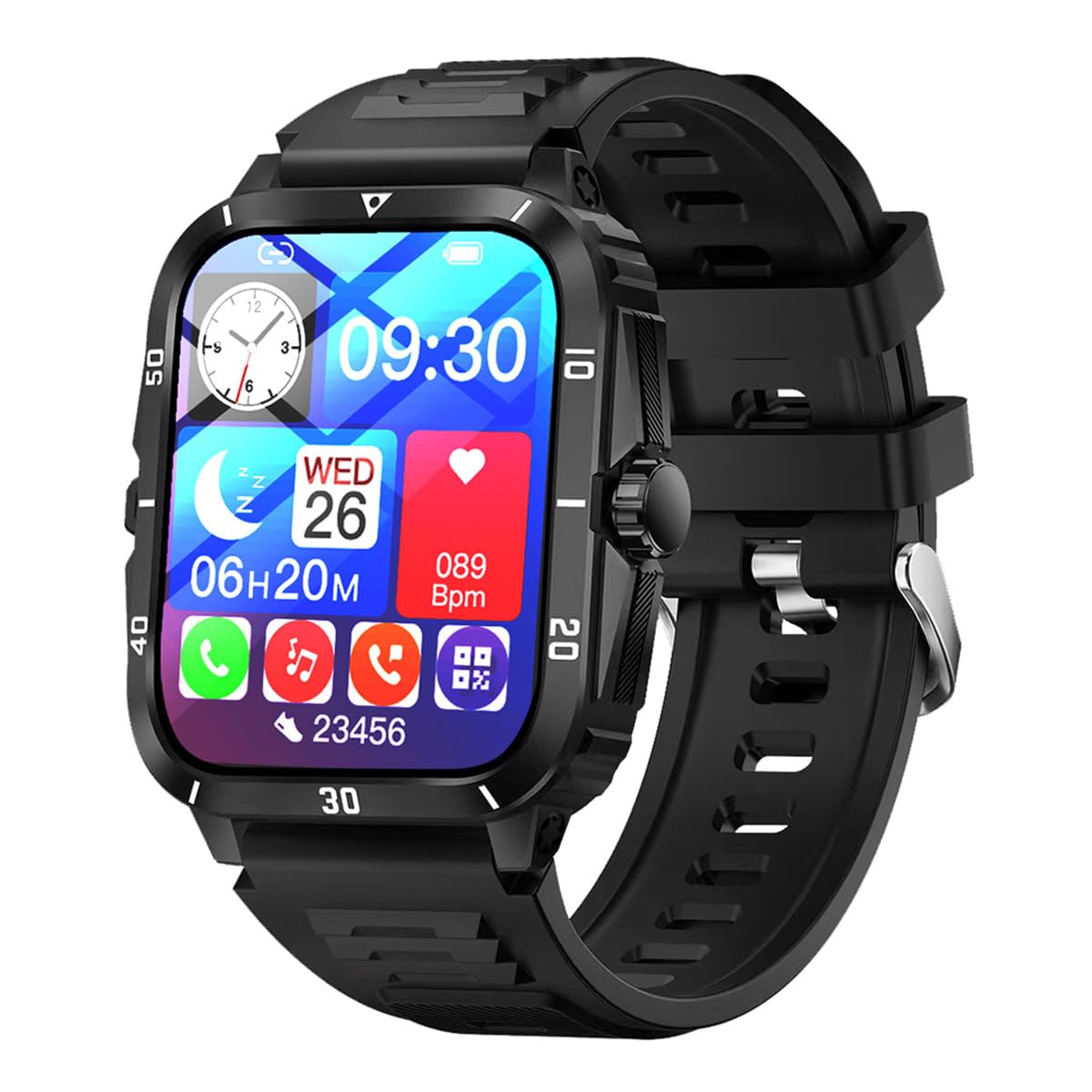
Figure 1: Front view of the STF Kronos Insignia Smartwatch.
2. Setup
2.1 Charging the Smartwatch
Before first use, fully charge your smartwatch. Connect the provided charging cable to the charging contacts on the back of the watch and to a USB power source.

Figure 2: Smartwatch back with charging contacts.
2.2 App Installation and Pairing
- Download the official STF companion application from your smartphone's app store (compatible with iOS and Android devices).
- Ensure Bluetooth is enabled on your smartphone.
- Open the STF application and follow the on-screen instructions to pair your smartwatch. The app will guide you through the connection process.
- Once paired, the smartwatch will synchronize time and data with your phone.
3. Operating Instructions
3.1 Basic Navigation
The Kronos Insignia Smartwatch features a 2-inch touch screen for easy navigation. Swipe left, right, up, or down to access different functions and menus. Press the side button to return to the home screen or wake the device.

Figure 3: Smartwatch displaying time and date.
3.2 Notifications and Calls
- Notifications: Once paired with your smartphone, the smartwatch will display notifications from compatible communication and messaging applications. Swipe down from the top of the screen to view recent notifications.
- Answering Calls: The smartwatch supports Bluetooth calls. When an incoming call is received, you can answer or reject it directly from the watch screen.
3.3 Health Monitoring
The Kronos Insignia Smartwatch includes several health monitoring features:
- Heart Rate Monitor: Measures your heart rate throughout the day.
- Sleep Duration: Tracks your sleep patterns and duration.
- Blood Oxygen Monitor: Measures your blood oxygen levels.
Access these features through the main menu or dedicated widgets on the watch face. For accurate readings, ensure the watch is worn snugly on your wrist.
3.4 Sports Mode
Engage in various sports activities with the dedicated sports mode. Select your activity from the menu to track metrics such as steps, distance, and calories burned. Data will be synchronized with the companion app on your smartphone.
4. Maintenance
4.1 Cleaning
Wipe the smartwatch and strap regularly with a soft, dry cloth. For stubborn dirt, a slightly damp cloth can be used. Avoid using harsh chemicals or abrasive materials.
4.2 Water Resistance
The Kronos Insignia Smartwatch has an IP65 rating, meaning it is protected against dust ingress and low-pressure water jets from any direction. It is resistant to splashes and dust, but it is not suitable for swimming, showering, or submersion in water. Avoid exposing the device to hot water or steam.
4.3 Battery Care
To prolong battery life, avoid fully discharging the battery frequently. Charge the device when the battery level is low. Store the smartwatch in a cool, dry place when not in use for extended periods.
5. Troubleshooting
- Device not turning on: Ensure the smartwatch is fully charged. Connect it to the charger for at least 30 minutes.
- Cannot pair with smartphone:
- Ensure Bluetooth is enabled on your phone and the smartwatch.
- Make sure the smartwatch is within the Bluetooth range of your phone.
- Restart both your smartphone and the smartwatch.
- Clear the app's cache or reinstall the companion application.
- Inaccurate health readings: Ensure the watch is worn snugly on your wrist, not too tight or too loose. Clean the sensors on the back of the watch.
- Notifications not appearing: Check your phone's notification settings for the companion app and ensure all necessary permissions are granted. Verify that notifications are enabled on the smartwatch itself.
6. Specifications
| Feature | Detail |
|---|---|
| Model | Kronos Insignia |
| Brand | STF |
| Screen Size | 2 Inches |
| Resolution | 240x296 |
| Connectivity | Bluetooth |
| GPS | No GPS |
| Water Resistance | IP65 (Splash and Dust Resistant) |
| Health Monitoring | Heart Rate, Sleep Duration, Blood Oxygen |
| Battery Life (Average) | Up to 5 days |
| Compatible OS | iOS, Android |
| Interface Type | Touch Screen |
| Communication Function | Bluetooth, Calls |
7. Warranty and Support
7.1 Product Warranty
The STF Kronos Insignia Smartwatch comes with a 1-year limited warranty from the date of purchase. This warranty covers manufacturing defects under normal use. It does not cover damage caused by misuse, accidents, unauthorized modifications, or failure to follow the instructions in this manual.
7.2 Customer Support
For technical assistance, warranty claims, or further inquiries, please contact STF customer support through their official website or the contact information provided with your purchase. Please have your proof of purchase and product model information ready when contacting support.
