
1. Introduction
The NGS Singer Star Duo is a set of two dynamic wireless microphones designed for clear and powerful audio. Featuring stable 2.4 GHz wireless technology, integrated volume and echo controls, and a long-lasting rechargeable battery, this system is suitable for various events and public speaking engagements. This manual provides detailed instructions for setup, operation, and maintenance to ensure optimal performance.
2. What's in the Box
Please check the contents of your package to ensure all items are present:
- 2 x Wireless Microphones
- 1 x Wireless Receiver
- 1 x USB Charging Cable
- 1 x 6.3mm Jack Adapter

Figure 2.1: Contents of the NGS Singer Star Duo package.
3. Product Overview
3.1. Wireless Microphone
- Microphone Head: Captures audio.
- Display Screen: Shows battery level and channel information.
- Power Button: Turns the microphone on/off.
- Volume Controls: Adjusts microphone volume (Up/Down).
- Echo Controls: Adjusts echo effect (Plus/Minus).
- Charging Port: USB-C port for recharging the internal battery.

Figure 3.1: Microphone display and controls.

Figure 3.2: Microphone features including power and wireless connectivity.
3.2. Wireless Receiver
- Jack 3.5mm Connector: Connects to audio input devices.
- 6.3mm Jack Adapter: For wider compatibility with professional audio equipment.
- Power Indicator: LED light indicating power status.
- Pairing Indicator: LED light indicating connection status.

Figure 3.3: Wireless receiver with adapter.
4. Setup
4.1. Initial Charging
Before first use, ensure both microphones and the receiver are fully charged. Use the provided USB charging cable to connect them to a suitable USB power source. The battery indicator on the microphone screen will show charging status.
4.2. Connecting the Receiver
- Plug the wireless receiver directly into the 3.5mm audio input jack of your speaker, mixer, amplifier, or other compatible sound system.
- If your audio device has a 6.3mm input, attach the included 6.3mm jack adapter to the receiver before plugging it in.
- Turn on your audio device.
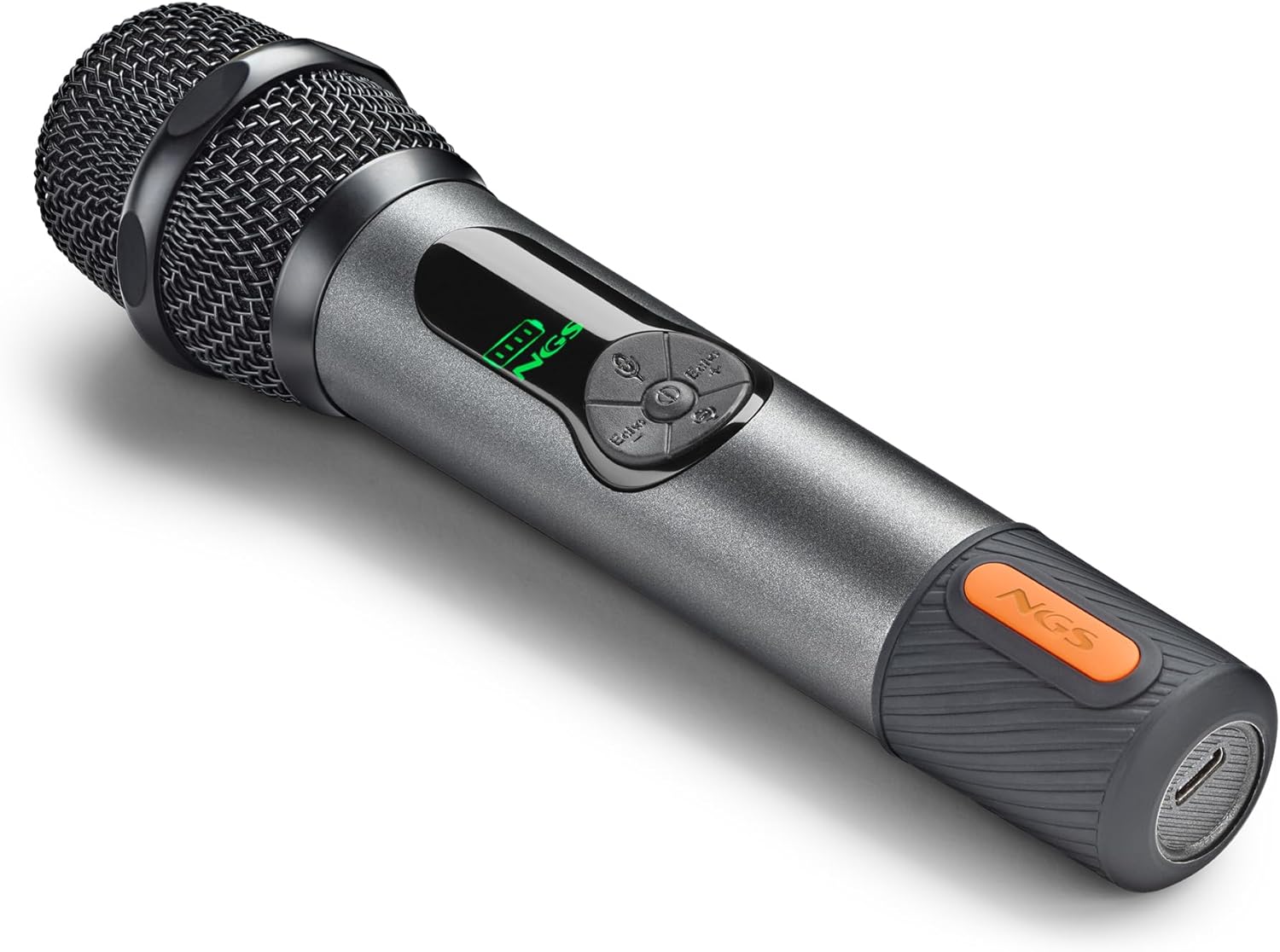
Figure 4.1: Connecting the microphone receiver to an audio system.
4.3. Pairing the Microphones
The microphones and receiver should automatically pair upon powering on. If pairing does not occur automatically, follow these steps:
- Ensure both the microphone and receiver are powered off.
- Press the power button on the microphone three separate times.
- Press the power button on the receiver three separate times.
- The LED on the microphone should turn solid green, and the LED on the receiver should turn solid blue, indicating a successful connection.
5. Operating the Microphones
5.1. Power On/Off
Press and hold the Power button on each microphone to turn it on or off. The display screen will illuminate when powered on.
5.2. Adjusting Volume and Echo
Each microphone features independent controls for volume and echo:
- Volume: Use the Volume Up (+) and Volume Down (-) buttons on the microphone to adjust the audio output level.
- Echo: Use the Echo Plus (+) and Echo Minus (-) buttons to add or reduce the echo effect.
5.3. Wireless Range
The 2.4 GHz wireless technology provides a stable connection with an operating range of up to 15 meters (approximately 49 feet). Ensure there are no major obstructions between the microphones and the receiver for optimal performance.

Figure 5.1: Wireless range and connectivity.
6. Maintenance
6.1. Charging the Batteries
The microphones and receiver are equipped with internal rechargeable batteries. The microphones have a 1500 mAh battery, and the receiver has a 650 mAh battery. A full charge provides up to 30 hours of continuous use for the microphones. The display screen on the microphones shows the real-time battery level.
- Connect the provided USB charging cable to the charging port on the microphone or receiver.
- Plug the other end of the USB cable into a standard USB power adapter (not included) or a computer USB port.
- A red indicator light will typically show during charging, turning off or changing color when fully charged.
6.2. Cleaning and Storage
- Wipe the microphones and receiver with a soft, dry cloth. Do not use abrasive cleaners or solvents.
- Store the system in a cool, dry place away from direct sunlight and extreme temperatures.
7. Troubleshooting
| Problem | Possible Cause | Solution |
|---|---|---|
| No sound from microphone | Microphone or receiver not powered on; Not paired; Low battery; Incorrect connection to audio device. | Ensure both devices are on. Perform manual pairing (Section 4.3). Charge batteries. Verify receiver is correctly plugged into audio input. |
| Microphone not pairing | Pairing sequence not followed correctly. | Follow the manual pairing steps in Section 4.3. |
| Audio delay or poor reception | Interference; Distance from receiver; Low battery. | Reduce distance between microphone and receiver. Ensure no major obstructions. Charge batteries. Avoid other 2.4GHz devices if possible. |
| Short battery life | Batteries not fully charged; Aging batteries. | Ensure full charge before use. If issues persist, contact support. |
8. Specifications
| Model Number | ELEC-MIC-0048 |
| Brand | NGS |
| Microphone Type | Dynamic, Handheld |
| Connectivity Technology | RF (2.4 GHz Wireless) |
| Operating Range | Up to 15 meters |
| Connector Type | Jack 3.5 mm, Jack 6.35 mm (with adapter) |
| Microphone Battery | 1500 mAh rechargeable |
| Receiver Battery | 650 mAh rechargeable |
| Battery Life (Microphone) | Up to 30 hours |
| Special Features | Volume Control, Echo Control, Mute Function |
| Compatible Devices | Amplifiers, Mixers, Speakers with 3.5mm/6.3mm input |
| Product Weight | 210 Grams |
| Color | Black |
| Country of Origin | Spain |
9. Warranty and Support
9.1. Product Warranty
This product comes with a 2-year warranty from the date of purchase. Please retain your proof of purchase for warranty claims.
9.2. Customer Support
For technical assistance, troubleshooting, or warranty inquiries, please visit the official NGS website or contact their customer support directly. Refer to the product packaging or the NGS website for the most up-to-date contact information.


