Introduction
The Bulelink Max 5 is a high-performance battery vacuum cleaner designed for efficient household cleaning. Featuring a powerful 550W motor and 45 KPa suction, it effectively removes dirt from various surfaces. Its intelligent OLED display provides real-time information, and the long-lasting battery ensures extended cleaning sessions. The innovative V-shaped brush and large dust collection container enhance the cleaning experience.

Figure 1: Bulelink Max 5 Battery Vacuum Cleaner and its components.
Safety Information
- Read all instructions before using the appliance.
- Do not use outdoors or on wet surfaces.
- Do not allow to be used as a toy. Close attention is necessary when used by or near children.
- Use only as described in this manual. Use only manufacturer's recommended attachments.
- Do not use with damaged cord or plug. If appliance is not working as it should, has been dropped, damaged, left outdoors, or dropped into water, return it to a service center.
- Do not pull or carry by cord, use cord as a handle, close a door on cord, or pull cord around sharp edges or corners. Do not run appliance over cord. Keep cord away from heated surfaces.
- Do not unplug by pulling on cord. To unplug, grasp the plug, not the cord.
- Do not handle plug or appliance with wet hands.
- Do not put any object into openings. Do not use with any opening blocked; keep free of dust, lint, hair, and anything that may reduce air flow.
- Keep hair, loose clothing, fingers, and all parts of body away from openings and moving parts.
- Do not pick up anything that is burning or smoking, such as cigarettes, matches, or hot ashes.
- Do not use to pick up flammable or combustible liquids, such as gasoline, or use in areas where they may be present.
- Do not pick up toxic material, such as chlorine bleach, ammonia, or drain cleaner.
- Do not use without dust bag and/or filters in place.
- Turn off all controls before unplugging.
- Use extra care when cleaning on stairs.
- Store the appliance indoors. Put away after use to prevent accidents.
- Use only the charger specified by the manufacturer.
- Do not incinerate the appliance even if it is severely damaged. The batteries can explode in a fire.
Package Contents
Please check the package contents to ensure all items are present and undamaged:
- Bulelink Max 5 Brushless Motor Main Unit
- V Anti-Tangle Motor Floor Brush
- Telescopic Tube
- 2-in-1 Brush
- Flat Brush
- HEPA Filter (pre-installed)
- Dust Container (pre-installed)
- Power Adapter
- Wall Mount
- Aromatherapy Tablets
- Hardware Kit (for wall mount)
- Quick Start Guide
- Batteries (8 x 2200 mAh removable)
- User Handbook (this manual)
Setup
1. Assembly
- Attach the Telescopic Tube: Insert the telescopic tube into the main unit until it clicks into place.
- Connect the Floor Brush: Attach the V Anti-Tangle Motor Floor Brush to the other end of the telescopic tube, ensuring it clicks securely.
- Install Batteries: Ensure the 8 removable batteries are correctly inserted into the battery compartment of the main unit.
- Optional Accessories: For specific cleaning tasks, attach the 2-in-1 brush or flat brush directly to the main unit or the telescopic tube.
2. Charging
Before first use, fully charge the vacuum cleaner. The intelligent OLED screen will display the battery level.
- Direct Charging: Connect the power adapter to the charging port on the main unit and plug it into a wall outlet.
- Wall-Mounted Charging: Install the wall mount in a suitable location using the provided hardware kit. Place the vacuum cleaner on the wall mount to charge. This method also saves space.

Figure 2: The removable battery pack for convenient charging.
Operating Instructions
1. Power On/Off and Suction Adjustment
- Power On: Press the power button on the main unit to turn on the vacuum cleaner. The OLED screen will illuminate.
- Adjust Suction: Press the suction adjustment button (usually located near the power button) to cycle through different suction modes (e.g., Standard, Max). The OLED screen will indicate the current suction level.
- Power Off: Press the power button again to turn off the vacuum cleaner.
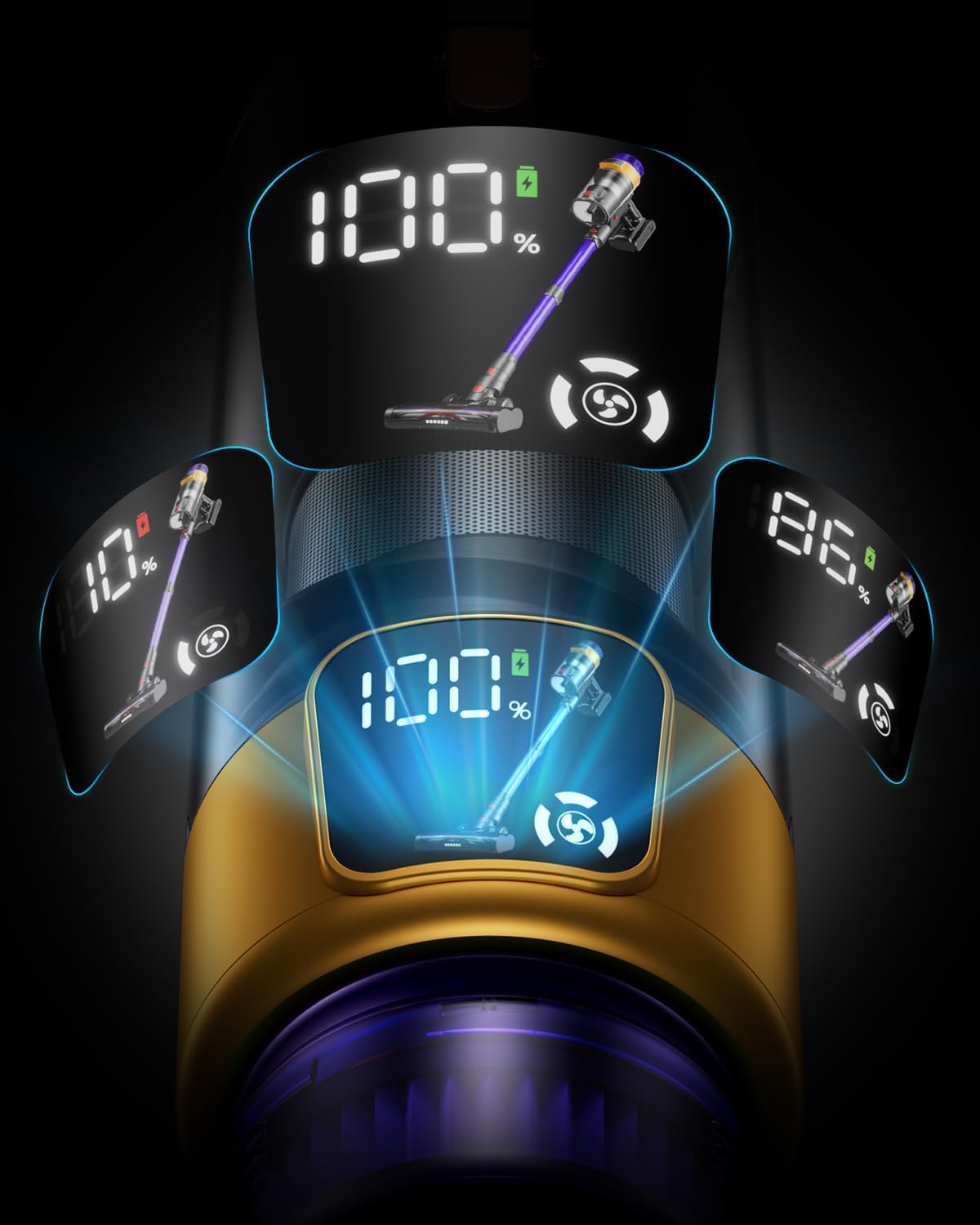
Figure 3: Intelligent OLED display showing battery level and suction power.
2. Cleaning Different Surfaces
- Hard Floors and Carpets: The V Anti-Tangle Motor Floor Brush is designed with a combination of soft and hard bristles, making it suitable for both hard floors and carpets. The large wheel floor brushes allow for smooth transition between surfaces.
- Tight Spaces and Corners: The flexible 270-degree brush head allows for easy maneuverability around furniture and into tight corners.
- Upholstery and Delicate Surfaces: Use the 2-in-1 brush attachment for cleaning upholstery, curtains, or other delicate surfaces.
- Crevices and Edges: The flat brush attachment is ideal for reaching narrow gaps, edges, and car interiors.

Figure 4: The vacuum cleaner effectively cleaning a hard floor.

Figure 5: Detailed view of the V-shaped brush roller designed to prevent tangling.
3. Aromatherapy Feature
The Bulelink Max 5 includes an aromatherapy card unit. Insert the provided aromatherapy tablets into the designated slot (refer to the diagram in the main unit's filter section) to release a fresh floral fragrance during cleaning, masking odors from food or pets.
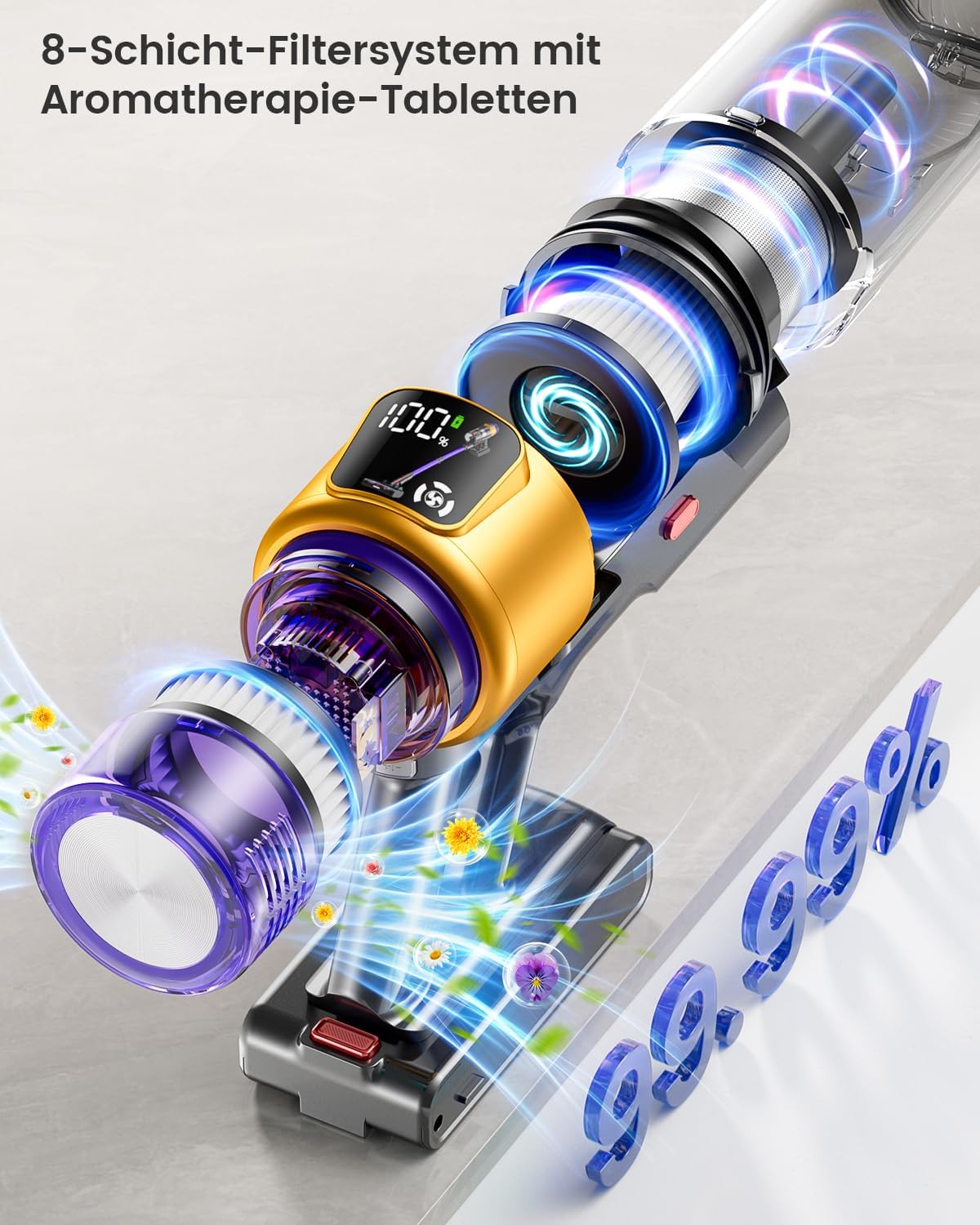
Figure 6: The 8-stage filter system with integrated aromatherapy feature.
4. Mite Remover (if applicable)
For deep cleaning of mattresses and upholstery, the vacuum cleaner can be used in handheld mode with a specialized mite remover attachment (if included in your package). This helps ensure a mite-free environment.
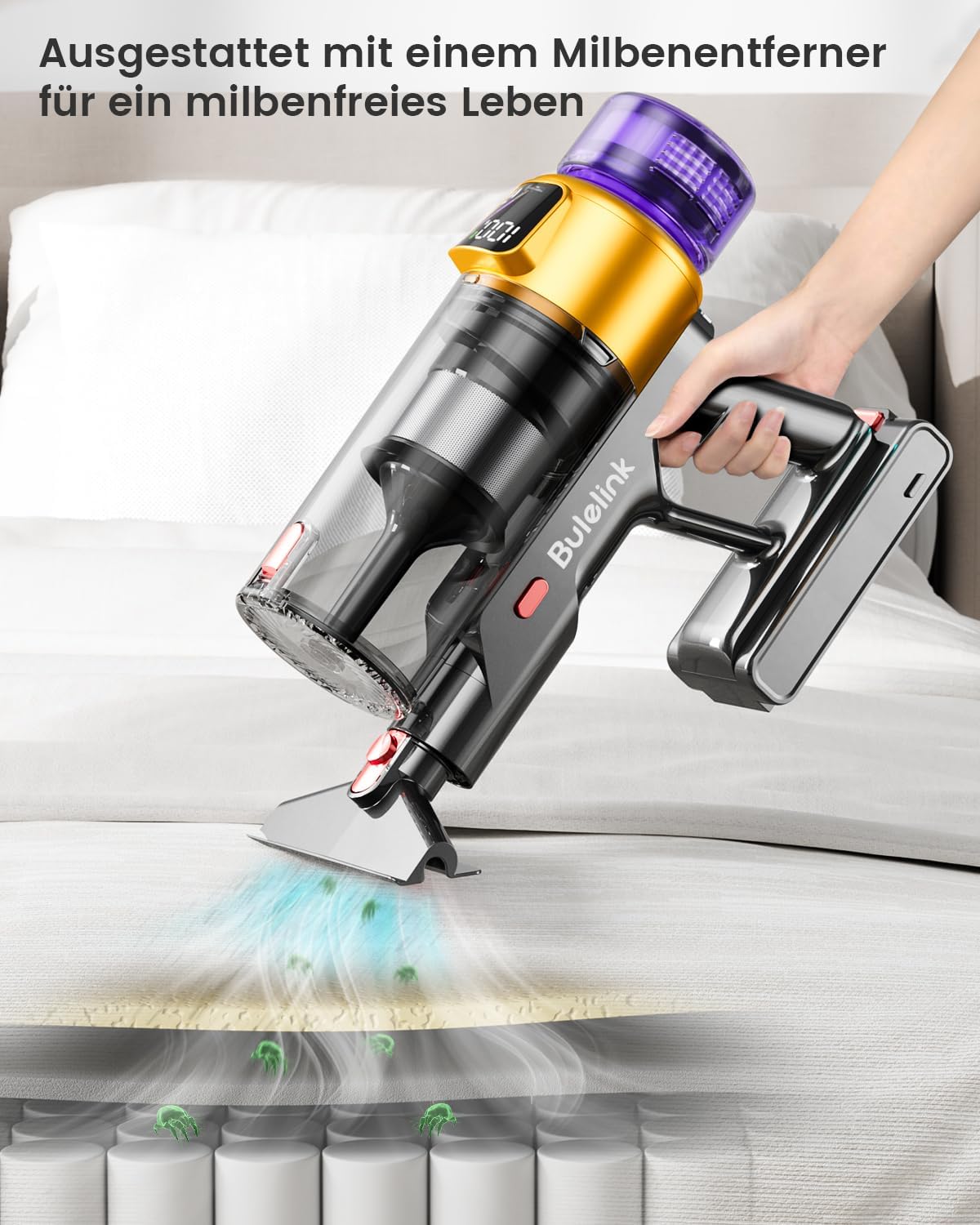
Figure 7: Using the vacuum in handheld mode with the mite remover attachment.
Maintenance
Regular maintenance ensures optimal performance and extends the lifespan of your Bulelink Max 5 vacuum cleaner.
1. Emptying the Dust Container
- The 1.8-liter dust container should be emptied regularly, especially when the "MAX" line is reached.
- To empty, hold the main unit over a trash bin and press the dust container release button (usually located near the bottom of the container). The bottom flap will open, allowing debris to fall out.
- Close the flap securely after emptying.
2. Cleaning Filters
The vacuum cleaner features a 9-stage filter system, including a HEPA filter. Clean filters regularly to maintain suction power.
- Pre-Filter/Mesh Filter: Twist and pull to remove the pre-filter from the dust container. Tap it gently to remove dust. If heavily soiled, rinse under running water. Ensure it is completely dry before re-installing.
- HEPA Filter: The HEPA filter is located within the main unit. Twist to unlock and remove it. Tap it to remove fine dust. The HEPA filter is generally not washable; replace it if it becomes excessively dirty or damaged.
- Reassembly: Once all filters are clean and dry, reassemble them in reverse order.
3. Cleaning the Brush Roller
- Periodically check the V Anti-Tangle Motor Floor Brush for tangled hair or debris.
- To remove the brush roller, locate the release tab on the side of the floor brush head and unlock it. Pull out the brush roller.
- Use scissors to cut away any tangled hair or threads. Wipe the brush and its housing with a damp cloth.
- Reinsert the brush roller and secure the release tab.
4. Battery Care
- To prolong battery life, avoid completely draining the battery before recharging.
- Store the vacuum cleaner in a cool, dry place when not in use.
- If storing for an extended period, charge the battery to about 50% and recharge every few months.
Troubleshooting
| Problem | Possible Cause | Solution |
|---|---|---|
| Vacuum cleaner does not turn on. | Battery is depleted. Battery not properly installed. Power button not pressed correctly. | Charge the battery fully. Ensure batteries are securely inserted. Press the power button firmly. |
| Low suction power. | Dust container is full. Filters are clogged. Brush roller is tangled. Obstruction in the tube/hose. | Empty the dust container. Clean or replace filters. Clean the brush roller. Check for and remove any blockages. |
| Brush roller stops rotating. | Tangled hair or debris. Obstruction in the brush head. | Turn off the vacuum and clean the brush roller. Remove any obstructions from the brush head. |
| Vacuum cleaner makes unusual noise. | Obstruction in the air path. Damaged component. | Check for and remove any blockages in the tube, brush head, or dust container. Contact customer support if noise persists. |
| Battery runtime is short. | Battery not fully charged. Using Max suction mode frequently. Battery degradation. | Ensure battery is fully charged. Use standard mode for general cleaning. Contact customer support for battery replacement options. |
Specifications
| Feature | Detail |
|---|---|
| Brand | Bulelink |
| Model Number | Max 5 |
| Motor Power | 550 W Brushless DC Motor |
| Suction Power | 45 KPa |
| Battery Type | 8 x 2200 mAh Removable Lithium-ion Batteries |
| Runtime | Up to 70 minutes (in standard mode) |
| Dust Container Capacity | 1.8 Liters |
| Filter System | 9-stage filter system, including HEPA filter (99.99% filtration rate for 0.3 microns) |
| Noise Level | <68 dB |
| Special Features | Intelligent OLED display, Tangle-free V brush roller, Aromatherapy unit, Wall-mounted charging |
| Product Dimensions | 70 x 50 x 60 cm |
| Item Weight | 4.09 Kilograms |
| Recommended Use | All floors, Floor cleaning |
Warranty and Support
Bulelink offers stable and sufficient customer support for your product.
- Warranty: The Bulelink Max 5 comes with a 24-month hassle-free return and exchange service.
- Technical Support: Lifetime technical support is provided for this product.
- Contact: For any problems, questions, or support needs, please contact Bulelink customer service. Refer to the contact information provided on the product packaging or the official Bulelink website.


