
1. Introduction
This manual provides detailed instructions for the YUYIU 2.4G Wireless PC Controller. This versatile controller is designed to enhance your gaming experience across multiple platforms with its advanced features, including RGB lighting, Hall effect joysticks and triggers, and programmable keys.
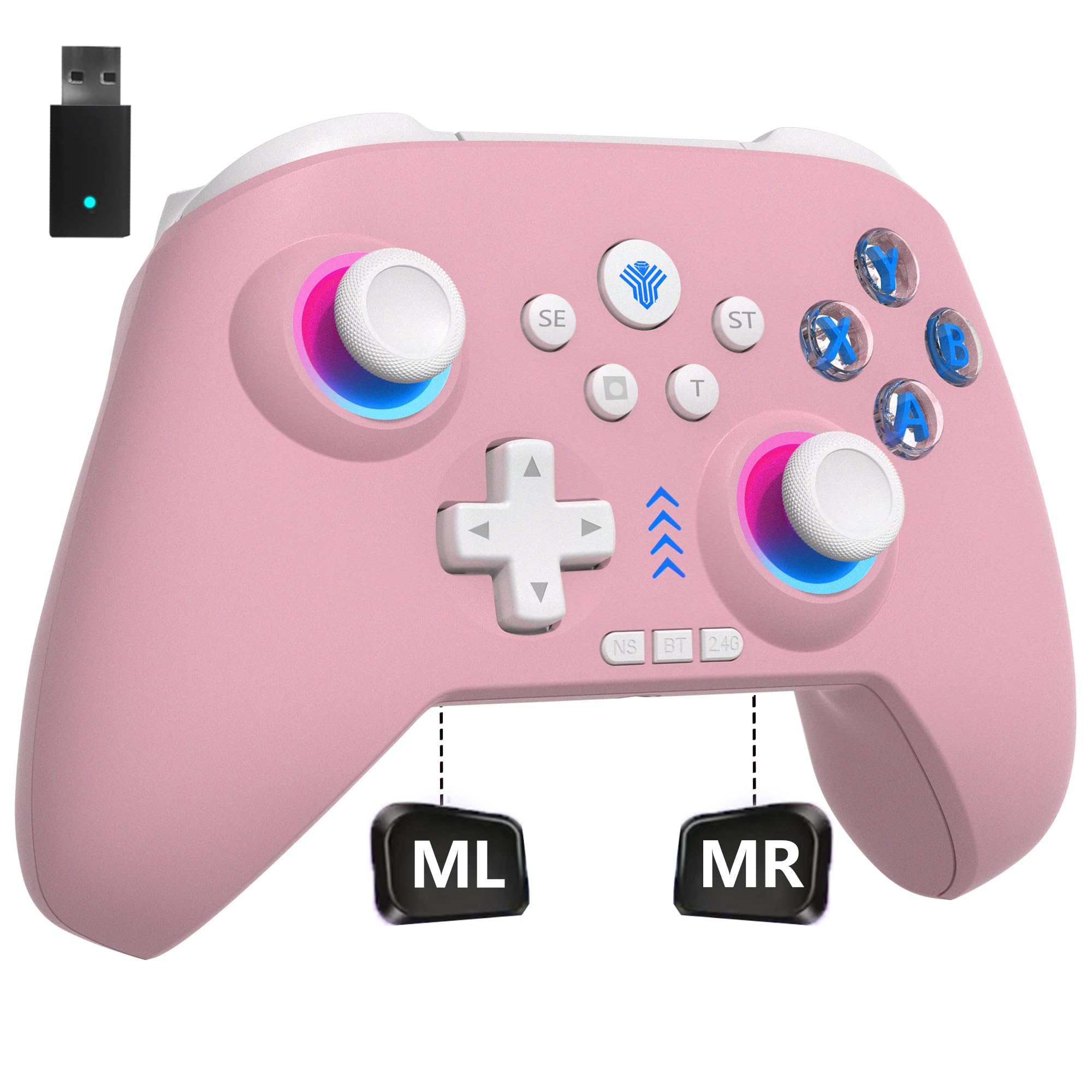
Image: YUYIU 2.4G Wireless PC Controller (Pink variant).
2. Package Contents
The package includes:
- YUYIU 2.4G Wireless PC Controller
- 2.4GHz Wireless Adapter
- USB Type-C Charging Cable
- User Manual (this document)
3. Setup and Connection
3.1 Charging the Controller
Before initial use, fully charge the controller. Connect the USB Type-C charging cable to the controller's charging port and the other end to a USB power source (e.g., PC, USB wall adapter). The controller is equipped with an 800mAh lithium battery and typically charges in 2-3 hours.
3.2 Connecting to Devices
The controller supports multiple connection modes for various platforms:

Image: The controller supports connections to multiple platforms including PC, Nintendo Switch, Android, and more.
- 2.4GHz Wireless Adapter: For PC, Steam Deck, and Android TV. Insert the 2.4GHz wireless adapter into a USB port on your device. The controller will connect automatically.
- Bluetooth: For Nintendo Switch, iOS, Android, and MacOS. Enable Bluetooth on your device and put the controller into pairing mode (refer to device-specific instructions for pairing).
- Wired Connection: Connect the controller directly to your PC or other compatible device using the USB Type-C cable.
Note: This controller is not compatible with Xbox, PS4, PS5, PS3, Fire TV, Firestick, or Nvidia GeForce Now.
4. Operating Instructions
4.1 RGB Lighting Control

Image: The controller features customizable 7-color RGB lighting.
- Cycle Color Modes: Press the dedicated light key to cycle through the seven available RGB lighting color modes.
- Fixed/Dynamic Color Switching: Long press the light key, then press the left joystick to toggle between a fixed display of the current color and dynamic color switching.
4.2 Adjustable Vibration
The controller features four adjustable vibration intensity levels:
- While connected, press and hold the T key.
- Shake the left joystick up to increase motor vibration intensity.
- Shake the left joystick down to decrease motor vibration intensity.
- A 3-second vibration prompt will indicate the change. Available gears: 100%, 70% (default), 30%, 0%.
4.3 Hall Effect Joysticks and Triggers

Image: The Hall effect triggers offer high precision for nuanced control.
Experience precise control with 255-level linear Hall effect triggers and 0.1mm high-precision Hall triggers. This technology ensures accurate throttle control, ideal for racing and shooting games. The 1000Hz esports return rate significantly reduces transmission delay.

Image: The right joystick speed-down button assists with precise aiming in games.
4.4 Programmable Keys
The "ML" and "MR" buttons located on the back of the controller can be programmed to map basic function keys:
- A, B, X, Y
- LB, RB, L3, R3
- D-PAD directions
Note: SE, ST, T, and screenshot keys cannot be mapped.
4.5 Auto Turbo Function
- Activate Turbo: Press and hold any desired button, then press the T button once.
- Adjust Turbo Speed: Hold down the T key and simultaneously move the right joystick up to increase the continuous firing speed, or down to decrease it.
- Reset All Buttons: To reset the turbo status of all buttons, long press the T key for 3 seconds.
5. Maintenance
- Keep the controller clean by wiping it with a soft, dry cloth.
- Avoid exposing the controller to extreme temperatures, humidity, or direct sunlight.
- Do not attempt to disassemble or repair the controller yourself, as this may void the warranty.
- Store the controller in a safe place when not in use to prevent damage.
6. Troubleshooting
6.1 Controller Not Connecting
- Ensure the controller is fully charged.
- For 2.4GHz connection, verify the wireless adapter is securely plugged into the device.
- For Bluetooth connection, ensure Bluetooth is enabled on your device and the controller is in pairing mode. Try re-pairing the controller.
- If using a wired connection, ensure the USB Type-C cable is properly connected to both the controller and the device.
- Restart both the controller and the device.
6.2 Input Lag or Unresponsiveness
- Ensure the controller is within the effective range of the wireless adapter or Bluetooth connection.
- Check for interference from other wireless devices.
- Ensure the controller's battery is not critically low.
- For PC, ensure drivers are up to date (if applicable, though typically plug-and-play).
6.3 Vibration Not Working
- Check the vibration intensity settings (refer to section 4.2). Ensure it's not set to 0%.
- Verify the game supports vibration feedback.
6.4 Programmable Keys Not Functioning
- Ensure the keys are programmed correctly (refer to section 4.4).
- Confirm that the keys you are trying to map are supported (SE, ST, T, and screenshot keys cannot be mapped).
7. Specifications
| Feature | Detail |
|---|---|
| Brand | YUYIU |
| Model | 2.4G Wireless PC Controller, Three-Mode Switch Controller |
| Connectivity | 2.4GHz Wireless, Bluetooth, Wired (USB Type-C) |
| Compatible Devices | PC, Nintendo Switch, Android, iOS, MacOS, Steam Deck, Gaming Console |
| Incompatible Devices | Xbox, PS4, PS5, PS3, Fire TV, Firestick, Nvidia GeForce Now |
| Battery Capacity | 800mAh Lithium Battery |
| Charging Time | 2-3 hours |
| RGB Lighting | 7 colors with multiple modes |
| Vibration | 4 adjustable levels (100%, 70%, 30%, 0%) |
| Joysticks & Triggers | Hall Effect, 255-level linear triggers, 0.1mm high-precision triggers |
| Return Rate | 1000Hz Esports Return Rate |
| Programmable Keys | ML/MR buttons for A/B/X/Y/LB/RB/L3/R3/D-PAD |
| Dimensions | 3.94 x 3.15 x 1.97 inches |
| UPC | 742082484544 |
| ASIN | B0F7R7WXZ1 |
8. Warranty and Support
YUYIU is committed to providing quality products and support. If you encounter any problems during use, please contact YUYIU customer service via email. Our team will assist you as soon as possible.
For further assistance, please visit the YUYIU Store on Amazon.