
1. Introduction
The SEDETA 94.5" Two-Person Gaming Desk is designed to provide a spacious and functional workspace for two individuals. This desk features an integrated LED lighting system, a convenient power strip with USB ports, a monitor stand, and ample storage solutions including 8 fabric drawers and open shelves. It is suitable for various uses, including gaming, office work, and study environments.
2. Safety Information
- Always assemble the desk on a flat, stable surface to ensure proper balance and prevent accidents.
- Do not overload the desk. The maximum weight capacity is 325 lbs. Exceeding this limit may compromise the desk's stability and structural integrity.
- Ensure the desk is properly anchored to the floor if necessary, especially in areas with high traffic or uneven surfaces, to prevent tipping.
- Keep all electrical components, such as the power strip and LED lights, away from liquids to prevent electrical hazards.
3. Package Contents
Please verify that all components are present before beginning assembly. If any parts are missing or damaged, please contact customer support.
- Desk Frame Components
- Desktop Panels (94.5" L x 19.7" W)
- 8 Fabric Drawers
- Printer Stand with Storage
- 94.5" LED Light Strip
- Power Strip with 3 AC Outlets and 2 USB Ports
- Monitor Stand Components
- Assembly Hardware (screws, bolts, etc.)
- Assembly Tools (basic tools may be included, but a screwdriver is recommended)
4. Setup and Assembly Instructions
Assembly is required for this desk. It is recommended to have two people for easier and faster construction, although it can be assembled by one person. All parts are typically numbered, and instructions are designed to be clear and straightforward.
4.1. General Assembly Steps
- Unpack and Identify Parts: Carefully unpack all components and lay them out. Refer to the included parts list to ensure everything is present.
- Assemble Frame: Begin by assembling the metal frame components according to the provided diagrams. Ensure all connections are secure but do not fully tighten screws until instructed.
- Attach Desktop Panels: Secure the desktop panels to the assembled frame. Pay attention to the orientation of each panel, especially for the L-shaped section.
- Install Storage Units: Assemble and integrate the 8 fabric drawers into their designated slots. Install the printer stand and open storage shelves.
- Mount Monitor Stand: Attach the monitor stand to the desktop. This stand is designed to elevate monitors to an ergonomic height.
- Install Power Strip: Integrate the recessed power strip into its designated cutout on the desktop. Connect the power cord.
- Apply LED Light Strip: Carefully apply the 94.5" LED light strip to the underside of the monitor stand or other designated areas. Ensure the adhesive is clean and dry for best adhesion. Note: Some users have reported issues with LED strip adhesion; additional clips or adhesive may be required for long-term security.
- Final Tightening: Once all components are in place and aligned, fully tighten all screws and bolts.
- Adjust Leveling Feet: Use the adjustable desk leg pads to ensure the desk is stable and level on any surface, including carpets.

Figure 1: Fully assembled SEDETA 94.5" Two-Person Gaming Desk.
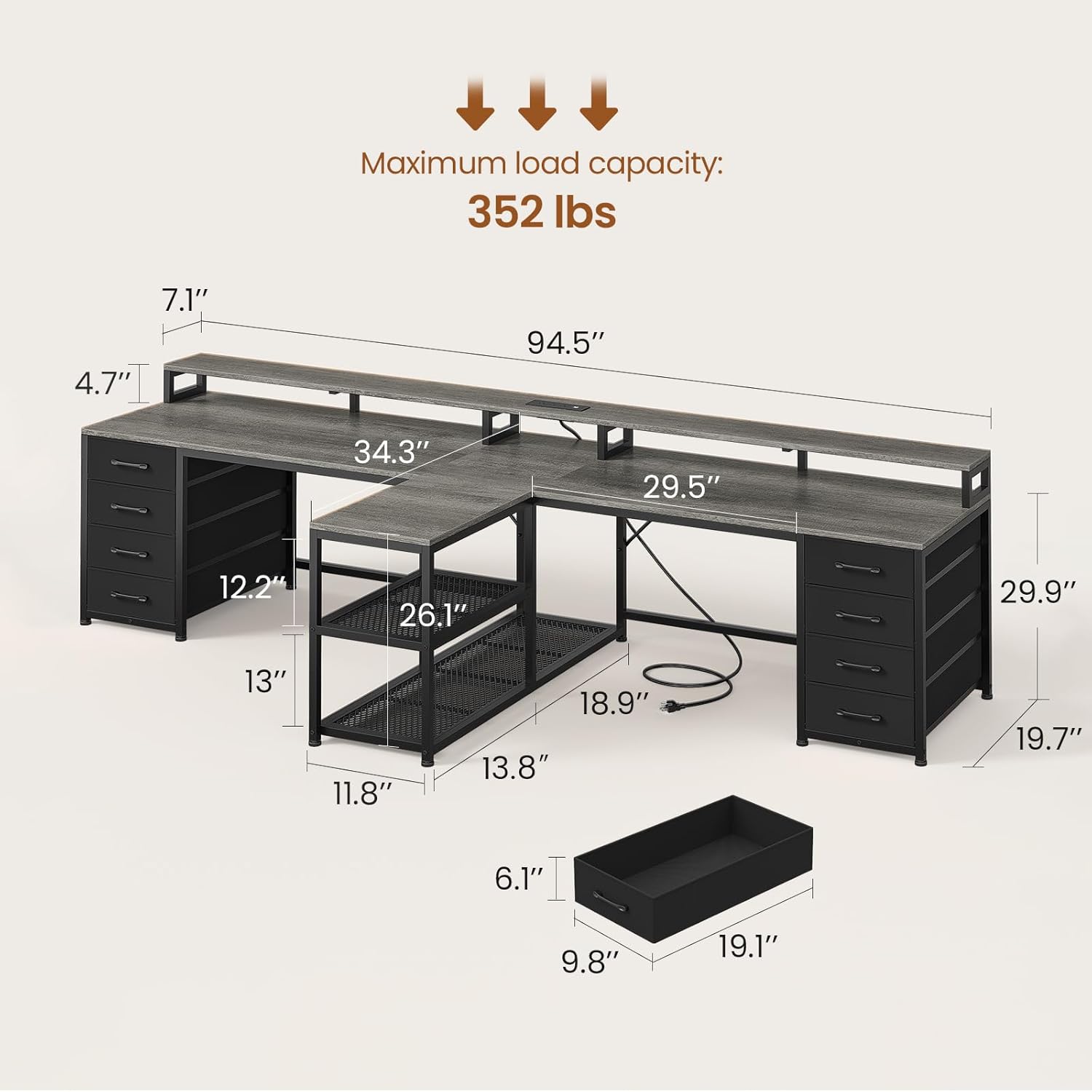
Figure 2: Detailed dimensions of the desk, including the 94.5" length and 29.9" height.

Figure 3: Overview of the large desktop space and integrated fabric drawers.

Figure 4: Illustration of the monitor stand and generous leg room provided by the desk design.

Figure 5: Close-up of the partitioned open storage area, suitable for a CPU tower and other accessories.
Video 1: A 3D display video showcasing the SEDETA 94.5" Gaming Long Desk, demonstrating its features and overall design.
5. Operating Instructions
5.1. LED Light Strips
- The desk is equipped with RGB LED light strips. Control is available via a remote control or a dedicated mobile application.
- Choose from multiple colors and 29 flashing modes to customize your lighting environment.
- The LED lights feature a music sync function with a built-in sensitivity-adjustable microphone. The light color will change in rhythm with sound and music.
- A timer function allows for scheduled operation of the lights.

Figure 6: The desk illuminated by RGB LED lights, highlighting the control options via key or app.
5.2. Recessed Power Strip
- The integrated power strip includes 3 AC outlets and 2 PowerIQ-enabled USB charging ports.
- This allows for simultaneous power and charging of up to 5 devices.
- The power strip supports a maximum power output of 1500W.
- The power cord is 6.5 feet long.

Figure 7: Close-up of the recessed power strip, showing 2 USB ports and 3 AC outlets in use.
5.3. Monitor Stand
- The monitor stand is designed to elevate up to four monitors to a suitable ergonomic height.
- This elevation helps reduce tension and pain in the back and neck during prolonged use.
6. Maintenance
- Cleaning: Wipe the desk surfaces with a soft, damp cloth. Avoid using abrasive cleaners or harsh chemicals, as these can damage the engineered wood finish.
- Dusting: Regularly dust the desk and its components to prevent buildup.
- Drawer Care: The fabric drawers can be spot cleaned with a mild detergent and water. Ensure they are completely dry before placing items inside.
- Stability Check: Periodically check all screws and bolts to ensure they remain tight. Retighten if necessary to maintain desk stability.
7. Troubleshooting
- Desk is Wobbly: Ensure all assembly screws are fully tightened. Adjust the leveling feet on the bottom of the desk legs to compensate for uneven floor surfaces.
- LED Lights Not Working: Check that the LED strip is properly connected to its power source and controller. Ensure the power outlet is functional. If using the app, verify Bluetooth connection.
- LED Strip Not Sticking: The adhesive on the LED strip may sometimes require additional support. Consider using extra adhesive tape or small clips to secure the strip firmly.
- Power Strip Not Supplying Power: Verify the power strip is plugged into a live wall outlet. Check for any tripped circuit breakers. Ensure devices are properly plugged into the outlets/USB ports.
- Missing or Damaged Parts: If your item arrives damaged, scratched, or with missing parts, please contact customer support immediately for a free replacement or partial refund.
8. Specifications
| Feature | Detail |
|---|---|
| Brand | SEDETA |
| Model Name | 2 person desk |
| Color | Grey |
| Product Dimensions (D x W x H) | 19.7" x 94.5" x 29.9" |
| Item Weight | 76 Pounds |
| Maximum Weight Recommendation | 325 Pounds |
| Top Material Type | Engineered Wood |
| Base Material | Metal |
| Number of Drawers | 8 (Fabric) |
| Number of Shelves | 2 (Open Storage) |
| Power Strip | 3 AC Outlets, 2 USB Ports (PowerIQ-enabled) |
| LED Lights | RGB, APP/Key Control, Music Sync, Timer Function |
| Required Assembly | Yes |
9. Warranty Information
The SEDETA 94.5" Two-Person Gaming Desk comes with a Limited Warranty. Specific details regarding the duration and coverage of this warranty are typically provided with your purchase documentation. Please refer to the warranty card or contact SEDETA customer support for comprehensive information regarding your product's warranty.
10. Customer Support
For any questions, assistance with assembly, troubleshooting, or to report missing/damaged parts, please contact SEDETA customer support. We are committed to providing free replacements or partial refunds for eligible issues.
Please refer to your purchase receipt or the product packaging for the most current contact information for SEDETA customer service.