
1. Introduction
Thank you for choosing the PULIVIA Digital Stopwatch Timer with Countdown (Model YS-805C). This device is designed for accurate timekeeping in various activities, including sports, training, and everyday use. It features both stopwatch and countdown timer functions, simple operation, and a clear digital display. This manual provides detailed instructions for setup, operation, and maintenance to ensure optimal performance.

Image 1.1: The PULIVIA YS-805C Digital Stopwatch Timer. This image displays the front view of the black stopwatch with its digital display showing "00:00:00" and the brand "PULIVIA" along with the model number "YS-805C". A black lanyard is attached to the bottom.

Image 1.2: Applications of the PULIVIA Stopwatch. This image shows the stopwatch being used in various training scenarios including football, basketball, cycling, swimming, and running, highlighting its versatility.
2. Product Features
- Stopwatch and Countdown Modes: Easily switch between precise stopwatch functionality and a convenient countdown timer.
- ON/OFF Function: Includes a power switch to conserve battery life when not in use.
- Split Timing: Capture intermediate times (splits) while the main timer continues to run, ideal for tracking multiple laps or segments.
- Replaceable AAA Battery: Powered by a single AAA battery, which is included and easy to replace without special tools.
- Large, Clear Display: Features a large digital screen for easy readability, even in bright outdoor conditions.
- Portable Design: Comes with a 47-inch nylon lanyard for convenient carrying around the neck or wrist.

Image 2.1: Key features of the PULIVIA Stopwatch. This image highlights features such as countdown, easy operation, 1/100th second accuracy, ON/OFF function for power saving, and a large, clear digit display. A coach is visible in the background on a soccer field.

Image 2.2: Large screen visibility of the PULIVIA Stopwatch. This image shows a hand holding the stopwatch on a soccer field, demonstrating that the screen remains clear and readable even under strong outdoor sunlight.
3. Setup
3.1 Battery Installation
The PULIVIA Stopwatch Timer requires one AAA battery (included).
- Locate the battery compartment on the back of the stopwatch.
- Gently slide open the battery cover.
- Insert one AAA battery, ensuring the correct polarity (+ and - terminals match the markings inside the compartment).
- Close the battery cover securely.
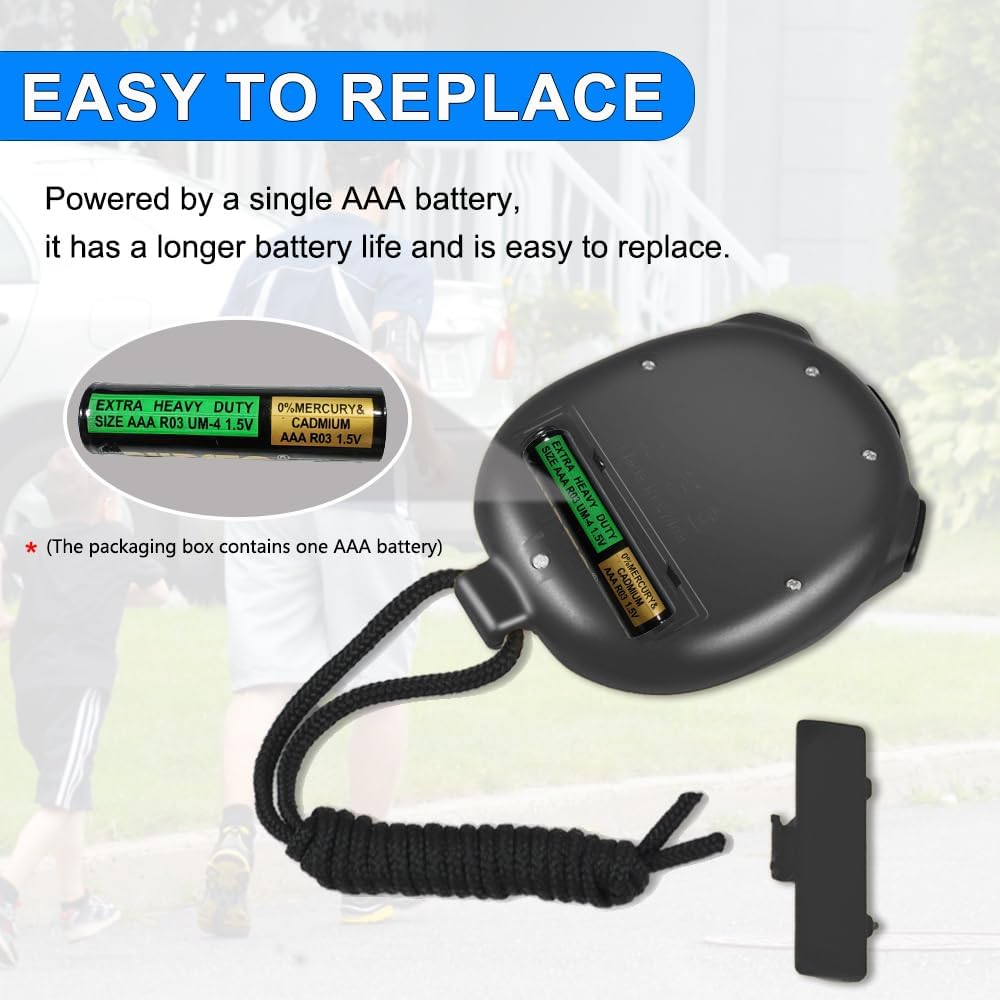
Image 3.1: Battery compartment and AAA battery. This image shows the back of the stopwatch with the battery cover removed, revealing the slot for a single AAA battery. Two AAA batteries are shown next to the stopwatch, illustrating the type required.
3.2 Initial Power On
After installing the battery, the device may power on automatically. If not, long-press the MODE ON/OFF button (Button A) for 3 seconds to turn on the device.
4. Operating Instructions
4.1 Button Functions

Image 4.1: Button layout and functions. This image labels the three buttons on the stopwatch: A (MODE ON/OFF), B (START/STOP), and C (SPLIT/RESET), along with their primary functions.
- Button A (MODE ON/OFF):
- Short press to switch between Stopwatch mode and Countdown mode.
- Long press (3+ seconds) to turn the device ON or OFF.
- Button B (START/STOP):
- In Stopwatch mode: Starts and stops the timer.
- In Countdown mode: Starts and stops the countdown.
- Button C (SPLIT/RESET):
- In Stopwatch mode:
- When running: Press to record a split time. The display will freeze to show the split time while the main timer continues in the background. Press again to return to the main timer display.
- When stopped: Press to reset the stopwatch to zero.
- In Countdown mode:
- When stopped: Press to adjust the countdown time.
- When running: Press to pause the countdown.
- In Stopwatch mode:
4.2 Stopwatch Mode
- Ensure the device is in Stopwatch mode (indicated by "STOPWATCH" on the display). If not, short press Button A to switch modes.
- Press Button B to start the stopwatch.
- To record a split time, press Button C while the stopwatch is running. The display will show the split time. Press Button C again to return to the running total time.
- Press Button B again to stop the stopwatch.
- To reset the stopwatch to zero, press Button C while the stopwatch is stopped.
4.3 Countdown Mode
- Short press Button A to switch to Countdown mode.
- While the countdown is stopped, press Button C repeatedly to set the desired countdown time. The digits will cycle through values.
- Press Button B to start the countdown.
- To pause the countdown, press Button B. Press Button B again to resume.
- When the countdown reaches zero, an alarm will sound. Press any button to stop the alarm.
- To reset the countdown to its initial set time, press Button C while the countdown is stopped.
5. Maintenance
5.1 Battery Replacement
When the display becomes dim or the device functions erratically, it is time to replace the AAA battery. Follow the steps outlined in Section 3.1 Battery Installation. Always dispose of used batteries responsibly according to local regulations.
5.2 Cleaning
To clean the stopwatch, wipe it with a soft, dry cloth. Do not use abrasive cleaners, solvents, or immerse the device in water.
5.3 Storage
Store the stopwatch in a cool, dry place away from direct sunlight and extreme temperatures. If storing for an extended period, it is recommended to remove the battery to prevent leakage.
6. Troubleshooting
- Device does not turn on:
- Check if the AAA battery is correctly installed with the proper polarity.
- Replace the battery with a new one.
- Ensure you are long-pressing the MODE ON/OFF button (Button A) for at least 3 seconds.
- Display is dim or erratic:
- The battery may be low. Replace the AAA battery.
- Buttons are unresponsive:
- Ensure the device is not in an unintended mode. Try turning it off and on again.
- Check for any debris or obstruction around the buttons.
- Countdown alarm does not sound:
- Verify that the countdown time was set correctly and reached zero.
- Ensure the device's sound is not muted (if applicable, though this model is simple).
7. Specifications
| Feature | Detail |
|---|---|
| Brand | PULIVIA |
| Model Number | YS-805C |
| Color | Black |
| Material | Acrylonitrile Butadiene Styrene (ABS) |
| Product Dimensions (D x W x H) | 0.6" x 3.3" x 2.5" (1.5 cm x 8.4 cm x 6.4 cm approx.) |
| Item Weight | 1.76 ounces (50 grams) |
| Number of Settings | 2 (Stopwatch, Countdown) |
| Battery Type | 1 x AAA battery (included) |

Image 7.1: Dimensions and weight of the PULIVIA Stopwatch. This image illustrates the physical measurements of the stopwatch, including its width (2.44 inches), height (2.83 inches), thickness (0.75 inches), and weight (1.7 oz). It also shows the lanyard length (22 inches).
8. Warranty and Support
For warranty information and customer support, please refer to the documentation provided with your purchase or contact the seller directly. Keep your purchase receipt as proof of purchase.
You can visit the official PULIVIA store for more information: PULIVIA Store.