
1. Introduction
1.1 Product Overview
This manual provides essential instructions for the proper setup, operation, and maintenance of your Hobbywing QUICRUN WP 10BL120 SD G2 Sensored Electronic Speed Controller (ESC) and 3650 SD G2 Brushless Motor Combo. This high-performance system is designed for remote-controlled vehicles, offering reliable and efficient power delivery. Please read this manual thoroughly before use to ensure optimal performance and safety.
1.2 Package Contents
Upon opening your package, verify that all components are present:
- 1 x QUICRUN WP 10BL120 SD G2 ESC (Sensored)
- 1 x QUICRUN 3650 SD G2 Brushless Motor (with customizable Turn)
- Hobbywing Decals
- Various Accessories (e.g., wires, connectors, heat shrink tubing)
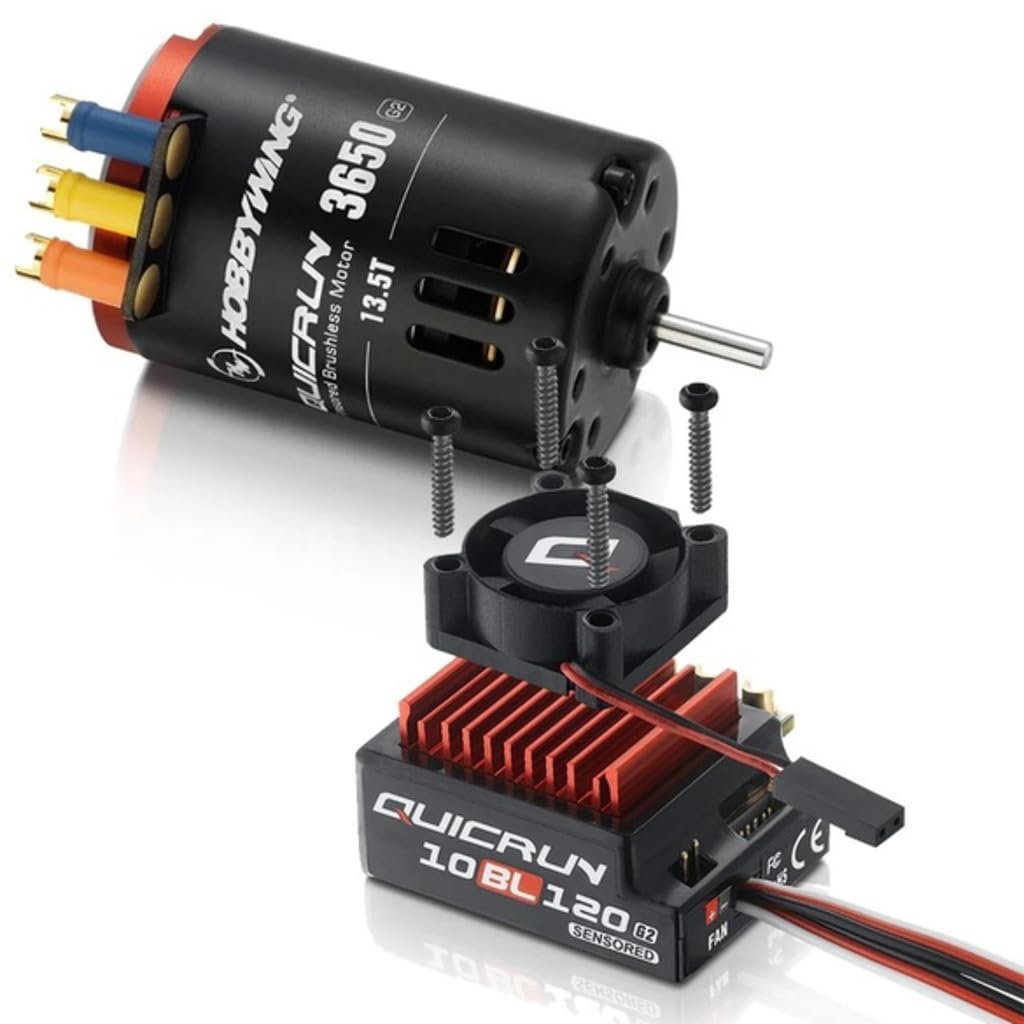
Image: The Hobbywing QUICRUN WP 10BL120 SD G2 ESC and 3650 SD G2 Motor Combo, showcasing the electronic speed controller and brushless motor components.
2. Safety Precautions
Adherence to the following safety guidelines is crucial for preventing damage to the product and ensuring user safety:
- Read the Manual: Familiarize yourself with all instructions before operating the product.
- Proper Connections: Ensure all connections are correct and secure. Incorrect wiring can cause damage.
- Battery Safety: Use only compatible batteries. Observe correct polarity. Do not overcharge or short-circuit batteries.
- Heat Management: ESCs and motors can become hot during operation. Allow components to cool before handling.
- Water Exposure: While the ESC is waterproof (WP), avoid prolonged submersion or exposure to corrosive liquids. Ensure all ports are sealed if applicable.
- Ventilation: Ensure adequate airflow around the ESC and motor to prevent overheating.
- Children: Keep the product and its components out of reach of small children.
- Disassembly: Do not attempt to disassemble or modify the ESC or motor. This voids the warranty and can cause damage.
3. Setup and Installation
3.1 ESC Connection
Follow these steps to connect the ESC:
- Motor Connection: Connect the three motor wires (A, B, C) from the ESC to the corresponding motor phases. For sensored motors, connect the sensor cable from the motor to the ESC's sensor port. Ensure the sensor cable is oriented correctly.
- Battery Connection: Connect the ESC's power input wires (red for positive, black for negative) to your battery pack. Ensure correct polarity.
- Receiver Connection: Plug the ESC's throttle cable (usually a three-wire servo connector) into the throttle channel (CH2) of your receiver.
- Cooling Fan (if applicable): If your ESC includes a cooling fan, connect it to the designated fan port on the ESC.
3.2 Motor Installation
Mount the 3650 SD G2 motor securely in your vehicle's motor mount using appropriate screws. Ensure proper gear mesh between the motor pinion and the spur gear. Incorrect gear mesh can lead to excessive wear and heat.
3.3 Throttle Range Calibration
Before first use, the ESC's throttle range must be calibrated to match your radio transmitter. Refer to the detailed calibration procedure in the separate ESC manual or Hobbywing's official website for your specific ESC model. Generally, this involves:
- Turn on your transmitter and set throttle trim to neutral.
- Hold the ESC's SET button, then turn on the ESC. Release the button when the LED flashes.
- Set full throttle on your transmitter, press SET.
- Set full brake/reverse on your transmitter, press SET.
- Set neutral throttle on your transmitter, press SET.
4. Operating Instructions
4.1 Powering On/Off
- To Power On: Ensure all connections are secure. Turn on your radio transmitter first, then connect the battery to the ESC. Press the ESC's power button.
- To Power Off: Disconnect the battery from the ESC. Then turn off your radio transmitter.
4.2 ESC Programming
The QUICRUN WP 10BL120 SD G2 ESC features programmable parameters to fine-tune its performance. These parameters can typically be adjusted using:
- The SET button on the ESC (limited parameters).
- A Hobbywing LED Program Box (recommended for full access to parameters).
Refer to the specific ESC manual for a complete list of programmable items and detailed instructions on how to adjust them.
5. Maintenance
Regular maintenance ensures the longevity and optimal performance of your ESC and motor combo:
- Cleaning: After each use, especially in dusty or dirty conditions, clean the ESC and motor with a soft brush or compressed air. Remove any debris that may impede cooling.
- Inspection: Periodically check all wires and connectors for signs of wear, fraying, or corrosion. Ensure all screws are tight.
- Motor Bearings: Inspect motor bearings for smooth operation. If they feel rough, they may need cleaning or replacement.
- Storage: Store the ESC and motor in a clean, dry place away from direct sunlight and extreme temperatures. Disconnect batteries when storing.
6. Troubleshooting
This section addresses common issues you might encounter:
| Problem | Possible Cause | Solution |
|---|---|---|
| Motor not running / No response | Incorrect throttle calibration; Loose connections; Dead battery; Receiver not bound. | Recalibrate throttle range; Check all wiring; Charge battery; Re-bind receiver. |
| Motor stutters or runs roughly | Incorrect motor wiring; Damaged sensor cable; Incorrect ESC settings. | Verify motor phase connections; Check/replace sensor cable; Adjust ESC timing/settings. |
| ESC overheats | Overgearing; Insufficient cooling; Excessive load; Incorrect ESC settings. | Reduce pinion size; Ensure proper airflow/fan operation; Reduce load; Adjust ESC timing. |
| Vehicle runs in reverse when throttle is applied forward | Motor wires connected incorrectly; Motor direction setting. | Swap any two of the three motor wires (A, B, C); Adjust motor direction in ESC programming. |
7. Specifications
Key technical specifications for the Hobbywing QUICRUN WP 10BL120 SD G2 ESC and 3650 SD G2 Motor Combo:
| Feature | Detail |
|---|---|
| Brand | HOBBYWING |
| Model Name | HWI38020382 |
| Included ESC | QUICRUN WP 10BL120 SD G2 (Sensored) |
| Included Motor | QUICRUN 3650 SD G2 Brushless |
| Material | Plastic |
| Manufacturer | Hobbywing |
| UPC | 088718516921 |
| Package Dimensions | 6.75 x 5.65 x 2.35 inches |
8. Warranty and Support
8.1 Warranty Information
For detailed warranty terms and conditions, please refer to the official Hobbywing website or contact your local distributor. Warranty coverage typically applies to manufacturing defects and may vary by region.
8.2 Customer Support
If you encounter issues not covered in this manual or require further assistance, please visit the official Hobbywing support page or contact their customer service department. Provide your product model number (HWI38020382) and a detailed description of the issue for efficient support.