
Introduction
Thank you for choosing the Aheaplus Washer and Dryer Countertop. This product is designed to enhance your laundry room with additional workspace, storage, and modern features. It includes integrated RGB LED lighting and a convenient power strip with USB ports and AC outlets. This manual provides essential information for safe assembly, operation, and maintenance of your new countertop. Please read these instructions carefully before installation and retain them for future reference.
Safety Information
- Ensure all electrical connections for the LED lights and power strip are made according to local electrical codes.
- Do not overload the power strip. Refer to the specifications for maximum wattage.
- Keep liquids away from electrical components. The countertop surface is waterproof, but electrical parts are not.
- Assemble the unit on a clean, flat, and stable surface to prevent damage or injury.
- Always use appropriate tools for assembly.
- Do not allow children to climb on or play with the assembled unit.
- Verify that the dimensions of your washer and dryer are compatible with the countertop before assembly.
Package Contents
Please check that all components are present and undamaged before beginning assembly. If any parts are missing or damaged, contact customer support.
- Main Countertop Panel
- Upper Shelf Panel(s)
- Side Support Panels
- Back Panel(s)
- RGB LED Light Strip
- Power Strip with USB Ports and AC Outlets
- Assembly Hardware (screws, dowels, brackets)
- Assembly Tools (e.g., Allen wrench, screwdriver)
Setup and Assembly Instructions
Follow these steps carefully to assemble your Aheaplus Washer and Dryer Countertop. It is recommended to have two people for assembly.
- Unpack and Identify Parts: Carefully remove all components from the packaging. Lay them out on a soft, clean surface to prevent scratches. Identify each part using the provided parts list (if applicable).
- Attach Side Supports: Secure the side support panels to the main countertop panel using the provided hardware. Ensure they are aligned correctly.
- Install Back Panel: Attach the back panel(s) to the main countertop and side supports. This provides stability and prevents items from falling behind the appliances.
- Assemble Upper Shelf: Construct the upper shelf unit by attaching its side and back panels. Then, secure the assembled shelf unit to the main countertop structure.
- Integrate Power Strip: Install the power strip into its designated cutout on the countertop or shelf. Connect its power cord.
- Install LED Lights: Affix the RGB LED light strip to the underside of the upper shelf or designated area. Connect the LED controller and power supply.
- Position the Countertop: Carefully lift and place the assembled countertop over your washer and dryer units. Ensure it is centered and stable. The anti-slip design helps keep it in place.
- Final Checks: Verify all connections are secure and the unit is stable. Plug in the power strip and LED lights.
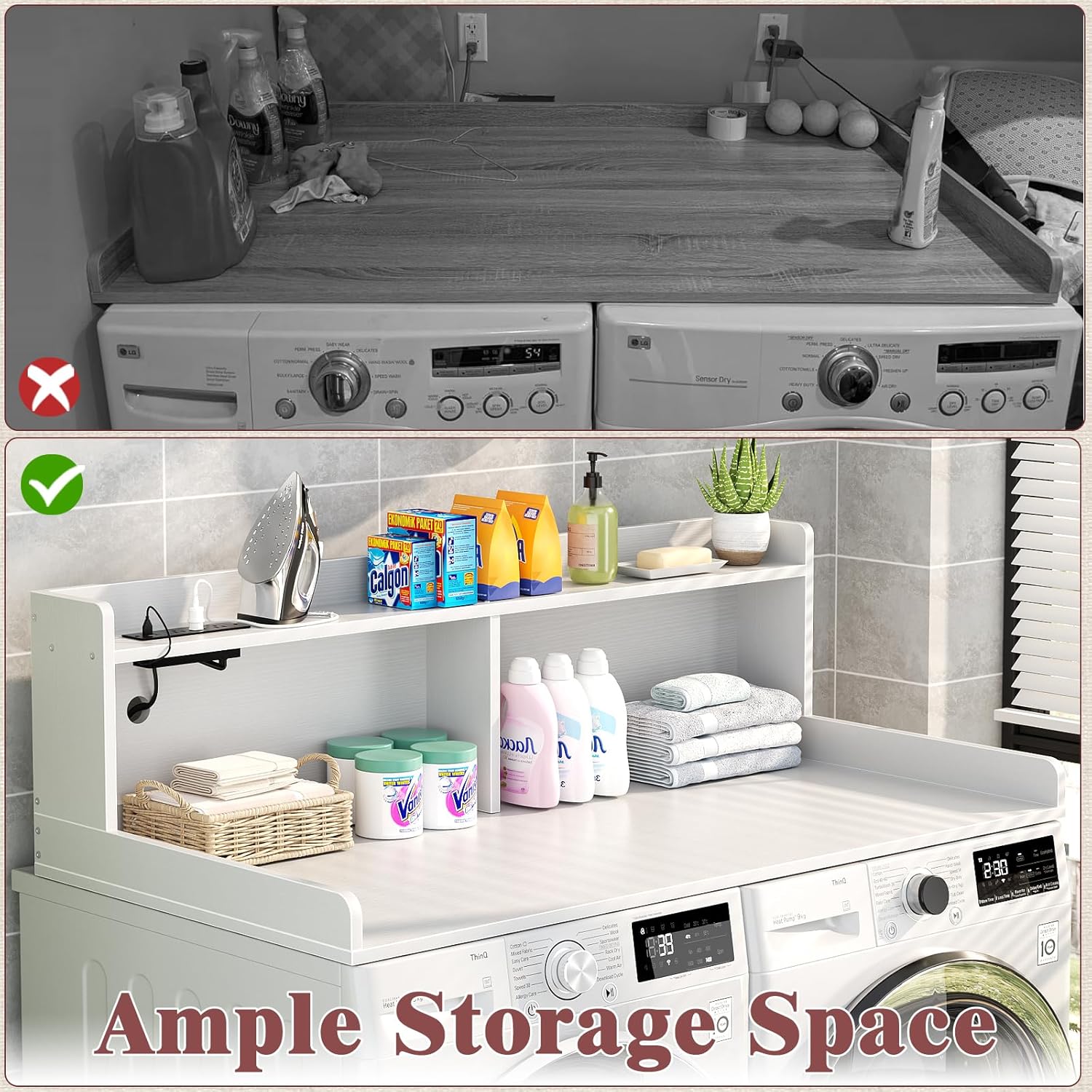
Figure 1: Assembled countertop providing ample storage space.

Figure 2: Detail of the slip-resistant edge for secure placement.

Figure 3: Integrated cable management hole for tidy wiring.
Operating Instructions
RGB LED Lights
The integrated RGB LED lights provide customizable ambiance for your laundry area.
- Power On/Off: Use the inline controller or the dedicated smartphone application to turn the LED lights on or off.
- Color and Mode Selection: Through the smartphone APP, you can select from a wide range of colors, adjust brightness, and choose various lighting modes (e.g., static, fading, flashing).
- App Pairing: Refer to the separate LED light instruction sheet for details on downloading and pairing the smartphone application with your LED strip.

Figure 4: RGB LED lights in operation, showing color customization.
Power Strip
The built-in power strip offers convenient access to electrical outlets and USB charging ports.
- AC Outlets: The power strip includes 3 standard AC outlets (125V/12A) for plugging in small appliances or charging devices.
- USB Ports: Two USB ports (5V/2A) are available for charging smartphones, tablets, and other USB-powered devices.
- Usage: Plug the power strip's main cord into a wall outlet. Ensure the total wattage of connected devices does not exceed the power strip's maximum capacity.
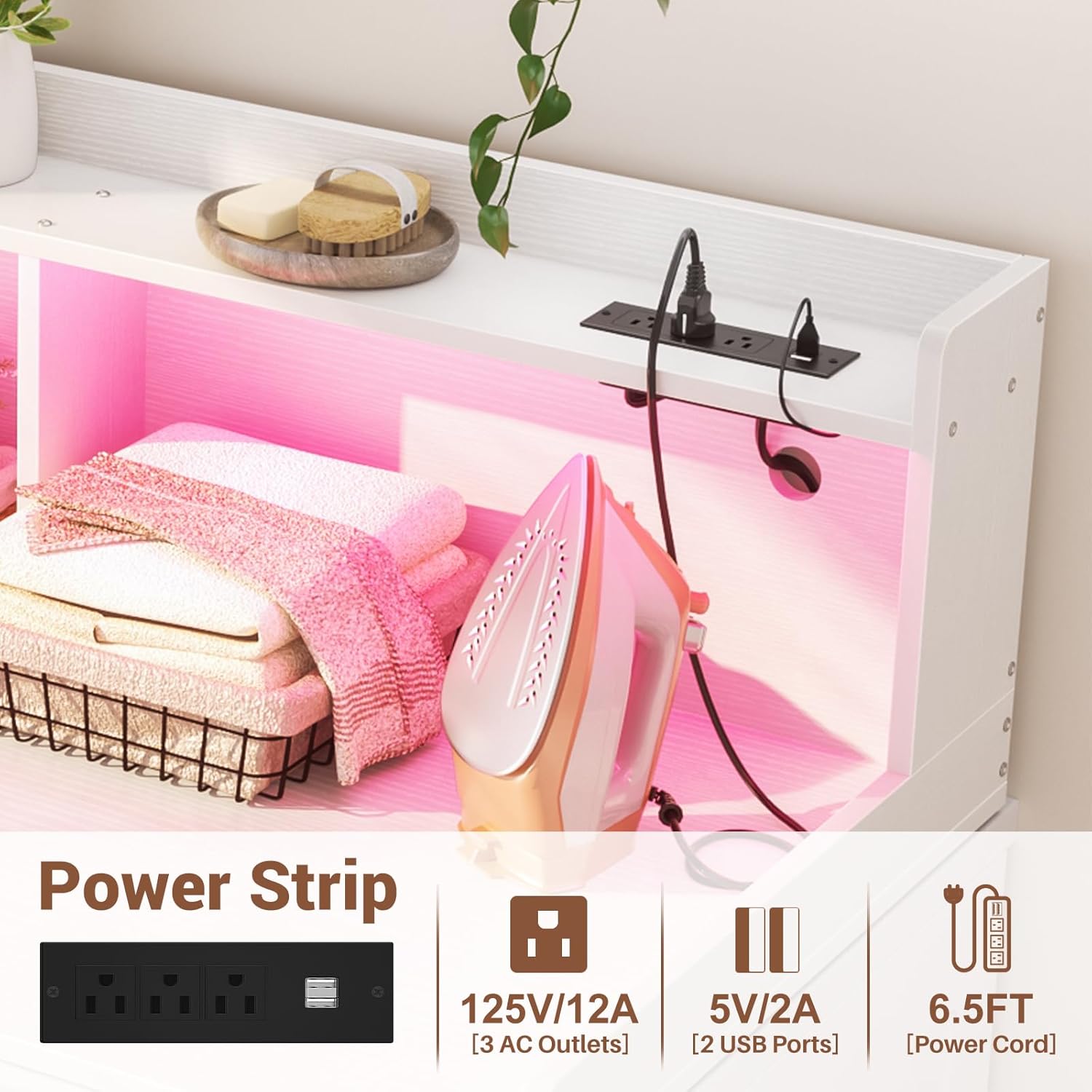
Figure 5: Detail of the power strip with AC outlets and USB ports.
Maintenance
To ensure the longevity and appearance of your countertop, follow these maintenance guidelines:
- Cleaning: The countertop surface is waterproof. Wipe spills immediately with a soft, damp cloth. For general cleaning, use a mild, non-abrasive cleaner. Avoid harsh chemicals that may damage the laminated finish.
- Dusting: Regularly dust the surface and shelves with a dry, soft cloth.
- Electrical Components: Keep the power strip and LED lights free from dust and moisture. Do not attempt to clean electrical components with liquids.
- Inspection: Periodically check all assembly hardware to ensure screws are tight. Retighten if necessary.

Figure 6: The waterproof surface allows for easy cleaning of spills.
Troubleshooting
If you encounter issues with your Aheaplus Washer and Dryer Countertop, refer to the following common problems and solutions:
| Problem | Possible Cause | Solution |
|---|---|---|
| LED lights do not turn on. | Power cord unplugged, loose connection, faulty LED strip/controller. | Check if the LED power adapter is securely plugged into an outlet. Ensure all connections to the LED strip and controller are firm. If issues persist, contact customer support. |
| Power strip is not providing power. | Power strip unplugged, circuit breaker tripped, overloaded. | Verify the power strip's main cord is fully plugged into a working wall outlet. Check your household circuit breaker. Reduce the number of devices plugged into the power strip to avoid overloading. |
| Countertop feels unstable or wobbly. | Loose assembly hardware, uneven placement. | Ensure all screws and fasteners are tightened. Check that the countertop is placed on a level surface and is properly seated over the washer and dryer. |
Specifications
| Brand: | Aheaplus |
| Model Number: | DKB-617 |
| Material: | Engineered Wood (MDF Board with Laminated Finish) |
| Product Dimensions (D x W x H): | 27.4"D x 54"W x 15.7"H |
| Color: | White |
| Special Features: | RGB LED Lights, Integrated Power Strip (3 AC Outlets, 2 USB Ports), Slip Resistant, Space Saving, Waterproof Surface |
| Mounting Type: | Floor Mount (over appliances) |
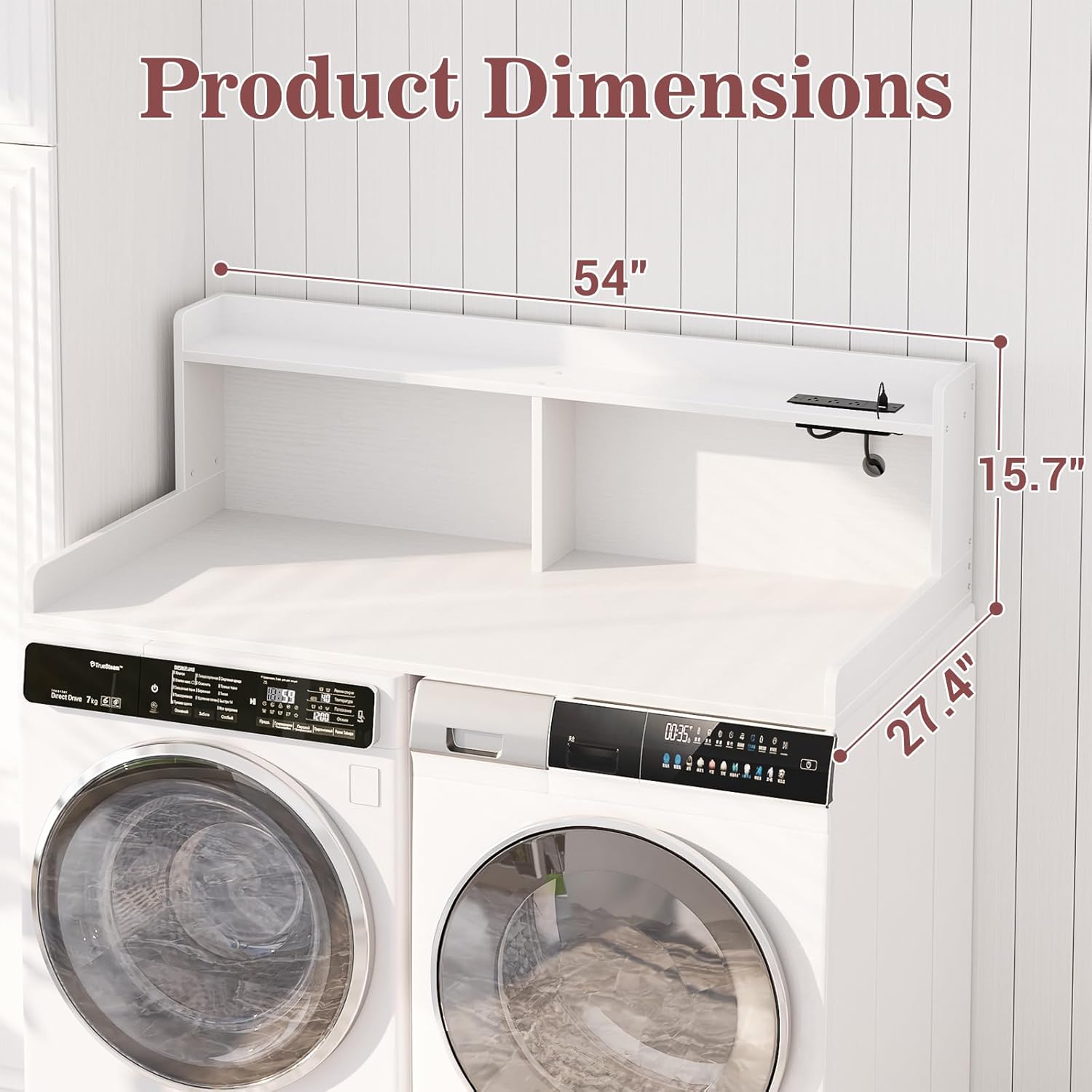
Figure 7: Product dimensions for planning placement.
Warranty and Support
For warranty information or technical support, please refer to the documentation included with your purchase or contact Aheaplus customer service directly. Keep your purchase receipt as proof of purchase.
You can typically find contact information on the manufacturer's official website or through the retailer where the product was purchased.