
TMEZON MZ-M790*2+MZ-D90
TMEZON M790 Smart WiFi Video Intercom System User Manual
Model: MZ-M790*2+MZ-D90
1. Introduction
Thank you for choosing the TMEZON M790 Smart WiFi Video Intercom System. This manual provides detailed instructions for the installation, operation, and maintenance of your new video intercom. Please read this manual thoroughly before installation and use to ensure proper function and safety.
2. Safety Information
Always follow basic safety precautions when using this product to reduce the risk of fire, electric shock, and injury. Ensure all wiring is performed by a qualified professional if you are unsure. Do not expose the indoor monitors to water or excessive humidity. Keep the product away from heat sources.
3. Package Contents
The TMEZON M790 Smart WiFi Video Intercom System package includes the following components:
- 2 x Indoor Touchscreen Monitors (MZ-M790)
- 1 x Outdoor Doorbell Camera (MZ-D90)
- 8 x RFID Cards
- Mounting Hardware
- Power Adapters
- User Manual

Image: Overview of the TMEZON M790 Smart WiFi Video Intercom System, showing the two indoor monitors, the outdoor doorbell unit, eight RFID unlock cards, and a smartphone demonstrating the mobile application interface.
4. Setup and Installation
4.1 Wiring Connection
The TMEZON M790 system requires a 2-wire wired connection for all devices. It is recommended to place the outdoor doorbell unit at the entrance, the main monitor on the first floor, and the slave monitor on the second floor for optimal coverage and communication. Ensure secure and correct wiring connections as per the diagram provided in the full installation guide.

Image: A visual representation of the 2-wire connection method for the TMEZON video intercom system, highlighting the simple wiring between the indoor monitor and the outdoor doorbell unit.
4.2 Wi-Fi Configuration
To enable smart features and app control, ensure your router operates on a 2.4 GHz frequency. Connect the monitor to your 2.4 GHz Wi-Fi network. Once connected, add the device to the TuyaSmart mobile application. This allows for remote control and monitoring.
5. Operating Instructions
5.1 Two-Way Audio Communication
The system supports two-way audio communication between the outdoor doorbell and the indoor monitors, as well as between the master and slave monitors. This allows you to speak with visitors or communicate between different floors of your home.

Image: A user engaging with the indoor monitor, illustrating the clear two-way audio communication feature of the TMEZON video intercom system.
5.2 Humanoid Motion Detection
The M790 video intercom features advanced humanoid motion detection. When a human figure is detected, the outdoor camera will automatically capture photos or videos and store them on the TF card. This intelligent detection helps reduce false alarms compared to traditional motion sensors.
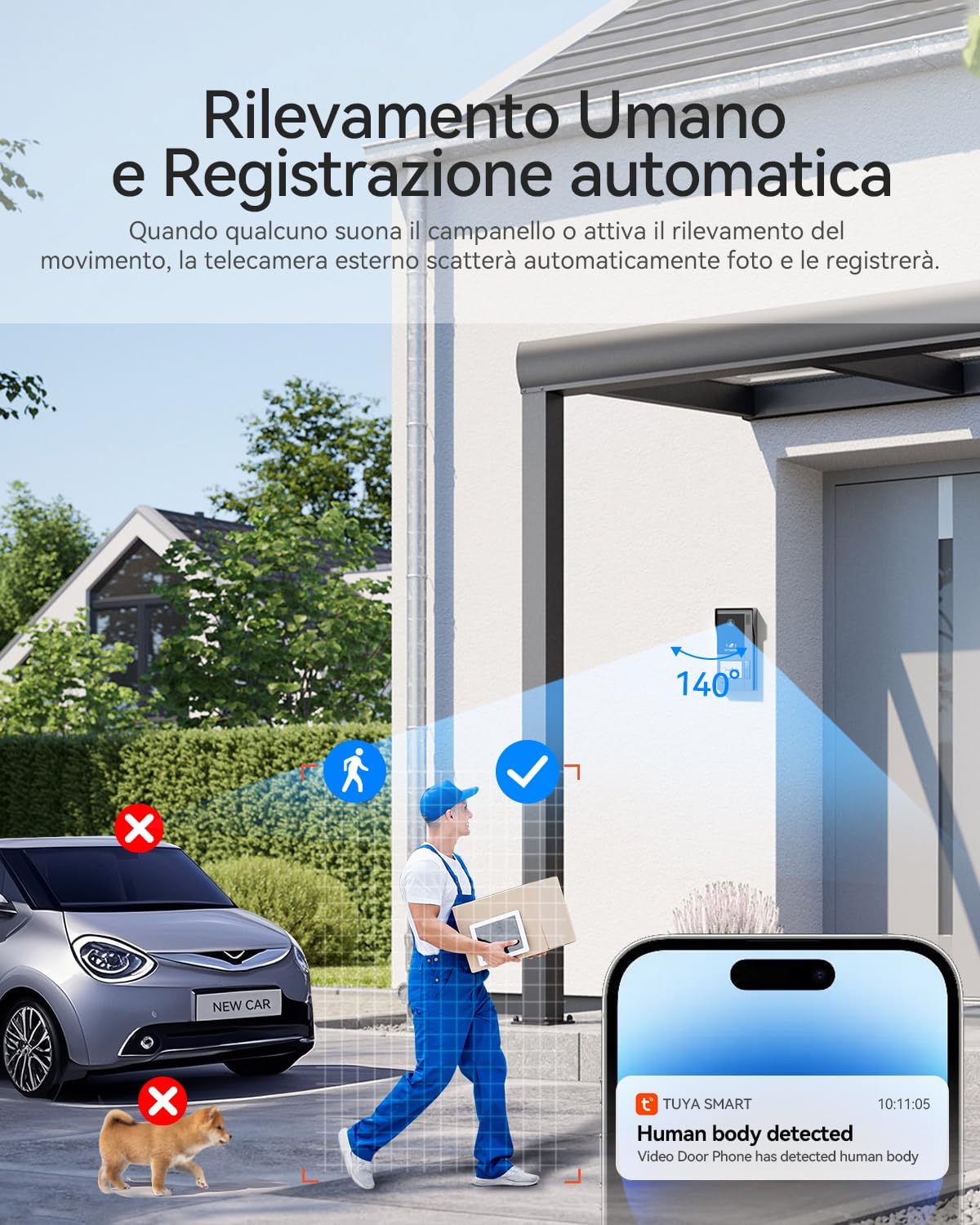
Image: A visual explanation of the humanoid motion detection feature, demonstrating how the system accurately identifies human presence while filtering out irrelevant movements from vehicles or animals.
5.3 Remote Access and Unlock via App
With the TuyaSmart app, you can remotely monitor your doorbell, communicate with visitors, and unlock the door from anywhere. This provides enhanced convenience and security, allowing you to manage access even when you are not home.

Image: A user interacting with the TuyaSmart mobile application on a smartphone, showcasing the live view and remote unlock functionalities of the TMEZON video intercom system.
5.4 RFID Card Unlock
The system supports unlocking the door using RFID cards. Eight RFID cards are included, providing a convenient and secure access method for family members. Simply tap the card on the designated area of the outdoor doorbell unit to unlock the door.
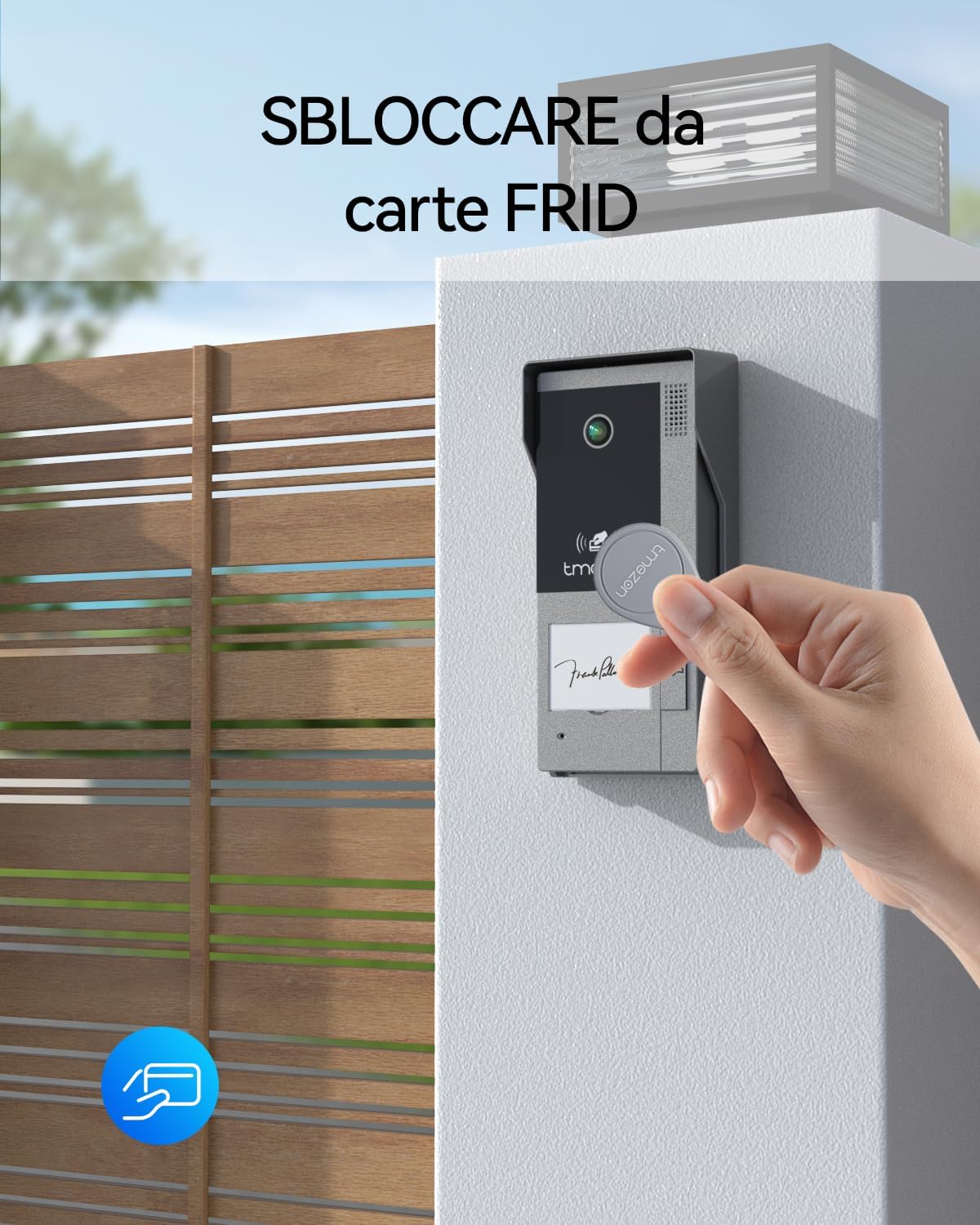
Image: A hand demonstrating the RFID card unlock feature by tapping an RFID card against the outdoor doorbell unit, providing a quick and secure entry method.
5.5 Video Recording and Playback
The outdoor doorbell camera records videos or captures images when the doorbell button is pressed or motion is detected. These recordings are stored on a TF card (up to 128GB supported). You can preview and play back recorded content at any time directly from the indoor monitor or via the mobile app.
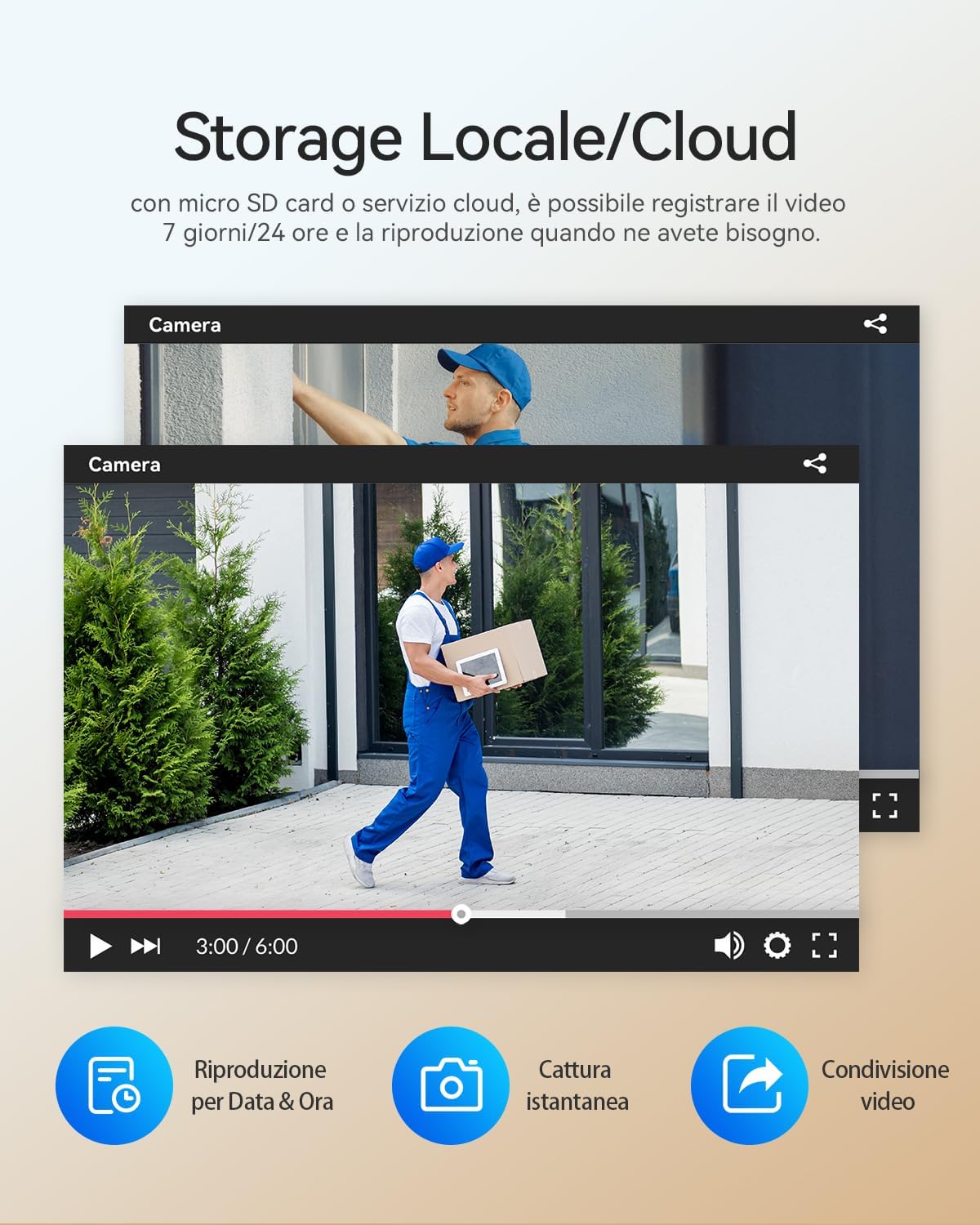
Image: Screenshots illustrating the local and cloud storage capabilities, along with the video playback interface, showing options for reviewing recorded footage, capturing instant images, and sharing videos.
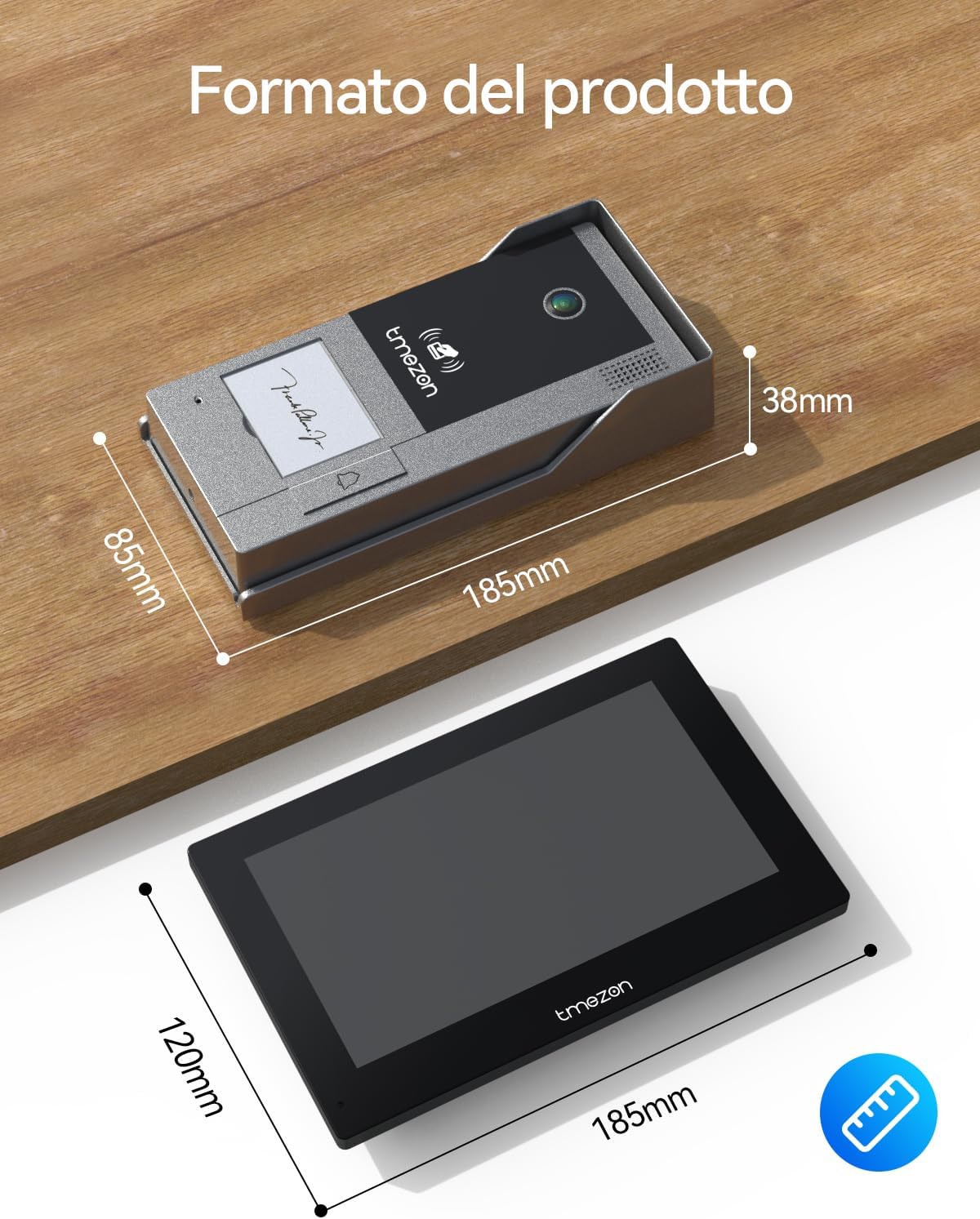
Image: A detailed view of the indoor monitor, highlighting the TF card slot and the process of inserting a memory card for local video storage and playback.
5.6 Voice Message Function
If no one answers the doorbell, visitors can leave a voice message. The system will provide a voice reminder to the visitor, ensuring important messages are not missed.

Image: The outdoor doorbell unit with a visual representation of the voice message function, showing a visitor leaving a message when no one is available to answer.
5.7 Night Vision
The outdoor doorbell camera is equipped with infrared light and a 140-degree wide-angle lens, providing clear visibility both day and night. This ensures you can see details in front of your door even in low-light conditions.
6. Maintenance
The outdoor doorbell unit is IP65 certified, making it water-resistant and suitable for various weather conditions. Regular cleaning of the camera lens and monitor screens with a soft, dry cloth is recommended to maintain optimal performance. Avoid using harsh chemicals or abrasive materials.

Image: The outdoor doorbell unit shown under simulated rain, emphasizing its IP65 weather-resistant design, suitable for outdoor installation in various climates.
7. Troubleshooting
- No Power: Check all power connections and ensure power adapters are securely plugged in.
- No Video/Audio: Verify all 2-wire connections between the doorbell and monitors are correct and secure.
- Wi-Fi Connectivity Issues: Ensure your router is set to 2.4 GHz. Restart your router and the indoor monitor. Re-attempt Wi-Fi configuration through the TuyaSmart app.
- Motion Detection Not Working: Check motion detection settings on the monitor and app. Ensure the camera lens is clean and unobstructed.
- RFID Cards Not Working: Ensure cards are properly programmed. Try re-adding them through the monitor interface.
For any complex issues or if troubleshooting steps do not resolve the problem, please contact TMEZON technical support or your seller for assistance.
8. Specifications
| Feature | Description |
|---|---|
| Brand | TMEZON |
| Model Number | MZ-M790*2+MZ-D90 |
| Connectivity Technology | Wired, Wireless (2.4 GHz Wi-Fi) |
| Video Capture Resolution | 1080p |
| Power Source | Corded Electric |
| Installation Method | Screw-in |
| Outdoor Unit Protection | IP65 Weather Resistant |
| Compatible Devices | Smartphone (TuyaSmart App) |
| TF Card Support | Max 128 GB |
| Product Dimensions (Package) | 20 x 17.6 x 12.4 cm |
| Item Weight | 2.02 Kilograms |

Image: A diagram illustrating the physical dimensions of both the outdoor doorbell unit and the indoor monitor, providing precise measurements for installation planning.
9. Support
For technical support, warranty inquiries, or any questions regarding your TMEZON M790 Smart WiFi Video Intercom System, please contact the seller or TMEZON customer service. Refer to your purchase documentation for specific contact details.
Ask a question about this manual
Ask about setup, troubleshooting, compatibility, parts, safety, or missing instructions. Manuals+ will review the question and use this page’s manual context to help answer it.