
Richmat PS1L-A29018-2
Richmat Adjustable Bed Power Supply Adapter User Manual
Model: PS1L-A29018-2
1. Introduction
This manual provides essential information for the safe and effective use of your Richmat Class 2 Power Supply Adapter, Model PS1L-A29018-2. This adapter is designed as a replacement power supply for adjustable beds, specifically compatible with Leggett and Platt 50 Series Adjustable Beds.
The adapter is UL Certified, ensuring it meets rigorous safety standards for reliability and durability.
2. Safety Information
- Electrical Hazard: To reduce the risk of electric shock, do not open the adapter casing. There are no user-serviceable parts inside.
- Dry Location Use Only: This power supply is intended for indoor use in dry locations only. Do not expose to water, moisture, or high humidity.
- Proper Ventilation: Ensure adequate ventilation around the adapter during operation to prevent overheating. Do not cover the adapter.
- Cable Inspection: Before each use, inspect the power cord and adapter for any signs of damage. Do not use if damaged.
- Compatibility: Only use this adapter with compatible adjustable bed systems as specified. Using it with incompatible devices may cause damage or safety hazards.
- Unplug When Not In Use: Disconnect the power supply from the wall outlet when not in use for extended periods or during electrical storms.
3. Setup and Installation
Follow these steps to properly install your Richmat power supply adapter:
- Verify Compatibility: Before connecting, ensure that the connector on your adjustable bed's cable matches the connector on the PS1L-A29018-2 adapter. If the connectors are not identical, the adapter cannot be used as a replacement.
- Disconnect Old Adapter: If replacing an existing adapter, unplug the old power supply from both the wall outlet and the adjustable bed.
- Connect to Bed: Carefully insert the adapter's output connector into the corresponding port on your adjustable bed's control box or motor. Ensure a secure and snug fit.
- Connect to Power Outlet: Plug the adapter's AC input plug into a standard 100-130V AC wall outlet.
- Power Indicator: Once connected to power, the "DC Power" indicator light on the adapter should illuminate, typically green, indicating that power is being supplied.

Figure 3.1: Adapter Connector Port. Ensure this matches your bed's cable.
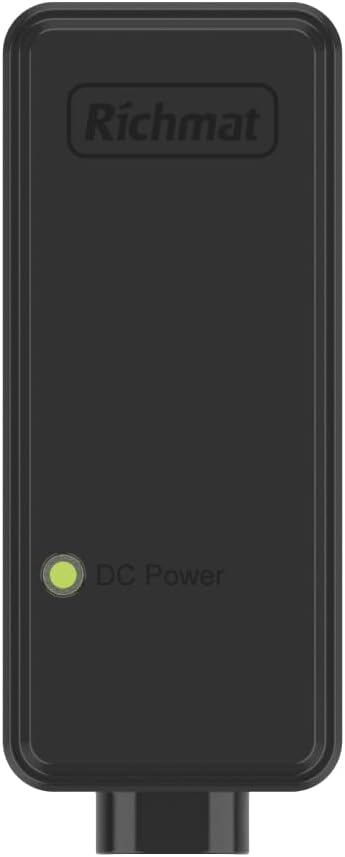
Figure 3.2: Adapter Front View with DC Power Indicator.
4. Operating Instructions
Once the Richmat power supply adapter is correctly installed and connected, your adjustable bed should be ready for operation. The adapter functions as a continuous power source for your bed's motor and control system.
- Normal Operation: The adapter provides stable power to your adjustable bed, allowing you to use its remote control or integrated controls to adjust the bed's position.
- Duty Cycle: The adapter is designed with a duty cycle of "ON 2 min / OFF 18 min". This means the motor should not be operated continuously for more than 2 minutes, followed by a rest period of at least 18 minutes to prevent overheating and prolong the life of the motor and adapter.
- Power Indicator: The green "DC Power" light on the adapter indicates that it is receiving AC power and converting it to DC power for the bed. If this light is off, check the wall outlet and connections.
5. Maintenance and Care
Proper care will ensure the longevity and safe operation of your power supply adapter:
- Cleaning: Disconnect the adapter from the power outlet before cleaning. Use a soft, dry cloth to wipe the exterior. Do not use liquid cleaners or sprays.
- Storage: If storing the adapter for an extended period, disconnect it from both the wall outlet and the bed. Store in a cool, dry place away from direct sunlight and extreme temperatures.
- Cable Management: Avoid kinking, twisting, or placing heavy objects on the power cord. This can damage the internal wires.
- Environmental Conditions: Do not operate the adapter in excessively dusty, humid, or hot environments.
6. Troubleshooting
If you encounter issues with your power supply adapter, refer to the following common problems and solutions:
| Problem | Possible Cause | Solution |
|---|---|---|
| No power to adjustable bed / Adapter indicator light is off. |
|
|
| Bed operates intermittently or slowly. |
|
|
| Adapter feels excessively hot. |
|
|
If the problem persists after attempting these solutions, contact customer support.
7. Specifications
| Feature | Detail |
|---|---|
| Model Number | PS1L-A29018-2 |
| Input Voltage | AC 100-130V, 50/60Hz, 2.5A |
| Output Voltage/Current | DC 29V, 1.8A |
| Output Power | 52.2W |
| Duty Cycle | ON 2 min / OFF 18 min |
| Certification | UL Certified |
| Color | Black |
| Compatible Devices | Adjustable Bed (e.g., Leggett and Platt 50 Series) |
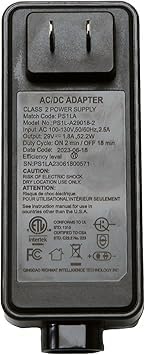
Figure 7.1: Adapter Back View with Specifications Label.
8. Warranty and Support
For warranty information or technical support regarding your Richmat PS1L-A29018-2 power supply adapter, please refer to the original purchase documentation or contact the seller directly. As this product is a replacement part, specific warranty terms may vary based on the retailer or manufacturer's policy.
For general inquiries or assistance, please reach out to the customer service provided by your point of purchase.
Ask a question about this manual
Ask about setup, troubleshooting, compatibility, parts, safety, or missing instructions. Manuals+ will review the question and use this page’s manual context to help answer it.