1. Product Overview
The SIXTOP Android 13 Car Stereo Radio is designed for Mazda 6 models from 2007-2012, offering advanced features such as Apple CarPlay, Android Auto, GPS Navigation, Mirror Link, FM/RDS Radio, Bluetooth, and Steering Wheel Control. This unit provides a 9-inch touch screen display and comes with a comprehensive set of accessories for installation.

Image 1.1: The SIXTOP Android 13 Car Stereo Radio unit along with its included accessories, such as the AHD camera, microphone, and a visual representation of Apple CarPlay and Android Auto functionality on a smartphone.
2. Setup and Installation
This car stereo is designed for plug-and-play installation in compatible Mazda 6 models (2007-2012). Ensure to check your original radio size and the shape of your car's center console for compatibility before proceeding with installation.
2.1 Package Contents and Dimensions

Image 2.1: This image displays the physical dimensions of the car stereo unit and a detailed list of all items included in the package, such as power cables, USB cables, Canbus, installation tools, GPS antenna, RCA cables, rear camera, and the user manual.
2.2 Wiring Instructions
Refer to the wiring diagram provided in the package. Special attention is required for vehicles equipped with a BOSE sound system.
- BOSE System Integration: If your vehicle has a BOSE subwoofer/amplifier system, you must connect the "AMP" and "AMP CTRL" wires from the car stereo harness to the corresponding wires on your stock radio harness. This step is crucial for sound output.
- Steering Wheel Controls: The aftermarket KEY1 and KEY2 loose wires need to be connected to the steering wheel control wire on the stock radio harness side to enable steering wheel button functionality.
- Backup Camera: For the backup camera, connect the red power wire to your white reverse bulb. The black ground wire is not always necessary for video display. Ensure the two very short wires on the camera are connected.
2.3 Initial Power-On and Settings
Upon first power-on, you may need to access factory settings for specific configurations. The factory setting password is 8888. For the backup camera, set the resolution to AHD 720/25fps within the Factory Settings (password: 000000).
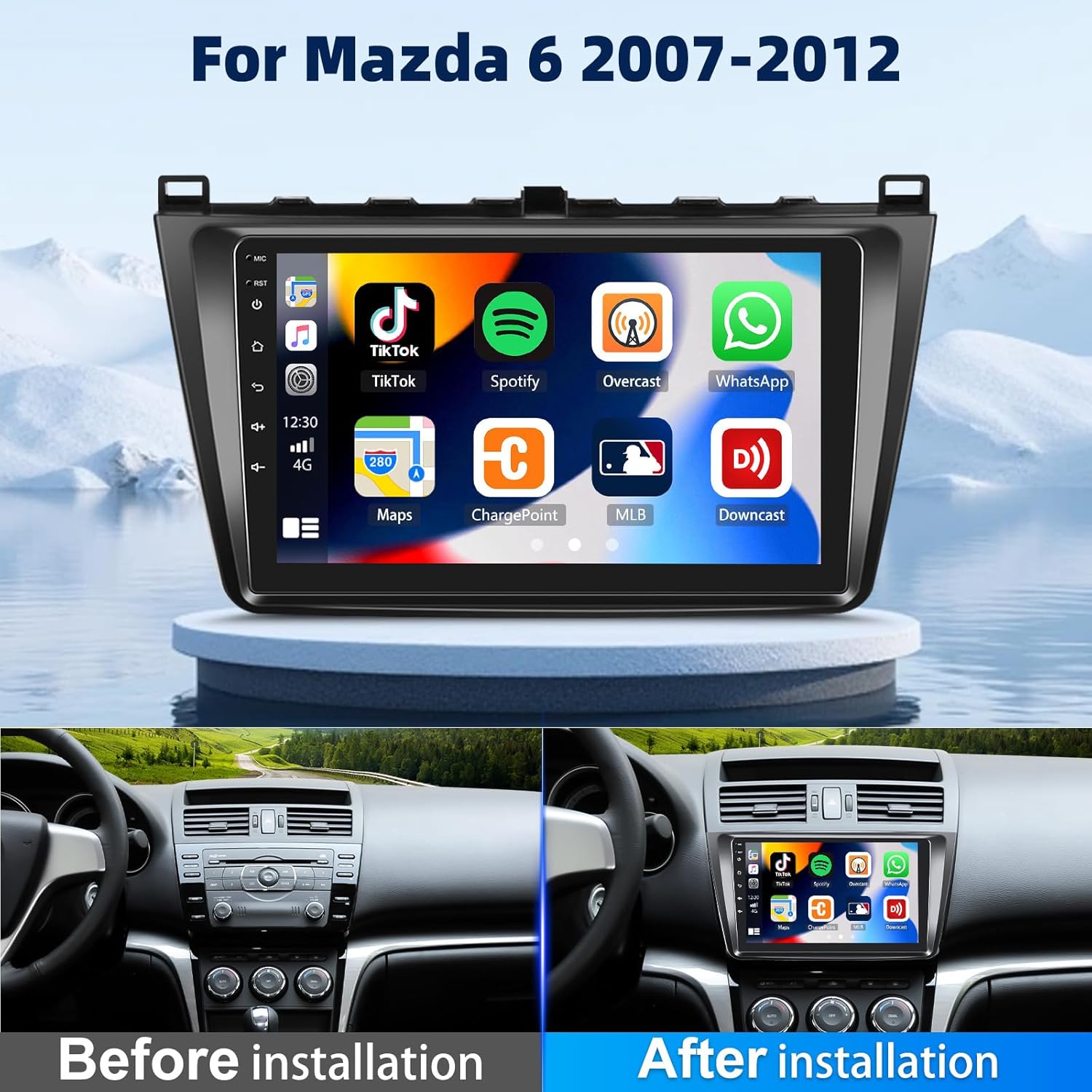
Image 2.2: A visual comparison showing the car's dashboard before and after the installation of the SIXTOP Android 13 Car Stereo, highlighting the seamless integration and improved aesthetic.
3. Operating Instructions
3.1 Apple CarPlay and Android Auto
The car stereo supports both Apple CarPlay and Android Auto, allowing seamless integration with your smartphone. This enables synchronization of phonebook, email, notifications, map navigation apps, and music apps directly to the radio display. You can also use your phone's voice assistant for voice control.
- Ensure your mobile phone's WiFi is enabled.
- Connect via Bluetooth, then open the "ZLINK5" app on the stereo to automatically connect.
- Alternatively, use a USB cable to connect your phone and then open the "ZLINK5" app.

Image 3.1: This image illustrates the user interfaces for Apple CarPlay, Android Auto, and Mirror Link, demonstrating how smartphone content and applications are displayed and controlled on the car stereo screen.
3.2 Mirror Link and Split Screen Functionality
Mirror Link allows you to project your mobile phone's screen onto the car stereo, ideal for viewing downloaded videos or other content. The Split Screen function enables independent operation of two applications simultaneously on the left and right sides of the screen.
- Mirror Link: Select the "ZLINK5" app and switch to the "Mirror Link" connection option.
- Split Screen: Click the rectangle icon at the top of the screen, select a browsing page or app, and drag it to either the left or right side of the screen.
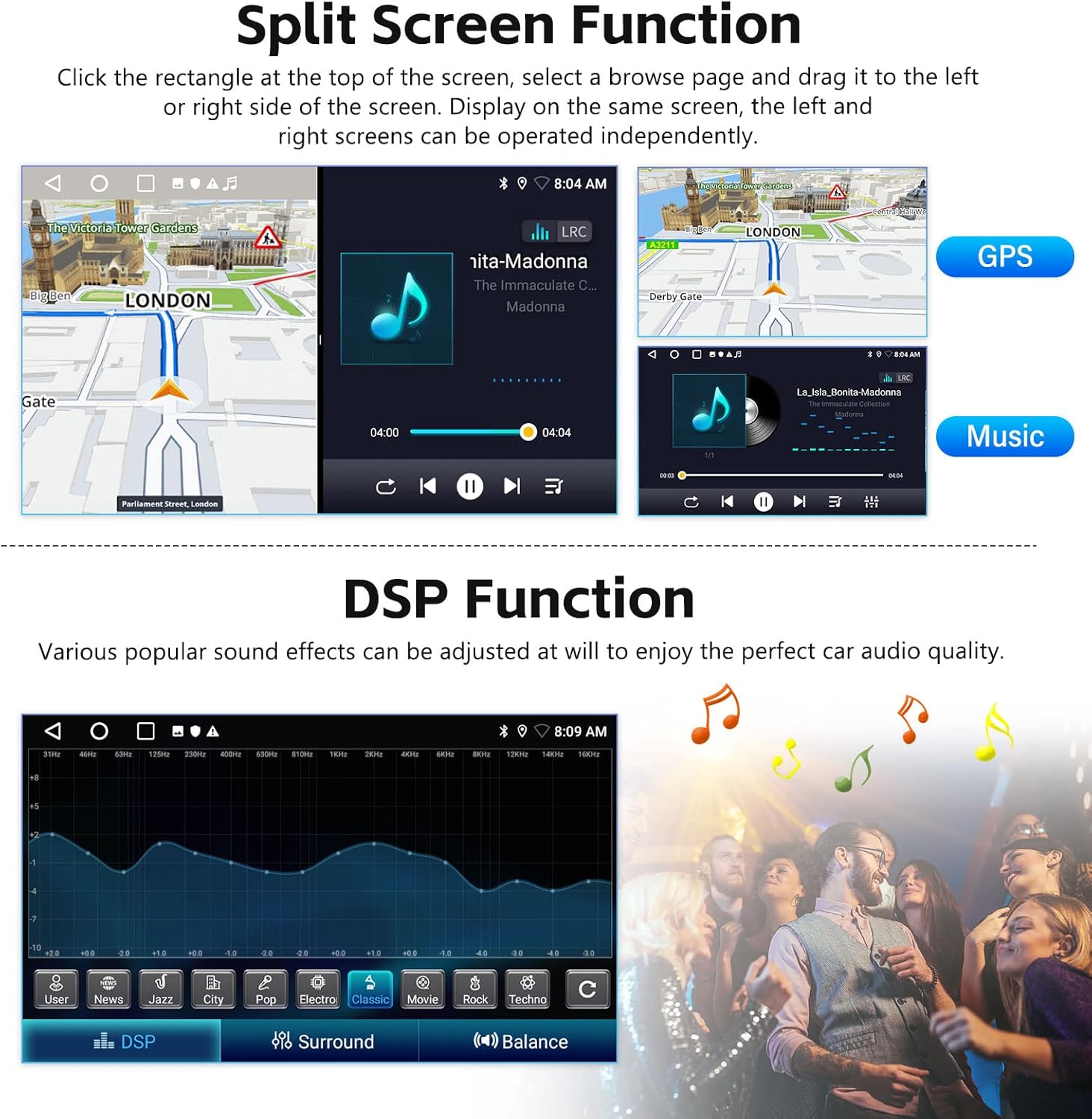
Image 3.2: This image demonstrates the Split Screen function, allowing two applications (e.g., GPS and music) to run simultaneously, and also showcases the Digital Sound Processor (DSP) interface for audio equalization and sound effect adjustments.
3.3 WIFI and GPS Navigation
Connect the stereo to a WiFi network to download various applications, stream online music, and watch videos. The built-in GPS navigation allows for offline map downloads from the Play Store, and online maps can be used when connected to WiFi.

Image 3.3: This image illustrates the car stereo's WiFi connectivity, enabling access to various online applications, and its integrated GPS navigation system with map display and route guidance.
3.4 Bluetooth and FM/RDS Radio
The Bluetooth feature supports hands-free calls, phonebook synchronization, and mobile phone music playback. The FM/RDS radio allows you to listen to news, music, weather forecasts, and traffic information across various radio stations (FM 87.5-108).

Image 3.4: This image showcases the FM/RDS radio interface with station tuning and the Bluetooth interface for hands-free calling and music streaming.
3.5 Steering Wheel Control and Reversing Display
The unit supports the original steering wheel buttons for convenient and safe control of audio functions. It also integrates with a waterproof night vision backup camera, providing a clear reversing image that automatically switches when the car is in reverse gear.

Image 3.5: This image illustrates the functionality of steering wheel controls for operating the car stereo and the clear display provided by the reversing camera when backing up.
3.6 Customizable Themes
The Android 13 car stereo offers 26 different desktop themes, allowing you to personalize the visual experience. To change themes, long-press any blank space on the homepage and select your preferred theme.
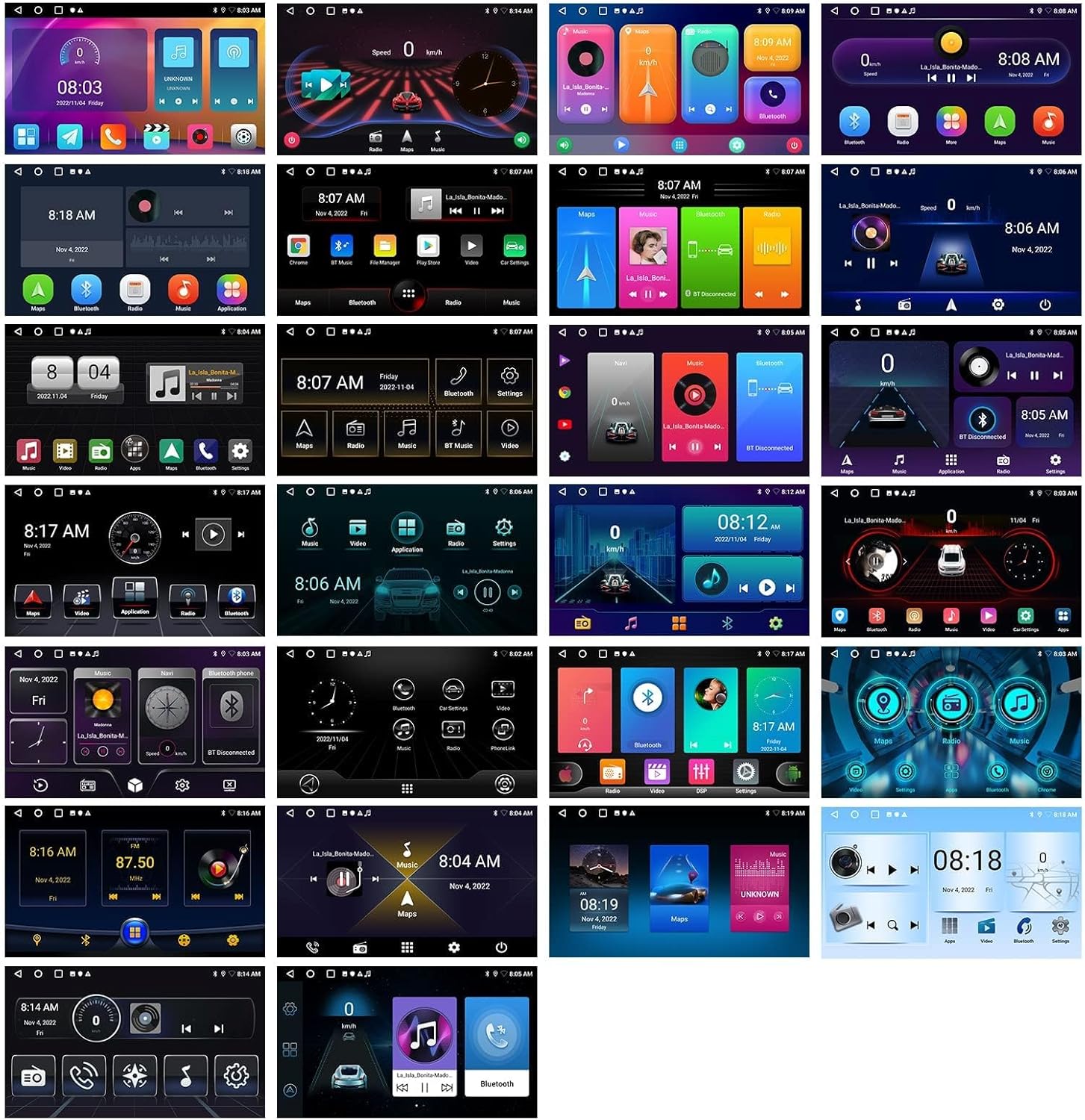
Image 3.6: A collage of various user interface themes available on the SIXTOP Android 13 Car Stereo, showcasing the customization options for the display's appearance.
4. Maintenance
To ensure optimal performance and longevity of your SIXTOP Android 13 Car Stereo, regular software updates are recommended. Connect the unit to a stable WiFi network periodically to check for and install any available system updates. Keep the screen clean using a soft, dry cloth. Avoid using abrasive cleaners or solvents.
5. Troubleshooting
- No Sound from Speakers (BOSE System): If you have a BOSE sound system and experience no audio output, ensure that the "AMP" and "AMP CTRL" wires from the car stereo harness are correctly connected to the corresponding wires on your vehicle's stock radio harness. This connection is essential to activate the BOSE amplifier.
- Backup Camera Image Issues: If the reversing image is unclear or not displaying correctly, verify that the camera resolution is set to AHD 720/25fps in the Factory Settings. The factory setting password is 000000.
- Power Cord Incompatibility: If the radio and frame match your car but the power cord socket is unsuitable (e.g., due to high vehicle configuration requiring a canbus protocol box), you may need an upgraded power cord. Contact SIXTOP customer service with pictures of your original car center console and car socket for assistance.
- Poor Radio Signal: If the radio signal is weak or inconsistent, check the antenna connection to ensure it is securely attached to the car stereo. Ensure the antenna is properly installed and not obstructed.
- Accessing Factory Settings: The password to access the factory settings menu is 8888.
6. Specifications
| Feature | Specification |
|---|---|
| System | Android 13 |
| Chipset | 8257 |
| Screen Size | 9 inches |
| Memory (RAM+ROM) | 2GB (RAM) + 64GB (ROM) |
| Screen Resolution | 1280*720 |
| Radio Chip | 8035 |
| Power Output | 4*45W |
| Bluetooth Version | 5.0 |
| Work Temperature | -20℃ to 75℃ |
| Power Amplifier Chip | YD7388 |
| Radio Band | FM/RDS (87.5-108 MHz) |
| Reversing Input | AHD/CVBS |
| External Microphone | Supported |
| Maps | Built-in offline maps (requires internet to download data) |
| USB Interface | Double USB interface |
| Audio Formats | APE/FLAC/WAV/MP3/WMA etc. |
| Video Formats | MKV/RMVB/AVI/MP4/MDV etc. |
| Picture Formats | PNG/JPEG/JPG/GIF/WBMP/BNP etc. |
| Languages | Chinese/English/French/Italian/Korean/Japanese/Arabic/Spanish/Portuguese/Russian/Turkish/Vietnamese/Hebrew/Polish/German |
| Item Weight | 8.82 pounds |
| Package Dimensions | 15.75 x 9.06 x 5.91 inches |
7. Warranty and Support
7.1 Warranty Information
The SIXTOP Android 13 Car Stereo Radio comes with a 1-year warranty from the date of purchase. Please retain your proof of purchase for warranty claims.
7.2 Customer Support
For any technical assistance, troubleshooting, or inquiries regarding your product, please contact SIXTOP customer service. We are committed to providing satisfactory service and support.
Online Support Email: SIXTOP123@163.com


