
Polibi 2107AAE
Polibi 2107AAE Modern Twin Platform Bed Instruction Manual
Model: 2107AAE | Brand: Polibi
Introduction
This manual provides detailed instructions for the assembly, operation, and maintenance of your Polibi Modern Twin Platform Bed. This bed features integrated storage shelves, a built-in desk, two under-bed drawers, USB charging ports, and an upholstered headboard. Please read all instructions carefully before beginning assembly and retain this manual for future reference.
Safety Information
- Always follow assembly instructions precisely.
- Ensure all fasteners are securely tightened before use. Periodically check and re-tighten as necessary.
- Do not exceed the maximum weight limit of 250 pounds for the bed.
- Keep small parts away from children during assembly to prevent choking hazards.
- Use on a level surface to prevent tipping.
- Do not stand or jump on the bed frame.
- Exercise caution when using electrical components (USB ports, outlets) and ensure they are not exposed to liquids.
Package Contents
Verify that all components and hardware are present before beginning assembly. Refer to the included parts list in your packaging for a complete inventory. If any parts are missing or damaged, please contact customer support.
Assembly Instructions
Assembly requires two adults. Please follow the steps outlined in the video and accompanying diagrams. An electric screwdriver is recommended for efficiency.
Assembly Video Guide
Video Description: This video provides a step-by-step visual guide for assembling the Polibi Twin Platform Bed. It demonstrates the correct placement and fastening of each component, including the frame, storage shelves, and desk. Follow the on-screen instructions and part labels carefully for a smooth assembly process.
Key Assembly Steps
- Frame Assembly: Begin by assembling the main metal frame components. Ensure all connections are secure using the provided hardware.
- Storage Shelf Integration: Attach the wooden storage shelves to the designated areas of the frame. Pay attention to alignment for proper fit.
- Built-in Desk Setup: Secure the built-in desk section to the main frame. Confirm stability and correct positioning.
- Drawer Installation: Assemble the two under-bed drawers and slide them into their respective compartments beneath the bed frame.
- Upholstered Headboard Attachment: Fasten the upholstered headboard to the bed frame.
- Charging Station Placement: Install the USB charging station into the pre-drilled slot on the storage shelf. Connect the power cord as instructed.
Operating Instructions
Storage Features
- Storage Shelves: Utilize the multiple compartments within the headboard and side sections for organizing books, electronics, and decorative items. Each shelf measures approximately 24.8" L x 8.7" W x 10.2" H.
- Under-Bed Drawers: The two spacious drawers beneath the bed provide convenient storage for bedding, clothing, or toys. Each drawer measures approximately 37" L x 15.7" W x 7.9" H.
Built-in Desk
The integrated desk offers a dedicated workspace for studying or creative projects. Its dimensions are approximately 49.8" L x 12.3" W x 29.5" H, providing ample surface area without occupying additional room space.
USB Charging Ports
The storage shelf is equipped with two standard electrical outlets and two USB ports. Connect your electronic devices for convenient charging while relaxing in bed.
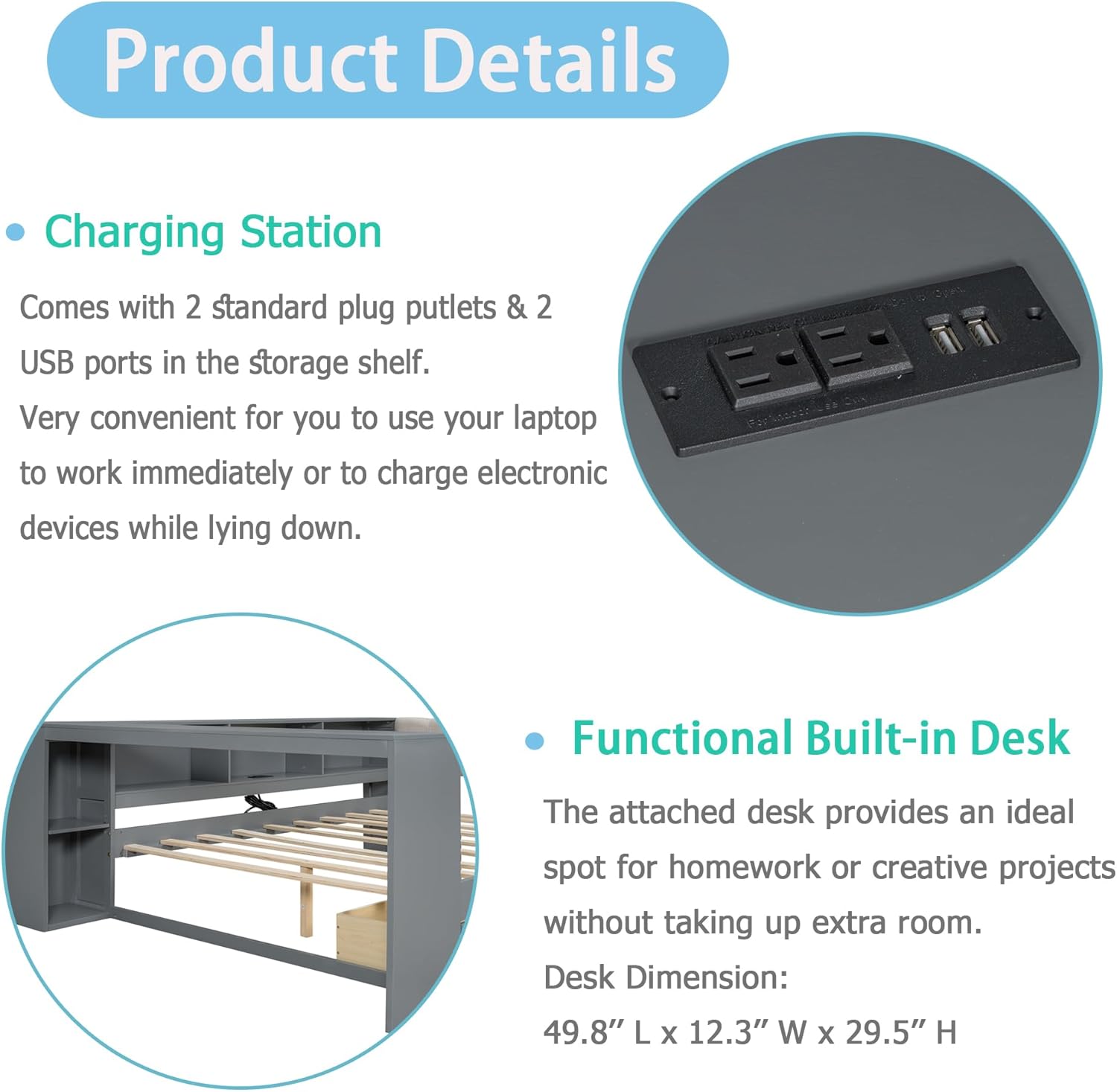
Image Description: This image highlights the integrated charging station with two standard outlets and two USB ports, along with a view of the functional built-in desk, demonstrating how devices can be conveniently charged and used.
Maintenance
- Cleaning: Wipe down wooden and metal surfaces with a soft, damp cloth. Avoid harsh chemicals or abrasive cleaners. For the upholstered headboard, spot clean with a mild fabric cleaner as needed.
- Fasteners: Periodically check all bolts and screws to ensure they remain tight. Re-tighten if any looseness is detected.
- Electrical Components: Ensure the USB ports and outlets are free from dust and debris. Do not attempt to repair damaged electrical components; contact a qualified technician.
Troubleshooting
- Wobbly Frame: Check all connections and ensure bolts are tightened. Ensure the bed is on a level surface.
- Drawers Not Sliding Smoothly: Verify that the drawer runners are correctly installed and free from obstructions. Ensure the drawers are not overloaded.
- USB Ports/Outlets Not Working: Check the power connection to the charging station. Ensure the wall outlet is functional. If issues persist, discontinue use and contact customer support.
- Missing Parts: If any parts are missing upon delivery, refer to the parts list and contact customer support for replacements.
Specifications
| Feature | Detail |
|---|---|
| Size | Twin |
| Product Dimensions | 88.3"L x 49.8"W x 29.5"H |
| Weight Limit | 250 Pounds |
| Item Weight | 130 Pounds |
| Material | Solid Pine Wood, MDF, Linen |
| Color | Grey+beige |
| Special Features | Built-in Desk, Storage Shelves, 2 Under-Bed Drawers, USB Charging Ports, Upholstered Headboard |
| Recommended Mattress Thickness | 8 inches |

Image Description: A visual summary of the bed's specifications, including material composition (Pine Wood + MDF + Linen), weight capacity (Twin bed: 250lbs), recommended mattress thickness (8"), and overall dimensions (88.3"L x 49.8"W x 29.5"H).
Warranty
This Polibi product comes with a Limited Warranty. Please refer to the warranty card included in your packaging for specific terms and conditions. Keep your proof of purchase for any warranty claims.
Customer Support
If you have any questions, require assistance with assembly, or need to report missing/damaged parts, please contact Polibi customer support. Contact information can be found on the product packaging or the official Polibi website.
Related documents2107AAE


Ask a question about this manual
Ask about setup, troubleshooting, compatibility, parts, safety, or missing instructions. Manuals+ will review the question and use this page’s manual context to help answer it.