
1. Introduction
This manual provides essential instructions for the safe and effective use of your INTERGREAT 52-inch Digital Keypad Rifle Safe. Please read this manual thoroughly before installation and operation. Keep this manual for future reference.
2. Safety Information
- Always store firearms unloaded and locked.
- Keep keys and access codes in a secure location, away from the safe and out of reach of children.
- Ensure the safe is securely mounted to a wall or floor to prevent tipping or unauthorized removal.
- Do not store flammable materials or hazardous substances inside the safe.
- Regularly check the battery level of the digital keypad to ensure proper function.
3. Package Contents
Verify that all components are present before beginning installation:
- 1x INTERGREAT Rifle Cabinet
- 2x Emergency Keys
- 4x Anchor Bolts for Floor & Wall Mount
- 1x Gray Carpet
- 1x Emergency Battery Box
- 1x L Wrench
- 1x Instruction Manual (this document)

Figure 3.1: Safe dimensions and included components.
4. Setup and Installation
The rifle safe is designed for secure mounting to a wall or floor. Proper installation is crucial for security.
4.1 Mounting the Safe
- Choose a suitable location for the safe. Consider accessibility and discretion.
- The safe has 10 pre-punched mounting holes: 6 in the back and 4 at the bottom.
- Position the safe and mark the desired drilling points on the wall or floor.
- Drill pilot holes according to the size of the anchor bolts.
- Secure the safe using the provided anchor bolts. Ensure all bolts are tightened firmly.

Figure 4.1: Installation steps for securing the safe.
4.2 Battery Installation
The digital keypad requires batteries for operation. Insert the batteries into the designated compartment, typically located on the inside of the safe door or behind the keypad unit.
5. Operating Instructions
5.1 Unlocking the Safe
Your safe offers two methods for access:
- Digital Keypad: Enter your personal password followed by the '#' key. Then, turn the knob to open the door. The initial password is 123456#.
- Override Key: In case of forgotten password or battery failure, insert the override key into the keyhole, turn it, and then turn the knob to open the door.
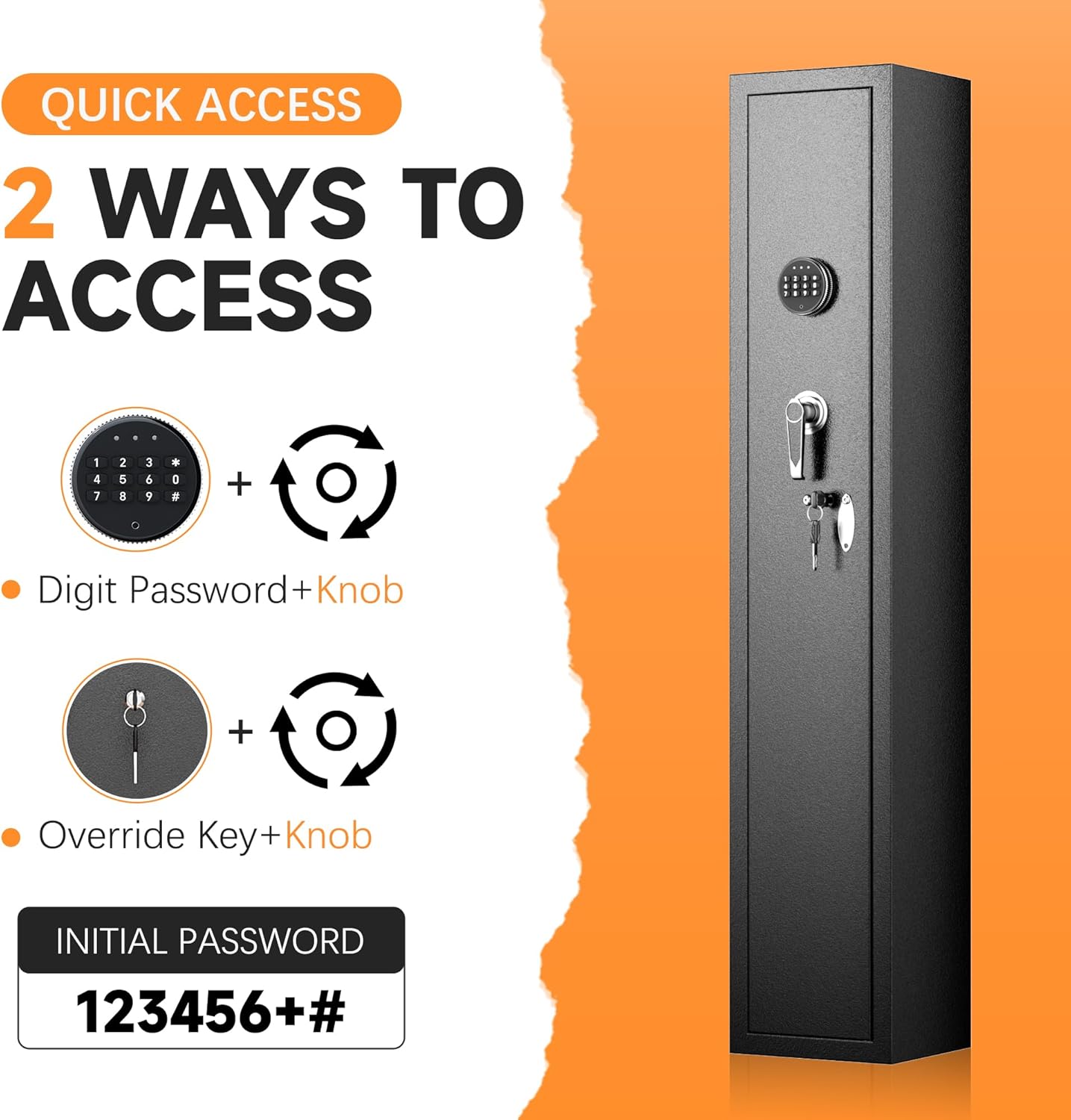
Figure 5.1: Quick access methods for the safe.

Figure 5.2: Multiple unlocking methods.
5.2 Changing the Password
The safe supports both a master password and a normal user password. The 'SETTINGS BUTTON' is a small button located inside the door, usually next to the light.
- To change the normal user password: Press the 'SETTINGS BUTTON', then enter your new code, and finally press '#'.
- To change the master password: With the door open, press '00' first, then the 'SETTINGS BUTTON', enter your new master pin, and press '#'.
It is recommended to test the new password with the door open before closing it.
5.3 Alarm System
The safe is equipped with an anti-theft alarm system. If an incorrect code is entered 3 consecutive times, the safe will emit an audible alarm for 48 seconds. This system helps deter unauthorized access and prevents children from tampering with the safe.

Figure 5.3: Dual alarm system indication.
5.4 Mute Function
The safe features a mute function to operate silently, which can be useful during nighttime access to avoid disturbance.

Figure 5.4: Mute and locking functions.
5.5 Interior Organization
The safe includes a removable shelf for versatile interior organization, allowing you to store pistols, handguns, ammunition, or other valuables in addition to rifles.

Figure 5.5: Removable shelf for interior organization.
6. Maintenance
- Battery Replacement: Replace batteries annually or when the low battery indicator appears. Use the emergency battery box if the internal batteries are depleted and you cannot open the safe.
- Cleaning: Wipe the exterior with a soft, damp cloth. Avoid abrasive cleaners.
- Key Storage: Store emergency keys in a secure location outside the safe.
7. Troubleshooting
| Problem | Possible Cause | Solution |
|---|---|---|
| Safe does not open with digital code. | Incorrect code entered; low batteries. | Re-enter code carefully. Replace batteries or use the emergency battery box. Use override key. |
| Alarm sounds unexpectedly. | Incorrect code entered multiple times. | Wait for the alarm to stop, then enter the correct code. |
| Cannot change password. | Incorrect procedure; 'SETTINGS BUTTON' not pressed correctly. | Ensure the 'SETTINGS BUTTON' (small button inside the door) is pressed before entering the new code. Follow the specific steps for normal or master password change. |
| Door feels loose or misaligned. | Mounting bolts are loose; manufacturing defect. | Check and tighten all mounting bolts. If the issue persists, contact customer support. |
8. Specifications
| Feature | Detail |
|---|---|
| Brand | INTERGREAT |
| Product Dimensions | 8.6"D x 9.8"W x 52"H |
| Lock Type | Electronic Combination Lock |
| Color | Black |
| Capacity | 0.25 Cubic Meters |
| Material | Metal |
| Special Feature | Removable Shelf |
| Mounting Type | Wall Mount |
| Item Weight | 37 Pounds |
| Alarm | Audible (triggered by 3 incorrect codes) |
| Water Resistance Level | Water Resistant |
9. Warranty and Support
INTERGREAT provides after-sale service for any issues including lost parts, damages, or setting problems related to your rifle safe. Replacement or refund options are available.
For assistance, please contact INTERGREAT customer service. Ensure you have your product model and purchase details ready when contacting support.
The package includes 1x rifle cabinet, 2x keys, 2x gun racks, 4x bolts, 1x instruction manual, 1x battery case, and 1x L wrench. Please double-check all parts upon receipt.