
1. Introduction
This manual provides detailed instructions for the installation, operation, and maintenance of your LASERTAIL 12.1 Inch Android 13 Car Stereo. Designed specifically for Ford Explorer models from 2011 to 2019, this head unit offers a significant upgrade to your vehicle's infotainment system with its large vertical touchscreen, advanced features, and seamless integration.
The system features an Android 13 operating system, an 8-core processor, 4GB DDR4 RAM, and 64GB ROM, ensuring smooth performance and ample storage. Enjoy wireless CarPlay and Android Auto, GPS navigation, 5Ghz WiFi, Bluetooth 5.0, DSP with 48 EQ, mirror link, split screen functionality, and a high-definition backup camera.
2. Safety Information
Please read all instructions carefully before installation and use. Improper installation or operation may cause damage to the device or vehicle, and could lead to injury. Always ensure the vehicle is turned off and the battery is disconnected before performing any installation or wiring procedures. If you are unsure about any step, seek professional assistance.
- Professional Installation Recommended: Due to the complexity of car electronics, professional installation is highly recommended.
- Vehicle Compatibility: Ensure the product is compatible with your specific Ford Explorer model (2011-2019).
- Wiring: Double-check all wiring connections to prevent short circuits or damage.
- AC Control: Verify AC control functionality after installation and adjust settings as needed.
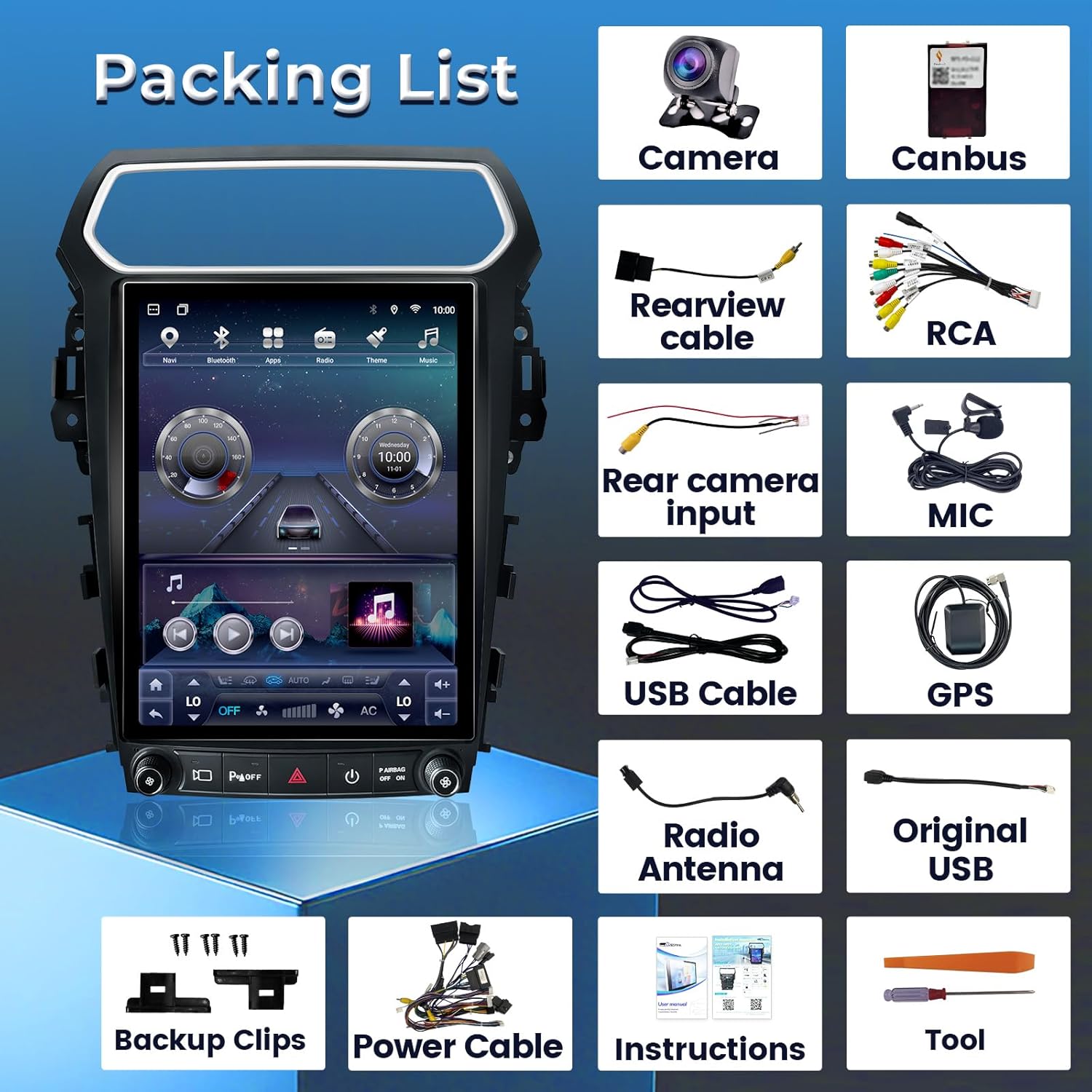
3. Package Contents
Your LASERTAIL 12.1 Inch Android 13 Car Stereo package includes the following items:
- Car radio (1)
- Installation kit (1)
- 1080P backup camera (1)
- Installation instruction (1)
- Function instruction (1)
4. Setup & Installation
Installation involves removing the original radio unit and connecting the new head unit with the provided wiring harnesses. Some car models may require minor modifications, such as cutting two clips on the top of the product and using backup clips for proper installation.
Wiring Connections
Refer to the detailed wiring diagram and video tutorials for precise connections. Ensure all connectors are securely plugged in to avoid functional issues.

Backup Camera Connection
The included 1080P backup camera provides high-definition reversing images. Connect the camera cable to the rear camera input on the head unit. If using the original factory camera, ensure the correct connector is used.

5. Operating Instructions
Your new LASERTAIL car stereo offers a wide range of features to enhance your driving experience. Below are instructions for key functionalities.
Wireless CarPlay and Android Auto
Connect your smartphone wirelessly to access navigation, music, messages, and calls via Siri or Google Voice control. This feature provides a seamless and safe way to use your phone's essential functions while driving.

GPS Navigation
The built-in GPS module supports both online and offline map navigation, allowing you to plan and execute your trips efficiently. Download your preferred navigation apps from the Google Play Store.

Steering Wheel Control (SWC)
Retain your original steering wheel controls for easy access to music, volume, and call functions, ensuring a safer driving experience.

5Ghz WiFi & Bluetooth 5.0
Connect to 5Ghz WiFi for high-speed app downloads and streaming. Bluetooth 5.0 enables stable and clear hands-free calls, enhancing safety on the road.


DSP with 48 EQ
Customize your audio experience with the Digital Signal Processor (DSP) featuring 48 EQ bands, 8 sound effects, and bass boost. The professional-grade TDA7851 amplifier chip ensures high-quality sound output.

Mirror Link & Split Screen
Synchronize your phone screen to the head unit for easy viewing with Mirror Link. The split screen function allows you to run two applications side-by-side, enhancing multitasking capabilities.

AM/FM/RDS Radio
Enjoy your favorite radio stations with the built-in AM/FM/RDS radio tuner, keeping you updated with the latest news and entertainment.

1080P Backup Camera
The included HD waterproof 1080P backup camera features night vision and a 170° wide-angle lens, providing clear reversing images and lines for safe parking and maneuvering.

Air Conditioning Control
The unit retains original AC control functionality. Ensure the agreement selection is consistent with the manual for proper AC operation. AC type and mode settings can be adjusted in the Car Settings menu.
6. Common Settings
Access the 'Car Settings' menu to configure various aspects of your head unit.

Canbus Settings
Navigate to