
Introduction
This manual provides comprehensive instructions for the setup, operation, and maintenance of your InnoGear Desk Ring Light with Stand, Model F-601. Please read this manual thoroughly before using the product to ensure optimal performance and longevity.
Package Contents
Verify that all components are present in the package:
- Ring Light
- Extension Rod
- Clip
- Base

Figure 1: All components of the InnoGear Desk Ring Light as received in the package.
Setup
1. Assembling the Stand
- Attach the extension rod to the base by screwing it clockwise until secure.
- Screw the ring light onto the top of the extension rod.

Figure 2: Assembly of the ring light with the stand and illustration of clamp-on and stand-mounted configurations.
2. Using the Clip Mount
Alternatively, the ring light can be attached using the provided clip for monitors or laptops:
- Unscrew the ring light from the extension rod.
- Attach the clip to the ring light by screwing it into the 1/4" thread.
- Securely clip the light onto your monitor, laptop, or other suitable surface.

Figure 3: The ring light attached to a laptop using the clip mount.
3. Power Connection
Connect the USB cable to a power source. For optimal and consistent performance, use a 5V/2A+ adapter or power bank. Avoid using a laptop USB port (typically 5V/1A) as lower current may cause flickering or unstable operation.
Figure 4: USB power connection and inline control panel.
Operating Instructions
1. Control Panel
The ring light is controlled via an inline remote on the USB cable:
- Power Button: Turns the light on or off.
- Mode Switch: Cycles through 5 studio-calibrated color presets (3000K-6000K).
- Brightness + / -: Adjusts brightness levels from 10% to 100% (10 levels).
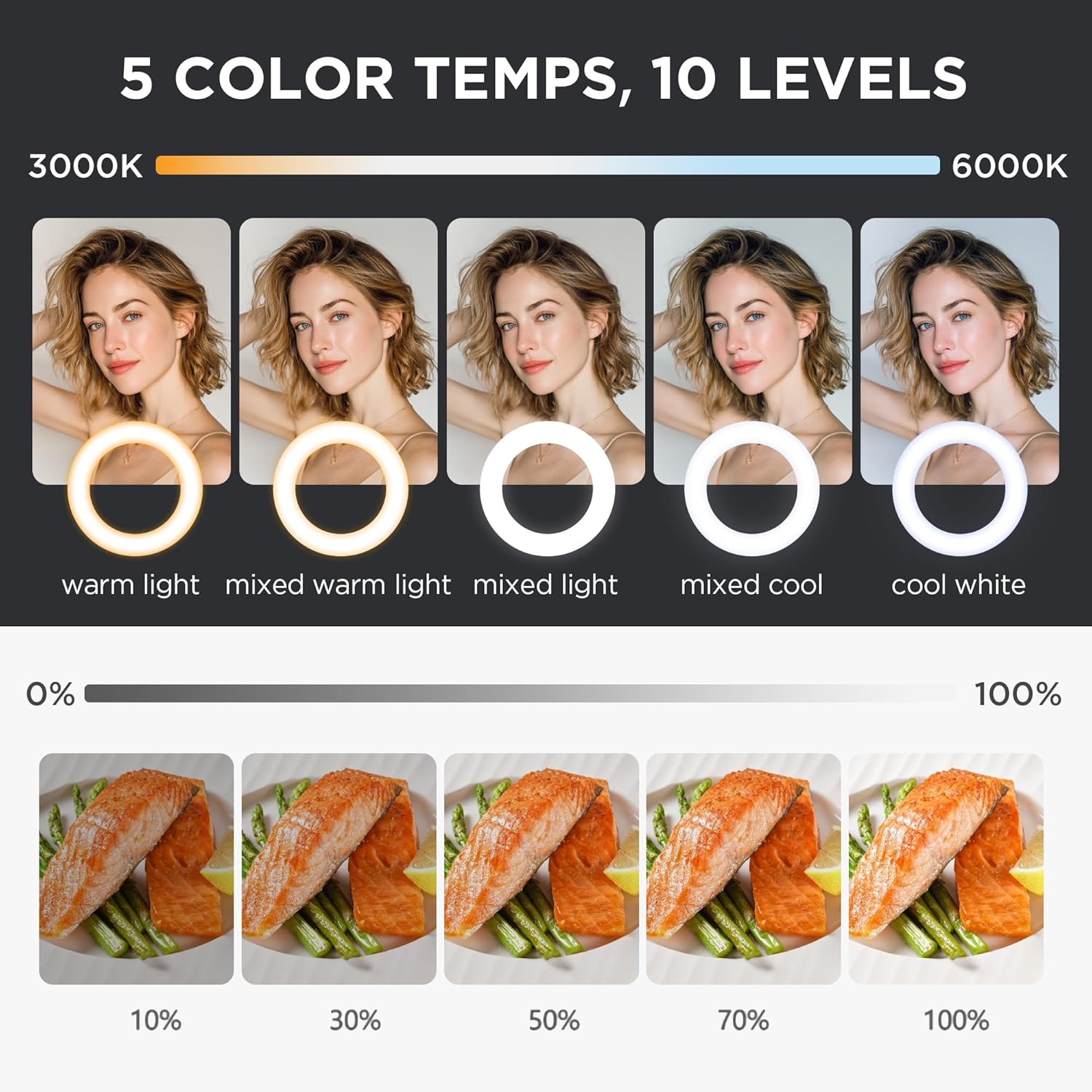
Figure 5: Illustration of 5 color temperatures and 10 brightness levels.
2. Adjusting Light Position
The ring light offers flexible positioning for optimal illumination:
- Tilt: The light can tilt up to 170° to direct illumination precisely.
- Rotation: The light can rotate 360° for full directional control.
- Height Adjustment: The telescoping stand can be adjusted from 7.98 inches to 11.42 inches. Unscrew the collar on the extension rod to adjust height, then tighten to secure.
Figure 6: Adjustable tilt, rotation, and height features.
Maintenance
To maintain the performance and appearance of your ring light:
- Keep the device clean by wiping it with a soft, dry cloth.
- Avoid using abrasive cleaners or solvents.
- Store in a cool, dry place when not in use.
Troubleshooting
If you encounter issues with your InnoGear Desk Ring Light, refer to the following common solutions:
- Light Flickering or Unstable Operation: Ensure the light is powered by a 5V/2A or higher adapter or power bank. Lower current sources, such as standard laptop USB ports (typically 5V/1A), may not provide sufficient power.
- Light Not Turning On: Check the USB connection to ensure it is securely plugged into a working power source. Verify the power button on the inline remote is pressed.
- Difficulty Adjusting Brightness/Color: Ensure the light is powered on and use the dedicated brightness and mode buttons on the inline remote.
Specifications
| Feature | Detail |
|---|---|
| Model Number | F-601 |
| Product Dimensions | 5 x 5 x 13.78 inches (5"L x 5"W x 13.78"H) |
| Item Weight | 1.19 pounds |
| LED Count | 60 |
| Power Output | 10W |
| Color Temperature | 3000K-6000K (5 presets) |
| Brightness Levels | 10% - 100% (10 levels) |
| Connectivity | USB |
| Mounting Options | Desk Stand, Monitor/Laptop Clip |
| Adjustability | 170° Tilt, 360° Rotation, 7.98"-11.42" Height Adjustment |
| UPC | 810015623633 |
Warranty and Support
For warranty information or technical support, please refer to the official InnoGear website or contact customer service through your purchase platform. Keep your proof of purchase for any warranty claims.