
1. Product Overview
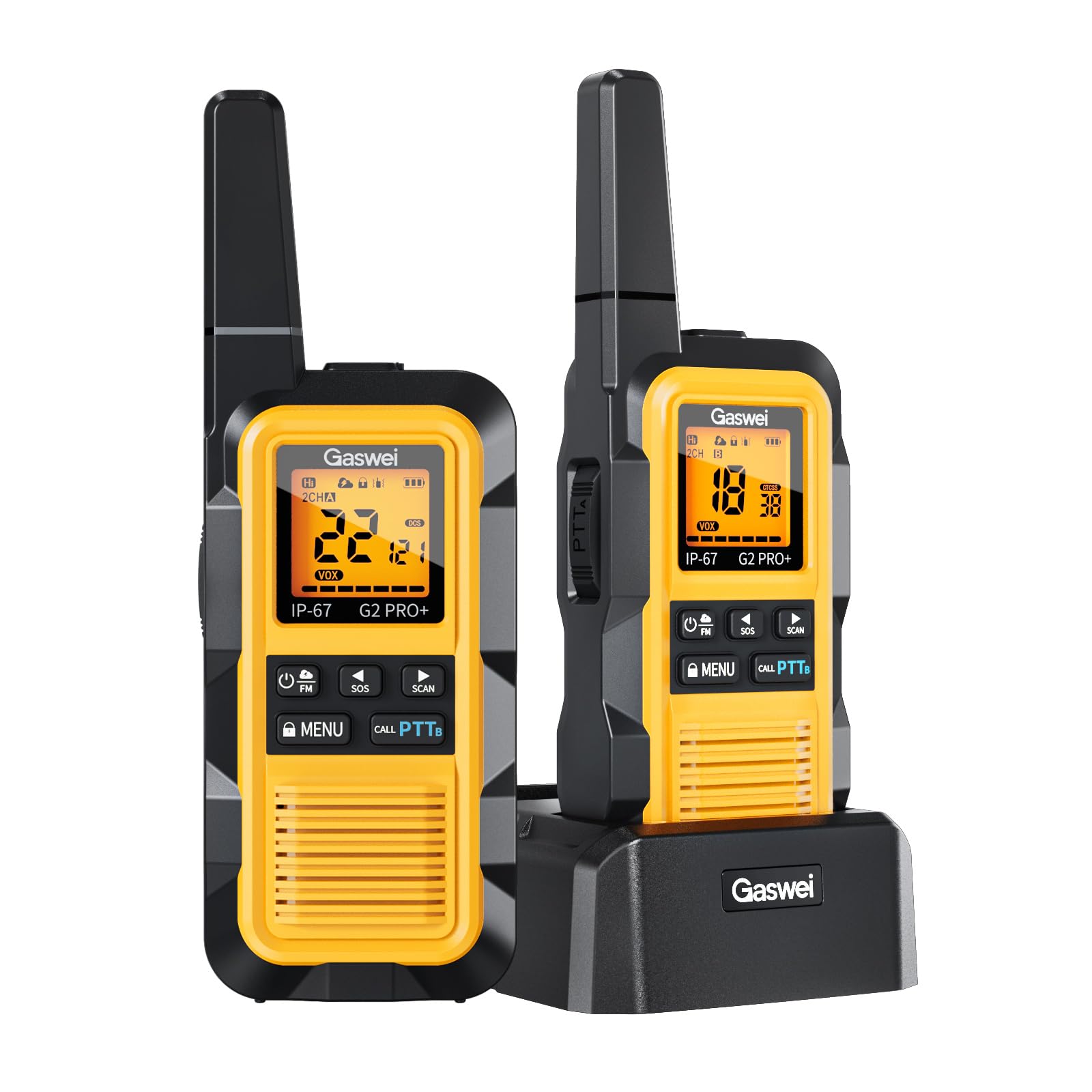
The Gaswei G2Pro+ is a robust and versatile two-way radio designed for reliable communication in various environments. Featuring IP67 waterproofing, shock resistance, and a floating design, it is suitable for outdoor activities, farms, warehouses, fishing, camping, and hunting. This manual provides detailed instructions for its setup, operation, and maintenance.
Key Features:
- Superior Protection: ABS+TPU wear-resistant, waterproof, shockproof, and dustproof shell with IP67 rating. Floats if dropped in water.
- Long Range Communication: Offers 0.5W energy-saving mode and 2W high-power mode for stable signals and clear calls up to 3-5 km in open areas.
- Abundant Channels & Privacy: 22 channels for multiple teams and 121 privacy codes for secure communication.
- Convenient Functions: VOX hands-free operation, vibration alarm, beep sound, key lock, high/low power switch, headphone connectivity, and USB-C charging.
- Ergonomic Design: Comfortable to hold, cable-free, and portable for easy operation.
2. Package Contents
Verify that all items are present in your package:
- Gaswei G2Pro+ Walkie Talkie x 2
- Nonstandard Battery x 2 (pre-installed or included separately)
- Charging Base x 1
- USB-C Cable x 1
- Power Adapter x 1
- Belt Clip x 2
- Wrist Strap x 2
- User Manual x 1

3. Product Diagram
Familiarize yourself with the various parts and controls of your Gaswei G2Pro+ Walkie Talkie:
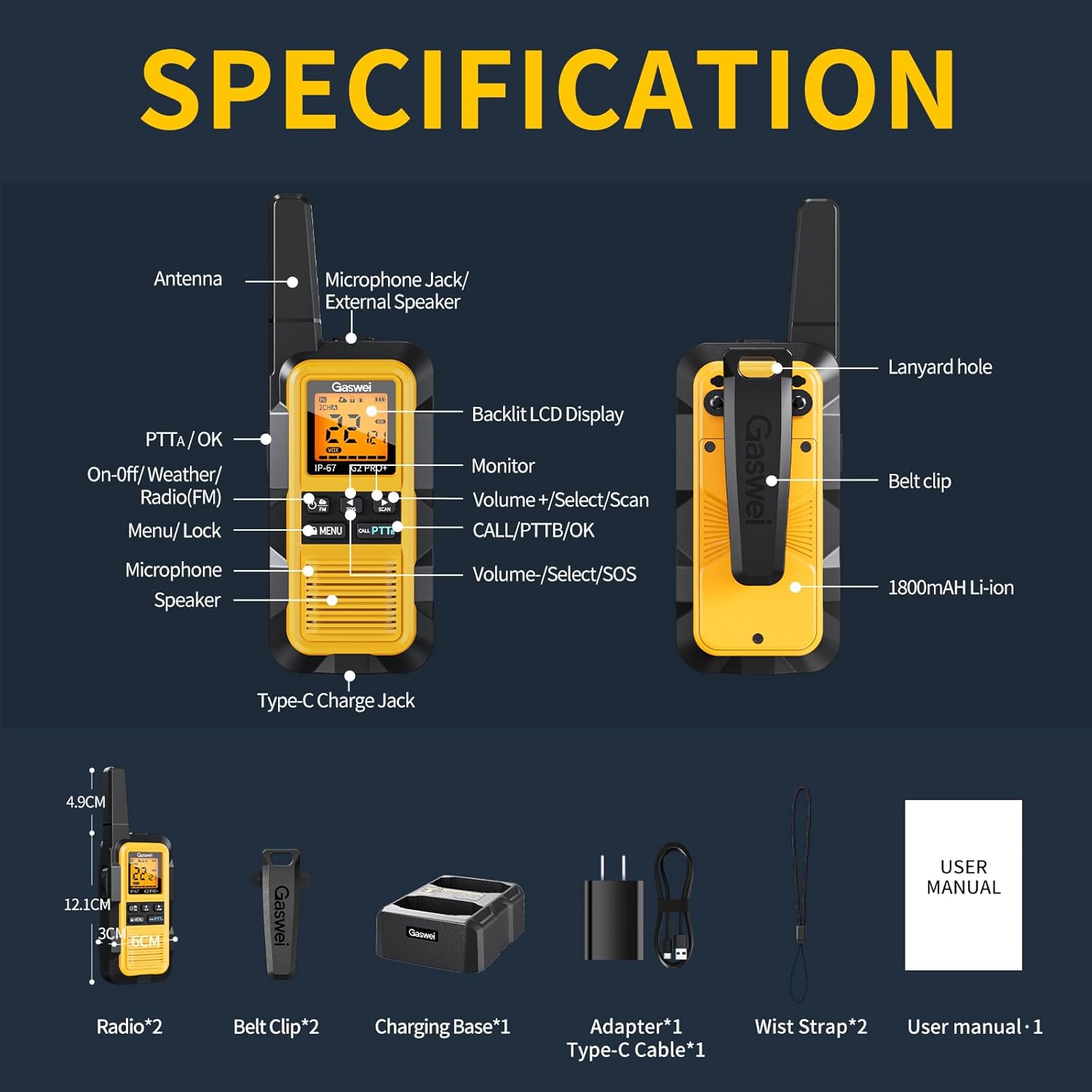
- Antenna: For transmitting and receiving signals.
- Microphone Jack / External Speaker: Port for external audio accessories.
- Backlit LCD Display: Shows channel, battery status, and other indicators.
- PTTA/OK Button: Push-to-Talk button (top).
- On-Off/Weather/Radio(FM) Button: Power control and mode selection.
- Menu/Lock Button: Accesses menu settings and locks/unlocks keys.
- Microphone: For voice input.
- Speaker: For audio output.
- Volume +/Select/Scan Button: Adjusts volume, navigates menus, and initiates scan.
- CALL/PTTB/OK Button: Call button and main Push-to-Talk button (side).
- Volume -/Select/SOS Button: Adjusts volume, navigates menus, and activates SOS.
- Type-C Charge Jack: USB-C port for direct charging.
- Lanyard Hole: Attachment point for wrist strap.
- Belt Clip: For attaching the radio to clothing or a belt.
- 1800mAh Li-ion Battery: Rechargeable battery.
4. Setup
4.1 Battery Installation
The Gaswei G2Pro+ walkie talkies come with nonstandard Li-ion batteries. Ensure the battery is correctly inserted into the compartment, following the polarity indicators. Secure the battery cover firmly to maintain the IP67 waterproof seal.
4.2 Charging the Battery
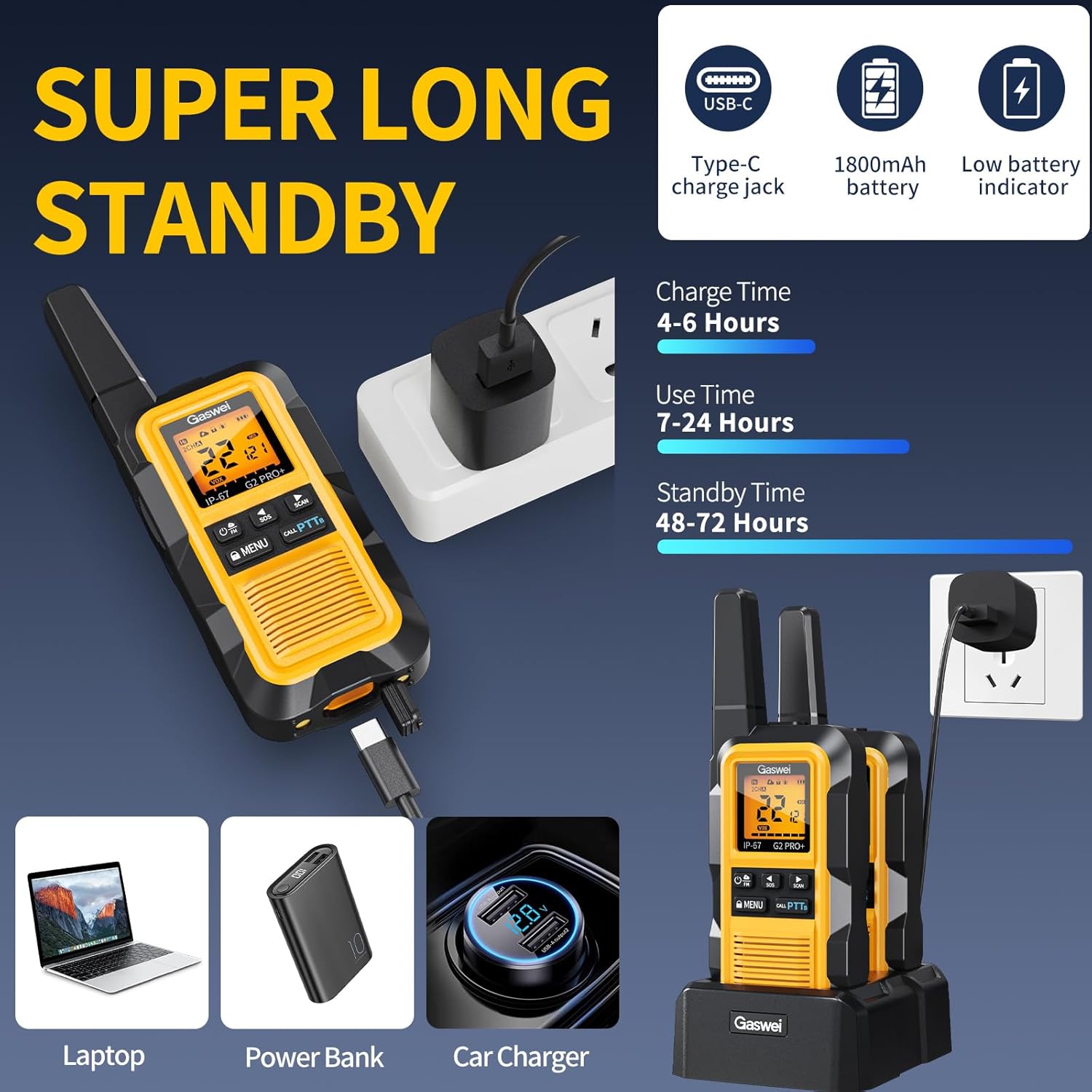
Before first use, fully charge the walkie talkies. You can charge them using the included charging base or directly via the USB-C port.
- Using the Charging Base: Connect the USB-C cable to the charging base and then to the power adapter. Plug the adapter into a wall outlet. Place the walkie talkie into the charging slot. The charging indicator on the display will show charging status.
- Direct USB-C Charging: Connect the USB-C cable directly to the Type-C Charge Jack on the walkie talkie and to a power source (adapter, laptop, power bank, car charger).
Charging typically takes 4-6 hours. A full charge provides approximately 7-24 hours of use time and 48-72 hours of standby time.
4.3 Attaching Accessories
Attach the belt clip to the back of the walkie talkie for convenient carrying. The wrist strap can be threaded through the lanyard hole for added security.

5. Operating Instructions
5.1 Power On/Off
Press and hold the On-Off/Weather/Radio(FM) button to power the walkie talkie on or off.
5.2 Channel Selection
The G2Pro+ has 22 channels. To change channels:
- Press the Menu/Lock button once to enter channel selection mode. The channel number on the display will flash.
- Use the Volume +/Select/Scan or Volume -/Select/SOS buttons to select your desired channel.
- Press the CALL/PTTB/OK button or Menu/Lock button again to confirm the selection.
5.3 Privacy Codes (CTCSS/DCS)
The G2Pro+ supports 121 privacy codes (CTCSS/DCS) to ensure secure communication and reduce interference. To set a privacy code:
- Press the Menu/Lock button twice to enter privacy code selection mode.
- Use the Volume +/Select/Scan or Volume -/Select/SOS buttons to select your desired code.
- Press the CALL/PTTB/OK button or Menu/Lock button again to confirm.
5.4 Push-to-Talk (PTT) Function
To transmit your voice, press and hold either the top PTTA/OK button or the side CALL/PTTB/OK button. Speak clearly into the microphone. Release the button to listen for a response.

5.5 VOX Hands-Free Operation
VOX (Voice Operated Exchange) allows you to transmit without pressing the PTT button. To activate VOX:
- Press the Menu/Lock button multiple times until the VOX setting appears on the display.
- Use the Volume +/Select/Scan or Volume -/Select/SOS buttons to select the desired VOX sensitivity level (e.g., 1-5, with 5 being most sensitive).
- Press the CALL/PTTB/OK button or Menu/Lock button to confirm.
5.6 FM Radio
The G2Pro+ includes an FM radio function. To use the FM radio:
- Press the On-Off/Weather/Radio(FM) button briefly to switch to FM radio mode.
- Use the Volume +/Select/Scan button to automatically scan for broadcast channels with the strongest signal.
- Use the Volume +/Select/Scan or Volume -/Select/SOS buttons to manually tune or select channels.
- Press the On-Off/Weather/Radio(FM) button again to exit FM radio mode.
5.7 NOAA Weather Alert
The walkie talkie can receive NOAA weather alerts. To activate NOAA weather mode:
- Press the On-Off/Weather/Radio(FM) button briefly to cycle through modes until NOAA weather mode is active.
- The device will automatically scan for NOAA weather channels and broadcast emergency weather warnings.
- Press the On-Off/Weather/Radio(FM) button again to exit NOAA weather mode.

5.8 SOS Function
In an emergency, the SOS function can be activated. Press and hold the Volume -/Select/SOS button to send an audible alert signal.
5.9 Key Lock
To prevent accidental button presses, press and hold the Menu/Lock button until the lock icon appears on the display. Repeat to unlock.
5.10 High/Low Power Switch
The G2Pro+ features a 0.5W energy-saving mode for short-range communication and a 2W high-power mode for extended range. This setting can typically be adjusted through the menu. Refer to the on-screen menu options for specific instructions on switching between high and low power modes.
6. Advanced Features
6.1 Long Range Communication
The Gaswei G2Pro+ is designed for long-range communication. The actual range can vary significantly based on terrain, obstructions, and atmospheric conditions.
- Max Range (4-6 Miles): Achievable in open areas with no line-of-sight obstruction.
- Ideal Range (3-5 Miles): Typical in areas with partial obstruction to line of sight.
- Obstructed Range (1-3 Miles): Expected in urban areas or environments with major obstructions.

7. Maintenance and Care
7.1 Waterproof, Shockproof, and Dustproof Features
The G2Pro+ boasts an IP67 rating, meaning it is fully protected against dust ingress and can withstand immersion in water up to 1 meter for 30 minutes. Its ABS+TPU shell provides excellent shock resistance, capable of withstanding drops from up to 2 meters.


7.2 Cleaning
To clean your walkie talkie, wipe it with a soft, damp cloth. Do not use harsh chemicals or abrasive cleaners. Ensure all port covers are securely closed before cleaning or exposing to water.
7.3 Battery Care
- Avoid fully discharging the battery frequently.
- Store the walkie talkie with a partial charge if not used for extended periods.
- Do not expose batteries to extreme temperatures.
8. Troubleshooting
| Problem | Possible Cause | Solution |
|---|---|---|
| No power | Battery depleted; Battery not installed correctly. | Charge the battery; Reinstall battery, ensuring correct polarity. |
| Cannot communicate with other radios | Different channels/privacy codes; Out of range; Obstructions. | Ensure all radios are on the same channel and privacy code; Move closer to other radios; Find a clearer line of sight. |
| Static or unclear audio | Weak signal; Interference; Low battery. | Move to an area with fewer obstructions; Charge the battery. |
| FM radio not working / static | Poor signal reception in the area. | Try scanning for stations in a different location with better reception. |
| Keys are unresponsive | Key lock is active. | Press and hold the Menu/Lock button to unlock the keys. |
9. Specifications
| Feature | Specification |
|---|---|
| Model Number | G2PRO |
| Brand | Gaswei |
| Waterproof Rating | IP67 |
| Number of Channels | 22 |
| Frequency Range | 462–467MHz |
| Talking Range Maximum | 5 Kilometer (in open areas) |
| Battery Type | 1800mAh Nonstandard Li-ion Battery |
| Voltage | 3.7 Volts (DC) |
| Charging Interface | USB-C |
| Operating Temperature | -20 to 60℃ Degrees Celsius |
| Dimensions (approx.) | 12.1cm (H) x 4.9cm (W) x 3cm (D) (excluding antenna) |
| Weight (approx.) | 300g per radio |
| Special Features | Long Range, Rechargeable, Waterproof IP67 & Shockproof, Double PTT, FM Radio, SOS & NOAA Weather Alerts, VOX |
10. Warranty Information
Gaswei products are manufactured to high-quality standards. For specific warranty details, including coverage period and terms, please refer to the warranty card included in your product packaging or contact Gaswei customer support directly. Keep your proof of purchase for warranty claims.
11. Customer Support
If you encounter any issues or have questions regarding your Gaswei G2Pro+ Walkie Talkies, please contact our customer support team. Contact information can typically be found on the product packaging, the official Gaswei website, or the warranty card. Please have your model number (G2PRO) and purchase details ready when contacting support.


