
BITIWEND B23
BITIWEND Wireless Doorbell Chime User Manual
Model: B23
Product Overview
The BITIWEND Wireless Doorbell Chime is designed to extend the audible notification range of your existing Blink Video Doorbell and Blink Video Doorbell (2nd Gen). This system allows you to hear your doorbell chime from various locations within your home, eliminating reliance solely on app notifications.
It consists of a wireless transmitter that connects to your Blink Video Doorbell and a plug-in receiver (chime unit) that can be placed in any standard electrical outlet.

Image: The BITIWEND Wireless Doorbell Chime receiver unit shown alongside a Blink Video Doorbell, illustrating the product's primary components.

Image: Visual confirmation of compatibility with both the original Blink Video Doorbell and the Blink Video Doorbell (2nd Gen).
What's in the Box
Your BITIWEND Wireless Doorbell Chime package includes the following components:
- 1 x Doorbell Receiver (Chime Unit)
- 1 x Video Doorbell Transmitter
Setup and Installation
Follow these steps to set up and pair your BITIWEND Wireless Doorbell Chime with your Blink Video Doorbell:
1. Prepare the Transmitter
The transmitter requires a battery to operate. Before installation, ensure the battery insulation sheet is removed to activate the battery.
Video: A short demonstration on how to remove the battery insulation sheet from the transmitter unit before first use.
2. Connect the Transmitter to the Blink Video Doorbell
Connect the transmitter to the back of your Blink Video Doorbell using the pre-installed cable. Ensure the connection is secure. The transmitter is designed to sit on top of the Blink Video Doorbell.

Image: Diagram showing how the transmitter connects to the back of the Blink Video Doorbell and its placement.

Image: Illustration of connecting the transmitter to the video doorbell using the included cable.
3. Pair the Transmitter and Receiver
Follow these steps to pair the transmitter with the receiver:
- Plug the receiver into a standard electrical outlet.
- Press the forward or back button on the receiver to select your desired ringtone.
- Press and hold the volume button on the receiver for 5-7 seconds until the receiver "dings" and the indicator light flashes rapidly. This puts the receiver into pairing mode.
- Quickly press the doorbell button on your Blink Video Doorbell. The transmitter indicator light will illuminate, and you should hear the chosen ringtone from the receiver, indicating successful pairing.

Image: Step-by-step visual guide for pairing the doorbell expander with the receiver.
Operating Instructions
Adjusting Chimes and Volume
The doorbell receiver offers 58 different chimes and 5 levels of volume adjustment (0-110dB) to suit your preferences. Use the dedicated buttons on the receiver to cycle through chimes and adjust the volume.

Image: Visual representation of the 5 selectable volume levels, ranging from 0dB (silent) to 110dB.
Wide Coverage and Multi-Scene Application
The doorbell extender provides a wireless coverage range of up to 656 feet (approximately 200 meters). This allows you to place receivers in various locations throughout your home, such as the living room, bedroom, attic, or garage, ensuring you never miss a visitor.

Image: Diagram illustrating the 200-meter wireless range coverage within a home layout, showing multiple chime units.
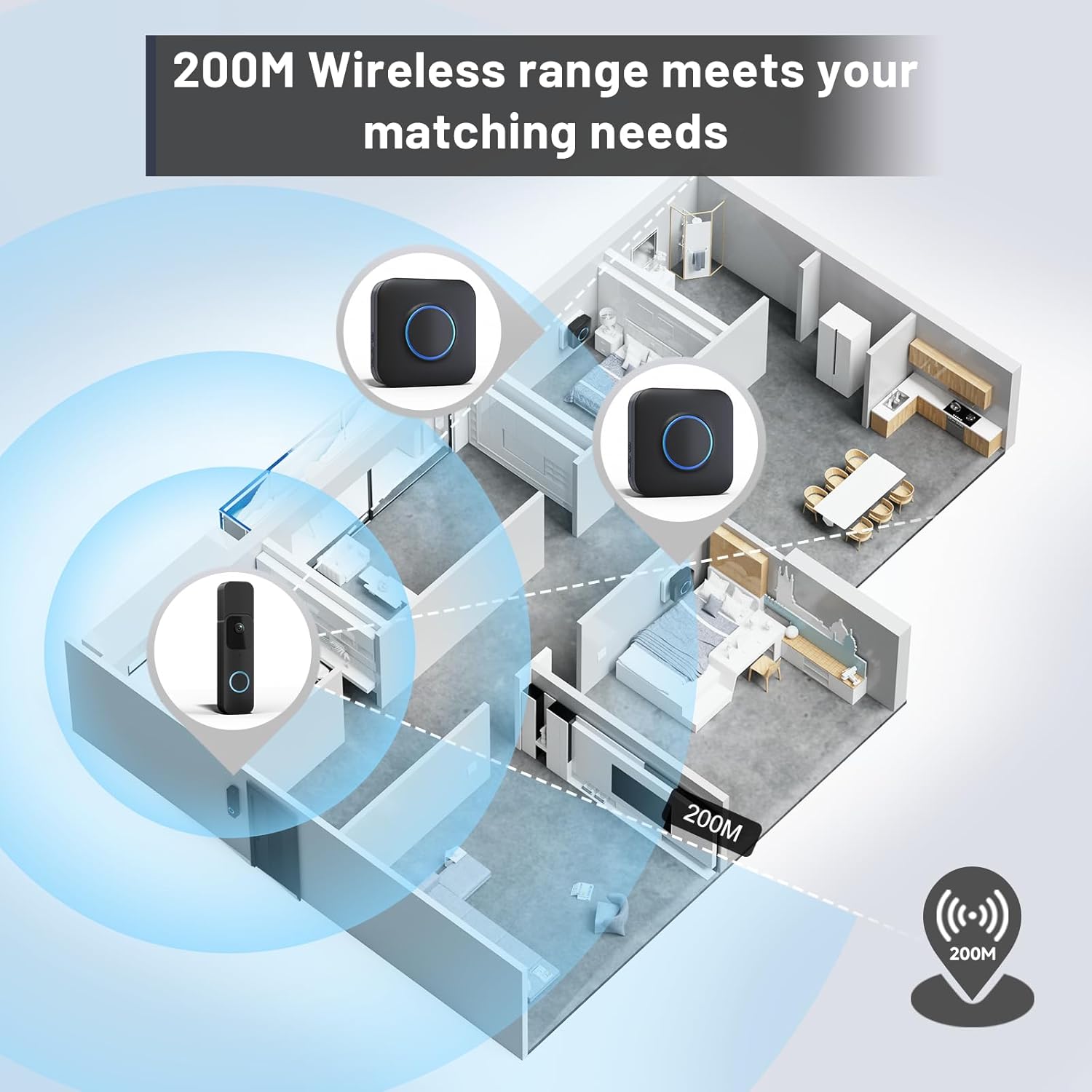
Image: Collage showing the doorbell chime being used in various home environments like the bedroom, living room, attic, and garage.

Image: The chime unit next to a sleeping baby, demonstrating its silent mode capability. The blue LED light indicates activity even when silent.

Image: The plug-in receiver unit featuring a blue LED night light, which can indicate doorbell activity even in silent mode or at night.
Multiple Connection Methods
One transmitter can connect to up to 20 receivers, allowing you to optimize coverage for larger living spaces or multi-story homes. Transmitters and receivers are pre-paired for convenience, but additional pairing can be done as needed.
Maintenance
To ensure optimal performance and longevity of your BITIWEND Wireless Doorbell Chime, follow these simple maintenance guidelines:
- Keep both the transmitter and receiver units clean by wiping them with a soft, dry cloth. Avoid using abrasive cleaners or solvents.
- Ensure the receiver is plugged into a stable power outlet.
- Protect the units from extreme temperatures, direct sunlight, and excessive moisture.
- Periodically check the connection of the transmitter to the Blink Video Doorbell to ensure it remains secure.
Troubleshooting
If you encounter issues with your BITIWEND Wireless Doorbell Chime, please refer to the following common troubleshooting steps:
- No Chime Sound / Pairing Failure:
- Ensure the battery insulation sheet has been completely removed from the transmitter.
- Verify the transmitter is correctly wired and securely connected to the Blink Video Doorbell.
- Confirm the receiver is properly plugged into a working electrical outlet.
- Repeat the pairing process carefully, ensuring you hold the volume button on the receiver for 5-7 seconds until it "dings" and flashes, then quickly press the Blink doorbell button.
- Check the volume level on the receiver; it might be set to 0dB (silent mode).
- Poor Range / Intermittent Chime:
- Relocate the receiver closer to the Blink Video Doorbell if possible.
- Ensure there are no large metal objects or thick walls directly between the transmitter and receiver that could obstruct the signal.
- Avoid placing the receiver near other wireless devices that might cause interference.
- Transmitter Fit Issues (Blink Video Doorbell 2nd Gen):
Please note that while the chime is compatible, the transmitter size may not perfectly fit with the Blink Video Doorbell (2nd Gen) in terms of physical housing. Ensure the wiring is secure and the transmitter is positioned stably.
Specifications
| Feature | Detail |
|---|---|
| Product Dimensions | 3.54 x 3.03 x 3.74 inches |
| Item Weight | 5.3 ounces |
| Model Number | B23 |
| Manufacturer | BITIWEND |
| Wireless Range | Up to 656 feet (approx. 200 meters) |
| Chime Options | 58 different chimes |
| Volume Levels | 5 levels (0-110dB) |

Image: Detailed dimensions of the doorbell system radio converter and receiver unit.
Warranty and Support
BITIWEND offers a 30-day money-back guarantee for this product. Our professional after-sales service team is committed to ensuring your peace of mind.
If you have any questions, concerns, or require assistance with your BITIWEND Wireless Doorbell Chime, please do not hesitate to contact our customer support. We are dedicated to providing excellent service and support.
For support, please visit the official BITIWEND store on Amazon or refer to the contact information provided with your product packaging.
Related documentsB23


Ask a question about this manual
Ask about setup, troubleshooting, compatibility, parts, safety, or missing instructions. Manuals+ will review the question and use this page’s manual context to help answer it.