
1. Introduction and Overview
The SHEHDS DMX512 DJ Controller is a versatile lighting console designed for controlling various DMX-compatible stage lighting equipment. It features an LED digital display and an intuitive interface for programming and managing lighting effects for DJ setups, parties, and stage productions.
Key Features:
- Three-Pin Cable Connectivity: Equipped with a standard three-pin DMX cable for easy connection to fog lights, headlights, par lights, strobe devices, beam lights, and other compatible devices. The controller features a durable black aluminum alloy shell.
- 512 Channels Control: Offers extensive control with 512 DMX channels, capable of managing up to 32 intelligent computer lights, each with 16 channels. It supports running 4 lights and 48 scenes simultaneously, and can operate 32 computers concurrently. Includes a built-in amplifier for music mode.
- User-Friendly Operation: The console layout includes a dedicated lighting area, channel faders, time/speed faders, a functional area, scene keys, a page change area, and an LCD display, making programming and switching between effects and scenes straightforward.
- Bright LCD Display: A clear LCD monitor provides real-time display of current lighting setups, allowing users to select work modes, program independent control for each lamp, and create new programming with simplified controls, ideal for beginners.
2. Setup
2.1 Unboxing and Initial Inspection
Carefully remove the DMX controller from its packaging. Inspect the unit for any signs of damage during transit. Ensure all accessories, including the power adapter and DMX cables, are present.
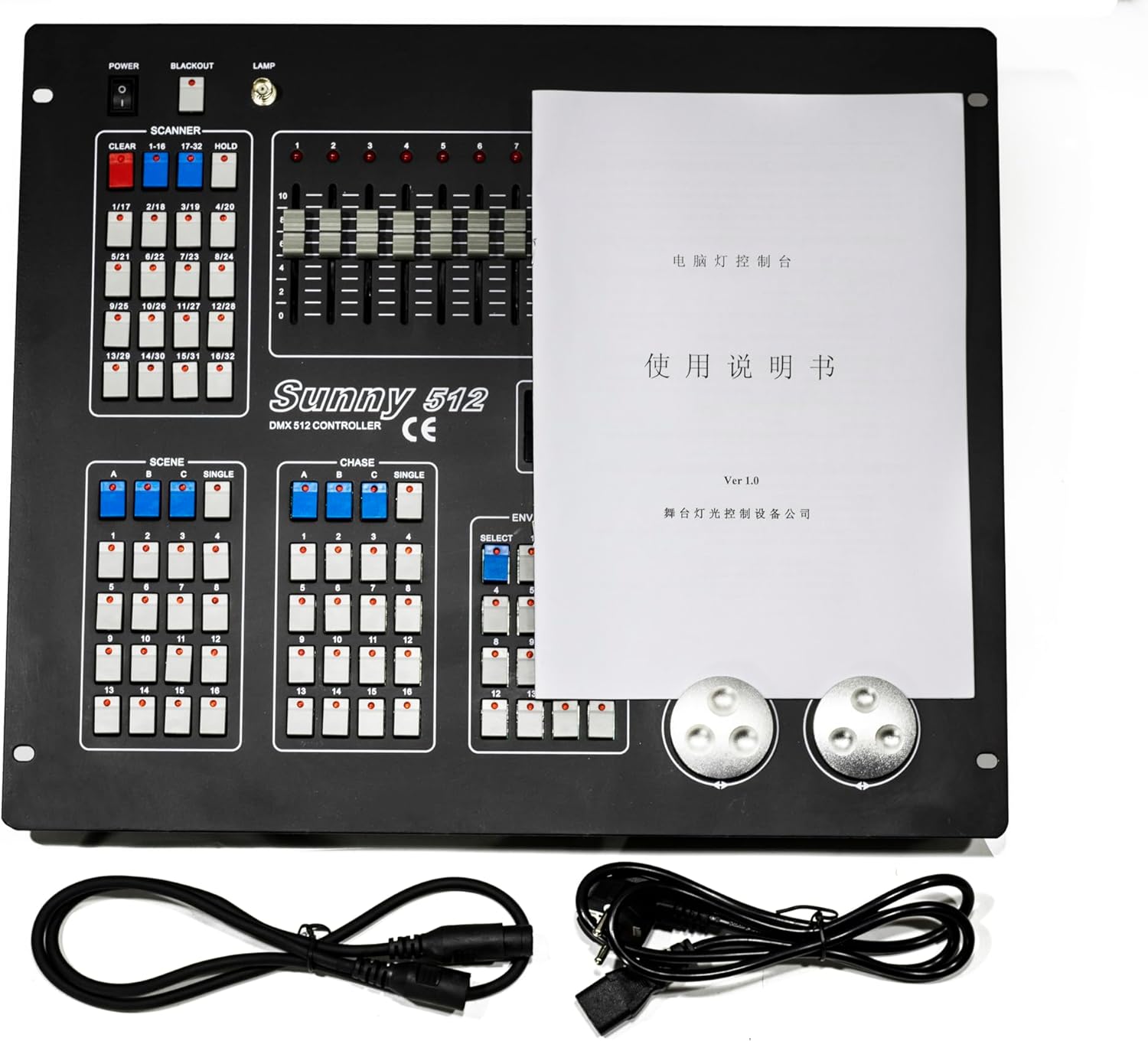
Figure 1: Top view of the SHEHDS DMX512 DJ Controller, showing the control layout, included manual, and connection cables.
2.2 Power Connection
Connect the provided power adapter to the DC input port on the rear of the controller. Plug the adapter into a suitable power outlet. Turn on the main power switch located on the rear panel.

Figure 2: Rear view of the SHEHDS DMX512 DJ Controller, highlighting the power input, DMX output ports, and other connectivity options.
2.3 DMX Fixture Connection
Connect your DMX-compatible lighting fixtures to the DMX OUT ports on the controller using 3-pin DMX cables. For multiple fixtures, daisy-chain them from the DMX OUT of one fixture to the DMX IN of the next.
2.4 Initial Reset (General DMX Controller Operation)
To clear any previous settings or factory test programs, perform an initial reset. This process may vary slightly between DMX controllers, but a common method involves holding specific buttons during power-on.
Video 1: General DMX Controller Operation - Initial Reset and Channel Assignment. (Note: The controller shown in this video is a YGYbeyond dmx384 and may differ visually from the SHEHDS DMX512, but the operational principles are similar.)
3. Operating Instructions
3.1 Programming Scenes
Scenes are static lighting states that can be recalled instantly. The SHEHDS DMX512 Controller allows you to program multiple scenes across various banks.
- Ensure no fixtures are selected (all fixture buttons are off).
- Press and hold the PROGRAM button for approximately 3 seconds until the 'PROG' indicator light flashes on the LCD display.
- Select the desired fixture(s) using the FIXTURES buttons.
- Adjust the channel faders to achieve your desired lighting state (e.g., color, intensity, strobe).
- Press the MIDI/ADD button.
- Select one of the SCENES buttons (1-8) to save your programmed scene. The controller's LEDs will flash to confirm successful storage.
- Repeat steps 3-6 for additional scenes. Use the BANK UP/DOWN buttons to access different banks (up to 30 banks, each with 8 scenes).
- To exit programming mode, press and hold the PROGRAM button for 3 seconds. The 'PROG' indicator will turn off, and the lights will blackout. Press the BLACKOUT button to restore lights.
Video 2: General DMX Controller Operation - Programming Scenes and Chases. (Note: The controller shown in this video is a Chauvet DJ Obey 40 and may differ visually from the SHEHDS DMX512, but the operational principles are similar.)
Video 3: General DMX Controller Operation - How to Run a Scene. (Note: The controller shown in this video is from NJX US STORE and may differ visually from the SHEHDS DMX512, but the operational principles are similar.)
3.2 Programming Chases
Chases are sequences of programmed scenes that play back in a specific order.
- Enter programming mode by holding the PROGRAM button for 3 seconds.
- Select the desired CHASE button (e.g., CHASE 1). The display will indicate the selected chase.
- Select the first scene you wish to include in the chase by pressing its corresponding SCENES button.
- Press the MIDI/ADD button to add the scene to the chase. The controller's LEDs will flash to confirm.
- Repeat steps 3-4 for all subsequent scenes you want in the chase, in the desired order.
- To exit programming mode, press and hold the PROGRAM button for 3 seconds.
Video 4: General DMX Controller Operation - Programming Scenes and Chases. (Note: The controller shown in this video is a CO-Z DMX-192 and may differ visually from the SHEHDS DMX512, but the operational principles are similar.)
3.3 Playing Back Scenes and Chases
To play back a programmed scene or chase:
- Ensure the controller is not in programming mode.
- To play a scene: Select the desired BANK using the BANK UP/DOWN buttons, then press the corresponding SCENES button.
- To play a chase: Press the desired CHASE button.
- Adjust the SPEED and FADE TIME faders to control the playback speed and transition smoothness of the chase.
- For automatic playback, press the AUTO/DEL button.
- For music-triggered playback, press the MUSIC/BANK COPY button. The built-in microphone will detect audio and trigger scene changes.
Video 5: General DMX Controller Operation - Wireless DMX Setup, Programming Scenes and Chases. (Note: The controller shown in this video is a Rockville ROCKFORCE W4 and may differ visually from the SHEHDS DMX512, but the operational principles are similar.)
Video 6: General DMX Controller Operation - Programming RGB Colors. (Note: The controller shown in this video is a FeiJie Direct DMX Light Controller and may differ visually from the SHEHDS DMX512, but the operational principles are similar.)
Video 7: General DMX Controller Overview - Features, DMX Channels, Scenes, Chases, MIDI Control. (Note: The controller shown in this video is a Rockville ROCKFORCE 384 and may differ visually from the SHEHDS DMX512, but the operational principles are similar.)
Video 8: General DMX Controller Operation - Basic Programming and Playback. (Note: The controller shown in this video is a YGYbeyond dmx192 and may differ visually from the SHEHDS DMX512, but the operational principles are similar.)
4. Specifications
| Feature | Value |
|---|---|
| Item Weight | 16.42 pounds |
| Package Dimensions | 22 x 19.25 x 8.25 inches |
| ASIN | B0F7LBXF1H |
| Date First Available | May 6, 2025 |
5. Maintenance
To ensure the longevity and optimal performance of your SHEHDS DMX512 DJ Controller, follow these maintenance guidelines:
- Cleaning: Regularly wipe the surface of the controller with a soft, dry cloth. Avoid using abrasive cleaners or solvents that could damage the finish or internal components.
- Storage: Store the controller in a cool, dry place away from direct sunlight, extreme temperatures, and excessive humidity. If transporting, use appropriate protective casing.
- Cable Management: Ensure DMX and power cables are not kinked, pinched, or under excessive strain. Properly coil cables after use to prevent damage.
- Ventilation: Ensure the controller's ventilation openings are clear and unobstructed to prevent overheating.
6. Troubleshooting
If you encounter issues with your SHEHDS DMX512 DJ Controller, refer to the following common troubleshooting steps:
- No Power: Check if the power adapter is securely connected to both the controller and the power outlet. Ensure the main power switch is in the 'ON' position. Test the power outlet with another device.
- Lights Not Responding:
- Verify all DMX cables are securely connected and not damaged.
- Ensure the DMX addresses on your fixtures match the addresses set on the controller.
- Check if the controller is in the correct operating mode (not in programming mode).
- Confirm the BLACKOUT button is not active.
- Incorrect Scene/Chase Playback:
- Re-enter programming mode and verify that scenes and chases were saved correctly.
- Check the SPEED and FADE TIME faders, as they affect playback.
- Intermittent Control: Ensure DMX cables are not running parallel to power cables, which can cause interference. Use DMX terminators on the last fixture in a daisy chain for long cable runs.
7. Warranty and Support
For warranty information, technical support, or service inquiries, please refer to the contact information provided with your product packaging or visit the official SHEHDS website. Keep your purchase receipt as proof of purchase for warranty claims.


